Digital Organization
 Call Kai
 Learn
Learn Practice Test
 Spaced Repetition
 Match
Match Flashcards
 Knowt Play
1/99

There's no tags or description
Looks like no tags are added yet.
Name | Mastery | Learn | Test | Matching | Spaced | Call with Kai |
|---|
No analytics yet
Send a link to your students to track their progress
100 Terms
Digital Firm
use of digital technology
SMACIT (social media, mobile, analytics, cloud, IoT)
Privacy of digital resources
Internet of Things (IoT)
objects that were never really meant to be connected to the internet that now are and generate data
EX. Apple Watch, Washing Machines
Enterprise Systems
A set of IS tools that many organizations use to enable information flow within and between processes (ways that enterprises transmit information internally)
Process View
each department is a silo of its own, that does its own work then sends completed work to the next step
Need for a “big picture”. Multiple persons, multiple pieces of data, multiple users of a specific data, multiple places
Enterprise Resource Planning (ERP)
software packages most frequently discussed type of ES
ERP gathers multiple pieces of data used by multiple users, in multiple departments and compute it through modular applications
Business Processes
repeatable set of activities to run a business
IT enhances business processes by…
increasing efficiency of existing processes + enabling entirely new processes
7 Types of Information Systems
Transaction Processing Systems (TPS)
Business Intelligence Systems (BIS)
Management Information Systems (MIS)
Decision Support Systems (DSS)
Executive Support Systems (ESS)
Enterprise Systems (ERP/EAI)
Coordination and Collaboration Systems
Transaction Processing Systems (TPS)
#1 - monitoring operations
A computerized system that performs and records the daily routine transactions necessary to conduct business
EX. sales order entry, payroll, shipping
Business Intelligence Systems (BIS)
#2 - data and software tools for organizing, analyzing, and providing access to data improving decision making for all levels of management
Management information systems, decision support systems, executive support systems
Management Information Systems (MIS)
#3
Support answering routine questions with predefined procedure for answering them
Typically have little analytic capability, most suitable for routine reports
Serve middle management with reports on firm’s current performance
Information is usually internally generated from TPS
Decision Support Systems (DSS)
#4
Tells you specifically what to do
Serves middle management
Support non-routine decision making
EX. The transit app, tells you when the bus is coming and WHEN TO LEAVE
EX. applying a discount to a purchase
May use external information as well as TPS/MIS data
Model driven DSS – a voyage-estimating system
Data driven DSS – a system to analyze customers’ revenue potential
Executive Support Systems (ESS)
#5
Serve senior management
Support non-routine decisions (ex. Requiring judgement, evaluation, and insight)
Incorporate data about external events (ex. New tax laws or competitors) as well as summarized information from internal MIS and MSS
EX. digital dashboard with real-time view of the firm’s KPI (ex. financial performance – working capital, accounts receivable, accounts payable, cash flow, and inventory)
Enterprise Systems (EAI/ERP)
#6
Connect multiple stakeholders to the enterprise, provides centralized data repository to share to departments
System Integration - collecting data from different processes and storing data in a central data repository (establishing one source of truth)
Information Sharing Enables: coordination of daily activities, efficient response to customer orders (production, inventory), help managers make decisions about daily operations and longer-term planning
Enterprise Systems: Enterprise Application Integration (EAI)
integration of multiple applications for data compartmentalization
EX. neomascol, courses, neomaagora
4 Major Enterprise Applications:
Enterprise Resource Planning (ERP - focuses on “internal” operations)
Supply Chain Management systems (SCM)
Customer Relationship Management systems (CRM)
Knowledge Management Systems (KMS)
Enterprise applications automate processes that span multiple business functions and organizational levels and may extend outside the organization
Enterprise Systems: Enterprise Resources Planning (ERP)
systems that companies use to keep track of everything that goes on in the company
Four Dimensions
Integration, Transversality, Modular Approach, Configuration & Customization
ERP systems promote organizations with a common language and a common pool of data, the sharing of business information stored on a common database
SCMS & CRMS
Integration
ERPs designed to seamlessly integrate information flows throughout the company
Transversality
Same information potentially shared across the whole organization and no longer only by a department or a function
Modular Approach
ERP applications exist by industry (automotive, retail, chemicals, etc.)
Supply Chain Management Systems (SCMS)
Manage firm’s relationships with suppliers (interorganizational system)
Sharing information about: orders, production, inventory levels, delivery of products and services
Goal: right about of products to destination with least amount of time and lowest cost
Customer Relationship Management Systems (CRMS)
Provide information to coordinate all of the business processes that deal with customers
Goal: helping firms identify, attract, and retain most profitable customers
Examples:
Sales: telephone sales, web sales, retail store sales, field sales
Marketing: campaign data, content, data analysis
Service: call center data, web self-service data, wireless data
Knowledge Management Systems (KMS)
Support capturing and sharing knowledge and expertise (how to create, produce, deliver products and services)
Collect internal knowledge and experience within firm and make it available to employees
Knowledge management can be supported by collaboration tools
EX. a shared Wiki
Operational CRM
Customer-facing applications such as sales force automation, call center and customer service support, and marketing automation
Analytical CRM
Based on data warehouses populated by operational CRM systems and customer touch points
Systems for Collaboration and Teamwork
#7
EX. e-mail and instant messaging, wikis, virtual worlds
Collaboration and social business platforms
Virtual meeting systems (telepresence), Microsoft SharePoint, Enterprise social networking tools
Successful collaboration requires an appropriate organizational structure and culture, along with appropriate collaboration technology
Digital Firm
uses Information and Communication Technologies (ICTs) as a primary source of competitive advantage in its internal and external operations
core business processes are accomplished through digital networks spanning the entire organization
Example of a Digital Firm
Working in a restaurant taking paper orders. Then switching to using a tablet (not yet digitalized). Using the data taken from the orders on the tablet to predict demands (digital firm).
3 Digital Transformation Capabilities
Ubiquitous Data
Unlimited Connectivity
Massive Computing Power
Investing in IT is not intrinsically a benefit
Generally a positive relationship, but volatile.
EX. Buying a good racket doesn’t matter if you can’t play tennis
Complementary Assets (…to acquisition of technology)
Social Assets - infrastructure at a societal level
EX. what good is 6G if no one has the ability to implement it
Management Assets - incentives for management innovation
Organizational Assets - efficient business processes and appropriate business models
Firms invest in IS to achieve 6 Strategic Business Objectives
Operational excellence - improvement of efficiency to attain higher profit
New products, services, and business models
Customer and supplier intimacy
Improved decision making
Competitive advantage
Survival - mimicking the way other companies have succeeded in order to stay relevant.
Network Effect
technology is only as useful as the network it uses
EX. Uber, you wouldn't use it if there weren’t enough drivers
Information System
contains information about an organization and its environment
3 basic activities: Input, Processing, Output
Supports decision making, coordination, and control
Consists of: Technology, Management, Organization
Feedback
output returned to appropriate people or activities in the organization to evaluate and refine the input
Basic to Complex Information
Data → Information → Business Intelligence → Knowledge
Data
Raw facts that describe the characteristics of an event or object
Information
data converted into a meaningful and useful context
Business Intelligence
information collected from multiple sources that analyzes patterns and relationships for decision making
Knowledge
the skills, expertise, experience, coupled with information and intelligence that create a person’s intellectual prowess
Information Technology (IT) is NOT Information Systems (IS)
technology vs. a social system that interacts with technology
Dimensions of an Information System
Organizational Dimension - organizational structure within a company
Management Dimension - strategic decision making
Technology Dimension - the technical aspect of data, network, software, and hardware
Interdependence between organizations and information systems
Changes in strategy, rules, and business processes increasingly require changes in hardware and software, databases, and telecommunications
Data Visualization
the representation of information in an efficient graphic form to support decision making
first example of modern data visualization is credited to…
William Playfair (1759-1823)
“Causes of Mortality in the Army of the East”
Florence Nightingale (1820-1910)
Effective Dataviz: Literacy
using agreed upon rules within a specific interpretive community
The efficacy of a design is a function of the audience’s training and shared cultural codes, rather than universal biologically optimized guidelines
EX. Reading an x-ray, doctors are able to cause they know what they’re looking for and they belong to the group that decodes
Effective Dataviz: Intuitive-By-Design
can a person take a glance and understand the premise of the information?
Pie charts are always…
bad
Chernoff’s Faces (1973)
Meant to facilitate memorization and clustering of multivariate data
idea of “faces are easy to recognize”
In realy, too complex to understand
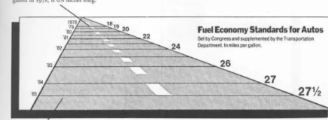
Bad Dataviz: The Lie Factor
visual distortion that misleads the reader, Edward Tufte
graphic showing a very large difference in area
Bad Dataviz: The Zoom Trap
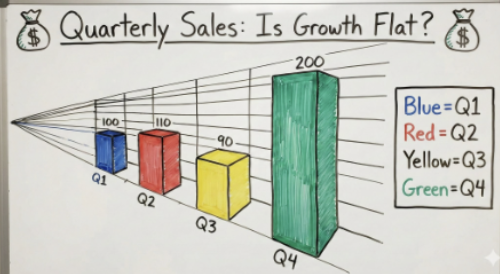
zooming in on the y-axis, not starting at zero

Bad Dataviz: Data-Ink Ratio
Too much extra information cluttering the graphic
10 Perceptual Tasks
when decoding information from a graph, a person will use at least one of these thought processes
From Best (1) to Worst (10)
Position
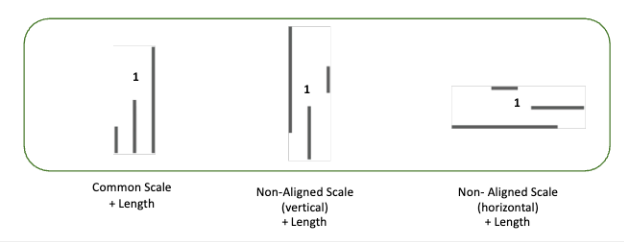
Non-Aligned Scales
Length
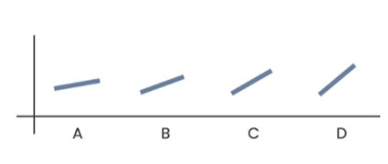
Direction
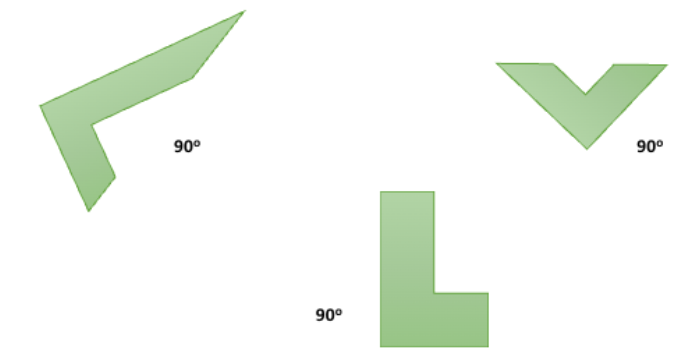
Angle
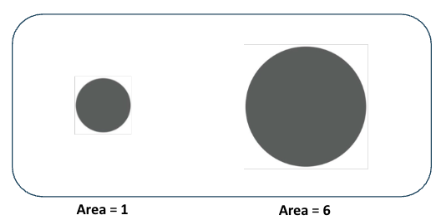
Area
Curve
Volume
Shading
Color Saturation
Position
#1 - using spatial location along a common baseline to represent data
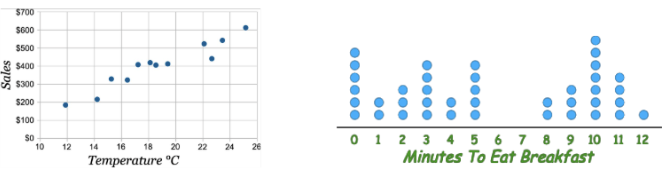
Non-Aligned Scales
#2 - using position to compare but baselines differ
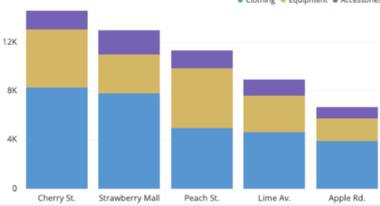
Length
#3 - can be hard to perceive an accurate measurement
Direction
#4 - can be difficult to determine
Angle
#5 - can be hard to estimate value
EX. Pie charts
Area
#6 - who knows for sure bruh
Curve
#7 - like what
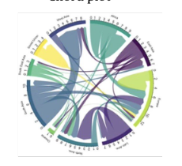
Volume
#8 - who is doing the math like really

Shading
#9 - who cares
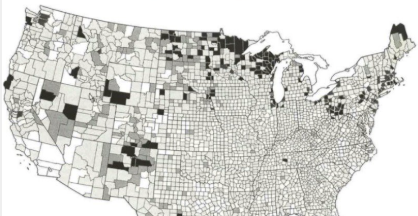
Color Saturation
#10 - I didn’t even think it was that bad
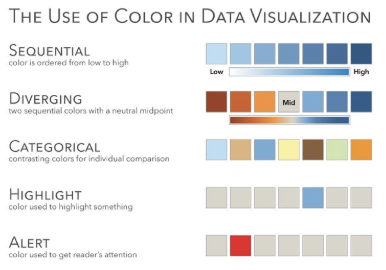
Continuous Variable
undetermined set of intervals/categories
EX. time, age, sales, interest rates
Discrete variable
determined set of intervals/categories
whole units
Why are systems vulnerable?
Technical Factors: hardware, software, network, data
Social Factors: human errors
Internal Threat: Inside Knowledge
EX. former developer knows about a “backdoor”
Internal Threat: Sloppy Security Procedures
EX. an office uses a shared “universal” login for all desk computers
Internal Threat: Social Engineering
EX. a worker receives a “spoofed” email from their boss asking them to urgently wire funds to a new vendor
Internal Threat: Internal Origin of Threats
EX. an angry IT admin deletes company files after they leave the firm
Threats to… Software
programming errors, installation errors, unauthorized changes, malware (malicious software)
Malware: Virus
a rogue software program that attaches itself to other software programs or data files in order to be executed
require a host file and human action to execute
Malware: Trojan Horses
software that appears benign but does something other than expected
mimics software but does not self-replicate
Malware: SQL Injection Attacks
hackers submit data to Web forms that exploit the sites unprotected software and sens rogue SQL queries to database
Prompt Injection → EX. teachers including invisible white text in an assignment to catch students using AI
Malware: Spyware
small programs that install themselves on computers to monitor user web surfing activity and serve up advertising
focuses on surveillance and data collection
Malware: Key Loggers
record every keystroke on a computer to steal serial numbers, passwords, launch internet attacks
used for credential theft by recording physical inputs from the keyboard
EX. on public use computers
Malware: Worms
independent computer programs that copy themselves from one computer to another over a network, they operate on their own
don’t need a host file or human action
Threats to… Hardware
Breakdowns, configuration errors, damage from improper use or crims, loss and theft of portable devices, disasters
Data Encryption
transforming data into cypher text
methods: Secure Socket Layers (SSL), Secure Hypertext Transfer Protocol (S-HTTP)
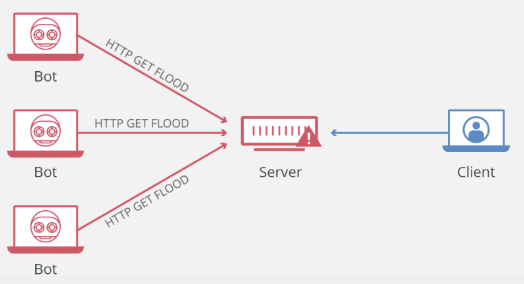
Network Attacks: Denial Of Service (DOS) Attack
malicious attempt to disrupt the normal traffic of a targeted server, service, or network by overwhelming the target or its surrounding infrastructure with a flood of internet traffic
Network Attacks: Spoofing
redirecting web link to another address from the intended one, with the new site masquerading as the intended destination
EX. using a fake email address
Network Attacks: Sniffer
eavesdropping program that monitors information traveling over the network
goal: stealing information
Network Attacks: Identify Theft
impersonation of someone else to steal personal information
Network Attacks: Phishing
setting up fake websites or email messages to ask for confidential personal data
EX. phishing emails
Network Attacks: Evil Twins
wireless networks that pretend to offer trustworthy Wi-Fi connections
Digital Certificates
help establish the identity of people or electronic assets
protect online transactions by providing secure, encrypted, online communication
EX. https
General Data Protection Regulation (GDPR)
mandates that companies notify relevant authorities about personal data breach within 72 hours
Information Systems Controls: General Controls
Govern, design, and use of computer programs through the organization (typically the IT department is responsible)
Includes: software, hardware, computer operations, data security, implementation, administration control
Information Systems Controls: Application Controls
Specific controls unique to an application (typically the business unit is responsible)
Includes: input, processing, output
Tools and Technologies to Secure IS
Intrusion detection systems - examines events as they are happening to discover attacks in progress
Antivirus and antispyware software - checks computers for presence of malware and can often eliminate it as well
Encryption
Digital certificate
Security in the cloud - responsibility for security resides with the company owning the data
Service level agreements (SLAs)
1st Era: File System Approach to Data Management / Hierarchical Model (1960s)
0s and 1s
Poor security
Any change in software program may require changes in data accessed by those programs
Presence of duplicate data in multiple data files
Data inconsistency and redundancy
Lack of flexibility and data sharing
2nd Era: The Database Approach to Data Management / Relational Model (1970s)
Introduction to shared data banks
A single human resources database provides many different views of data, depending on the information requirements of the user
A relational database organizes data in the form of two-dimensional tables (columns, rows)
Database Management: Entity-Relationship Diagram

Database Management Systems: Data definition capability
specifies the structure of database content, used to create tables and define characteristics of fields
Database Management Systems: Data Dictionary
automated or manual file storing definitions of data elements and their characteristics
Database Management Systems: Data manipulation language
used to add, change, delete, retrieve data from database EX. SQL
3rd Era: Data Warehousing (1980s)
Data Warehouses
Stores current and historical data from many core operational transaction systems, Consolidates and standardizes information for use across enterprise, but data cannot be altered
Data Marts
Subset of data warehouses, Summarized or focused portion of data for use by specific population of users
You want variables that aren’t derived from other variables
EX. You don’t want both Years_of_Service and Date_Hired because Years_of_Service can be calculated from Date_Hired
4th Era: Multidimensional Model (1990s) and Business Intelligence Tools
Data/Text/Web Mining - finding patterns in the data for Multi-Dimensional Online Analytical Processing
Multi-Dimensional Online Analytical Processing (OLAP) - where a unit of data can be characterised as multiple things to easily find it
5th Era: Data Lakes (2010s)
Big data, introduction of the cloud
6th Era: Semantic Models (2020+)
AI