Critical chain buffer Management
 Call Kai
 Learn
Learn Practice Test
 Spaced Repetition
 Match
Match Flashcards
 Knowt Play
1/14

There's no tags or description
Looks like no tags are added yet.
Name | Mastery | Learn | Test | Matching | Spaced | Call with Kai |
|---|
No analytics yet
Send a link to your students to track their progress
15 Terms
Critical Chain
Introduced by Goldratt
Improved project success
Reduced project duration
Increased project team satisfaction
Simplified project measurement
Simplified project management
Increased project throughput with same resource - resource efficiency increased
Critical chain vs theory of constraints
Critical chain is nothing more that theory of constraints applied on project management
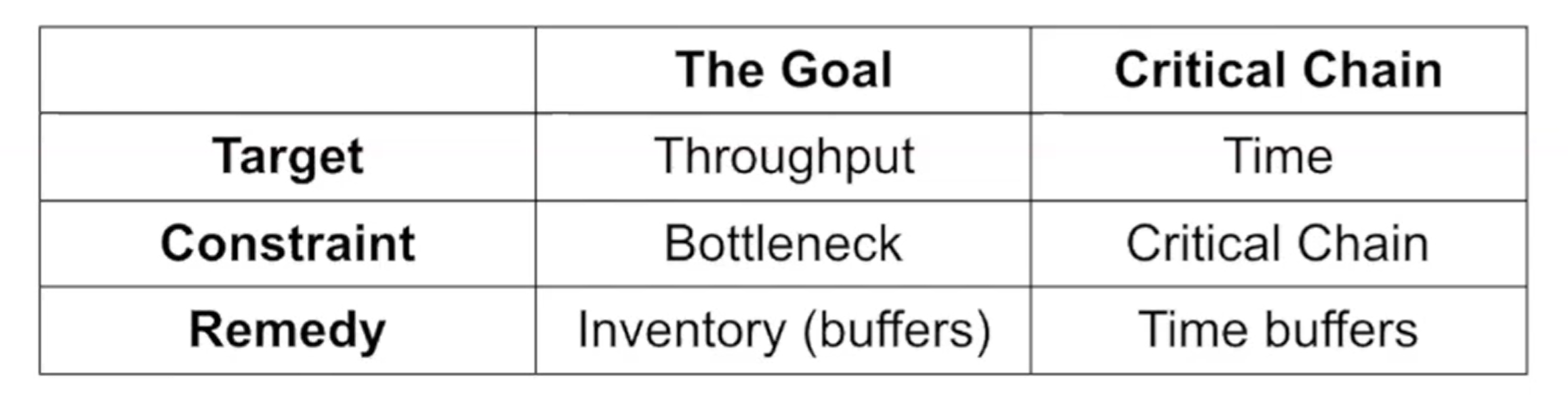
Operations Management (Theory of Constraints):
Target: throughput - produce as much as you can per time
Constraint: The bottleneck machine determines the maximal production quantity
Remedy Solution - inventory buffers (add some inventory so bottleneck machine would not delay the process)
Critical Chain:
Target: Time
Constraint: Critical chain - determines the total project duration
Remedy: Time buffers
Critical Chain/Buffer Management CC/BM planning methodology
Come up with aggressive estimates
Construct an ALAP schedule - as late as possible
Identify the critical chain
Determine appropriate buffer positions (in the end)
Detemine appropriate buffer sizes
Insert the buffers into the schedule
Come up with aggressive estimates
The vicious cycle:
we’re scared things will go wrong → we add extra safety time to estimates
More trust - more relaxed
Less attentive
Consumption of safety time
Exceeding activity durations
Return for more safety time
If something can go wrong, it will anyway
So, Instead of letting every person hide safety time in their own task, pool it into shared buffers — and actually manage those buffers actively.
People tend to add protection time to their estimates to feel safe, which ends up being equal to 90% confidence level. CC/BM says to take the average (median) estimate instead — the 50% confidence level.
Step 2. Construct as late as possible schedule
Work backwards from project deadline
Minimize work-in-progress (levelling resources)
Delay important cash outflows
Less rework (more info you get → less rework)
BUT all tasks become critical (!no slack left)
Prons and cons with Goldratt Critical Chain Method
Advantages:
It is a new technique - some of the software offers the solutions with those methods
Buffer insertion
Disadvantages
Critical chain depends on the method used or objective selected, so identifying critical chain is a difficult part, it is unique, insertion of buffers changes the CC, quality depends on the CC
Buffer insertion - 50% rule is a bad random rule, better based on risk and resource scarceness
Activity estimates - tricky on how to convince people to be honest with you. Bottom-up instead of top down
Roadrunner mentality - not clear dates for subcontracters, so more subcontracters →weaker the technology is
Buffer Management — You need to constantly track how much "safety time" you've used up. People usually use the major part of the buffer at the beginning of the project.
Multi-project — If people work on multiple projects at once, everything slows down because they're always waiting for each other.
Step 4. Determine appopriate buffer positions
Collect all buffers you took away from each activity and put 50% of the critical chain amount in the end.
Risk (variability) - sometimes you can finish earlier, other time later - those things cancel out, less buffer needed
As a result - can promise much quicker project deadline for a client then with Regular technique
Roadrunner mentality - no longer milestones, as you finished earlier → other person starts earlier, finish later → starts later. Not based on milestones that extend the deadline
Size of the buffer two methods
50% of critical chain - quite random but simplified
Sum of squares method - proportional to the riskiness
Adaptive method with network density
Adaptive method with resource tightness
Buffer - protects only the risk of delays of activities on the critical chain!!!
Feeding buffer
Add to any feeding chain that enters the critical chain
The feeding chains - the sub network of activities not lying on the critical chain, non-critical activities lie there
Project buffer - protects the project duration against delay in the activities of the critical chain, onw project buffer
Feeding buffer- protect the critical chain from the delays in activities in the feeding chain, multiple feeding buffers - in between the end of feeding chain and a critical chain
Resource buffer
Placed when a resource is needed on the CC, and the previous CC activity will be performed by another resource type
placed before a critical chain activity that needs a scarce or important resource.
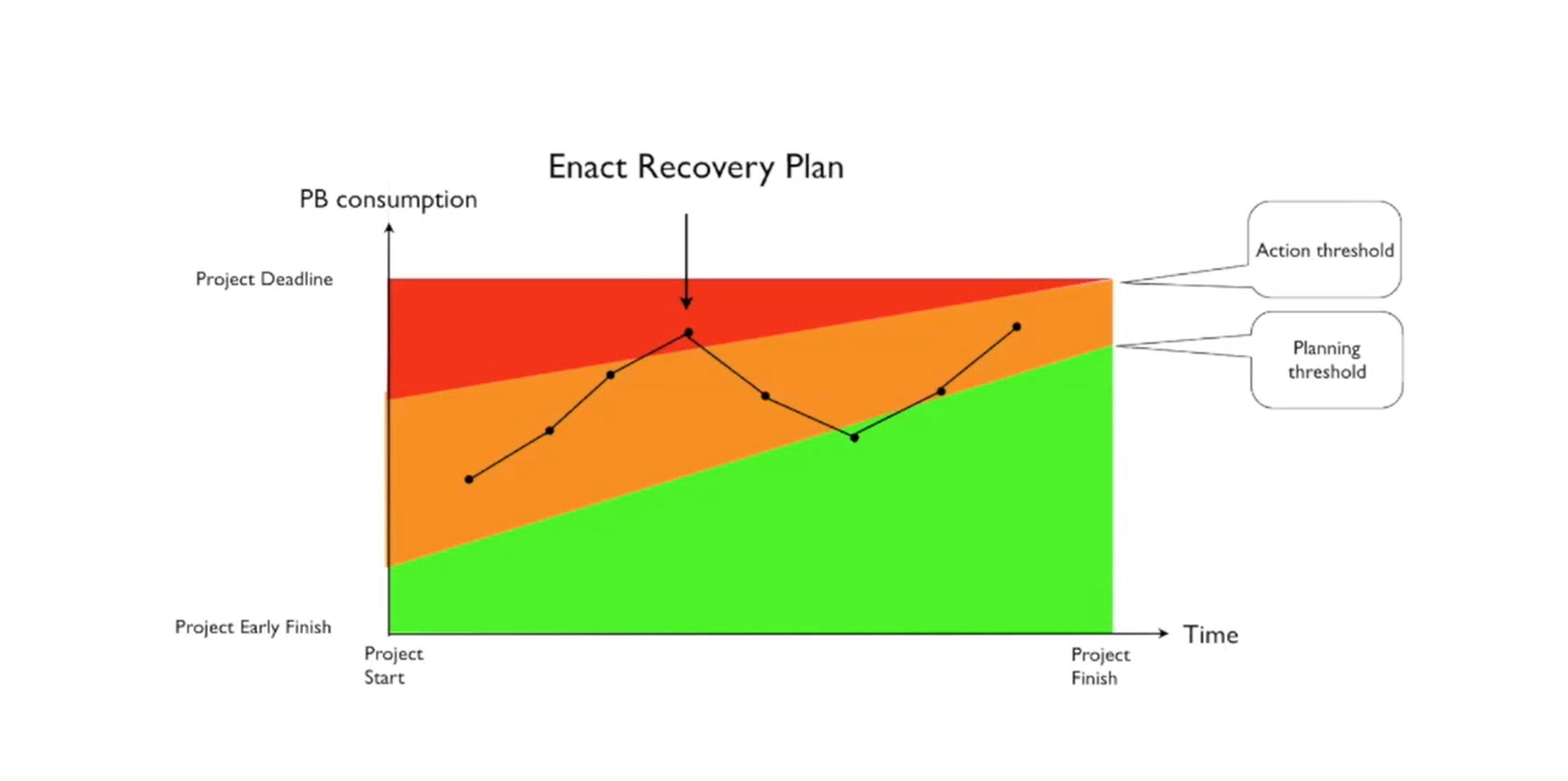
Action threshold
At the green zone - everything goes well
Orange zone - watch out
Red zone - almost all time buffer is consumed, take actions
Green zone increases as the project reaches its end, so in the end less risk (if you consumed almos all your buffer in the end - no worries as your project has almost finished)
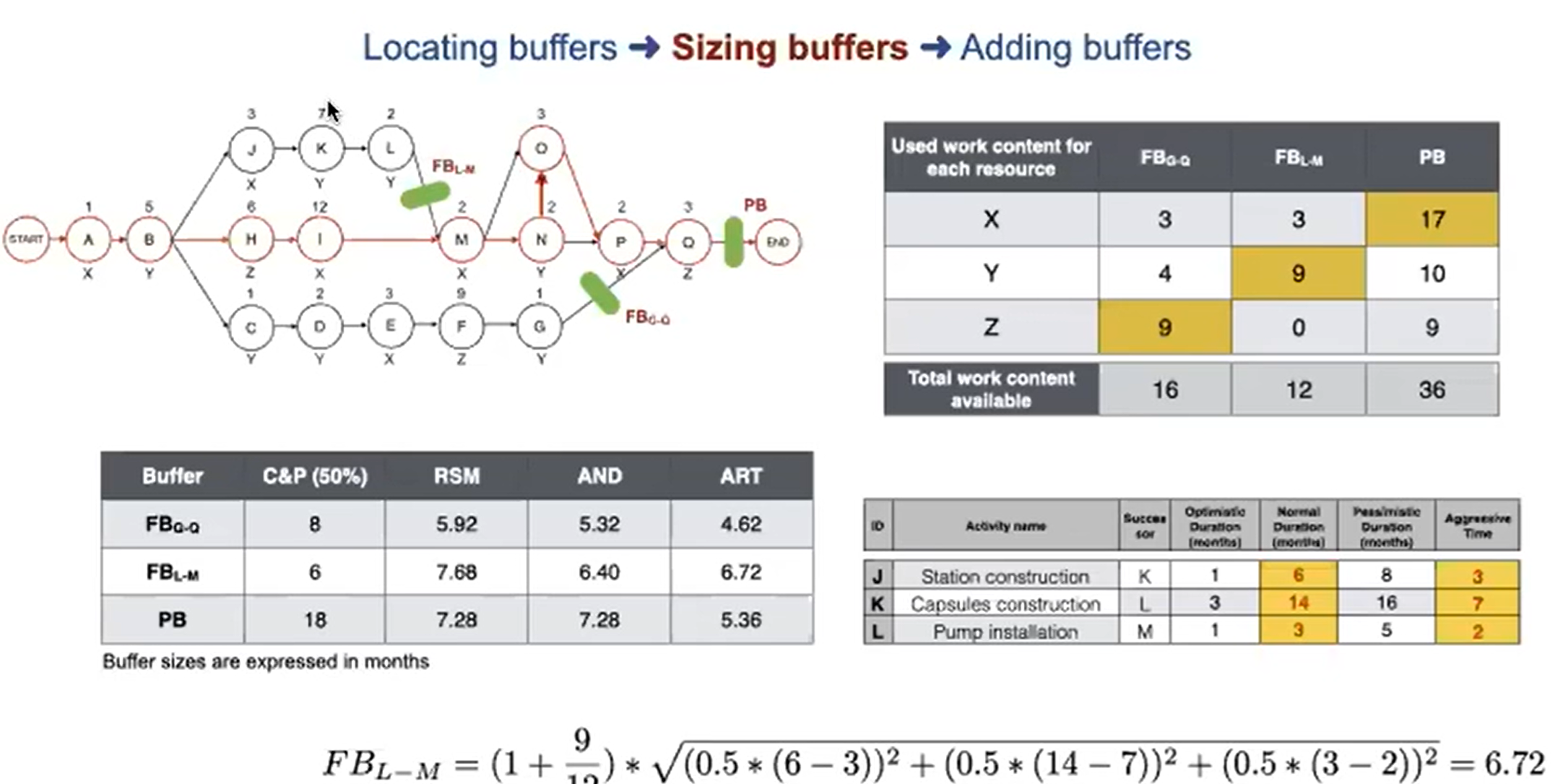
Root squared error (RSM)
Bigger risk → bigges size of the buffer
The buffer size is equal to the square root of the sum of squares of differences between the normal duration and aggressive duration
√((normal1 - aggressive1)² + …(normaln - aggressiven)²)
Adaptive method with network density (AND)
Buffer depends on risk and network structure
difference = normal - aggressive
√((difference1*0.5)² + …(differencen)²) * (1 + network density)
Network density = number of arrows btw activities / number of activities
Problem with adding buffers
If you add buffer → new resource conflicts
BUT after solving → hidden buffers appear
ART (Adaptive method with resource tightness)
Considers for 50% of the riskiness + resource criticality
ART = (1+Resource tightness)*RSM(50%)
Resource tightness = total work content used/total work content available
Total work content used - the activity on a chain with the largest work content
Total work content available = sum of the work content of activities on a chain