IS390 Ch 3 - Identifying User Stories and Use Cases
 Call Kai
 Learn
Learn Practice Test
 Spaced Repetition
 Match
Match Flashcards
 Knowt Play
1/38

There's no tags or description
Looks like no tags are added yet.
Name | Mastery | Learn | Test | Matching | Spaced | Call with Kai | Chat |
|---|
No analytics yet
Send a link to your students to track their progress
39 Terms
functional requirements
solve the business problem
Non functional requirements
everything that comes after that- ex. Technical piece
user story
a one-sentence description of a work-related task done by a user to achieve some goal or result
Acceptance Criteria
features that must be present for the user to be satisfied with the resulting implementation
What must have to happen for the story to be true
mentation.
identify the features that must be present at the completion of the task
Something we identify as the benefit to completing that task!
The template for a user story description is:
“As a <role> I want to <goal> so that <benefit>
example for a user story description template
Ex. as a shipping clerk i want to ship an order as accurately as possible as soon as order details are available
“As a <role> I want to <goal> so that <benefit>
Acceptance criteria
Available order details must pop up
Printable display and scanning device
Sort items by bin location
Indicate items in stock
Recommend shippers based on weight size and location
These criteria all make the user story true!
What must have to happen for the story to be true
Use case
an activity that the system performs, usually in response to a request by a user
Use cases define functional requirements
Analysts decompose the system into a set of use cases (functional decomposition)
two techniques for identifying use cases
user goal technique
event decomposition technique
how are use cases named
Name each use case using Verb-Noun
user goal technique
example of user goal technique chart
to make use cases
ask users to describe their goals for the system. To do so, first categorize them by type of user, and do interviews to learn from each user group
—-
This technique is the most common in industry
Simple and effective
Identify all of the potential categories of users of the system
users can be internal or external (anyone who is involved at any point)
think about what those users do!
Interview and ask them to describe the tasks the computer can help them with
Probe further to refine the tasks into specific user goals, “I need to Ship items, Track a shipment, Create a return”
Example of user goal technique chart
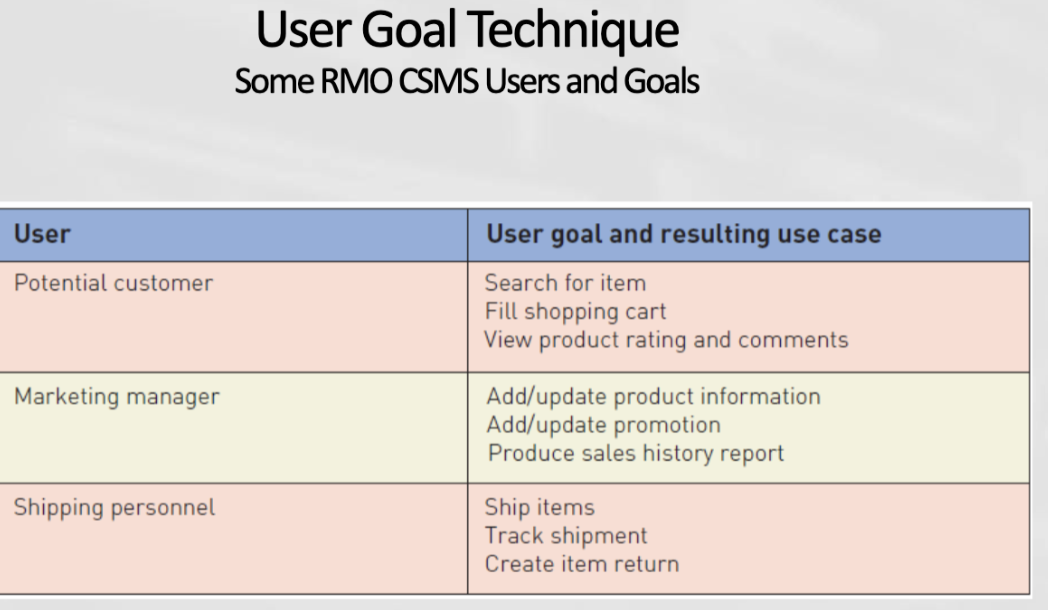
user goal technique - specific steps
1. Identify all the potential users for the new system
2. Classify the potential users in terms of their functional role (e.g., shipping, marketing, sales)
Classify by what they do
3. Further classify potential users by organizational level (e.g., operational, management, executive)
Executives have diff use cases than sales associates!
What can they do that the other cant do, and vice versa!
4. For each type of user, interview them to find a list of specific goals they will have when using the new system (current goals and innovative functions to add value)
5. Create a list of preliminary use cases organized by type of user
6. Look for duplicates with similar use case names and resolve inconsistencies
Where are the duplicates?
Where do they vary slightly?
7. Identify where different types of users need the same use cases
Where can we combine them?
8. Review the completed list with each type of user and then with interested stakeholders
Repeat the process! Iterate over time until you reach the final list
Allows you to find out additional information
SUMMARIZED - user goal technique - specific steps
Identify & classify users: Brainstorm all potential users, categorizing them by functional role and organizational level.
Interview for goals: Gather current and innovative goals from each user group to draft preliminary use cases.
Consolidate & refine: Eliminate duplicates, resolve inconsistencies, and combine overlapping use cases across roles.
Review & iterate: Validate the unified list with users and stakeholders, repeating until finalized.
Event decomposition technique
Identify events the system responds to, and each event leads to a use case
More Comprehensive and Complete Technique
Identify the events that occur to which the system must respond.
For each event, name a use case (verb-noun) that describes what the system does when the event occurs
What does a system do when an event happens?
takes more time!
what is an event
something that occurs at a specific time and place, can be described, and should be remembered by the system
Driven by business rules and business decisions
ex. event: customer changes their address
So now they want to ensure their information is updated
examples of events and use cases —> diagram
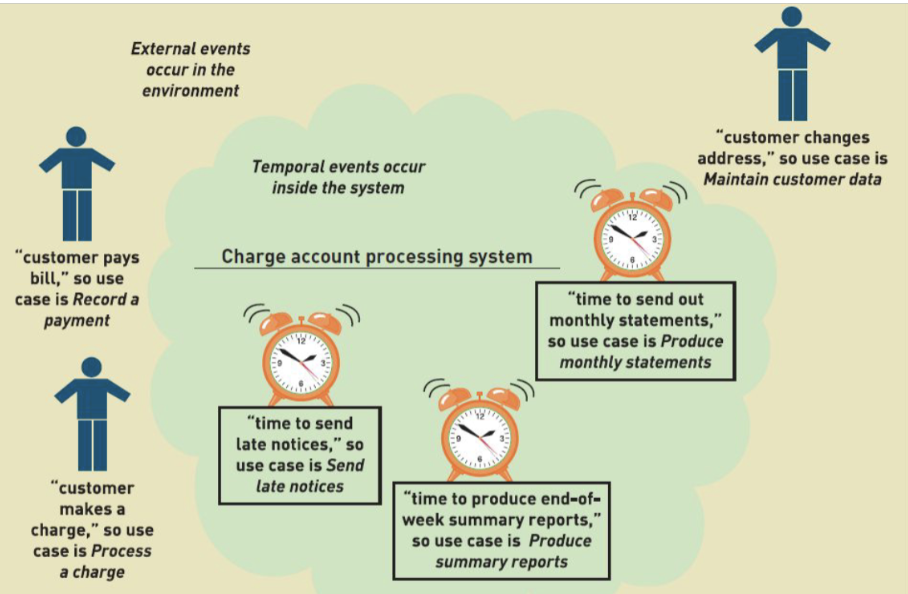
temporal events
an event that occurs as a result of reaching a point in time
ex. defined intervals, weekly or monthly reports, payrolls, etc
(events driven by time)
Ex. late notices for late payments- is there a seven day trigger for the email notification to be sent?
Ex. monthly statements - once a threshold is met, like the end of the month, the statements go out
external event
an event that occurs outside the system, usually initiated by an external agent or actor
Ex. customer changes their address
state event
an event that occurs when something happens inside the system that triggers some process
reorder point is reached for inventory item
Ex. when your stock is a certain amount of low, an event happens, and a notification is sent to order more stock
external event checklist - 4 items
based on wants and needs for info or changes
External agent or actor wants something resulting in a transaction
Ex. Customer buys a product
External agent or actor wants some information
Ex. Customer wants to know product details
External data changed and needs to be updated
Ex. Customer has new address and phone
Management wants some information
Ex. Sales manager wants update on production plan
temporal event checklist
internal vs external temporal event examples
Internal outputs needed at points in time
Management reports (summary or exception)
Operational reports (detailed transactions)
Internal statements and documents (including payroll)
Ex. when do we need to be payed, or notified of collections?
External outputs needed at points of time
Statements, status reports, bills, reminder
finding the actual event that affects the system
(better to look at notes for this)
in this case, the system is not affected untill the customer is in the store, has a shirt they want to buy, and says “i want to buy this shirt”
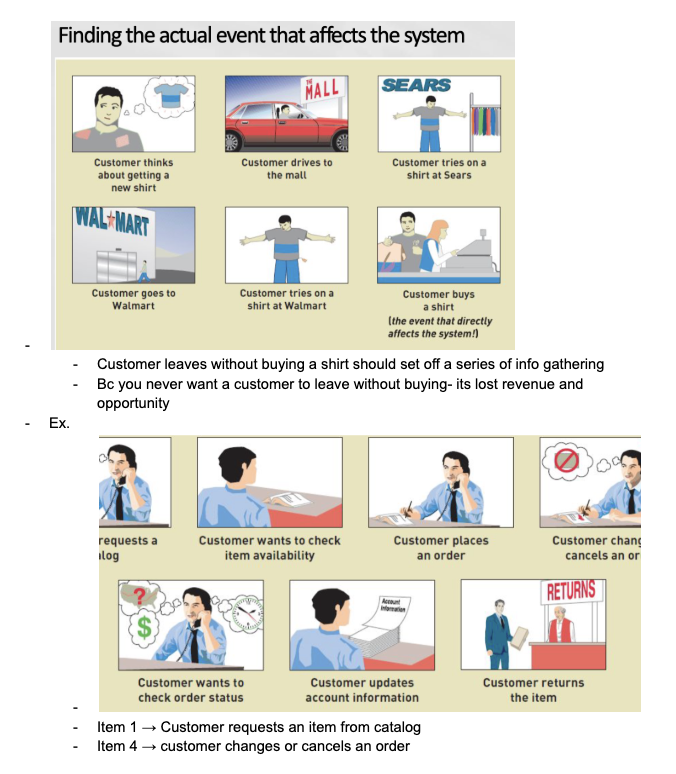
added content from second half of class goes from here
system controls
checks or safety procedures put in place to protect the integrity of the system
ex. logging onto the system, backing up data every day
perfect technology assumption
assume the system is fully operational under ideal conditions, to allow them to focus on the core business needs,
rather than technological or people-related limitations. This occurs during the analysis phase.
This prevents technical constraints from inhibiting true functional requirements, and separates the analysis from the design component.
during design phase, we drop the assumption, and focus on the implementation and technicalities
By pretending that technology is perfect, analysts can eliminate events like “Time to back up the database” because they can assume that the disk will never crash.
events should be included during analysis only if the system would be required to respond under perfect conditions
Don't worry about functions build into the system bc of limits in technology and people- wait until you are considering design
when you are identifying business requirements and use cases, you assume that the underlying technology is 100% perfect, reliable, and secure
once you are in the design and implementation phase (you leave the analysis and requirements phase), you can drop the assumption and explicitly design system controls (logins, encryptions, backups, crash recovery, audit trails)
event decomposition technique: specific steps
1. Consider the external events in the system environment that require a response from the system by using the checklist shown in Figure 3-3
2. For each external event, identify and name the use case that the system requires
3. Consider the temporal events that require a response from the system by using the checklist shown in Figure 3-4
4. For each temporal event, identify and name the use case that the system requires and then establish the point of time that will trigger the use case
5. Consider the state events that the system might respond to, particularly if it is a real-time system in which devices or internal state changes trigger use cases.
6. For each state event, identify and name the use case that the system requires and then define the state change.
7. When events and use cases are defined, check to see if they are required by using the perfect technology assumption. Do not include events that involve such system controls as login, logout, change password, and backup or restore the database, as these are put in later.
SUMMARIZED - event decomposition technique: specific steps
External events: Identify outside triggers (e.g., customer places an order) and name their use cases.
Temporal events: Identify time-based triggers (e.g., end-of-month billing) and set their trigger points.
State events: Identify internal state or device changes (e.g., low inventory threshold) and define their triggers.
Filter with perfect technology assumption: Remove technical controls (logins, backups, passwords) to keep only core business use cases.
Event decomposition technique: benefits
Events are broader than user goal: Capture temporal and state events
Help decompose at the right level of analysis: an elementary business process (EBP)
Uses perfect technology assumption to make sure functions that support the users work are identified and not additional functions for security and system controls
what is EBP
elementary business process (EBP)
EBP is a fundamental business process performed by one person, in one place, in response to a business event
Use cases and brief use case descriptions
all examples on doc of notes from slides

brief use case description examples

what is a use case diagram
a UML model used to graphically show uses cases and their relationships to actors
Recall UML is Unified Modeling Language, the standard for diagrams and terminology for developing information systems
Actor is the UML name for an end user
what is an actor
Actor is the UML name for a end user
the person who has the use cases
what is an automation boundary
the boundary between the computerized portion of the application and the users who operate the application

use case diagram symbols

use case UML diagram example

use case chart style diagram example

How to include things included in use cases in UML diagrams
Have a dotted line with “includes” to the next included use case/item

use case diagram steps
1. Identify all the stakeholders and users who would benefit by seeing a use case diagram
2. Determine what each stakeholder or user needs to review in a use case diagram: each subsystem, for each type of user, for use cases that are of interest
3. For each potential communication need, select the use cases and actors to show and draw the use case diagram.
There are many software packages that can be used to draw use case diagrams
4. Carefully name each use case diagram and then note how and when the diagram should be used to review use cases with stakeholders and users
SUMMARIZED - use case diagram steps
identify all stakeholders and users who would benefit from one
determine what each stakeholder would be interested or need to review in the diagram
for each potential communication, choose which use cases and actors to show in ur user case diagram (can use software to make)
carefully name each diagram, and note how and when they should be used to review with stakeholders and users