Prism 2
 Call Kai
 Learn
 Practice Test
 Spaced Repetition
 Match
 Flashcards
 Knowt Play
1/60

There's no tags or description
Looks like no tags are added yet.
61 Terms
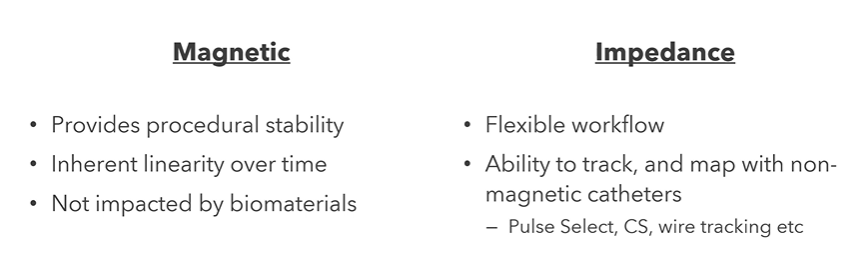
magnetic vs impedance tracking
True or False: Patches can be placed under or in contact with ablation return electrode patches, defibrillation pads, or ECG electrodes.
False
True or False: The sphere 9 catheter extension cable port has not changed.
False
How many mapping patches go on the patient when using the Affera Mapping and Ablation System with Prism 2 software?
6
If Leads I and III are noisy (Lead II is clean)- what ECG electrode should you check?
LA
The patch key has which of the following indicators?
Select all that apply
Good Quality
Poor Quality
No Connection
Good Quality
Poor Quality
No Connection
True or False: Catheters that are connected through the “primary” port on the system for magnetic mapping will be automatically recognized as the primary catheter in the settings menu.
True
True or False: The generator link cable port on the CIU is directly beneath the port on the PFG.
True
True or False: The Limb Leads (RA, LA, RL, and LL) along with V1 are the most important surface leads for the Affera system as they are the surface reference.
True
The inferior patch should be placed:
Low on the patient’s back
Below the anterior patch, at hip level
On the patient’s belly
Below the anterior patch, at hip level
What does a blue or red impedance field grid cross color mean?
low detection confidence
True or False: The mapping point’s projection distance indicates how far a collected data point can be from the surface of the geometry and still be included in the map that is being displayed
True
The left and right patches should be placed
Approximately in the same plane
Over other patches
Over a hairy arm pit
Approximately in the same plane
Select the correct pathway of the 12-lead signals:
Patient, Affera, Recording System
Patient, Recording System, Affera
Recording System, Affera, Patient
Affera, Recording System, Patient
Patient, Affera, Recording System
The Workstation Ethernet port connects:
RFG to remote
RFG to CIU
External Generator
RFG to CIU
The magnetic sensors are in:
The anterior and posterior patches themselves
The snap connector from the localization patch adapter
On the magnetic field frame
The snap connector from the localization patch adapter
AFTER a catheter is added to the secondary catheter’s library, select the additional step(s) that need to be taken:
Select all that apply
The number of pins needs to be identified
The starting pin location needs to be identified
Visible box must be selected to enable the catheter as an option for visualization and map collection
The starting pin location needs to be identified
Visible box must be selected to enable the catheter as an option for visualization and map collection
How do you change which catheter you are actively collecting mapping data from?
Use the drop-down menu that is attached to the collection button in the middle of the screen
Double clicking the catheter on the right mapping view
The catheter can be selected when right-clicking on the right mapping view
Use the drop-down menu that is attached to the collection button in the middle of the screen
The superior patch should be placed:
Above the posterior patch, near the trapezius muscle
On the patient’s neck
Over one of the grounders
Above the posterior patch, near the trapezius muscle
Select the option(s) that are included on the system as the impedance reference:
Select all that apply
Body Surface Reference – limb leads and V1
Intracardiac Reference – whichever electrode that is pinned into #1 of the IC pin block
Body Surface Reference – limb leads and V1
Intracardiac Reference – whichever electrode that is pinned into #1 of the IC pin block
What is the new V trigger lower limit rate?
150 ms
200 ms
250 ms
100 ms
200 ms
Which of the following adjustments can be made in the Beat Library? (select all that apply)
Include or exclude specific 12‑lead channels
Place a pace tag
Adjust signal gain using the mouse wheel
Adjust sweep speed (e.g., Ctrl + mouse wheel
Adjust cycle length tolerance
Modify the Window of Interest (WOI)
Rename the saved beat
Include or exclude specific 12‑lead channels
Adjust signal gain using the mouse wheel
Adjust sweep speed (e.g., Ctrl + mouse wheel
Modify the Window of Interest (WOI)
Rename the saved beat
What is the primary purpose of Pace Tagging?
Deliver ablation
Identify catheter location only
Measure impedance
Compare paced QRS morphology to saved beats with tag locations
Compare paced QRS morphology to saved beats with tag locations
What does a high % match during Pace Tagging indicate?
Stable cycle length
Strong impedance signal
Good catheter contact
Close morphological match to a saved beat
Close morphological match to a saved beat
You observe multiple pace tags updating after adding a new beat to the Beat Library. Why?
Tags are static
System error
Tags are dynamically recalculated based on the Beat Library
CL filter is off
Tags are dynamically recalculated based on the Beat Library
What is a key relationship between Beat Matching and Pace Tagging?
They cannot be used together
Pace Tagging uses the Beat Library created for Beat Matching
They are unrelated
Beat Matching uses pace tags
Pace Tagging uses the Beat Library created for Beat Matching
What is the key difference in Prism-2 v2.4.1 when using multiple V triggers?
Uses only Lead I
Turns off Beat Matching
Uses aggregation of multiple ECG signals to determine timing
Uses only Trigger Graph V
Uses aggregation of multiple ECG signals to determine timing
You are using V Trigger All and switch the Trigger Graph V lead. What happens?
Beat Matching turns off
V trigger timing changes
Map resets
Only the displayed V lead in the Trigger Graph changes
Only the displayed V lead in the Trigger Graph changes
When would it be appropriate NOT to use a filtered voltage map?
When troubleshooting inconsistencies between activation and voltage maps
When activation and voltage maps must align on the same filtered beats
When you want a rapid, high‑density overview of overall substrate without filter restrictions
When using Beat Matching to isolate a specific PVC morphology
When you want a rapid, high‑density overview of overall substrate without filter restrictions
How many consecutively captured beats are needed for Pace Tagging calculation/analysis to occur?
2
4
3
5
5
How can you select a mini-electrode for Pace Tagging? (select all that apply)
ctrl + left double clicking on the signal channel label
Using the drop down on the Pace Tagging channel
windows + left double clicking on the signal channel label
left double clicking on the signal channel label
ctrl + left double clicking on the signal channel label
Using the drop down on the Pace Tagging channel
Which of the following are key characteristics of mapping filters (Cycle Length and Beat Matching) on the Affera system? (Select all that apply)
Filters permanently delete beats that do not meet criteria
Filter changes require recollection of map data to take effect
Filters can be turned on or off and adjusted in real time by the user
Filter changes retrospectively update both previously collected and incoming beats
Filters determine which beats are displayed on the 3D map, even though the system may collect all beats
Filters can be turned on or off and adjusted in real time by the user
Filter changes retrospectively update both previously collected and incoming beats
Filters determine which beats are displayed on the 3D map, even though the system may collect all beats
What is the max output when pacing from a Sphere-9 mini-electrode?
20mA
15mA
5mA
10mA
20mA
What is a key benefit of using isochronal maps?
Highlighting areas of slow or fast conduction
Adjusting pacing output
Filtering out ectopic beats
Identifying catheter contact force
Highlighting areas of slow or fast conduction
From which catheter(s) can Pace Tagging be performed?
Sphere‑9 mini‑electrodes only
Any diagnostic catheter connected to the system
Any ablation catheter with pacing enabled
Any catheter displaying ECG signals in the sweep graph
Sphere‑9 mini‑electrodes only
What is the primary use of the Review Morphology Browser?
Editing timing annotation
Editing map geometry
Comparing morphology between the selected point and saved beats
Placing a pace tag
Comparing morphology between the selected point and saved beats
You are reviewing a point in the map using the review window and identify an electrogram of interest. How can you place a tag directly from the review window?
By switching to the Beat Library and saving the beat
By adjusting the cycle length filter in the review window
By selecting the signal in the review window, right clicking on the signal channel label, and applying a tag using the tagging function available in that view
By re-running Pace Tagging from the review window
By selecting the signal in the review window, right clicking on the signal channel label, and applying a tag using the tagging function available in that view
How can you hide Pace Tags below a specific % match value?
Label all Pace Tags with percentage match in Pace Tag Settings
Change the target match threshold on the Beat Matching filter
Toggle off visibility of the Pace Tag group
Adjust the tag percentage slider for that Pace Tag group
Adjust the tag percentage slider for that Pace Tag group
What is the primary function of Beat Matching?
Display voltage amplitude
Filter beats based on cycle length
Compare QRS morphology to that of an applied saved beat
Control pacing output
Compare QRS morphology to that of an applied saved beat
What data does Beat Matching use to evaluate similarity?
Voltage amplitude only
Only intracardiac EGMs
Timing only
Multiple ECG leads evaluating amplitude and direction
Multiple ECG leads evaluating amplitude and direction
What happens if the V trigger shifts timing during Beat Matching?
Different portion of the QRS is analyzed
System recalculates cycle length
No Impact
Beat Matching turns off
Different portion of the QRS is analyzed
You are reviewing the sweep graph and identify a beat you want to use for Beat Matching. What is the correct next step?
Select any ECG signal from the beat graph and automatically save without adjustment
Apply Beat Matching first, then choose a beat from the 3D map
Hover over a ventricular trigger in the sweep graph, select the “+” icon, then name and define the WOI before saving
Hover over a ventricular trigger in the sweep graph, select the “+” icon, then name and define the WOI before saving
What is the purpose of the Beat Library?
Store pacing locations
Store reference beats for morphology comparison
Store lesion data
Store voltage data
Store reference beats for morphology comparison
What is the difference between the match quality shown in the Beat Library and the instantaneous match quality displayed in the Beat Matching panel?
The Beat Library match quality reflects the live match of incoming beats, while instantaneous match quality reflects saved beats only
Both values represent the same calculation and should always match
The Beat Library match quality shows the match of the currently opened/saved beat, while instantaneous match quality reflects the live match of incoming beats to the applied beat
The Beat Library match quality is used for pacing, while instantaneous match
The Beat Library match quality shows the match of the currently opened/saved beat, while instantaneous match quality reflects the live match of incoming beats to the applied beat
A map may take longer to recalculate after turning on Beat Matching. Why?
System lag
Network issue
Incorrect WOI
System re-evaluating all beats against morphology criteria
System re-evaluating all beats against morphology criteria
what front connections have changed in prism 2?
generator link cable is not a diagonal connection anymore, it goes straight down to the CIU
IC Catheter Pin block and main magnetic catheter for sphere 9 are left to right two inputs, respectively
8,10,11 are all new
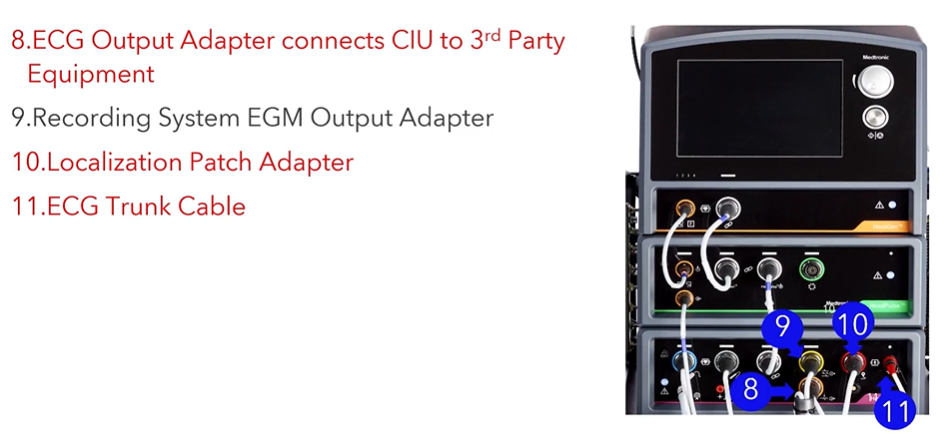
location ref adaptor
localization patch adaptor that connects to 6 patches that connect directly to pt’s patches with patch ke
ECG lead connection
CIU to ecg patches through adaptor end and reads ECG data
one side connects limb leads and the other side connects chest leads
changes to rear CIU

what are the 6 new patches
post, sup, ant, left, right, and inf
help create impedance field within the pt to track non magnetic references

back patch display
posterior to heart displayed as a purple circle
chest patch display
anterior patch places anterior to heart and displayed as a purple diamond
T/F left and right patches can be placed on different planes
false they must be aligned
inferior patch includes a
includes a patch key adapter
superior patch location
above trapexius muscle
how has posterior localization patches changed?

patches are ____ but the patch sensors on the dongle of the patch snap connector are _____
radiolucent
radioopaque