IS390 Chapter 7: Defining the System Architecture
 Call Kai
 Learn
 Practice Test
 Spaced Repetition
 Match
 Flashcards
 Knowt Play
1/35

There's no tags or description
Looks like no tags are added yet.
36 Terms
activities of core process 4 - Design System Components
describe the environment
design the application components
design user interface
design the database
design the software classes and methods
two main parts of a modern system
server
personal computing devices / clients
server
Sever - manages shared resources and enables users and other computers access to these resources
ex, SQL stores and transacts data for information systems
Diff servers do diff things!
Ex. front end web servers vs backend servers
client
Personal computing devices are clients
Even with cloud, it is still a client-server environment
simplified architecture for application example - Amazon.com

server farm
Very large databases and very high use
Data centers!
Large environments that store large networks (?)
Computer network - 3 thing they are made of
hardware, software, transmission media
Internet backbone
Physical connection, large wheels of fiber optic cables that stretch the internet backbone from cities to rural or other areas to allow for connectivity
High-capacity with high-bandwidth trunk lines and large high-speed computers
Owned by governments and telecom companies
Local area network (LAN)
Small network for a single site
World Wide Web (WWW)
All the interconnected resources accessed through the Internet
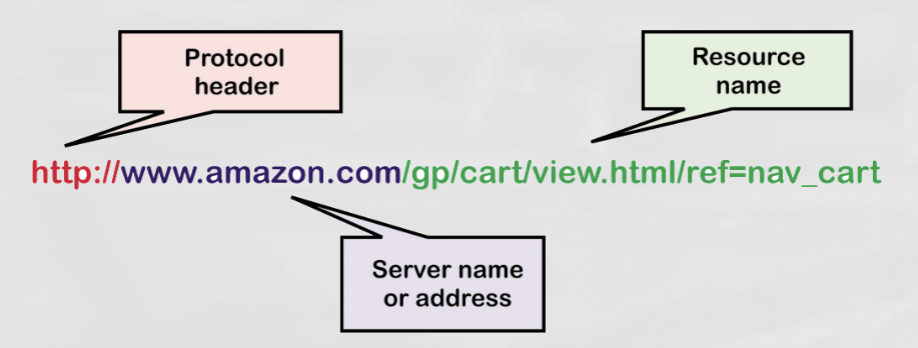
Uniform Resource Locator (URL)
The identifier for the Web to locate a particular resource
First part is protocol, nowadays this is usually HTTPS (not just HTTP) bc now we make sure all traffic is going securely
A map to the destination!
Good to have an understanding of how URLs work
Hyperlink
The URL of a resource embedded within another resource
protocol header, resource name, and server name/address in a link
Application software
programs that perform work for users
Either a custom app or a Web-based application
App
A custom program usually for a laptop or smartphone
System Software
Behind the scene software, works as glue to hold everything together
anatomy of software- whatis included in server software vs personal computing device software
DIAGRAM

Web-Based Applications - ANATOMY
Uses a web browser
Accessed through a URL
Resides on a Web server
Uses standard IP protocols
Embedded Software - ANATOMY
Software apps or functions embedded within another app, such as within a browser or O/S
Toolbars, Plug-ins, Widgets
Protocol
A set of languages and rules to ensure communication and data exchange between hardware and software
Network protocols & VPN
Virtual Private Network (VPN)
Creates a private network but on the Internet by using secure technologies and encryption
anatomy of software AND PROTOCOLS - whatis included in server software vs personal computing device software
DIAGRAM

Web Protocols
HTML
XML
HTTP
HTTPS
HTML (hypertext markup language)
Protocol for the structure and content of a Web page
XML (extensible markup language)
An extensions of HTML that enables defining semantics of tags
HTTP (hypertext transfer protocol)
Defines format and content for transfer of Web documents
an older protocol still loosely in use
If a website is using HTTP it means its an insecure connection - may get the pop up of this is an insecure site and to return to safety
HTTPS (hypertext transfer protocol secure)
Encrypted and secure http transfers
putting security on the HTTP protocol
technology vs application architecture
Technology architecture
Computers, network computers and hardware, and system software
Application architecture
The software programs and their configuration
SAAS
Software as a Service
No software is installed on the user’s device
Application services is accessed remotely
User data is isolated and stored on common servers
Application is accessed remotely, data is isolated in that cloud environment
The only software user has is a browser! No other software downloaded on user end
canvas is a great example of this! Its an app you access through web browser
GMAIL - google manages the back end architecture- you just have the browser component and the link that gets you in
web service
Software function that is executed with Web standards
Access via a URL
Inputs sent via the URL
Executes remotely
Data returned within a Web pag
distributed architecture - client/server architecture
Software design with part of the application on a server and part on the client
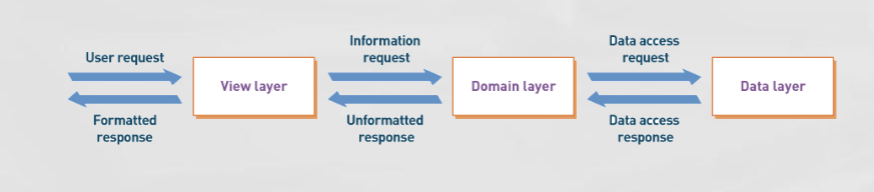
distributed architecture - three-layer architecture
what are the 3 layers and what do they mean
Client/server architecture with application divided into view layer, logic layer, and data layer
View layer – the user interface
logic layer – program logic to implement the functions
where application determines what the user is asking for, which then goes to the database to transact
data layer – the functions to access the data

Interoperability
The ability of an application to interact with other software
Important characteristic in current development projects
Understand the environment
Reuse software existing components (purchased or in-house)
Build components considering interoperability
Combine all components into a solution system
ERP usually has multiple modules in a business where a business works with HR, finance, etc, and when they all come into one space and can interoperate is what we are referring to!
Is a want
when not to interoperate
There could be reasons not to interoperate
Ex. if legal team does not want sensitive legal data to mix with corporate data
But usually sharing data company wide = more data = better insights = better decision making
Location Diagrams
Identify geographical placement of hardware, software, and users
where are our systems, what systems or locations need to talk to each other?
network diagrams
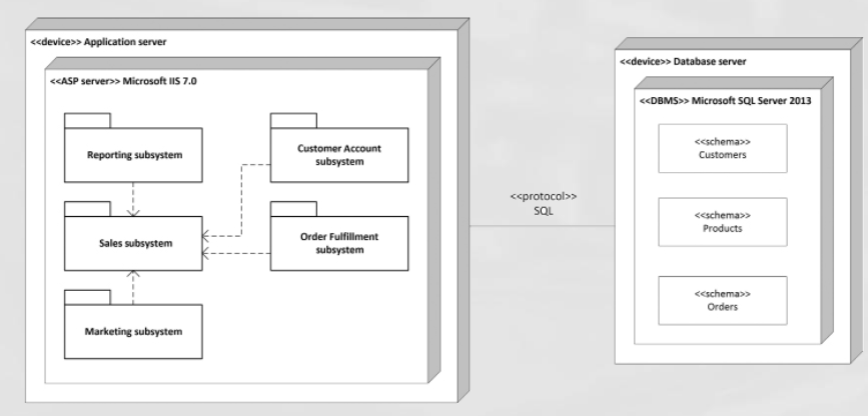
how the application software is deployed accross the hardware and system software
deployment diagrams
how components of a network are interconnected
Key Questions to help describe envrionemnt accurately
What are the key features of existing or new environment
O/S, system software, networks, tools
What are the external systems or DBMSs
What kind of interaction
What is the data
What are the protocols
What kind of security
What devices will be required
Protocols for devices
Security
What APIs
What user-interface technology will be used
Where and who are users, and what skills
What hardware and devices
What client O/S will be used
Security requirements
What APIs are needed
Application Component Boundaries
Actors
shared data
events
Which components perform which functions
How to group functions to build components
Actors – what functions to particular actors use
Shared data – what functions use the same data
Events – what functions occur in common business events
system of record
shows who “owns” the data
What system is responsible to maintain the data
What system has a copy or can access the data