K204 Chapter 3
 Call Kai
 Learn
Learn Practice Test
 Spaced Repetition
 Match
Match Flashcards
 Knowt Play
1/64

There's no tags or description
Looks like no tags are added yet.
Name | Mastery | Learn | Test | Matching | Spaced | Call with Kai | Chat |
|---|
No analytics yet
Send a link to your students to track their progress
65 Terms
information from LLM are not always _______
accurate
Systems
groups of integrated and interrelated components that work together to achieve a goal
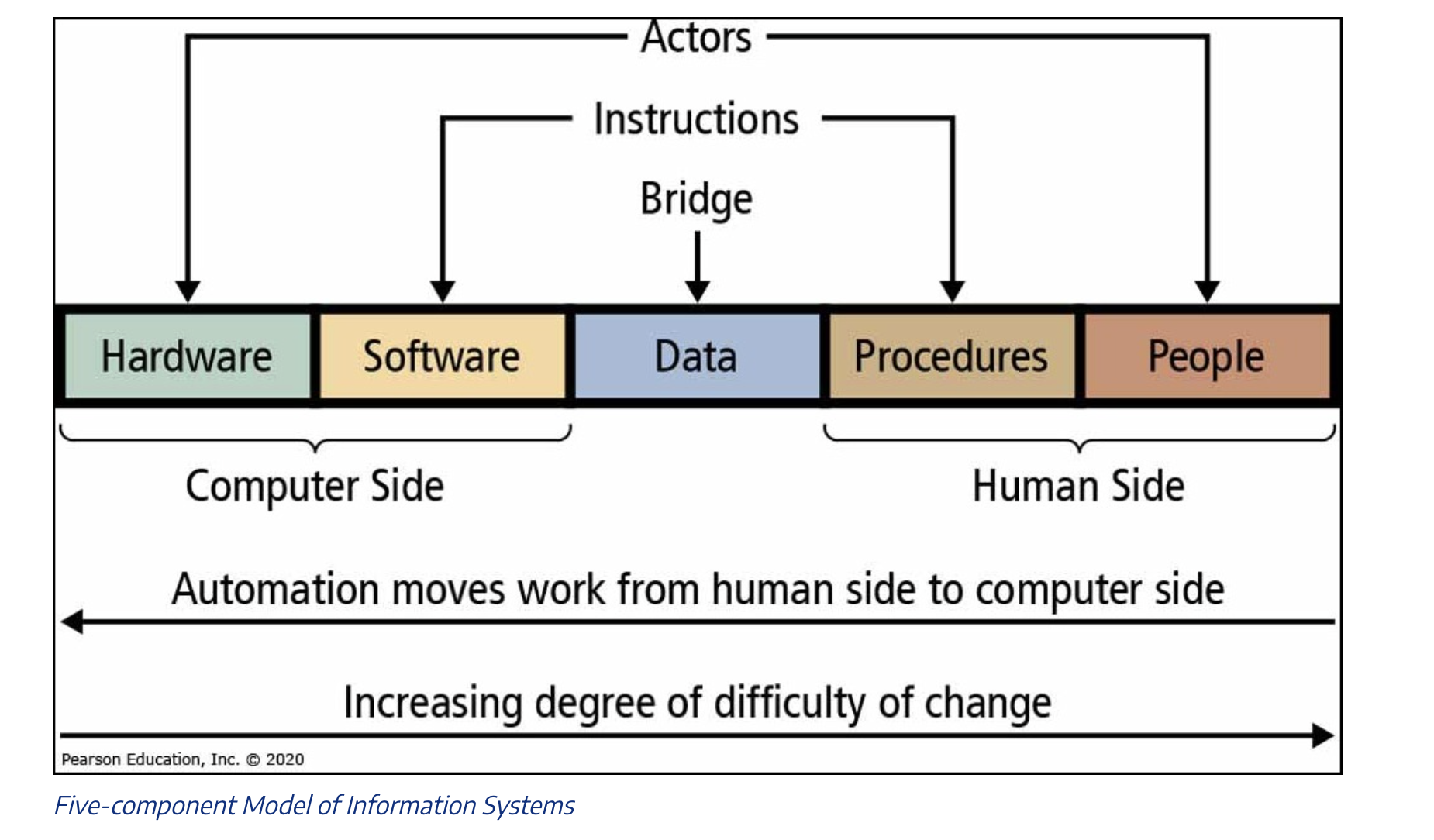
5 Components of an Information System
Hardware
Software
Data
Procedures
People
Hardware
physical equipment used - computers, keyboards…
Software
programs and instructions that tell hardware what to do
Data
raw facts and figures that the system collects, stores, and processes
Procedures
steps involved in using the information system to achieve a goal
People
users who interact with the system - employees, customers…
Operational Efficiency
automation, less mistakes, saves time
Financial Performance
saves money because automation instead of manual
better visibility into business’s performance
Decision-Making Enhancement
better decisions - more up-to-date information
data
data visualization (charts, graphs)
predict future trends
test “what if” scenarios before making big decisions
Customer Value Creation
better experiences for customers
personalization based on customer preferences and history
tracking issues and solving them quickly
gain insights
Strategic Alignment
measure progress of meeting goals, grow with the business
Which of the following are recognized business values of information systems? (Choose all that apply)
Customer Value Creation
Decision-Making Enhancement
Financial Performance
Operational Efficiency
Strategic Alignment
Customer Value Creation
Decision-Making Enhancement
Financial Performance
Operational Efficiency
Strategic Alignment
Early Adoption of Technology
Establishing market dominance and lasting advantages by being the first to use new tech.
Product/Service Differentiation
Using technology to make offerings stand out from competitors.
Low-Cost Leadership
Employing sophisticated systems to manage supply chains and keep costs lower.
Technology + Business Strategy and examples
information systems help with low costs
EX: Walmart - supply chain systems - track inventory and reorder products @ the right time
tech can be used to make prods/service stand out from competition
EX: Netflix - recommendation algorithm
being first to adopt new tech can have lasting advantages
EX: Amazon - e-commerce innovations and AWS cloud services (market dominance)
Changing Industries Through Technology
Information systems often disrupt traditional industries
EX: Uber with Uber app
reach new markets that were previously inaccessible
connect directly with consumers, bypassing middlemen
unique tech or valuable data can create barriers making difficult competition
EX: Google - search engine - high-quality and personalization
Information as a Business Asset
collected information is valuable
some organizations sell data as a source of revenue - EX: Nielsen
digital platforms become more valuable with more use - create a “network effect”’
advanced data analysis can reveal customer needs + opps. before companies notice
Excellence in Operations Through Technology
efficient supply chain → ↓ inventory costs
EX: Zara (tech-driven system to move designs from concept → store)
information systems can improve product + service quality
EX: Spotify - enhanced music streaming
online marketing - better personalization
Work Together Through Technology
build networks of partners through tech. platforms
EX: Salesforce
collaboration through technology
EX: Microsoft + OpenAI
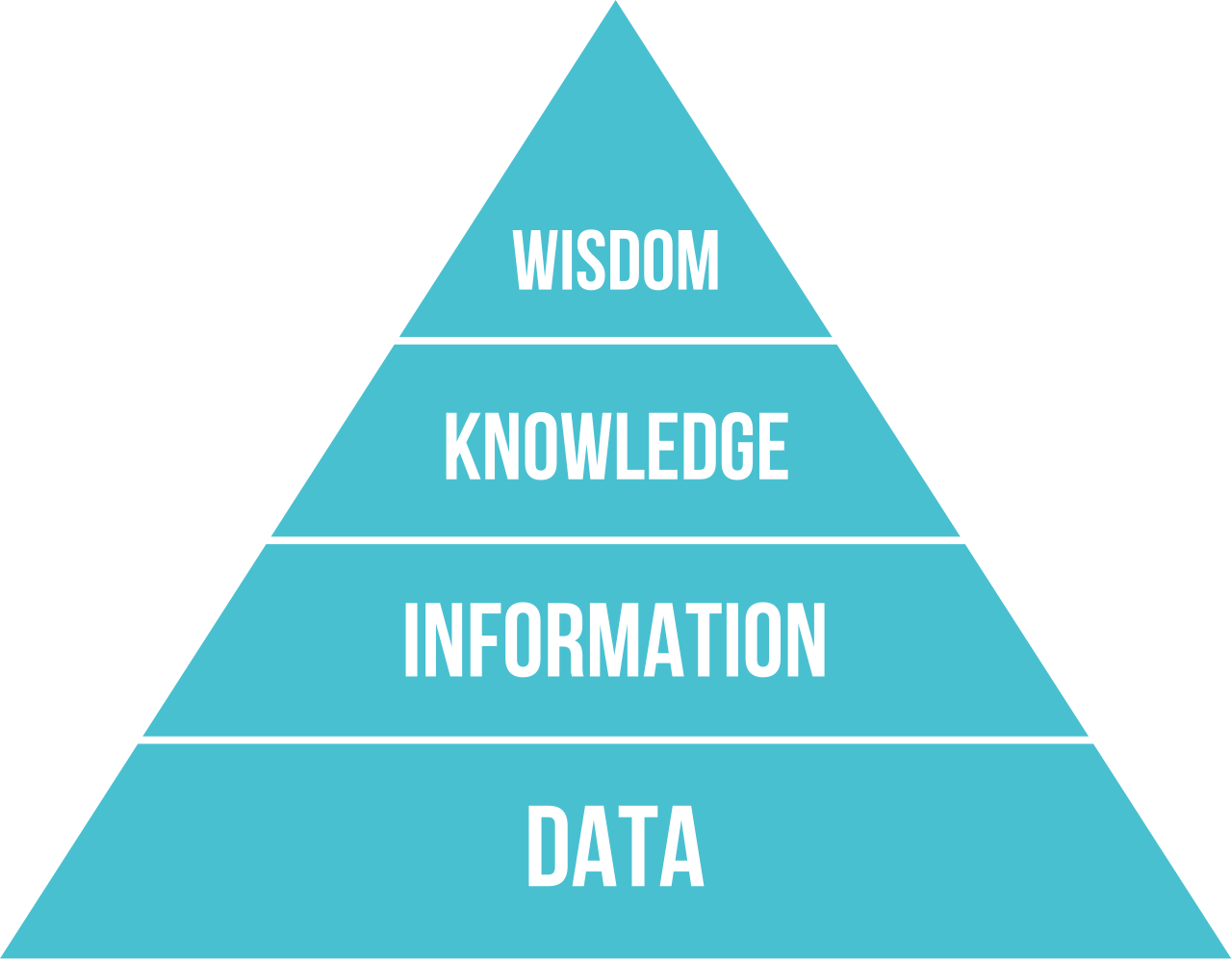
Data-to-Wisdom Hierarchy
helps us understand how raw facts become valuable insights
Data
raw facts and numbers w/o context
EX: list of sales transactions, website clicks
Information
outcome of organized data put into context
answers W.W.W.W Qs (Who, What, When, Where)
Knowledge
when we understand patterns + relationships
answers “HOW” Qs
know relations b/tw information
Wisdom
using knowledge to make good judgements + decisions
answers “WHY” Qs
helps with difficult choices
deep understanding to make strategic decisions
List all Basic Data Management Concepts
data management
data collection
data storage
data quality
data governance
data security + privacy
data integration
data management
how businesses handle their data throughout its life cycle
from collection → archiving/deleting
data collection
where it begins; gather data from many sources
KEY: collect correct data w/o overwhelming systems
data storage
keeping data safe + accessible
data quality
making sure data is accurate + reliable
data governance
setting rules about way of data management
who can access what
duration of data storage
“house rules” for data
data security + privacy
protection data from unauthorized access while respecting customer privacy
scrambling (encryption), secure passwords, etc.
data integration
bringing data together from different sources for effective use
to see a complete picture
database
organized collection of data stored electronically - digital filing cabinet
relational database
most common type of database
organizes data into tables with rows + columns
Purposes of Using Databases (5)
Customer Relationship Management (CRM)
Inventory Management
Financial Databases
Human Resources Database
E-commerce Database
Customer Relationship Management (CRM)
databases that store info about customers, interactions, + purchase history
allows for better service, stronger customer relationships
Inventory Management
databases track product info, stock levels, locations, and movement
helps with popular items, reordering if low stock
Financial Databases
store transaction records, accounts, budgets, and financial reports
help track money coming in + out, prepare reports
Human Resource Database
maintain employee records
personal info., job deets, performance reviews, benefits
help businesses manage work effectively
E-commerce Database
power online stores by storing product catalogs, customer accounts, orders, payment info.
w/o online databases, online shopping not possible
everytime add something to cart, database records that
data-driven decision making
using facts + analysis to make business decisions
List the ways in which data-driven decision making shows up (6)
reduced risk + uncertainty
from having real info. to support decisions
faster response to changes
when closely monitoring data
more objective decisions
looking at the actual data
continuous improvement
competitive advantage
resource optimization
do more with what businesses have
Data is:
Structured - consistency + reliability
Stored - managed within systems to ensure accuracy + accessibility
Analyzed - processed to uncover patterns + trends in support of decision-making
Types of Information Systems in Organizations (6)
Transaction Processing Systems (TPS)
Management Information Systems (MIS)
Decision Support Systems (DSS)
Executive Information Systems (EIS)
Enterprise Resource Planning (ERP) Systems
Customer Relationship Management (CRM) Systems
Transaction Processing Systems (TPR)
handles day-to-day basic business transactions
workhorse of business information systems - processes quickly
MAIN PURPOSE: record + process everyday business events
capture data where transaction occurs
process data to established rules - calculating/updating
store details for future reference
generate basic documents like receipts/paychecks
update related info (inventory levels/account balance)
Management Information Systems (MIS)
takes data collected by TPS → useful reports that help managers run the business
MAIN PURPOSE: provide structured reports that help with operational + tactical management
convert raw data →reports
present info in formats easy 2 understand
provide regular reports on a scheduled basis
allow identification of trends/problems by data comparison (past data)
Decision Support Systems (DSS)
helps managers make better decisions for complex/non-routine problems
interactive, explore data
MAIN PURPOSE: support semi-structured decision-making through interactive analysis
analyze data with flexibility, “what-if” analysis
combine data from multiple sources, in + out of organization
include models to predict outcomes, support decision processes
more sophisticated than MIS - more user interaction, group decision-making
Executive Information Systems (EIS)
for top executives to monitor overall performance of organization
provide a high-level view that helps senior leaders track how business is doing
“dashboard”
MAIN PURPOSE: support decision-making at @ highest levels of organization
present info in highly visual, easy-to-understand formats
focus on key performance indicators (KPIs)
allow executives to “drill down” from summary to more details when needed
include external information about business environment, competition, industry trends
highlight exceptions + problems that need attention
Enterprise Resource Planning (ERP) Systes
comprehensive software platform that integrates all big business fxns into one system with shared database
MAIN PURPOSE: integrate business processes across departments + ensure everyone is working with same info
create single source of truth
automate flow of info. b/tw business fxns
standardize business processes
provide real-time visibility into operations
reduce duplicate data entry + errors
Customer Relationship Management (CRM) Systems
helps manage interactions with current + potential customers
complete record of company’s relationship with customers
“super-powered contact list “
every convo, purchase, preference, etc.
MAIN PURPOSE: improve customer relationships + ⬆ customer loyalty + retention
centralize customer info.
track complete history of interactions across all channels
manage sales processes from lead generation → closing deals
support marketing campaigns
help customer service reps. access important info
ID cross-selling + up-selling opportunities based on customer history + preferences
relational database
stores + organizes data in tables (consists of rows + columns)
Tables
collections of related data
Rows
represents a single record
Columns
represents a specific attribute of the data
in a relational database, tables can be related to e/o using key fields:
Primary Key
Foreign Key
Primary Key
unique identifier for each record in a table
Foreign Key
field in one table that links to a primary key in a nother table, establishing a relationship b/tw the 2 tables
relational databases use a language called _______ to manage and manipulate the data
SQL - Structured Query Language
Why are data stored in separate tables in relational databases?
Normalization
Avoid Data Redundancy
Maintain Data Consistency
Avoid Data Redundancy
data redundancy is minimized by splitting data into separate tables based on related entities
Maintain Data Consistency
changes to data only need to be made in one place
5-component Model of Information Systems