Professor Messer 2.3 | Interface Configurations
 Call Kai
 Learn
 Practice Test
 Spaced Repetition
 Match
 Flashcards
 Knowt Play
1/10

There's no tags or description
Looks like no tags are added yet.
11 Terms
Speed and duplex
Operates at various speeds, such as 10-megabit, 100-megabit, 1-gigabit, or even 10-gigabit connections. They can also function in either half-duplex or full-duplex mode. Both speed and duplex settings can be configured automatically or manually, but it's crucial that they match on both sides of the connection. For instance, if a device is set to 1-gigabit and full-duplex, the switch it connects to must also be configured to 1-gigabit and full-duplex to ensure proper communication.
IP address management
Essential for communicating with network infrastructure devices through various interfaces, including Layer 3, VLAN, and management interfaces. Proper configuration involves assigning an IP address, subnet mask (or CIDR block), default gateway, and optionally, DNS
VLANs
Each device port is assigned to a specific VLAN. When connecting switches, trunking allows multiple VLANs to share a single link. Trunk ports handle both tagged and untagged VLANs. Untagged frames belong to the default or native VLAN. Trunk ports add VLAN tags to outgoing frames and remove them from incoming frames.
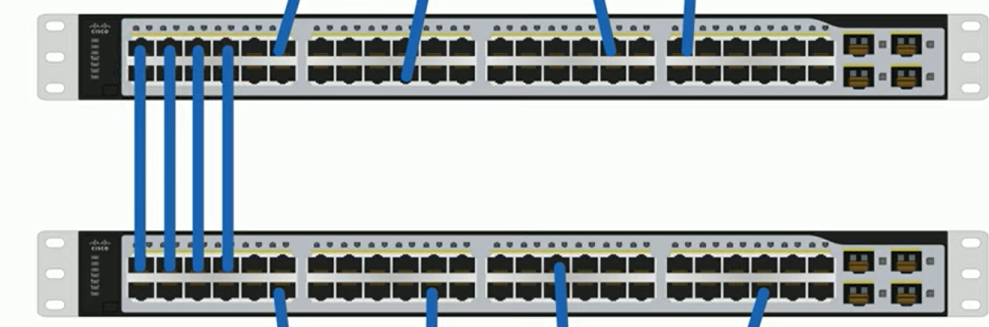
Port bonding, or Link Aggregation (LAG)
Combines multiple network interfaces to function as a single, larger interface. The Link Aggregation Control Protocol (LACP) automates and manages this process by bundling individual Ethernet links into a single logical connection, adds additional automation and management.
Port mirroring
Allows the duplication of traffic from one or more interfaces on a switch to another interface, enabling packet capture or intrusion detection. This can be done on the same switch or across different switches, making it possible to monitor and analyze network traffic in real-time without disrupting the original data flow.
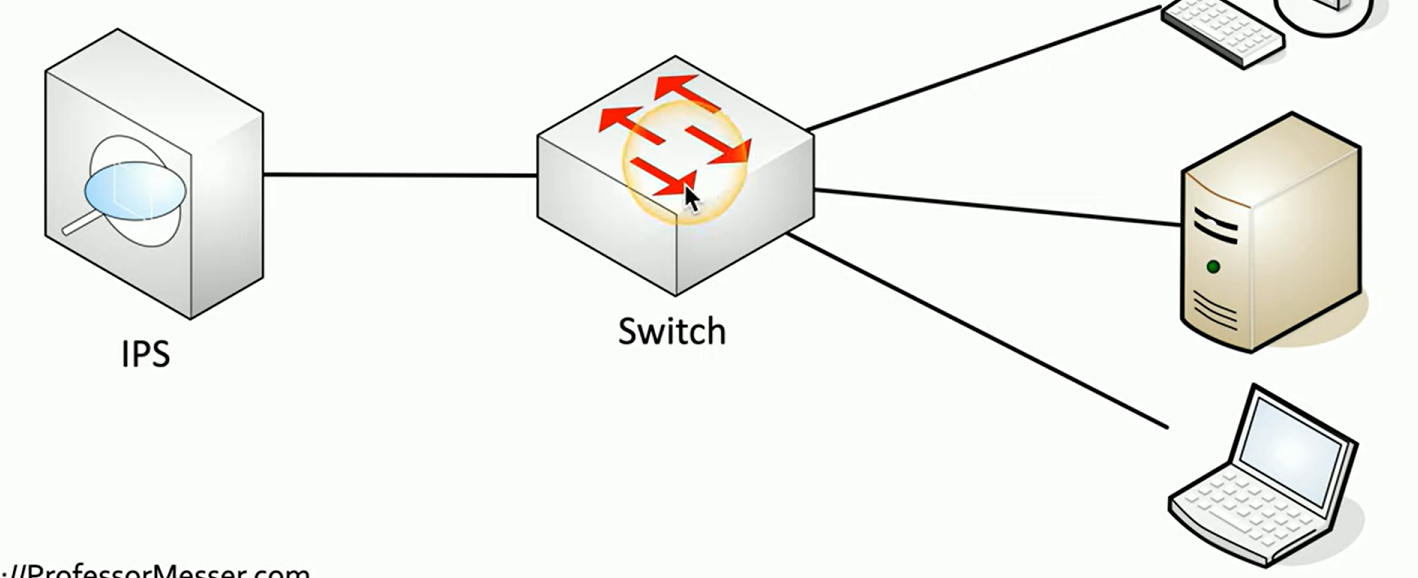
Port mirroring example:
Switched Port Analyzer (SPAN) or using a network tap, allows for the examination of a copy of network traffic. In this scenario, if a device communicates with a server, the switch sends a copy of the traffic to the server and another copy to an Intrusion Prevention System (IPS) operating in offline mode.
Jumbo frames
Ethernet frames that exceed the standard 1,500 bytes of payload, typically reaching up to 9,000 bytes, with 9,216 bytes as the upper limit. These larger frames increase transfer efficiency by reducing the number of packets that need to be switched or routed, making them ideal for large file transfers or backups. However, all Ethernet devices involved, such as switches and interface cards, must support it.
Ethernet flow control:
Ethernet is non-deterministic, meaning the traffic speed is unpredictable. To prevent buffer overflow in switches, flow control methods like IEEE 802.3x, commonly known as the "pause" frame, allow a device to signal another to temporarily halt data transmission. Over the years, enhancements like incorporating Class of Service (CoS) have improved flow control by prioritizing certain types of traffic during congestion.
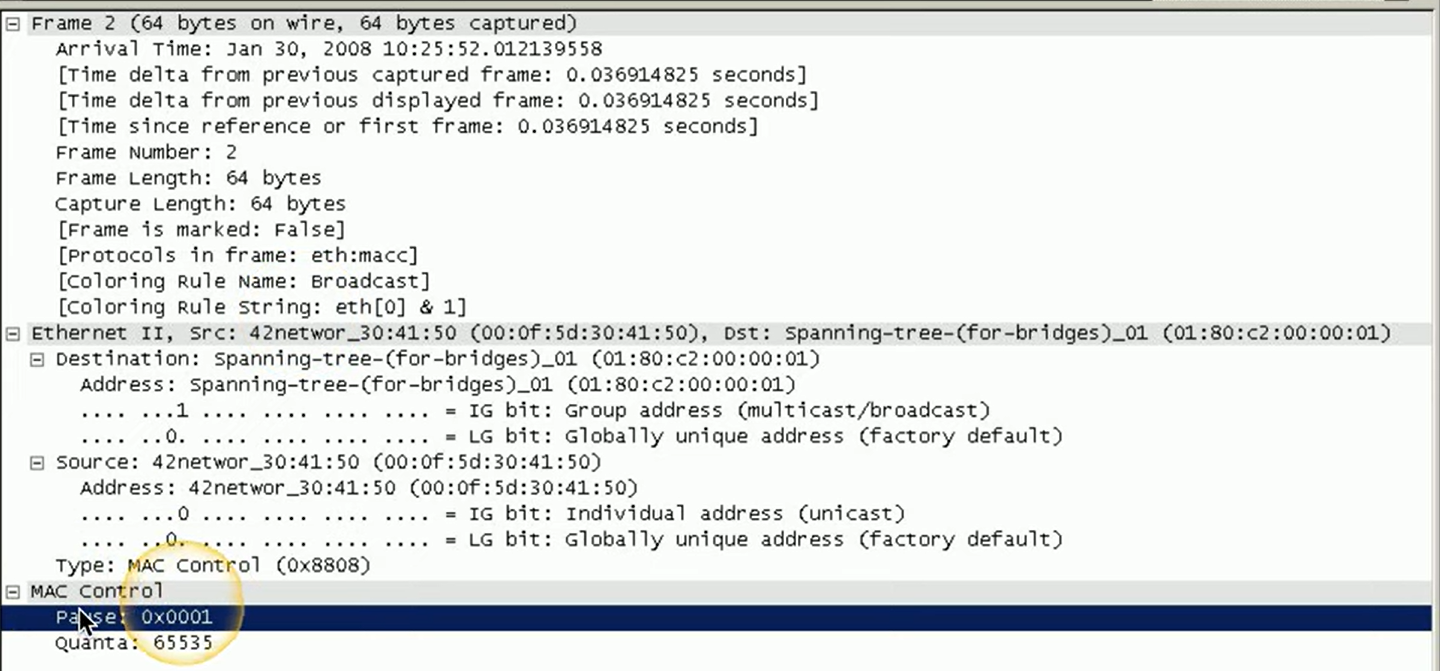
Ethernet flow control example:
A packet capture reveals a pause frame within the MAC control section of the frame. This pause frame signals the other device to stop sending data temporarily. It includes a timer called a "quanta," specifying the duration the device should wait before resuming traffic.
Port security
Helps prevent unauthorized users from connecting to a network by controlling access at the switch interface level. By restricting access based on the source MAC address, the switch can detect unauthorized devices, even if the traffic is forwarded from another location. If an unauthorized device is detected, the switch can either alert the network administrator or disable the port entirely. Each port can be configured with unique security rules
Port security operation
Operates by setting a maximum number of allowed source MAC addresses per interface. You can configure both the maximum number of MAC addresses and specify particular MAC addresses to permit. The switch continuously monitors and maintains a list of unique source MAC addresses. If the number of addresses exceeds the configured limit, port security activates, typically disabling the interface by default to prevent unauthorized access.