IntroComp - Midterms
 Call Kai
 Learn
Learn Practice Test
 Spaced Repetition
 Match
Match Flashcards
 Knowt Play
1/85

There's no tags or description
Looks like no tags are added yet.
Name | Mastery | Learn | Test | Matching | Spaced | Call with Kai | Chat |
|---|
No analytics yet
Send a link to your students to track their progress
86 Terms
Awareness
When you begin to study computers, you will be aware of their importance, versatility and pervasiveness in our society.
Knowledge
You will learn what computers are and how they function. This requires knowing some technical jargons in order to understand the computer language.
Interaction
The best way to understand computers is to use it directly for some simple applications like doing research via the internet, mailing and chatting electronically
ICT
The technology required for information processing, in particular, the use of electronic computers, communication devices and software applications to convert, store, protect, process, transmit and retrieve information from anywhere, anytime.
Information
The knowledge obtained from reading, investigation, study or research
Information Technology
It is the application of computers and telecommunications equipment to store, retrieve, transmit and manipulate data often in the context of a business or other enterprise.
Management Information Services and Information Services
Information technology encompasses entire industries, including ___ and ____
Compute
The term "computer" originates from the word, _____ meaning to calculate.
True
The Information Technology department in businesses is responsible for managing information storage, protection, processing, transmission, and retrieval.
Program
It operates under instructions stored in memory called _____
Simple and Complex
The computer can perform both _____ and _____ operations swiftly and accurately.
Electronic Machine
A computer is an _____ _____ that accepts processes data, performs operations, and generates output.
Peopleware
Users who operate the computer for various applications.
Software
Programs providing instructions to process data into useful information.
Hardware
Tangible components of a computer system.
Input
Output
Primary Memory
Secondary Memory
Four Basic Functions
Speed
Accuracy
Diligence
Versatility
Power of Remembering
No IQ
No Feelings
Storage
Characteristics of a computer
Speed
Very fast processing capabilities that surpass human ability.
Accuracy
High precisionin data processing without human error.
Diligence
Capability to work continuously without fatigue.
Versatility
Ability to peerform a wide range of tasks.
Power of Remembering
Long-term storage of vast amounts of information.
No IQ
Operates solely on user-provided instructions; no independent decision-making.
No Feelings
Lacks emotions and does not experience fatigue or bias.
Storage
Can store exteensive amounts of data in built-in and external memory.
Automation
Reduces time on repetitive tasks, improving efficiency.
Reliability
Produces consistent results without emotions influencing performance.
Scalability
Adaptability to increase or decrease capabilities as needed.
Multitasking
Capability to perform several tasks simultaneously.
Analog Computers
Operate on continuous data and provide approximate results.
Digital Computers
Process digital data using binary (Os and 1s) for accurate results.
Hybrid Computers
Combine features of both analog and digital computers, suitable for complex tasks.
Supercomputers
Designed for complex appolications such as global forecasting and space exploration.
60 billion instructions per second
Speed of a supercomputer
Automobile size
Size of a supercomputer
Mainframe
Capable of supporting thousands of users simultaneously, executing multiple programs.
250 million instructions per second
Speed of a mainframe
Refrigerator size
Size of a mainframe
Minicomputers
Used in telecommunications and various business applications.
150 million instructions per second
Speed of a minicomputer
Filling cabinet size
Size of a minicomputer
Microcomputers
Affordable computers for individual use, categorized into personal computers, laptops, and handheld devices.
Microprocessor
Invention of _____ (single chip CPU) gave birth to the much cheaper micro computers.
Personal Computer
A small, inexpensive computer designed for individual users, based on microprocessor technology.
Laptop
Portable, lightweight, battery-operated computers popular among travelers.
Notebook
They are also called as _____ computers because of their small size.
Handheld Computers
Small, pen-based devices used for personal organization, scheduling, and basic applications.
Personal Digital Assistant
Handheld computers are also referred to as ______
Computer Architecture
Describes how the hardware components of a computer are put together.
Controllers
Are devices that coordinate the activities of specific peripherals.
Audio Chip
PCle Slots
External Input/Output Ports
Chipset (Under Heatsink)
CPU (In Socket)
CPU Pin Header
Fan Pin Header
USB Pin Header
Case Front Panel Pin Headers
USB 3 Pin Header
BIOS Chips
BIOS Battery
Power Connectors
RAM Slots
MSATA
SATA Connectors (Newer Boards Have M.2 Which Are Longer)
Parts of a Motherboard
Ethernet Cable
PS2 Ports
DVI Port
HDMI Port
USB C Port
USB Type A Ports (3.0 Blue or 3.1 Teal)
USB Type A Ports (2.0 Black)
Audio Line In (Blue)
Audio Line Out (Green)
Microphone (Pink)
External Input/Output Ports of a Motherboard
Speed
Computer can perform million or billion of operation on the data in one second.
Accuracy
The computer is not only fast but it is also accurate and does not make any mistake.
GIGO (Garbage In, Garbage Out)
The term which describes accuracy of the computer.
Reliability
The computer can perform very complicated calculations without creating any problem and produces consistent results.
Storage Capacity
A computer has internal storage, as well as external or secondary storage.
Communication
Through connections over telecommunication system, computers can transmit data around the world.
Lack of Common Sense
No IQ
No Feelings
No Thinking Capability
No Decision Making Ability
No Learning Power
User Dependent
No Implementation Power
Cannot Express Ideas
For Knowledgeable Audience
Limitations of a computer
Business
A computer has high speed of calculation, diligence, accuracy, reliability, or versatility which made it an integrated part in all business organizations.
Banking
Online account management, ATM usage, and records handling.
Insurance
Insurance companies are keeping all records up-to-date with the help of computers.
Education
The computer has provided a lot of facilities in the education system.
Computer Based Education or (CBE)
The computer provides a tool in the education system known as ______
Computer aided instructions or (cai)
Teachers use _______ to better help the students learning.
Marketing
Utilize computers for advertising, promotion, and
home shopping convenience.
Advertising
With computers, advertising professionals create art and graphics, write and revise copy, and print and disseminate ads with the goal of selling more products.
At Home Shopping
Home shopping has been made possible through use of computerized catalogues
Healthcare
The computers are being used in hospitals to keep the record of patients and medicines. It is also used in scanning and diagnosing different diseases.
Diagnostic System
Computers are used to collect data and identify cause of illness.
Lab-diagnostic System
All tests can be done and reports are prepared by computer.
Surgeons
Nowadays, computers are also used in performing surgery in surgical operations which make it faster and less painful for the patients
Patient Monitoring System
These are used to check patient's signs for abnormality such as in Cardiac Arrest, ECG etc
Pharma Information System
Computer checks DrugLabels, Expiry dates, harmful drug’s side effects etc.
Engineering Design
Computers are widely used in Engineering purpose.
Structural Engineering
Requires stress and strain analysis for design of Ships, Buildings, Budgets, Airplanes etc.
Industrial Engineering
Computers deal with design, implementation and improvement of integrated systems of people, materials and equipment's.
Engineers and Architect
Use computer program called computer aided design (cad) to easily drawn and create their plans and designs and help in planning towns, designing buildings, determining a range of buildings on a site using both 2D and 3D drawings.
Computer aided designs or (cad)
Engineers and Architect use a computer program called ______ to easily drawn and create their plans and designs.
Military
Computers are largely used in defense.
Communication
To convey a message, an idea, a picture or speech that is received and understood clearly and correctly
Government
Computers play an important role in government.
Media and Entertainment
In Game and Movie Animation, cartoon animators use computer to create excellent animation games, cartoons and animated films is because computers are capable of producing realistic visual and sound effects that excite the children and movie watchers.
10101
11111
100001
1001001
1111111
What are the Binary of the Decimal:
21
31
33
73
127
25
33
69
143
214
What are the Decimal of the Binary:
11001
10001
1000101
10001111
11010110
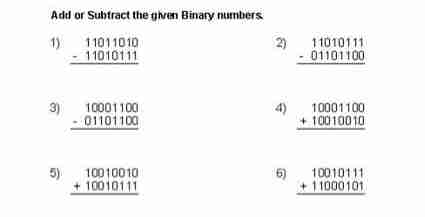
Binary Addition