IE 172 Codes
 Call Kai
 Learn
 Practice Test
 Spaced Repetition
 Match
 Flashcards
 Knowt Play
1/69

Earn XP
Description and Tags
Ito na yung may code pati how to eme eme
70 Terms
Command to return list of contents in current directory
ls
Command to change directory to specified path
cd “D:\copied_path”
Command to go one folder above current directory
cd ..
Install virtual environment in current directory
Creates new folder for venv named <environment_name>
python -m venv <environment_name>
Command to list all Python packages currently installed in venv
pip freeze
Command to activate the venv (windows)
source <venvname>/Scripts/activate
Command to activate the venv (mac)
source <venvname>/bin/activate
How to check if venv is activated?
(venvname) on the leftmost side
Command to deactivate venv
deactivate
Setting up venv on VS Code
python interpreter > venv folder > Scripts > python
How to know if interpreter active in VS Code
bottom status bar
Command to install dash (package that provides functions for app customization)
pip install dash
Command to install dash_bootstrap_components (for designs)
pip install dash_bootstrap_components
File for blank script named “app”
app.py
How to add the installed packages in the script?
import Script to add webbrowser dependency (opens web browser automatically when app is ran)
import webbrowserScript to add dash
import dashScript to add dash_bootstrap_components with nickname dbc
import dash_bootstrap_components as dbcHow to pull tools from imported package (ex: dcc [defines interactive elements], html [allows html elements in app] from dash)
from dash import dcc, htmlHow to update imports for app callbacks?
from dash import Input, Output, State, callbackHow to define application object? (app)
Create Dash application with Bootstrap Styling
app = dash.Dash(__name__, external_stylesheets = [dbc.themes.BOOTSTRAP])How to set up title for application object? (app)
Set title of application object, app, using dash attribute
app.title = “Title”How to set up initial layout for application object? (app showing Hello World with no extra formatting)
app.layout = html.Div(“Hello World”)Script that runs the application object app
if __name__ == '__main__':
    webbrowser.open('http://127.0.0.1:8050', autoraise=True)
app.run()How to stop/kill the server?
Ctrl+C
Create a function “getFactorial” that returns num’s factorial
def getFactorial(num):
    if num < 0:
        raise Exception("Number must be nonnegative")
    elif num <= 1:
        return 1
    else:
return num*getFactorial(num-1) How do you manually trigger a general exception in Python?
raise Exception("")How to print value of function getFactorial when you want to get factorial of 2?
print(getFactorial(2))Create a dbc card with header “First Dash App”
app.layout = html.Div(
	[
		dbc.Card(
			dbc.CardHeader("First Dash App")
		)
	]
)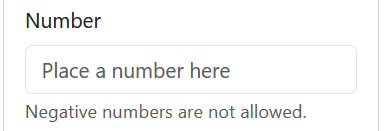
Create the code that would reflect this inside of a dbc card
html.Div(
	[
		dbc.Label("Number"),
		dbc.Input(placeholder ="Place a number here", type="text"),
		dbc.FormText("Negative numbers are not allowed"),
	]
)Create dash bootstrap component dropdown with options “This” and “That” and id “process_select”
dbc.Select(
	id="process_select",
	options=[
		{"label":"This","value":1},
		{"label":"That", "value":2},
	]
)Create app callback for (no def yet)
                dbc.CardBody(
                    [
                        html.Div(
                            [
                                dbc.Label("Number"),
                                dbc.Input(placeholder="Place a number here", type="text", id='num_input'),
                                dbc.FormText("Negative numbers are not allowed."),
                            ]
                        ),
                        html.Div(
                            [
                                dbc.Label("Process"),
                                dbc.Select(
                                    id="process_select",
                                    options=[
                                        {"label": "Get Factorial", "value": 1},
                                        {"label": "Generate Fibonacci", "value": 2},
                                    ],
                                ),
                                dbc.FormText("Select an operation"),
                            ]
                        ),
                        dbc.Button("Calculate!", id='btn_calculate', color='primary', n_clicks=0),
                        html.Div(id='output_area')
                    ]
                ),
@app.callback(
[
Output("output_area","children")
],
[
Input("btn_calculate","n_clicks")
],
[
State("num_input","value"),
State("process_select","value")
],
)Add style, 2px solid green border, to
html.Div(
	'Hello World'
)
html.Div(
'Hello World',
style={'border': '2px solid green'},
)Use className to style for a bold font with centered text
html.Div(
	'Hello World',
	style={'border': '2px solid green'},
)html.Div(
'Hello World',
style={'border': '2px solid green'},
className='fw-bold text-center'
)Create a Data Frame, df, using pandas (shortcut to pd) with sample data
fruits_data = {
    'fruit': ['apple', 'banana', 'mango', 'orange', 'pineapple'],
    'Quantity': [10, 15, 7, 20, 6],
    'Price': [5, 3, 8, 6, 10]
}
import pandas as pd
fruits_data = {...}
df = pd.DataFrame(fruits_data)Create a column for Totals in data frame df using Quantity and Price columns
df["Totals"] = df["Quantity"]*df["Price"]Sort data frame, df, values descending order based on Totals column
df.sort_values("Totals", ascending=False, inplace=True)Use iloc to print value in the 3rd and 4th column of the data frame (df) for the 3rd row
print(df.iloc[[2],[2,3]])app.py setup: script to make sure that callbacks are not activated when input elements enter the layout
app.config.suppress_callback_exceptions = Trueapp.py setup: script to get CSS from a local folder
app.css.config.serve_locally = Trueapp.py setup: script to enable your app to run offline
app.scripts.config.serve_locally = Trueapp.py setup: script to reduce the logs on your terminal to debug
log = logging.getLogger('werkzeug')
log.setLevel(logging.ERROR)SQL Script to create genres table with genre_id and genre_name
CREATE TABLE genres(
	genre_id serial primary key not null,
	genre_name varchar(128)
);Create the function “getdblocation” to access SQL database from Python?
def getdblocation():
	db = psycopg2.connect(
		host='',
		database='',
		user='postgres',
		port=0,
		password='',
	)
return dbCreate the function “modifyDB” to modify SQL database from Python
def modifyDB(sql,values):
	db = getdblocation()
	cursor = db.cursor()
	cursor.execute(sql,values)
	db.commit()
db.close()Creates a cursor object named “cursor” from open database db
cursor = db.cursor()Call function to execute the SQL code with the cursor value
cursor.execute(sql,values)Call function to save changes to db via Python
db.commit()Use pre-made function to close db connection
db.close()Create function “getDataFromDB” for querying SQL database from Python
def getDataFromDB(sql,values,dfcolumns):
	db = getdblocation()
	cur=db.cursor()
	cur.execute(sql,values)
	rows = pd.DataFrame(cur.fetchall(), columns=dfcolumns)
	db.close()
return rows Placeholders for where you want the values to go to in sql query
%s
Use pandas to create the variable “rows” to grab all query results from the cursor and converts them into a pandas table labeled with dfcolumns
rows = pd.DataFrame(cur.fetchall(), columns=dfcolumns)Edit the following code to not make it susceptible to SQL injections
sql = """ SELECT user_id FROM users WHERE user_name = <username_val> AND password = <password_val> """sql = """ SELECT user_id FROM users WHERE user_name = %s AND password = %s """
values = [username_val, password_val] Create the location variable for index.py with ‘url’ id
dcc.Location(id="url", refresh=True)Create the page content div for index.py with ‘page_content’ id
html.Div(id="page_content") Create the initial app layout variable for index.py setup with location variable ‘url’ id and page content div ‘page_content’ id
app.layout = html.Div(
	[
		dcc.Location(id="url", refresh=True),
		html.Div(id="page_content"),
	]
)index.py: Callback to update page_content if url changes (home and movies pages)
@app.callback(
	[
		Output("page_content", "children")
	],
	[
		Input("url", "pathname")
	]
)
def displaypage(pathname):
	ctx = dash.callback_context
	if ctx.triggered:
		eventid = ctx.triggered[0]["prop_id"].split('.')[0]
	else:
		raise PreventUpdate
	if eventid == "url":
		if pathname == "/" or pathname == "/home":
			returnlayout = home.layout
		elif pathname == "/movies":
			returnlayout = movies.layout
		else:
			returnlayout = "error404"
	else:
		raisePreentupdate
return[returnlayout]displaypage(pathname) code block to extract event id of triggered input
ctx = dash.callback_context
if ctx.triggered:
	event_id = ctx.triggered[0]['prop_id'].split(".")[0]
else:
raise PreventUpdatedisplaypage(pathname) code block that executes action based on value of eventid (in this case url pa lang pwede magbago to /home or /movies)
if eventid == "url":
	if pathname == "/" or pathname "/home":
		returnlayout = home.layout
	elif pathname == "/movies":
		returnlayout = movies.layout
	else:
		returnlayout = "error404"
else:
	raise PreventUpdate

return[returnlayout]dbc Navbar setup with link to Home and Movies
navbar= dbc.Navbar(
		dbc.Container(
			[
				dbc.NavLink("Home", href="/home"),
				dbc.NavLink("Movies", href="/movies")
			]
		),
)Lines to import navbar from commonmodules as cm to index py
from apps import commonmodules as cmindex.py: app layout with common modules navbar, location variable ‘url’ id, and page content div ‘page_content’ id
app.layout = html.Div(
	[
		dcc.Location(id="url", refresh=True),
		cm.navbar,
		html.Div(id="page_content")

	]
)eventid callback: parsing the parameter mode from url (?mode=add or ?mode=edit)
parsed = urlparse(urlsearch)
create_mode = parse_qs(parsed.query)['mode'][0]Cloning a repository with github link
git clone <github link>Committing repository changes with comment
git commit -m "comment"Staging changes (all edited files)
git add .Full order of pushing all changes to repository
git add .
git commit -m "comment"
git pushPulling changes in repository
git pullUndoing commit if already pushed
git revert <commit-hash copied from git or vscode>Undoing commit if not pushed
git reset --soft HEAD~1