Network+ Lesson 17: Network Access
 Call Kai
 Learn
 Practice Test
 Spaced Repetition
 Match
 Flashcards
 Knowt Play
1/9

There's no tags or description
Looks like no tags are added yet.
10 Terms
Connects entire networks to each other over the internet
Branches/remote offices act like one local network
Uses encrypted tunnels over public networks

Also called remote access VPN
Individual users connect securely to the corporate network
Typically uses VPN client software

Secure access through a web browser
No dedicated VPN client software needed
Used for specific web applications and services
Split: only corporate traffic goes through the VPN
Split: other traffic goes straight to the internet
Split: less load on VPN gateway but more security risk
Full: all client traffic goes through the VPN
Full: more secure, but more bandwidth and slower
Visual, point-and-click interface to a device
Alternative to the command line
Dashboards, configuration menus, monitoring tools
Direct physical access through a device's console port
Uses a console cable and terminal emulator
For initial setup, recovery, and when remote access fails
Encrypted protocol for secure remote login
Secure channel over an insecure network
Replaces Telnet, which does not encrypt
Used to manage servers and network devices remotely
Secure computer admins connect to first
Stepping stone from one security zone to another
Controlled access between trust levels
Often used to manage devices in a DMZ/screened subnet

Manage devices over the same network used for data traffic
Uses standard tools and protocols such as SSH

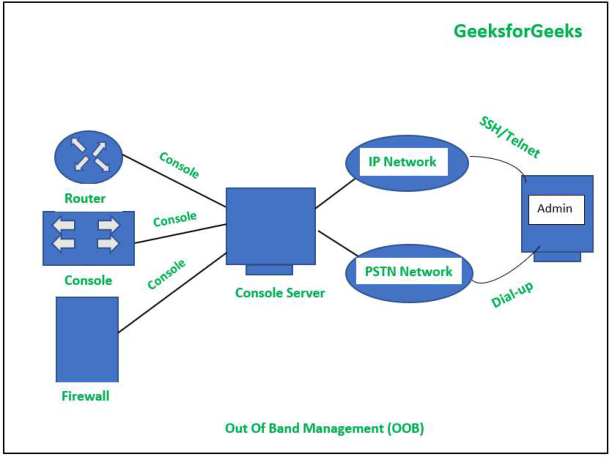
Separate, dedicated channel for device management
Independent of the main network
Access still works when the main network is down
Improves security and uptime