Module 4: Protocols, Addressing & Services

0.0(0)
Studied by 0 people
call kaiCall Kai
learnLearn
examPractice Test
spaced repetitionSpaced Repetition
heart puzzleMatch
flashcardsFlashcards
GameKnowt Play
Card Sorting

1/3

encourage image

There's no tags or description

Looks like no tags are added yet.

4 Terms

1
New cards

Networking Models & Encapsulation

  1. OSI Model: 7-layer conceptual networking framework (Physical, Data Link, Network, Transport, Session, Presentation, Application).

  2. TCP/IP Model: 4-layer practical networking suite (Network Interface, Internet, Transport, Application).

  3. PDU (Protocol Data Unit): Name of data at each OSI layer: Bits (L1), Frames (L2), Packets (L3), Segments (L4), Data (L5–7).

  4. Encapsulation: Process of adding protocol headers (and trailers) as data moves down the OSI layers for transmission.


2
New cards

IP Addressing, Subnetting & Translation

  1. MAC Address: 48-bit (6-byte) hexadecimal physical hardware address burned into a NIC, operating at Layer 2.

  2. IPv4 Address: 32-bit logical address written in dotted-decimal notation (e.g., 192.168.1.10), operating at Layer 3.

  3. Private IPv4 Ranges (RFC 1918): Non-routable internal addresses: 10.0.0.0/8, 172.16.0.0/12 (172.16–172.31), and 192.168.0.0/16.

  4. APIPA (169.254.0.0/16): Automatic self-assigned IP address a Windows client uses when it cannot reach a DHCP server.

  5. Loopback Address (127.0.0.1 / ::1): Reserved diagnostic address used to test a local device's own TCP/IP stack.

  6. Subnet Mask: 32-bit value (e.g., 255.255.255.0 or /24) that separates the network ID portion from the host ID portion of an IPv4 address.

  7. CIDR (Classless Inter-Domain Routing): Slash notation (e.g., /26) indicating the number of network bits in a subnet mask.

  8. Default Gateway: The local router IP address to which a host sends traffic destined for outside its own subnet.

  9. IPv6 Address: 128-bit hexadecimal address (e.g., 2001:0db8::1) designed to replace IPv4 and eliminate address exhaustion.

  10. NAT (Network Address Translation): Translates private internal IP addresses into a public IP address for Internet access.

  11. PAT (Port Address Translation):

    Form of NAT that maps multiple internal private IPs to a single public IP using unique source port numbers.


3
New cards

Core Transport, Security & Directory Protocols

  1. TCP (Transmission Control Protocol): Connection-oriented Layer 4 protocol guaranteeing reliable, ordered delivery via a 3-way handshake (SYN, SYN-ACK, ACK).

  2. UDP (User Datagram Protocol): Connectionless, low-overhead Layer 4 protocol offering fast, best-effort delivery without acknowledgments (used for VoIP, DNS, streaming).

  3. ARP (Address Resolution Protocol): Resolves a known Layer 3 IPv4 address to an unknown Layer 2 MAC address on a local network.

  4. ICMP (Internet Control Message Protocol): Network-layer diagnostic and error-reporting protocol used by ping and tracert.

  5. IPsec (Internet Protocol Security): Layer 3 security suite that authenticates and encrypts IP packets, commonly used in site-to-site VPNs.

  6. SSL / TLS: Cryptographic protocols operating at Layer 6 to secure web (HTTPS), email, and VPN communications.

  7. Proxy Server: Intermediary server that forwards client requests, caches web content, and filters outbound web traffic.

  8. IDS (Intrusion Detection System): Passive security sensor that monitors network traffic for malicious signatures and alerts administrators.

  9. IPS (Intrusion Prevention System): Inline security device that actively blocks or drops malicious traffic in real time.

  10. AAA (Authentication, Authorization, Accounting): Security framework that verifies user identity, enforces permissions, and logs user activity.

  11. FQDN (Fully Qualified Domain Name): Complete domain name specifying exact location in the DNS hierarchy (e.g., ://company.com).

  12. DNS Record Types: A (IPv4 host), AAAA (IPv6 host), CNAME (alias), MX (mail server), PTR (reverse IP-to-name lookup).


4
New cards

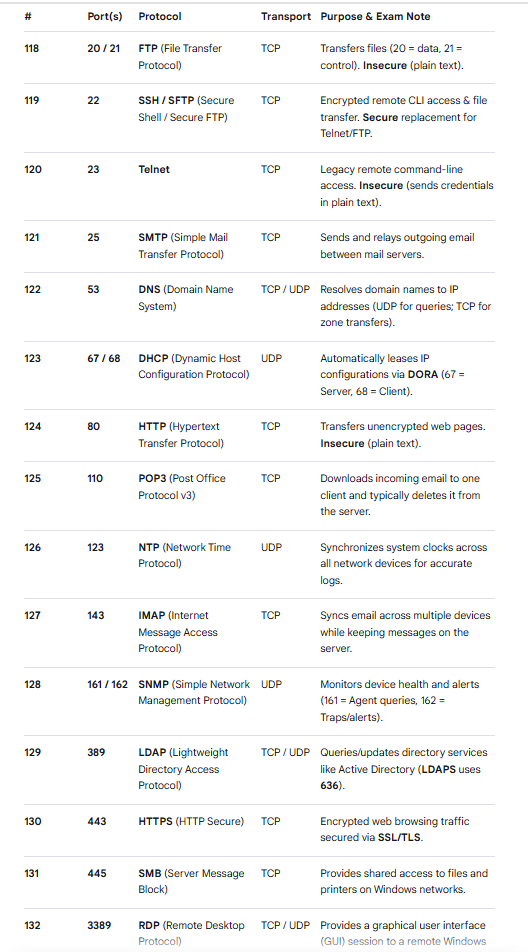
Must-Know Network Ports & Services

#

Port(s)

Protocol

Transport

Purpose & Exam Note

118

20 / 21

FTP (File Transfer Protocol)

TCP

Transfers files (20 = data, 21 = control). Insecure (plain text).

119

22

SSH / SFTP (Secure Shell / Secure FTP)

TCP

Encrypted remote CLI access & file transfer. Secure replacement for Telnet/FTP.

120

23

Telnet

TCP

Legacy remote command-line access. Insecure (sends credentials in plain text).

121

25

SMTP (Simple Mail Transfer Protocol)

TCP

Sends and relays outgoing email between mail servers.

122

53

DNS (Domain Name System)

TCP / UDP

Resolves domain names to IP addresses (UDP for queries; TCP for zone transfers).

123

67 / 68

DHCP (Dynamic Host Configuration Protocol)

UDP

Automatically leases IP configurations via DORA (67 = Server, 68 = Client).

124

80

HTTP (Hypertext Transfer Protocol)

TCP

Transfers unencrypted web pages. Insecure (plain text).

125

110

POP3 (Post Office Protocol v3)

TCP

Downloads incoming email to one client and typically deletes it from the server.

126

123

NTP (Network Time Protocol)

UDP

Synchronizes system clocks across all network devices for accurate logs.

127

143

IMAP (Internet Message Access Protocol)

TCP

Syncs email across multiple devices while keeping messages on the server.

128

161 / 162

SNMP (Simple Network Management Protocol)

UDP

Monitors device health and alerts (161 = Agent queries, 162 = Traps/alerts).

129

389

LDAP (Lightweight Directory Access Protocol)

TCP / UDP

Queries/updates directory services like Active Directory (LDAPS uses 636).

130

443

HTTPS (HTTP Secure)

TCP

Encrypted web browsing traffic secured via SSL/TLS.

131

445

SMB (Server Message Block)

TCP

Provides shared access to files and printers on Windows networks.

132

3389

RDP (Remote Desktop Protocol)

TCP / UDP

Provides a graphical user interface (GUI) session to a remote Windows PC.


<table style="width: 0px;"><colgroup></colgroup><tbody><tr><th colspan="undefined" rowspan="1" style=""><p>#</p></th><th colspan="undefined" rowspan="1" style=""><p>Port(s)</p></th><th colspan="undefined" rowspan="1" style=""><p>Protocol</p></th><th colspan="undefined" rowspan="1" style=""><p>Transport</p></th><th colspan="undefined" rowspan="1" style=""><p>Purpose &amp; Exam Note</p></th></tr><tr><td colspan="NaN" rowspan="1" style=""><p><strong>118</strong></p></td><td colspan="NaN" rowspan="1" style=""><p><strong>20 / 21</strong></p></td><td colspan="NaN" rowspan="1" style=""><p><strong>FTP</strong> (File Transfer Protocol)</p></td><td colspan="NaN" rowspan="1" style=""><p>TCP</p></td><td colspan="NaN" rowspan="1" style=""><p>Transfers files (20 = data, 21 = control). <strong>Insecure</strong> (plain text).</p></td></tr><tr><td colspan="NaN" rowspan="1" style=""><p><strong>119</strong></p></td><td colspan="NaN" rowspan="1" style=""><p><strong>22</strong></p></td><td colspan="NaN" rowspan="1" style=""><p><strong>SSH / SFTP</strong> (Secure Shell / Secure FTP)</p></td><td colspan="NaN" rowspan="1" style=""><p>TCP</p></td><td colspan="NaN" rowspan="1" style=""><p>Encrypted remote CLI access &amp; file transfer. <strong>Secure</strong> replacement for Telnet/FTP.</p></td></tr><tr><td colspan="NaN" rowspan="1" style=""><p><strong>120</strong></p></td><td colspan="NaN" rowspan="1" style=""><p><strong>23</strong></p></td><td colspan="NaN" rowspan="1" style=""><p><strong>Telnet</strong></p></td><td colspan="NaN" rowspan="1" style=""><p>TCP</p></td><td colspan="NaN" rowspan="1" style=""><p>Legacy remote command-line access. <strong>Insecure</strong> (sends credentials in plain text).</p></td></tr><tr><td colspan="NaN" rowspan="1" style=""><p><strong>121</strong></p></td><td colspan="NaN" rowspan="1" style=""><p><strong>25</strong></p></td><td colspan="NaN" rowspan="1" style=""><p><strong>SMTP</strong> (Simple Mail Transfer Protocol)</p></td><td colspan="NaN" rowspan="1" style=""><p>TCP</p></td><td colspan="NaN" rowspan="1" style=""><p>Sends and relays outgoing email between mail servers.</p></td></tr><tr><td colspan="NaN" rowspan="1" style=""><p><strong>122</strong></p></td><td colspan="NaN" rowspan="1" style=""><p><strong>53</strong></p></td><td colspan="NaN" rowspan="1" style=""><p><strong>DNS</strong> (Domain Name System)</p></td><td colspan="NaN" rowspan="1" style=""><p>TCP / UDP</p></td><td colspan="NaN" rowspan="1" style=""><p>Resolves domain names to IP addresses (UDP for queries; TCP for zone transfers).</p></td></tr><tr><td colspan="NaN" rowspan="1" style=""><p><strong>123</strong></p></td><td colspan="NaN" rowspan="1" style=""><p><strong>67 / 68</strong></p></td><td colspan="NaN" rowspan="1" style=""><p><strong>DHCP</strong> (Dynamic Host Configuration Protocol)</p></td><td colspan="NaN" rowspan="1" style=""><p>UDP</p></td><td colspan="NaN" rowspan="1" style=""><p>Automatically leases IP configurations via <strong>DORA</strong> (67 = Server, 68 = Client).</p></td></tr><tr><td colspan="NaN" rowspan="1" style=""><p><strong>124</strong></p></td><td colspan="NaN" rowspan="1" style=""><p><strong>80</strong></p></td><td colspan="NaN" rowspan="1" style=""><p><strong>HTTP</strong> (Hypertext Transfer Protocol)</p></td><td colspan="NaN" rowspan="1" style=""><p>TCP</p></td><td colspan="NaN" rowspan="1" style=""><p>Transfers unencrypted web pages. <strong>Insecure</strong> (plain text).</p></td></tr><tr><td colspan="NaN" rowspan="1" style=""><p><strong>125</strong></p></td><td colspan="NaN" rowspan="1" style=""><p><strong>110</strong></p></td><td colspan="NaN" rowspan="1" style=""><p><strong>POP3</strong> (Post Office Protocol v3)</p></td><td colspan="NaN" rowspan="1" style=""><p>TCP</p></td><td colspan="NaN" rowspan="1" style=""><p>Downloads incoming email to one client and typically deletes it from the server.</p></td></tr><tr><td colspan="NaN" rowspan="1" style=""><p><strong>126</strong></p></td><td colspan="NaN" rowspan="1" style=""><p><strong>123</strong></p></td><td colspan="NaN" rowspan="1" style=""><p><strong>NTP</strong> (Network Time Protocol)</p></td><td colspan="NaN" rowspan="1" style=""><p>UDP</p></td><td colspan="NaN" rowspan="1" style=""><p>Synchronizes system clocks across all network devices for accurate logs.</p></td></tr><tr><td colspan="NaN" rowspan="1" style=""><p><strong>127</strong></p></td><td colspan="NaN" rowspan="1" style=""><p><strong>143</strong></p></td><td colspan="NaN" rowspan="1" style=""><p><strong>IMAP</strong> (Internet Message Access Protocol)</p></td><td colspan="NaN" rowspan="1" style=""><p>TCP</p></td><td colspan="NaN" rowspan="1" style=""><p>Syncs email across multiple devices while keeping messages on the server.</p></td></tr><tr><td colspan="NaN" rowspan="1" style=""><p><strong>128</strong></p></td><td colspan="NaN" rowspan="1" style=""><p><strong>161 / 162</strong></p></td><td colspan="NaN" rowspan="1" style=""><p><strong>SNMP</strong> (Simple Network Management Protocol)</p></td><td colspan="NaN" rowspan="1" style=""><p>UDP</p></td><td colspan="NaN" rowspan="1" style=""><p>Monitors device health and alerts (161 = Agent queries, 162 = Traps/alerts).</p></td></tr><tr><td colspan="NaN" rowspan="1" style=""><p><strong>129</strong></p></td><td colspan="NaN" rowspan="1" style=""><p><strong>389</strong></p></td><td colspan="NaN" rowspan="1" style=""><p><strong>LDAP</strong> (Lightweight Directory Access Protocol)</p></td><td colspan="NaN" rowspan="1" style=""><p>TCP / UDP</p></td><td colspan="NaN" rowspan="1" style=""><p>Queries/updates directory services like Active Directory (<strong>LDAPS</strong> uses <strong>636</strong>).</p></td></tr><tr><td colspan="NaN" rowspan="1" style=""><p><strong>130</strong></p></td><td colspan="NaN" rowspan="1" style=""><p><strong>443</strong></p></td><td colspan="NaN" rowspan="1" style=""><p><strong>HTTPS</strong> (HTTP Secure)</p></td><td colspan="NaN" rowspan="1" style=""><p>TCP</p></td><td colspan="NaN" rowspan="1" style=""><p>Encrypted web browsing traffic secured via <strong>SSL/TLS</strong>.</p></td></tr><tr><td colspan="NaN" rowspan="1" style=""><p><strong>131</strong></p></td><td colspan="NaN" rowspan="1" style=""><p><strong>445</strong></p></td><td colspan="NaN" rowspan="1" style=""><p><strong>SMB</strong> (Server Message Block)</p></td><td colspan="NaN" rowspan="1" style=""><p>TCP</p></td><td colspan="NaN" rowspan="1" style=""><p>Provides shared access to files and printers on Windows networks.</p></td></tr><tr><td colspan="NaN" rowspan="1" style=""><p><strong>132</strong></p></td><td colspan="NaN" rowspan="1" style=""><p><strong>3389</strong></p></td><td colspan="NaN" rowspan="1" style=""><p><strong>RDP</strong> (Remote Desktop Protocol)</p></td><td colspan="NaN" rowspan="1" style=""><p>TCP / UDP</p></td><td colspan="NaN" rowspan="1" style=""><p>Provides a graphical user interface (GUI) session to a remote Windows PC.</p></td></tr></tbody></table><p></p>