chapter 8 -- networking and communication basics
 Call Kai
 Learn
 Practice Test
 Spaced Repetition
 Match
 Flashcards
 Knowt Play
1/30

There's no tags or description
Looks like no tags are added yet.
31 Terms
network
two or more objects sharing resources and information
computers, terminals, and servers interconnected by communication channels sharing data and program resources
devices other than computers are networked:
printers, scanners, and barcode readers
devices that can be shared to save money and space for the users
geographic classifications
two major categories:
local area network (LAN)
wide area network (WAN)

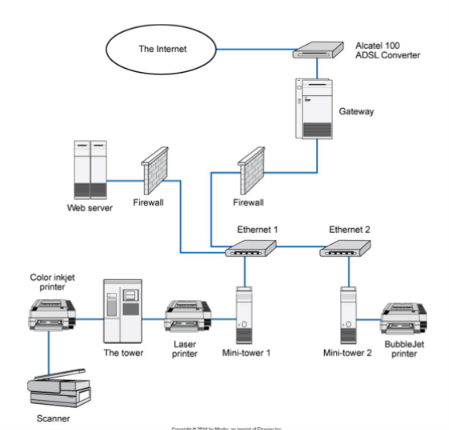
LAN
small area networked with a series of cables or wireless access points
computers can share information and devices on the same network
least expensive to install
much faster than the WAN
larger networks are composed of several LANs interconnected to create the WAN
PACS workstations in a radiology reading room would be considered a LAN
computers are interconnected and communicate by passing images and reports
WAN
a wide area network spans a large area, city, state, nation, continent, or the world
is used to connect computers that are not physically attached
are connected through other means:
telephone lines
satellite links
other communication cables
long-distance communication links are costly
often these communication links are owned by a separate company

component role classification
network type is determined by the following:
roles the computers play in operation of the network
which computer controls the network operation
two typical component role classifications of networks are the following:
peer to peer
server or client based
peer-to-peer network
each computer on the network is considered equal
each computer controls its own information and operation
a computer can function as a client of a server
most popular network for small office or home configuration:
least expensive
simplest to set up
network has limited scope

server-based network
a centralized computer (server) controls the operations, files, and sometimes the programs of the computers (clients) attached to the network
the server provides a location for storage and retrieval on the network
allows users to move from computer to computer and access files from this central location
how it works:
the client requests a file
the server sends the entire file to the client for processing
the client sends the entire changed file back to the server for storage
the network allows for lower-end computers as the clients with one expensive high-end computer as the server
the network can have multiple servers
the network must have one dedicated server that controls it
a radiology PACS system is an example of this type of network
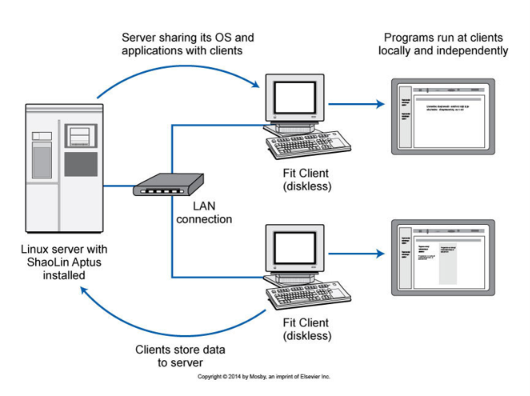
client-based network
similar to a server-based network
centralized computer controls the operations
server processes the resource as requests by the client
server returns only the results back to the client
smaller exchange of information cuts down the load on the network
network allows more room for other requests
typical components of a network
computers
three types found:
servers
thin client
thick client
each of the three has a specific purpose and mission on the network
server
computer that manages resources for other computers, servers, and networked devices
may also house applications
provides storage for files
manages various other networked tasks
most often dedicated to one single task for the network
usually the most robust computer on the network
may be one server that provides storage for files, one may manage the print functions, and another may provide internet access for the network
thin client
a device found on a network that requests service and resources from a server
may be another computer, a printer, or any other networked device that needs that server to complete its tasks
almost any PC can be a client as long as it can be attached to the network
thick client
computers that can work independently from the network
can process and manage its own files
is networked so that it can share resources such as printing and take advantage of the additional security available on networks through dedicated servers
is generally a high-end computer that does high-level processing for specific purposes
specialty application workstations most often found in sectional imaging modalities where three-dimensional imaging is used to aid in diagnosis
sectional images are fed into the workstation application
application transforms the slices into 3D images that can be evaluated
network connectivity
communication medium
devices are connected via some sort of communication medium
the physical connection between the devices is one of the following four types:
coaxial cable
twisted-pair wire
fiberoptic cable
electromagnetic waves
coaxial cable
similar to the wiring used for the cable TV
consists of a center conduction wire surrounded by insulation and a grounded shield of braided wire
shield minimizes electrical and radiofrequency interference
is the sturdiest wire used
often found in the network infrastructure throughout a building
twisted-pair wire
is similar to telephone wire except that telephone wire only has four wires
consists of four twisted pairs of copper wire
wire is insulated and bundled together with an RJ-45
wires come in various levels of quality and capacity
the minimum recommended standard is Cat 5 (category 5) cable
wire is the most common connection medium used in LANs
fiberoptic cable
uses glass threats to transmit data on the network
consists of a fiberoptic core that is surrounded by a plastic protective covering
is much faster than its metal counterpart but is more expensive and much more fragile
easily damaged by kinking and twisting of the cable
most often used in the infrastructure of the network, in network closets, and in large archive or computer rooms
wireless connections
connection is made by using infrared or ratio frequencies (electromagnetic frequencies)
no physical cabling is needed, but each device must contain the appropriate wireless transmitter and receiver
biggest advantage is mobility and convenience, but connection has a limited range
wall thickness and composition and the distance from the source must be taken into account when using wireless access points
network router
a more sophisticated device
can read portions of the messages and direct them to their intended target even if the target is on a separate network and uses a different network protocol
helps with segmenting the network to allow access only for approved devices within that segment
in large networks, multiple routers, switches, and hubs work in concert to perform the necessary tasks
network communication
devices communicate on networks through a communication medium, data is sent to destination addresses of appropriate targets
each computer on the network is assigned a unique address
the address is a combination of a physical address from the computer hardware and a node address given by the network
one type of addressing is IP (internet protocol)
data travels along the network using an agreed-upon set of rules known as a network protocol
protocols send data in packets from one device to another
a packet is a piece of the data with added information such as the following:
destination address
source address
sequence of the packets
errors in transmission
network topology
the physical (geometric) layout of the connected devices on a network
four common topological configurations are the following:
bus, ring, star, mesh
type of communication media, the network speed, the connecting equipment design, and the number of devices to be connected must be considered
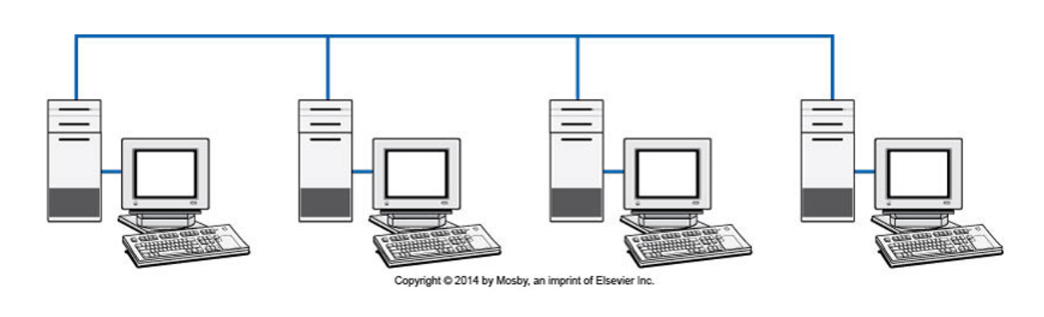
bus
all devices are physically attached to and listen for communication on one single wire
the wire is a single point of failure
if there is a break, the entire network is down
some communication can take place between the computers on either side of the break
ring
devices are connected in a circle
each device passes received messages to the next node on the ring (always in the same direction)
data transmissions move around the circle until they reach the correct receiver
if there is a break at some point in the ring, the entire network comes to a halt

star
devices are connected to a central hub or switch
the data is sent through the hub to the destination device
transmission might be through another hub or switch to an adjacent network or directly to the device
this is the most common network topology used

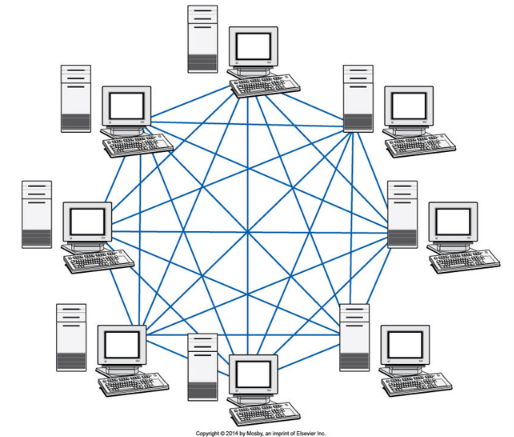
mesh
consists of multiple pathways of interconnecting devices and network
redundancy is built in with the multiple connections
the internet is based on this topology
most often used to connect networks to other networks
digital imaging communications in medicine (DICOM)
has become almost universally accepted standard for exchanging medical images
it is layered on top of TCP/IP, the most common network communication standard
has multiple layers like TCP/IP
developed by the American College of Radiology (ACR) and the National Electrical Manufacturers Association (NEMA)
first version completed in 1985 (1.0), addressing only point-to-point connections between devices
up-to-date information available on the NEMA website
standard defines service classes or functions that a device can perform on a defined information object
SCU, SCP
a device can act as SCU, SCP, or both, depending on the situation
network communications are always between an SCP and an SCU
each service defines a specific transaction for the modality and PACS
standardization makes device interoperability possible
another aspect is its specification on uniquely identifying each study, series, and image (instance)
uses unique identifiers (UIDs) to globally identify each image set
each study is identified by a study instance UID
the numbers are created based on vendor number, serial number of equipment, date, time, patient or processing number, study, series, and image numbers
also provides a framework for the use of compression technologies on image data
lossless compression, lossy compression
when a modality supports the service class of modality worklist management
patient demographics can be pulled directly from the radiology information system (RIS)
SCU
service class user — requests the service
CT scanner
SCP
service class provider — provides or performs the service
PACS
most common service classes in modalities/PACS
image storage, query and retrieval, print, modality worklist, modality performed procedure, storage commitment, interchange media storage
lossless compression
most common compression technique used within hospitals
no image degradation results upon viewing after decompression
lossy compression
when moving images outside the hospital, may be necessary to suit external networks
some loss of image detail can occur at higher compression values
radiology information system (RIS)
a specialized, networked software system designed to manage the administrative, clinical, and operational workflows of a medical imaging department or clinic
can interface via DICOM or through a gateway that creates an interface with the HL-7 device and the DICOM device
HL-7
stands for health level 7
developed by:
american national standard institute
accredited standards developing organizations
used in most healthcare applications such as medical devices, imaging, insurance, and pharmacy
consists of many parts and is used at many levels within various hospital systems
the standard generally used in communication between the hospital information system (HIS) and the RIS
HIS holds the patient’s full medical information from hospital billing to the inpatient ordering system
the RIS holds all radiology-specific patient data from the patient scheduling information to the radiologist’s dictated and transcribed report
the electronic medical record (EMR) is a part of the HIS or runs along with it and contains all the patient’s records
PACS have also begun interfacing with EMRs to present images to referring physicians through the same common system