Computer science Unit 1 (Main characteristics of a processor)
 Call Kai
 Learn
Learn Practice Test
 Spaced Repetition
 Match
Match Flashcards
 Knowt Play
1/25

There's no tags or description
Looks like no tags are added yet.
26 Terms
What is the Central Processing Unit (CPU)
The CPU fetches, decodes, and executes program instructions, handling everything from basic math to running operating system and apps
Where is the CPU installed?
It is installed in a socket on the motherboard; the main circuit that connects all components of a computer.
What are four features of the CPU?
The CPU:
Performs mathematical calculations
Runs applications and games
Manages I/O operations
Stores and receives data during processing
What are the FIVE components of a CPU?
ALU (Arithmetic control unit)
CU ( Control Unit)
Registers
Cache
Clock
What is the ALU?
This is a component of the CPU that handles arithmetic and logical tasks
What are the components of the ALU?
Accumulator (ACC)
Arithmetic and logic circuit
programmable flags
What is the Accumulator (ACC)?
This is an 8-bit register inside the ALU used to store the intermediate and final values of arithmetic and logical operations.
What are Flags (Status Flags)?
These are 1-bit memory cells that indicate the outcome of the last arithmetic or logical operations. These flags tell the CPU whether the result was a zero, negative , overflow or carry.
What is The Control Unit (CU)?
The CU manages all of the computer’s hardware operations. It fetches program instructions from RAM, decodes it and sends electrical signals to tell the relevant hardware components (ALU, registers, I/O registers etc) what to do.
What are Registers?
These are high-speed memory units that enable quick access to data frequently used by the CPU. It also plays a role in data manipulation, memory addressing and tracking processor status.
What are the FIVE types of CPU registers?
Accumulator
Memory Address Register (MAR)
Memory Data Register (MDR)
Memory Buffer Register (MBR)
Current Instruction Register (CIR)
What is The Memory Address Register (MAR)?
A dedicated register in the CPU that holds the exact memory address that the CPU want to read or write to.
Memory Data Registers (MDR)?
The MDR holds the actual program or instruction that is either being fetched from RAM or waiting to be written into RAM. (It and Memory Buffer register are used interchangeably)
Current Instruction Register CIR / instruction Register (IR)
This register temporarily stores instructions that have just been fetched from memory.
What is an Instruction format?
This represents how instructions are stored in memory
What are the FOUR types of instruction formats?
zero-address instruction
one-address instruction
two- address instruction
three-address instruction
Why are Instruction formats needed?
They are needed because the computer does not understand high-level languages, thus compilers or assemblers are required to translate to machine language.
NB: The instruction is divided into a group of bits called a field

What is the Opcode, operand and addressing mode?
Opcode- This field specifies the operation to be performed by the CPU
Operands- These fields contain the data or addresses to data on which the operation acts
Addressing mode- This specifies how to interpret or locate the operand, such as direct, indirect, or immediate addressing.
What is direct addressing ? (Addressing Mode)
The address of the operand is given in the instructions
Indirect Addressing (Addressing mode)
The instruction specifies a register, which contains the address of the operand.
Immediate addressing (Addressing mode)
The operand value is directly embedded into the instructions rather than being stored in a separate register or memory location.
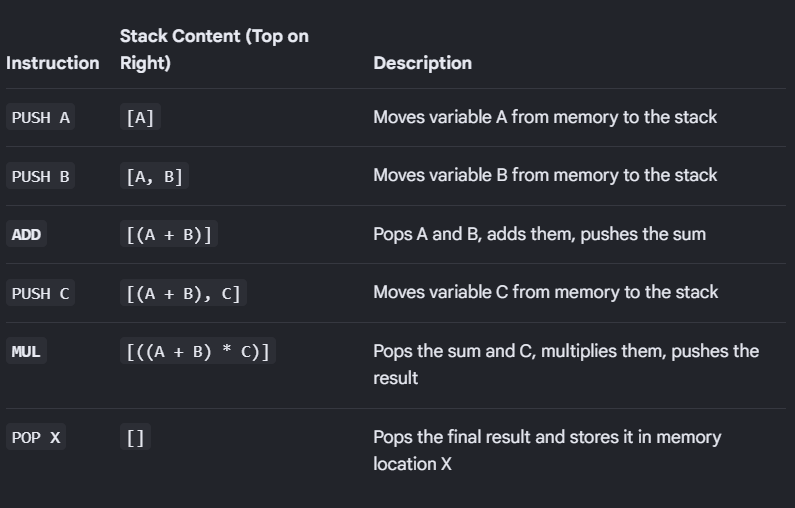
What are Zero-Address instructions?
This design relies on a stack-based architecture, where operands are automatically popped from the top of a stack, processed by the CPU, and the result is pushed back onto the stack.

One- Address Instructions
These instructions consists of a single opcode or an address that gives a value and the operation to be carried out (E.g ADD X). Then the CPU executes the instruction using the operand value and the value stored in the Accumulator.
The result is then stored in the ACC
NB: the CPU always assumes there is a value in the accumulator
Two-Address Instructions
These instructions specify two operands or addresses. The CPU operates on the contents of both operands and the result is then stored in one of the specified operands.
Three-Address Instructions
Three-address instructions are a computer instruction format where all three operands—two sources and one destination—are explicitly specified within a single instruction.
Two operands are used for the operation and the result is stored in the third (R1=R2+R3)