Print Media Exam 2
 Call Kai
 Learn
Learn Practice Test
 Spaced Repetition
 Match
Match Flashcards
 Knowt Play
1/84

Earn XP
Description and Tags
Production Planning, Pre-Press, Mark up & Disk Prep
Name | Mastery | Learn | Test | Matching | Spaced | Call with Kai | Chat |
|---|
No analytics yet
Send a link to your students to track their progress
85 Terms
Audience, Purpose, Use, Processes, Scheduling, Quantity, Quality
What are the 7 considerations of production planning?
Turnaround Time
Includes the entire production process-from submitting files and proofing through printing, finishing, and delivery.
M
Shorthand for more than 100
mm
Shorthand for more than a million
5M
What would the shorthand be for 5,000?
5MM
What would the shorthand be for 5,000,000?
Price Break
Printing cost per unit decreases with an increase in quantity. This is where the cost per unit drops significantly.
Over/Under(Overrun and Underrun)
When the final quantity delivered is slightly more or less than the quantity ordered due to normal variations in the printing and finishing process
Cost Per Unit
Refers to the individual cost of an item after a large quantity has been printed
Quantity Shorthand
to avoid confusion and prevent spelling errors, it is helpful to use shorthand to specify large quantities
Audience
WHO are you designing for?
Purpose of Project
WHAT does the piece need to DO?
Use of Piece
HOW will the piece be used?
Other processes
What ELSE has to happen to the work AFTER it is printed?
Scheduling
WHEN does it need to be finished?
Quantity
HOW MANY should we print?
Quality
How GOOD does it need to be?
1.5, 2 and 3 times their requested amount
When quoting a client, how many times greater should you quote them?
gives clients a good idea of price breaks, and may put you in good standing with your client as you’re getting them a deal
Why should you quote your client more than what they requested?
Digital Presses
What press is the SAME COST PER UNIT no matter the quantity?
10%
What percent do printers allow a over/under tolerance for print runs UNDER 1000?
Quick Print/On Demand, Commercial Printing, Specialty Printing, Fine Art/Archival Printing
What are the 4 MAIN divisions of printing quality?
the process of submitting a specified proposal for printing work. Printers use this to estimate the price for a job.
Speck a job/Specking
2-5 depending on quality
How many printers should you speck a job with before choosing one?
Designed for speed, convenience, and smaller quantities. Such as copies, flyers or simple cards
What is quick print/on demand printing quality good for?
Range of professional printed materials using digital, offset, or other commercial processes. Good for brochures, catalogs, publications, etc.
What is commercial printing good for?
Projects requiring specialized processes, materials, equipment, or craftmanship beyond commercial printing. Such as specialty inks + substrates, foil, embossing, die cutting. Used for packaging, premium promotions, unusual formats
What is specialty printing good for?
Focuses on exceptional reproduction, materials, longevity, and color accuracy. Often used for photography, artwork, museums, galleries, and limited editions.
What is fine art + archival printing used for?
Audience, Purpose of project, Use of piece, other processes, scheduling, quantity, quality
Discuss 3 things that, we as designers, need to take into consideration when designing for print for a client or specific target audience.
Prepress
the process of checking, preparing, and processing files so they can be accurately reproduced
Resolution
describes the amount of img. info available at a particular reproduction size
DPI- dots per inch
Printer/output resolution
Dots Per Inch
What does DPI stand for?
Pixels per inch
What does PPI mean?
PPI
Digital img. resolution
Raster
Pixels + resolution dependent format
Vector
Paths + resolution independent format
TIFF
Tagged Image File Format, Raster, Print production preferred for Raster imgs.
EPS
Encapsulated PostScript, Vector/Print, Print production preferred for complex vector
JPEG
Joint Photographic Experts Group, Raster, Convert to TIFF for production
Portable Network Graphics, output/exchange, print production preferred for print-ready documents, proofs + finished file delivery
Packaging
Collects the files needed to reproduce, transfer, or archive an InDesign project. Collected InDesign file + links + available fonts
YES! It is against the law to copy/send fonts EXCEPT service bureaus/printers. Printers, however, MUST trash fonts once job is finished.
Is it illegal to copy/send fonts?
PNG
Portable Network Group, Raster, NOT used for final production files, used for digital graphics + transparency
Knockout
Removes the underlying color
Overprint or Surprinting
Prints one color over another
Trapping
Creates a tiny overlap between adjoining colors to help prevent a potential gap
Choke
allows a lighter surrounding color to extend beneath a darker object
Spread
expands a lighter object into a darker surrounding color
Dot Gain
halftone dots printing larger on paper than they are in the digital file or on the plates
Proof
A representation of a print job produced before final production
Soft proof
Viewed digitally rather than as a physical printed sheet
Hard proof
Physical printed proof sheet
Red Pen
What color pen is most commonly and most recommended to use for marking up proofs?
It becomes a legally binding document that you are taking responsibility for the project and that the proof is okay for final production.
What happens when you sign a proof?
Pre-flight
The process of checking a document for potential production problems BEFORE it goes to the printer. *Commonly checking InDesign File
Missing or Modified links, Missing or incorrect fonts, Low-res imgs, Incorrect color spaces, Missing bleed + other production issues
What is flightcheck checking for?
Trapping
What process is being used for these two colors?

Knockout or K/O
What process is being used for these two colors?

Overprint/Surprint
What process is being used for these two colors?

Choke
What printing process is the img portraying?

Spread
What printing process is the img portraying?

Soft Proof
What type of proof is this?

Hard proof
What type of proof is this?

Contract Proof
What type of proof is this?

Contract Proof
color managed proof intended to provide an agreed-upon reference for how the job should reproduce. Once approved, it can serve as the target against which production color is evaluated.
Press Proof
What type of proof is this?
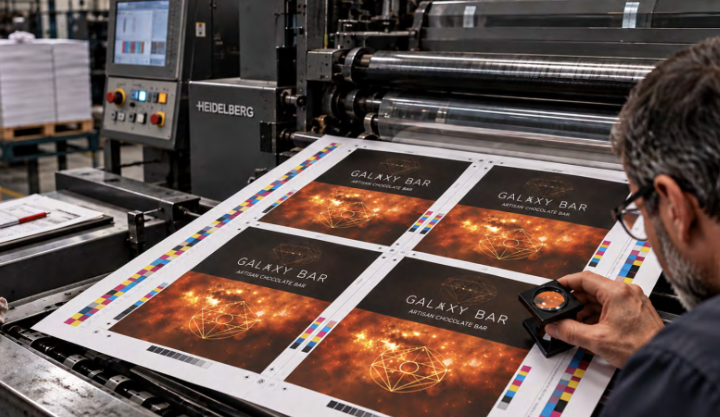
Press Proof
produced using the actual printing process—or a production setup closely tied to the final job—to evaluate reproduction before the full run.
when wet or insufficiently set ink transfers from one printed sheet onto the sheet that contacts it. This can mark the reverse side of sheets and damage the printed image.
Set Off
Identify the printing proof error

Hickey
Identify this printing proof error

Hickey
an unwanted printing defect caused when debris interferes with the transfer of ink. Dust, paper fibers, dried ink, or other particles can create spots, rings, or irregular marks in the printed image.
Poor Registration/misregistration
Identify this printing proof error

Misregistration/Poor registration
printing colors do not align correctly. Because each color is applied separately, even a small shift can create visible gaps, color fringes, or blurred edges.
Poor Trapping
Identify this printing proof error
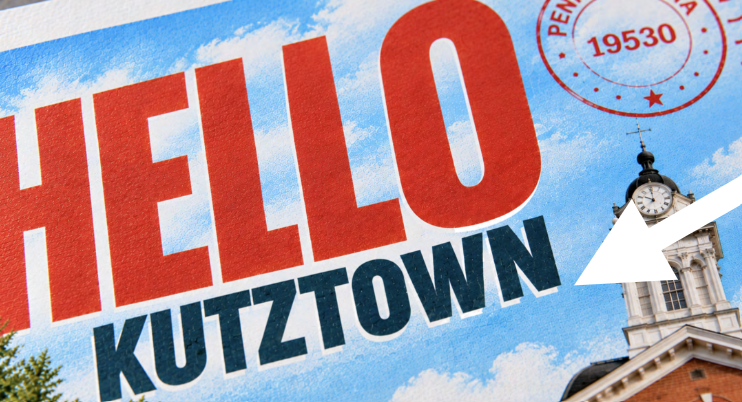
Trap/Trapping (poor)
overlap is too large, too small, or inappropriate for the colors involved, the BLANK itself may become visible
Picking
Identify this printing proof error
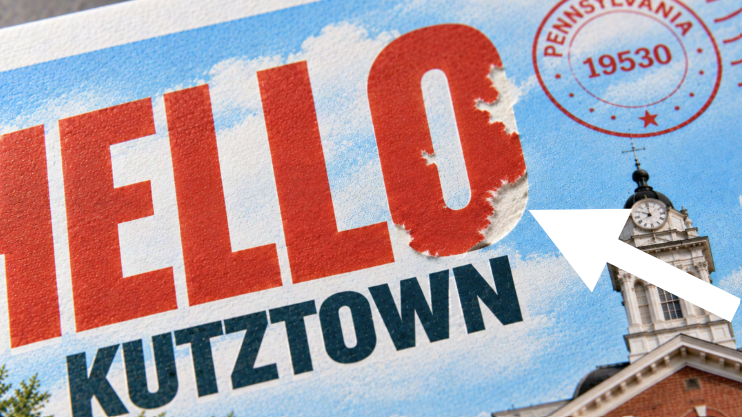
Picking
when the surface of the paper is pulled away during printing. The tack of the ink can lift fibers, coating, or small particles from the sheet, leaving damaged areas in the printed image and potentially creating debris that causes additional printing problems.
Scumming
Identify this printing proof error

Scumming
when unwanted ink appears in areas that are supposed to remain clean and unprinted. In offset lithography, non-image areas of the plate begin accepting ink, creating a tint, haze, or dirty appearance where there should be no ink.
Content Correctness, Position(is it everything where it should be), Color(reproduction acceptability), Construction(Does finished piece work as intended?) + ANY OTHER ERRORS
What are you checking for when checking/marking up a proof?
Open Swatches Panel
Create New Color Swatch
Change color type to SPOT color
Ensure color mode is CMYK
Name Swatch
If using to mark where special effects are, pick a color that stands out from design.
If done correctly, a box with a dot will appear next to the color name in swatch panel.
Describe the steps necessary to create a special effect spot color in InDesign to properly set a file up for commercial printing.
Packaged job folder WITH printers marks/bleed settings ON, Markups, fonts, images, folding comp, separations
What things are handed over to the commercial printer?
Images should be TIFF or EPS, Image status should be linked, CMYK color mode for everything, Fonts should be used in document and not missing, Resolution should be 300 DPI, Placed at 100%,
What things are on the Disk Prep Checklist?
Native InDesign document, IDML Template InDesign file, Fonts, Images, PDF
What is included in your final packaged InDesign file?