Professor Messer 4.3 | Wireless Security
 Call Kai
 Learn
 Practice Test
 Spaced Repetition
 Match
 Flashcards
 Knowt Play
1/8

There's no tags or description
Looks like no tags are added yet.
9 Terms
MAC filtering
Allows network administrators to control which devices can connect to a wireless network by limiting access to specific MAC addresses, the unique hardware identifiers for each device.
While this can keep unauthorized users, like neighbors, off the network, it adds administrative overhead when managing visitors. However, MAC filtering is easily bypassed, as MAC addresses can be spoofed using free, open-source software.
Is an example of "security through obscurity," which is not effective security because anyone familiar with the method can easily defeat it.
Antenna placement
The goal is to limit the signal to necessary work areas and prevent access from outside, like a parking lot, where unauthorized users could connect to internal networks.
Adjusting power levels helps focus coverage, optimizing signal strength for specific locations. This may require site surveys to walk around and fine-tune the coverage for optimal performance.
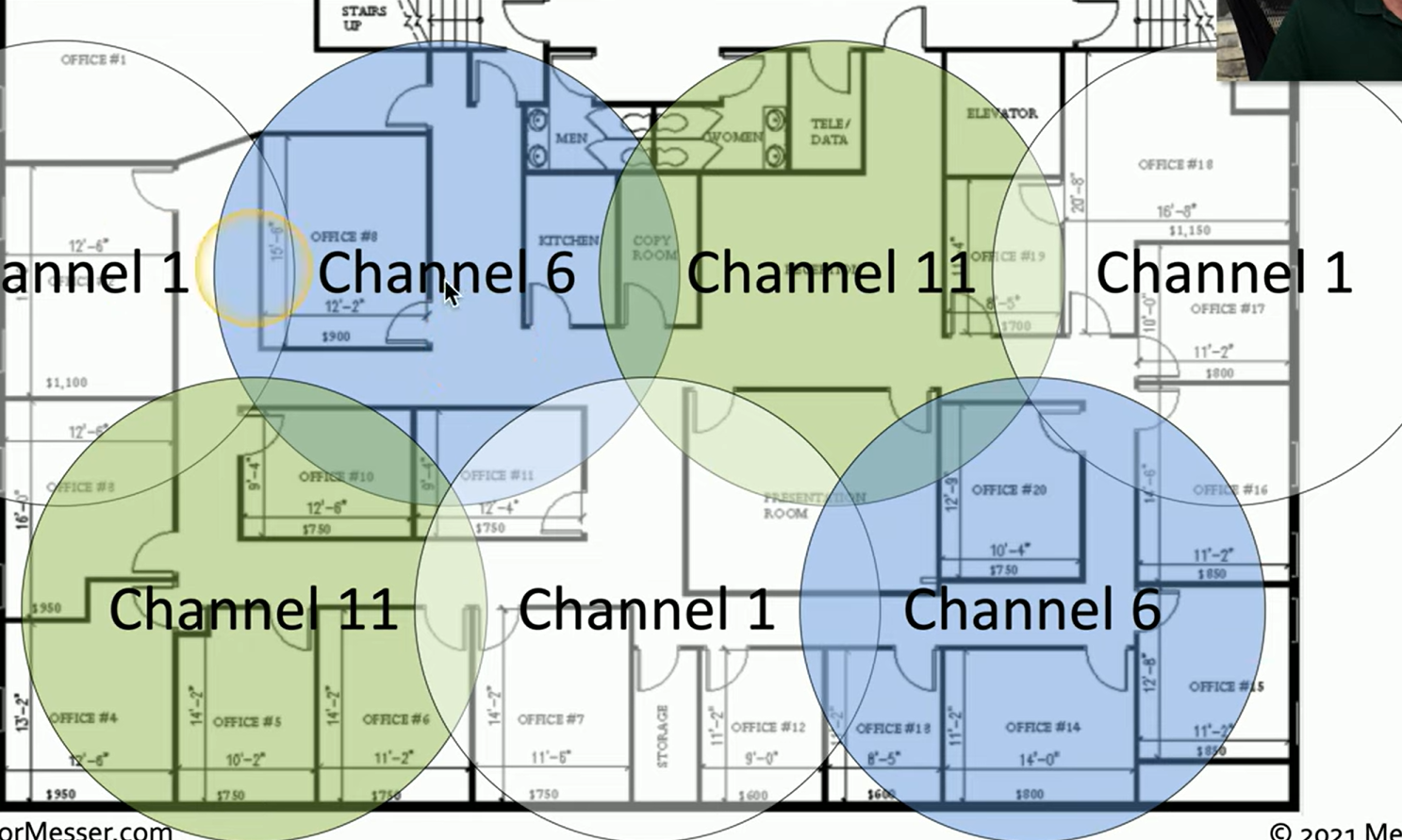
Antenna placement example
It's essential to avoid interference with other frequencies in use. For example, in a 2.4 GHz network, only channels 1, 6, and 11 are non-overlapping. If installing multiple access points, you should place the antennas to avoid overlapping coverage on these channels.
By carefully positioning antennas across these three channels, as shown in the diagram, you can achieve optimal coverage with minimal interference.
Wireless isolation
Prevents devices on the same wireless network from communicating with each other. While users can still access the internet, they cannot interact with other connected devices.
This feature is helpful in places like hotels or public areas but may hinder peer-to-peer communication in a workplace.
Guest network isolation ensures that the guest network is restricted from accessing the internal private network, which is generally the preferred configuration for security, allowing guests to connect to the internet while protecting internal resources.
Wireless security modes:
Various authentication options based on the network's size and needs.
Open System: No authentication or password is required.
WPA/2/3-Personal (PSK): Common for smaller or private networks, it uses a shared 256-bit key for encryption, meaning everyone uses the same passphrase.
WPA/2/3-Enterprise (802.1X): Suited for larger environments, such as offices, this method requires individual user authentication with unique usernames and passwords, typically verified against a centralized database like a RADIUS server.
EAP (Extensible Authentication Protocol)
A flexible authentication framework widely used in wireless networks, particularly with WPA2 and WPA3. Supports various authentication methods based on RFC standards, allowing for different ways to authenticate users.
In WPA2 and WPA3, five primary types are used for authentication. Is often paired with 802.1X to authenticate users against a backend database, such as a RADIUS server.
Geofencing
In Mobile Device Management (MDM) allows for controlling device features or access based on the device's geographic location. For example, when a device is within a defined physical boundary, such as inside a building, certain features like the camera can be restricted. Once the device leaves the area, normal functionality resumes.
Devices might only be allowed to authenticate or access sensitive data when they are within specific areas, helping to enforce security policies tied to physical locations.
Captive portal
Is a web page that users are redirected to when trying to access a network, typically seen in public or guest Wi-Fi environments. This page requires users to authenticate before they can use the network.
It checks whether the user's device is on an access list; if not, the portal prompts for credentials such as a username and password, or other authentication factors.
Once authenticated, users are granted access for a limited period, often 24 hours, after which they must re-authenticate to continue using the network.
IoT security
Is critical due to the lack of robust security measures in many Internet of Things devices, such as smart appliances, door locks, and lights. Since security may not be a priority for IoT manufacturers, extra precautions are necessary to protect your personal data and networks.
One key measure is network segmentation. IoT devices should be placed on a separate wireless network or VLAN from sensitive devices like laptops or storage systems. This way, if an IoT device is compromised, your private network remains secure.
Many home routers provide guest networks, which can isolate IoT devices, offering outbound access only, while keeping them inaccessible from the internet, unlike a DMZ or screened subnet designed for external access.