Learn: R and RStudio Basics: Scripts, Packages, and Code
 Call Kai
 Learn
Learn Practice Test
 Spaced Repetition
 Match
Match Flashcards
 Knowt Play
1/52

There's no tags or description
Looks like no tags are added yet.
Name | Mastery | Learn | Test | Matching | Spaced | Call with Kai | Chat |
|---|
No analytics yet
Send a link to your students to track their progress
53 Terms
What is R?
R is both a programming language and a software package used for statistical analysis.
Who developed the S language, which R is based on?
John Chambers and others at Bell Telephone Laboratories.
When was R created?
In 1991 by Ross Ihaka and Robert Gentleman.
What is the Comprehensive R Archive Network (CRAN)?
CRAN is the primary source for downloading the R software package.
What are the four freedoms granted by the GNU General Public License for R?
1. Run the program for any purpose. 2. Study and adapt the program. 3. Redistribute copies. 4. Improve the program and share improvements.
What is 'Base R'?
Base R contains the fundamental functions required to run R.
What is Tidyverse?
Tidyverse is a collection of R packages designed for data science, sharing a common design philosophy.
What are some packages included in Tidyverse?
ggplot2, dplyr, tidyr, readr, purrr, tibble, stringr, forcats.
What is a limitation of R?
Objects must be stored in physical memory, limiting functionality based on available memory.
How can you modify settings in RStudio?
Go to Tools -> Global Options to change workspace settings and appearance.
What does green text represent in R scripts?
Green text represents comments, which are not executable lines of code.
What do black/blue text represent in R scripts?
Black/blue text represents executable lines of code.
What is the purpose of comments in R scripts?
Comments are used to explain code and can be 'commented out' for troubleshooting.
What is the structure of a basic function in R?
A basic function is written as f(argument1, argument2, ...).
What is the significance of headings in R scripts?
Headings help organize the script and serve as 'jump-to' points for navigation.
What is the primary use of RStudio?
RStudio is an integrated development environment (IDE) for writing, saving, and executing R code.
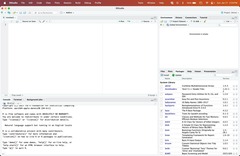
What happens if the title of an R script is in red?
It indicates that there are unsaved changes in the document.
What is the purpose of the R console in RStudio?
The R console displays the execution of code, errors, and warnings.
What is the difference between R and RStudio?
R is the software package that runs the code, while RStudio is the IDE used to write and manage the code.

What is the significance of frequent updates to R?
Frequent updates ensure that R remains compatible with modern computing environments and incorporates bug fixes.
What is the role of user contributions in R's functionality?
Functionality is based on consumer demand and voluntary user contributions.
What are some common tasks that can be simplified using R code?
R code can simplify tasks for specific purposes or projects using built-in functions.
What is the purpose of the 'Save workspace to .RData on exit' setting?
This setting controls whether the current workspace is saved when exiting RStudio.

What is the native pipe operator in R?
The native pipe operator (|>) allows for chaining commands in R, improving code readability.

What is the importance of R's graphics capabilities?
R can produce 'publication quality' graphics, making it valuable for data visualization.
What does it mean that R is free software?
It means that anyone can use, modify, and distribute the software without restrictions.
What is the significance of R being available on various platforms?
R can run on almost any standard computing platform, including modern tablets and phones.
What is required to initiate a heading in R scripts?
Two symbols: Hashtag(s) (#) at the start of the line and at least four hashtags (#), dashes (-), or equal-signs (=) at the end of the line.
What is the recommended way to compile R scripts?
Compile the scripts into a single file.
What is the least efficient method for running code in R?
Highlight the line of code and click Run.
What indicates that a command is incomplete in the R console?
A '+' symbol instead of a '>' symbol.
What is the recommended way to write commands in R scripts?
One command per line in the R Script file.
What does R and RStudio report when there is an issue with code?
Errors, warnings, and messages.
What is the purpose of R packages?
To extend the functionality of R by providing additional functions, data, and documentation.
How many R packages are available for use?
Over 10,000 packages.
What is the analogy used to describe R packages?
R is like a new mobile phone, and R packages are like apps you can download.
What is the command to install the Tidyverse package?
Use the command install.packages('tidyverse').

What happens when you load a package in R?
You open the app, and it will not load again in the same R session.
What should you do when RStudio prompts you to update?
Always update when prompted and save work prior to updating.
How do you update R on a PC?
Download the new version and uninstall the previous version.
What is the recommended method for commenting out code in R?
Use Ctrl + Shift + C on PCs or Cmd + Shift + C on Macs.
What is the command line method to install packages?
Use install.packages('package_name').
What is the Tidyverse?
A collection of packages designed to work seamlessly together.
What packages are included when you install Tidyverse?
dplyr, forcats, ggplot2, lubridate, purrr, readr, stringr, tibble, and tidyr.
What should you avoid doing when running code in R?
Copying code from the script to the console.
What does the '[1]' indicate in the R console output?
It indicates that it's the first object in the output.
What does a warning in R indicate?
The code will still work, but with some caveats.
What is the significance of the '>' symbol in the R console?
It indicates that the command is ready for a new command.
What is the purpose of the ESC key in R?
To abort a command when it is incomplete.
What should you do if you see a '+' symbol in the R console?
Complete the command or use the ESC key to abort.
What is the recommended practice for spacing in R commands?
Spacing generally doesn't matter in commands.
What is a common mistake when writing code in the R console?
Writing any code you want to save in the console.
What does R being case-sensitive imply?
Variable names and function names must match the exact case used.