ITSS 4330 exam 1
 Call Kai
 Learn
Learn Practice Test
 Spaced Repetition
 Match
Match Flashcards
 Knowt Play
1/80

There's no tags or description
Looks like no tags are added yet.
Name | Mastery | Learn | Test | Matching | Spaced | Call with Kai | Chat |
|---|
No analytics yet
Send a link to your students to track their progress
81 Terms
As a systems analyst, you should be able to answer the
questions:
What are requirements?
Why do we need good requirements?
How do you collect and document requirements?
What is a requirement?
• A statement of what the system must do or a characteristic it must have and will evolve into a technical description of how the system will be implemented.
• Types:
• Functional: specify the behavior of the system, relates to a process or data
• Non-functional: specify non-behavioral properties of the system, relates to performance or usability
Functional Requirements
Testable
Typically a “shall statement”.
Examples?
• The system should allow you to update the customer information (name,
address, phone, and email), but not the customer id number.
• Other Examples?
Nonfunctional Requirements

Nonfunctional Requirements
Requirement type Example
Operational
• The system should be able to fit in a pocket or purse
• The system should be able to integrate with the existing inventory system.
Performance
• Any interaction between the user and the system should not exceed 2 seconds.
• The system should receive updated inventory information every 15 minutes.
Security
• Only direct managers can see personnel records of staff
• Customers can see their order history only during business hours.
Cultural & Political
• The system should be able to distinguish between United States and European currency
• The system shall comply with insurance industry standards.
Usability
• Error messages must give the user specific instructions for recovery.
Reliability
• The component shall not fail more than an average of 3 times per year.
Maintainability
• Upgrades to the PC client portion shall be downloadable from the UNIX Server over the internet.
Attributes of GOOD Requirements
Testable
Complete
Clear
Consistent
Unambiguous
Measurable
Testable
• your “software tester” should be collecting sets of basic tests generated for each
requirement linked to the requirement
• this is part of writing the requirement!
• Are things the system you are developing must do
• Should be one thing (not multiple). (Because a requirement is a single entity… it passes or fails as
one piece).
• Should have a source (who/what decided this was required)
• Should have a priority
Should not be a design choice (this is hard to get right).
BAD:
The system shall store user information in an Oracle database including name, DOB, address, SSN.
• Is Oracle really REQUIRED? Hard to say… maybe, but probably not. This is a decision you would make
at implementation design time.
• Question: Does the customer care that you use Oracle? MySQL? Etc.. Maybe someone found some
other MUCH BETTER approach storing the data on moon rocks.
GOOD:
The system shall store user information including name, DOB, address and SSN
Why do we need good requirements?

Root cause for high failure rates
Other factors include: unrealistic time frames, inadequate resources, inadequate technology skills.
At least 1/3 of development projects fail for reasons directly related to
requirements gathering, documentation, and requirements management.
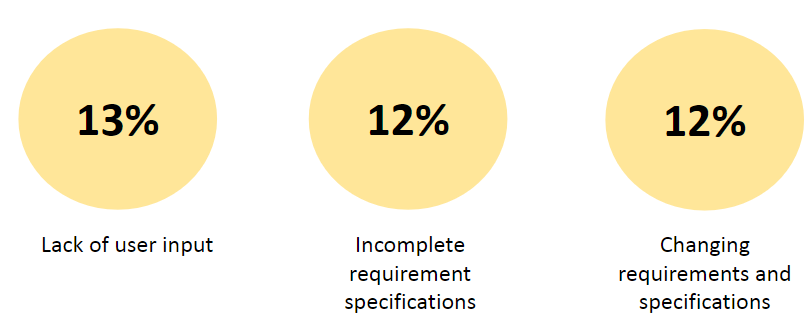
Three most important factors in the success of IT projects
Its much more expensive to fix or change a requirement later in the development
lifecycle.

How do you collect and document requirements?
Purpose: to convert high level business requirements (from the system request) into detailed requirements that can be used as inputs for creating models.
Functional & non-functional requirements listed in outline format May be prioritized
Provides information needed in subsequent workflows
Defines the scope of the system
Requirements are best determined by
systems analysts and business people together.
Techniques:
• Interviews, questionnaires and/or observation (user stories)
• Joint application development (JAD)
• Document analysis
• Problem analysis (root cause analysis, duration analysis, outcome analysis,
technology analysis, activity elimination)
Requirements-Gathering Techniques Compared
• A combination of techniques may be used
• Document analysis & observation require little training; JAD sessions can be very challenging
Creating a Software Requirements Specification
• Determine the types of functional and non-functional requirements applicable to the project
• Use requirements-gathering techniques to collect details
• Analysts work with users to verify, change and prioritize each requirement
• Continue this process through analysis workflow, but be careful of scope creep
• Requirements that meet a need but are not within the current scope can be added to a list of future enhancements
Problems in Requirements Determination
• Analyst may not have access to the correct users
• Requirements specifications may be inadequate
• Some requirements may not be known in the beginning
• Verifying and validating requirements can be difficult
Requirements Gathering Techniques
Process is used to:
Uncover all requirements (those uncovered late
in the process are more difficult to incorporate)
Build support and trust among users
Which technique(s) to use?
Interviews and User Stories
Story Cards and Task Lists
Joint Application Development (JAD)
Questionnaires
Document analysis
Observation
Interviews
Most popular technique—if you need to know something, just ask
• Process:
• Select people to interview & create a schedule
• Design interview questions (Open-ended, closed-ended, & probing types of
questions)
• Prepare for the interview (Unstructured vs. structured interview organized in
a logical order)
• Conduct the interview (Top-down vs. bottom-up)
• Follow-up after the interview
Interviewing Strategies

Story Cards & Task Lists
Capture requirement using story cards
(index cards)
• File card with single requirement
• Each requirement (card) is discussed
• How much effort is required to
implement it
• A task list is created for each
requirement (story)
• Large requirements can be split into
smaller sections
• The story can be prioritized by risk
level and importance
A brief explanation of a business requirement…
3 elements:
• A written description of the
story.
• Conversations about the story.
• Acceptance tests to convent
when the story is complete.
…Written in a simple story format.
As a <type of user>,
• I want <to perform some task>
• so that I can <achieve some
goal/benefit/value>
User story title: Customer withdraws cash.
As a customer,
I want to withdraw cash from an ATM
So that I don't have to wait in line at the bank.
Acceptance Criterion 1:
Given that the account is creditworthy
And the card is valid
And the dispenser contains cash,
When the customer requests the cash
Then ensure the account is debited
And ensure cash is dispensed
And ensure the card is returned.
As a Harvard University student
I can see my fee for the semester
so that I know the remaining balance
Acceptance Criteria for This Example:
The semester fee balance is displayed.
The semester fee balance is calculated.
The fee balance is displayed for that semester
duration.
The balance is not displayed if an unknown student
identity is applied.
Joint Application Development (JAD)
Joint user-analyst meeting hosted by a facilitator
10 to 20 users
• 1 to 2 scribes as needed to record the session
• Usually in a specially prepared room
Meetings can be held electronically and anonymously
• Reduces problems in group settings
• Can be held remotely
Sessions require careful planning to be successful
• Users may need to bring documents or user manuals
• Ground rules should be established
Questionnaires
A set of written questions used to obtain information from individuals
May be paper based or electronic (e.g., web based)
Common uses: Large numbers of people
Need both information and opinions
When designing for use outside the organization (customers, vendors, etc.)
Typical response rates: < 50% (paper); < 30% (Web)
Questionnaire Steps
Select the participants Identify the population
Use representative samples for large populations
Designing the questionnaire Careful question selection
Remove ambiguities
Administering the questionnaire Working to get good response rate
Offer an incentive (e.g., a free pen)
Questionnaire follow-up Send results to participants
Send a thank-you
Good Questionnaire Design
Begin with non-threatening and interesting questions
Group items into logically coherent sections
No important items at the very end
Do not crowd a page with too many items
Avoid abbreviations
Avoid biased or suggestive items or terms
Number questions to avoid confusion
Pretest to identify confusing questions
Provide anonymity to respondents
Document Analysis
• Provides information about the “as-is” system
• Review technical documents when available
• Review typical user documents:
• Forms
• Reports
• Policy manuals
• Look for user additions to forms
• Look for unused form elements
Observation
Users/managers often don’t remember everything they do
Checks validity of information gathered in other ways
Behaviors may change when people are watched
Workers tend to be very careful when watched
Keep a low profile
Try not to interrupt or influence workers
Be careful not to ignore periodic activities Weekly … Monthly … Annually
Requirements Analysis Strategies
Concept Maps
Represent meaningful relationships between concepts
Focus individuals on a small number of key ideas
Problem analysis
Ask users to identify problems with the current system
Ask users how they would solve these problems
Good for improving efficiency or ease-of-use
Root cause analysis
Focus is on the cause of a problem, not its solution
Create a prioritized list of problems
Try to determine their causes
Once the causes are known, solutions can be developed
Requirements Analysis Strategies(Cont.)
Duration analysis
•Determine the time required to complete each step
in a business process
•Compare this to the total time required for the entire
process
•Large differences suggest problems that might be
solved by:
1.Integrating some steps together
2.Performing some steps simultaneously (in parallel)
Activity-based costing
• Same as duration analysis
but applied to costs
Informal
benchmarking
• Analyzes similar processes
in other successful
organizations
Outcome analysis
• What does the customer
want in the end?
Technology analysis
• Apply new technologies to
business processes &
identify benefits
Activity elimination
• Eliminate each activity in a
business process in a
“force-fit” exercise
Use cases model the behavior of a system.
• Use cases are the primary driver for ALL UML diagramming
techniques.
• A use case is a unit of system behavior. Depicts activities performed
by users.
• A use case is a contract that formalizes the interaction between
stakeholders and the system.
• A use case details the interaction of an actor with a system to
accomplish a goal of value to the actor.
• Use cases are technology-independent
What use case modeling is not…
Use Case modeling is limited to a system’s external behavior.
• Use cases do not model the system from inside.
• Use cases are not effective in capturing the non-functional requirements.
• Use case modeling is not the same as functional decomposition.
• Use cases are not inherently object-oriented.
• Use cases describe what a system accomplishes, not how.
Actors
• An actor is an entity outside the system that interacts with the system to achieve a specific goal.
• The goal of the primary actor is specified by the name of the use case.
• Supporting (or secondary) actors support the primary actor in reaching the goal of the use case.
• An actor is identified by a unique name which describes a unique role.
• Does the entity interact with the information system? If yes, the are an actor. If no, they are not an actor.
Use Case Scenario
• A use case is successful only if its stated goal is completely achieved.
• A use case’s name is its goal. The name must be active, concise and
decisive.
• It is the goal that decides the relevance of activities in a use case.
System Boundary
• The boundaries define the scope of a use case and the system.
• A use case cannot leave a system, but can reach across its boundaries
Library Circulation System
• System should support searching, borrowing, and book maintenance activities.
• The system should support searching based on various attributes – title, isbn, subject, author, etc.
• Borrowing activities are built around checking books out and returning books by borrowers. It also includes processing overdue books by the librarian.
• Maintenance activities deal with adding and removing books from the library’s collection by the library manager.
How do you identify major use-cases?
• Review the requirements definition
• Identify the subject’s boundaries
• Identify the primary actors and their goals
• Identify the business processes and major use-cases
• Carefully review the current set of use-cases
• Split or combine some to create the right size
• Identify additional use-cases
Use Case Writing Guidelines
1. Write in the form of subject-verb-direct object
2. Make sure it is clear who the initiator of the step is
3. Write from independent observer’s perspective
4. Write at the same level of abstraction
5. Ensure the use case has a clear set of steps
6. Apply the KISS principle liberally. Each diagram should have no
more than 5-7 use cases
7. Write repeating instructions after the set of steps to be repeated
How do you know your use-case diagram is correct?
• Use-cases must be verified and validated before beginning structural and behavioral modeling.
• Utilize a walkthrough.
• Perform a review of the models and diagrams created so far
• Performed by individuals from the development team and the client (very interactive)
Rules for Verification and Validation of your Use Case
Diagram
• One and only one description for each use-case
• All actors listed in a use-case description must be shown on the use-
case diagram
• Stakeholders listed in the use-case description may be shown on the
use-case diagram (check local policy)
• All relationships in the use-case description must be depicted on the
use-case diagram
• All diagram-specific rules must be enforced
Elements of a Use Case Description
Overview
• Name, ID Number, Type, Primary Actor, Brief Description, Importance Level,
Stakeholder(s), Trigger(s)
Relationships
• Association: Communication between the use case and the actors
• Extend: Extends the functionality of a use case
• Include: Includes another use case
• Generalization: Allows use cases to support inheritance
Flow of events
• Normal flow: the usual set of activities
• Sub-flows: decomposed normal flows to simplify the use-case
• Alternate or exceptional flows: those not considered the norm
Optional characteristics (complexity, time, etc.)
How do I create use-case descriptions?
Pick a use-case and create an overview:
• List the primary actor
• Determine its type (overview or detail; essential or real)
• List all stakeholders and their interests
• Determine the level of importance of the use-case
• Briefly describe the use-case
• List what triggers the use-case
• List its relationship to other use-cases
• Fill in the steps of the normal flow of events required to complete the
use-case
Normal Flow is the best-case scenario
Normal Flow:
1. Customer inserts the bank card.
2. Customers enters password.
3. System verifies password.
4. System presents a list of transaction types that the
customer may conduct.
5. Customer selects a type of transaction.
Sub-flows identify the details of the steps in the normal flow.
Normal Flow:
1. The registration clerk enters or updates personal
data.
Sub Flows: 1.1 The registration clerk enters the Social Security
Number of the new patient.
1.2 The registration clerk enters or updates patient’s
address.
1.3 The registration clerk enters or updates patient’s
phone number.
1.4 The registration clerk enters or updates the name,
the address and the phone number of the patient’s
closest relative.
Alternate flows identify remedies and exeptions signify failure.
Alternate Flow/
Exceptions:
3.a Patient is new. Reception clerk directs the patient to registration…
3.b Patient is not new but personal or insurance data has
changed. Reception clerk directs the patient to registration…
3.c Patient has lost the hospital ID card. Reception clerk directs
the patient to registration…
Relationships support base use cases and support reusability.
Includes – “refers to” →
Extends – “is part of” ←
Dependencies: EXTEND
• An extend relationship is one in which a use case is created to extend the functionality of a base use case.
• An extend is good for modeling subflows and alternate flows.
Dependencies: INCLUDE
An include relationship is one in which one use case uses the functionality of another, independent, use case.
Normal Flow: …
3. Reception clerk verifies that patient has been registered and registration is valid.
…
Alternate Flow/ Exceptions: 3.a Patient is new. Reception clerk directs the patient to registration. (Include: 140 - Register Patient.)
Class diagrams
• The class diagram is a static
model, it is considered a
structural model.
• Shows the classes and the
relationships among the classes.
• Class is the main building block
of a class diagram, which stores
and manages information in the
system.
What is “object-oriented”?
• The object-oriented approach views a system as a collection of self-contained objects, including both data and processes.
• Object-oriented systems focus on capturing the structure and behavior of information systems in modules (objects) that encompass both data and processes.
An Object Is:
• something that is perceived as an entity and
referred to by name;
• something perceptible by one or more of the
senses;
• something intelligible or perceptible by the mind.
A person, place or thing about which we want to
capture information.
Classes versus objects
□ What’s the difference between an object and a class?
□ Class is a set of objects that share the same attributes and operations.
□ Every object is associated with a class.
□ An object is an instance (instantiation) of a class;
• For example, John Doe is an “instance” of the class Human; Tim Stephens is an
“instance” of the class Professor;
Instance
• An instance is the concrete manifestation of a class.
• For example, John Doe is an “instance” of the class Human.
• Marshall Erikson is an instance of the class Character.
• Jason Segal is an instance of the class Actor.
Attributes
• Attributes are features, properties, qualities or characteristics that are associated with an object.
• Attributes are usually paired with values that qualify or quantify the attribute.
• The range of values that can be assigned to an attribute is called the attribute’s domain..
• Name value pair; Name = value
What are the components of a class diagram?
• Classes - instances of people, places, or things
• Attributes - properties that describe the state
of an instance of a class
• Operations - actions or functions that a class
can perform
• Relationships – describe how classes relate to
one another
What is the meaning of + and – in the diagram?
How do you create a class diagram?
1. Identify classes.
2. Identify attributes and operations.
3. Identify associations between the classes.
Identify classes, classes have attributes and operations.

How do you identify classes?
• Brainstorming: Initial list of classes (objects) is developed, attributes,
operations and relationships to other classes can be assigned in a
second round
• Common object lists
• Physical things
• Incidents
• Roles
• Interactions
• Libraries
Finding Class Candidates: Use Case Description
Make Appointment Use Case Description
Normal Flow:
1. Appointment clerk verifies that the needed medical service is provided by the
hospital.
2. Appointment clerk records patient’s personal and contact data.
3. Appointment clerk records information about the referral source.
4. Appointment clerk consults hospital’s schedule to find a free slot for the
required medical service.
5. Appointment clerk verifies that the patient is available for the appointment.
Loop 1: Repeat steps 4-5 until hospital’s schedule matches patient’s
availability.
6. Appointment clerk makes the appointment.
Loop 2: Repeat steps 4-6 for each appointment
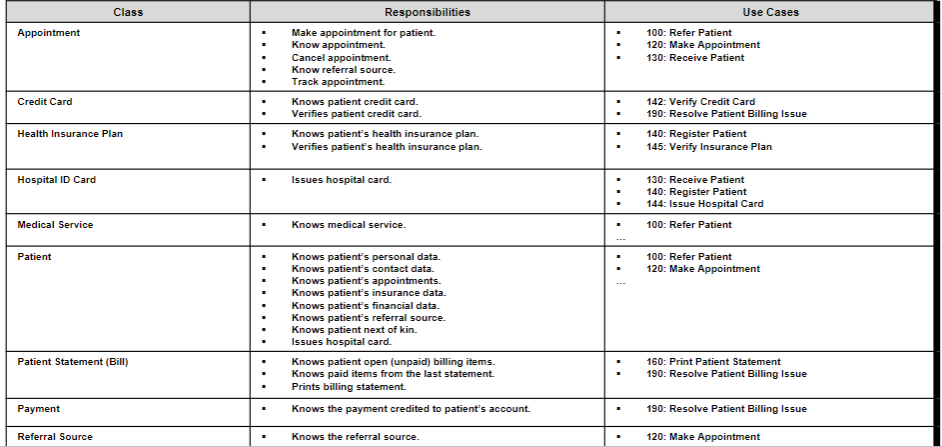
Patient Management: Preliminary Class Candidates
CRC Cards
CRC Cards – Class, Responsibility, and Collaboration Index cards used to document the responsibilities and collaborations of a class
Responsibilities
• Knowing—what a class must know manifested as attributes
• Doing—what a class must do manifested later as operations Collaboration
• Objects working together to service a request
Role-playing is an exercise that can help complete a CRC card. Team members perform roles associated with actors and objects.
CRC Rules
1. Each CRC card is associated with a class
2. Responsibilities on the front of the card are included as operations on the
class diagram
3. Collaborators on the front of the card imply a relationship on the back of the
card
4. Attributes on the back of the card are listed as attributes on the class
diagram
5. Attributes on the back of the CRC card each have a data type (e.g., salary
implies a number format)
6. Relationships on the back of the card must be properly depicted on the class
diagram
7. Association classes are used only to include attributes that describe a
relationship
Identify associations - associations represent the relationships that classes have with one another.
• There are 3 basic types of relationships in UML
1. Generalization
2. Aggregation/Composition
3. Association
1. Generalization denotes inheritance
• Shows that one class (subclass) inherits from
another class (superclass).
• Enables inheritance of attributes and
operations
• Represents relationships that are “a-kind-of”
• Depicted as a solid line with a hollow arrow
pointing at the superclass.
2. Aggregation and composition is used when classes actually comprise other classes.
Relates parts to wholes or assemblies, represents relationships that are “a-part-of” or “has-parts”.
Aggregation
• Aggregation denotes a logical “a-part-of” relationship
• denotes a logical “a-part-of” relationship Composition
• Composition denotes a physical “has-a” relationship
• a form of aggregation in which the part is exclusively owned by the whole and its lifecycle is dependent on the lifecycle of the whole.
Composition and Aggregation
Characteristic Composition Aggregation
Ownership Strong Weak
Relationship Part-of Has-a
Child exists independently? No Yes
Lifecycle dependent? Yes No
Example House → Room Department → Professor
UML Notation Filled diamond ◆ Hollow diamond ◇
3. Association relationships are a more general relationship type.

Building the Diagram.

Naming conventions are important when building the diagram: CLASSES
CLASSES: Class name must be a noun or a noun
phrase.
Class name is usually singular (except for
collection class).
Class name is always capitalized -
STUDENT, COURSE, GRADE
Definite or indefinite articles must be
avoided — never APatient
Naming conventions are important when building the diagram: ATTRIBUTES
Properties of a class- Person: last name, first name, address,
etc.
Attribute is what an object knows.
Class attributes are placeholders: it is the objects that fill the
placeholders — or variables — with values.
Attribute names typically begin with a lower-case letter;
firstName. This is sometimes called camelBack case.
The lower-case start is a convention to distinguish attributes
and operations from classes.
Visibility enforces information hiding and restricts access to
attributes to ensure consistency.
Naming conventions are important when building the diagram: OPERATIONS
Operation defines what an object does or what can be done to it
A class merely defines what an object is expected to do.
It is the object that carries out the actual operation: a Plane class
does not fly; a plane object does
Rules for naming operations are the same as for naming attributes.
move (verb)
getStarted (verb)
Common operations are not
shown
Create or delete an instance
Return or set a value
Get and Set operations
Types of operations: Constructor—creates an object
Query—makes information about the state of an object available
Update—changes values of some or all of an object’s attributes
Destructor—deletes or removes an object
Remember the important object-oriented concepts?
• Encapsulation
• Information Hiding
• Polymorphism
• Interface
Encapsulation is enclosing data and processes within one single unit.
Encapsulation enables the object to enforce business rules with authority.
Encapsulation results in two spaces:
• Private. Data and processes that are inside the object are labeled as “private.”
• Public. Whatever the object exposes — that is, makes visible to the outside world — is “public.”
Visibility of an attribute or operation supports encapsulation and information hiding.
The visibility of an object’s attributes or operations defines their availability to other objects.
Public attributes (+): visible to all classes
Private attributes (-): visible only to an instance of the class in which they are defined
Protected attributes (#): visible only to an instance of the class in which they are defined and its descendants
Information hiding conceals the inner entities and the workings of the object from the outside entities.
• The box metaphor for classes and objects emphasizes: encapsulation and information hiding.
An object’s interface is a contract between the object and the entities that use it.
The object promises to perform services for an outside entity that behaves according to rules that the object expects.
The interface of an object, once formalized and made available for use, cannot be changed unless all parties to the contract agree to the change.
The interface of an object is both the services that it offers to the outside world and how these services are structured and arranged (what you see is what you get).
The outside view of a class, object, or module, which emphasizes its abstraction while hiding its structure and the secrets of its behavior.” [Booch 1994, 515.]
Once you have completed the class diagram, you can structure the interface.
The interface of an object — its services — must itself be structured in a predictable manner. It has:
Name – What the object knows.
Attributes
Operations – What the object does.
What is an object diagram?
• Class diagrams with instantiated classes
• Example: instead of a Doctor class, create an actual doctor, say Dr. Smith
• Place values into each attribute
• Used to discover additional attributes, relationships and/or
operations or those that are misplaced
How do you verify your Class Diagram?
• Analyst presents to developers & users
• Walks through the model
• Provides explanations & reasoning behind each class
• Rules
• Each CRC card is associated with a class
• Responsibilities on the front of the card are included as operations on the class diagram
• Collaborators on the front of the card imply a relationship on the back of the card
• Attributes on the back of the card are listed as attributes on the class diagram