Data Engineering & Analytics Unit II
 Call Kai
 Learn
Learn Practice Test
 Spaced Repetition
 Match
Match Flashcards
 Knowt Play
1/39

There's no tags or description
Looks like no tags are added yet.
40 Terms
1. What is HDFS?
Hadoop Distributed File System is a distributed file system designed to store and manage very large datasets across multiple computers connected in a cluster.
Applications of HDFS
Social media data analysis.
Search engine indexing.
Banking and financial transaction analysis.
E-commerce clickstream analysis.
Scientific research and simulation datasets.
Internet of Things (IoT) sensor data.
Machine learning data preparation.
Large-scale log processing.
Data lakes and archival storage.
Telecommunications and network traffic analysis.

2. What is Hadoop?
an open-source framework used for distributed storage and processing of large datasets across clusters of computers

3. Why was HDFS developed?
Traditional file systems face limitations when datasets become extremely large and the number of machines required to store them increases.
HDFS was designed to address the following problems:
Huge data storage: Store files ranging from gigabytes to terabytes and beyond.
Scalability: Increase storage capacity by adding more machines.
Fault tolerance: Recover from individual machine or disk failures using replication and recovery mechanisms.
High-throughput access: Support large sequential reads and writes efficiently.
Cost-effective storage: Use clusters of commodity hardware rather than relying exclusively on expensive specialized machines.
Distributed processing: Bring computation close to where data is stored, reducing unnecessary network transfer.
Large-file handling: Efficiently manage large files divided into blocks.
Data availability: Maintain replicas so that data can often be accessed even when a machine fails.
Automatic recovery: Detect failures and recreate missing replicas when possible.
Data-intensive applications: Support log analysis, web indexing, data warehousing, and large-scale analytics.
Design goals of HDFS
1. Fault Tolerance: Detect hardware failures and recover data using replication and automatic re-replication.
2. High Throughput: Read and write large amounts of data efficiently rather than focusing on very low response time.
3. Large File Support: Store and process very large files by dividing them into blocks.
4. Scalability: Increase storage capacity by adding more machines (DataNodes) to the cluster.
5. Data Locality: Move computation close to the machines storing the data to reduce network traffic.
6. Commodity Hardware: Run on relatively inexpensive, commonly available computers instead of requiring specialized high-end hardware.
7. Large Block Size: Reduce metadata overhead and improve the efficiency of processing large files.
8. Write-Once, Read-Many Model: Optimize for files that are written once and read repeatedly, with support for append operations.
9. Automatic Recovery: Detect failed DataNodes and restore missing block replicas when possible.
10. Reliability and Data Integrity: Use replication and checksums to maintain data availability and detect data corruption
HDFS architecture
The major components are:
NameNode: Manages filesystem metadata.
DataNodes: Store actual file blocks.
HDFS client: Requests file operations from the NameNode and exchanges file data with DataNodes.
Secondary NameNode or checkpointing service: Periodically creates metadata checkpoints; it is not simply a backup NameNode.

HDFS Concepts

HDFS file read and write
Reading a file:
The client requests the file from the NameNode.
The NameNode returns the locations of its blocks.
The client reads blocks directly from DataNodes.
The client assembles the blocks in the correct order.
Writing a file:
The client requests file creation from the NameNode.
The NameNode checks permissions and whether the file already exists.
The NameNode selects suitable DataNodes for block storage.
The client sends data packets through a DataNode pipeline.
DataNodes store and forward packets to other DataNodes.
Acknowledgements return through the pipeline.
The file is finalized when the required write and close operations complete.
HDFS Command Line Interface (CLI)
The HDFS Command Line Interface allows users to manage files and directories in HDFS using terminal commands.
The common command format is:
hdfs dfs -commandThe hadoop fs interface is also available for many of the same operations
Administrative commands :
hdfs dfsadmin -reportDisplays DataNode status and storage information.
hdfs fsck /Checks filesystem health and reports information about files and blocks.
hdfs dfsadmin -safemode getChecks whether the NameNode is in safe mode.
hdfs dfs is primarily used for file operations, while hdfs dfsadmin is used for administrative tasks.

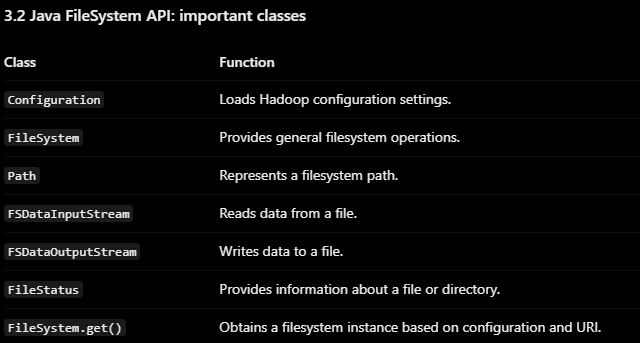
Hadoop File System Interfaces
A file system interface is a way for users or applications to access, read, write, and manage files stored in Hadoop.
Hadoop provides multiple interfaces so that files can be accessed through programs, command-line tools, HTTP requests, and other compatible systems.

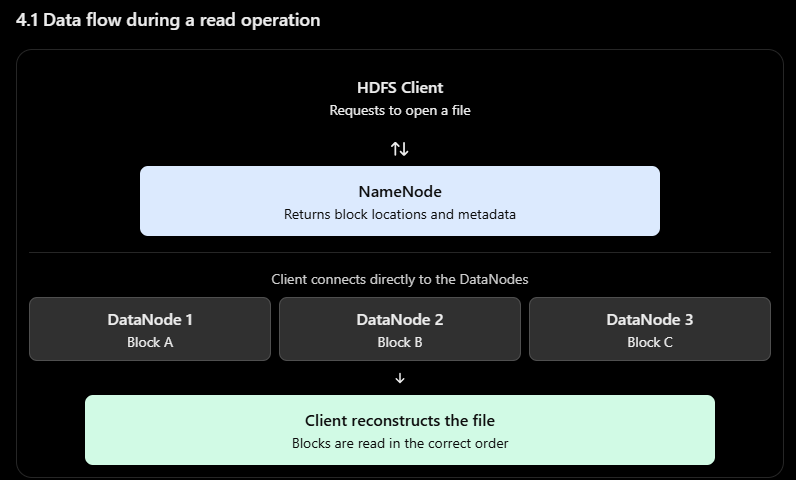
HDFS Data Flow
HDFS data flow describes how data travels between a client, the NameNode, and DataNodes during file operations.
There are two main processes:
File read data flow:
The client requests to open a file.
The NameNode verifies the file and returns the locations of its blocks.
The client selects a suitable DataNode, usually preferring a nearby replica.
The client reads the first block directly from that DataNode.
It continues reading subsequent blocks in sequence.
Checksums are verified to detect corrupted data.
If a DataNode or replica fails, the client may switch to another valid replica.
The complete file is delivered to the application.
File write data flow:
The client requests a new file from the NameNode.
The NameNode checks permissions and whether the path already exists.
The NameNode selects DataNodes based on the replication policy.
The client divides data into packets and sends them to the first DataNode.
The first DataNode writes the data locally and forwards it to the second.
The second forwards it to the third DataNode, forming the pipeline.
Acknowledgements travel back through the pipeline.
If a node fails, HDFS attempts to recover the pipeline and continue writing.
The client closes the file, and the NameNode finalizes it when the required conditions are satisfied.

Read vs. write data flow

Data Ingestion in Hadoop
the process of collecting data from different sources and transferring it into a storage or processing system such as Hadoop.
Data sources may include:
Relational databases such as MySQL and Oracle.
Web servers and application logs.
Social media streams.
Sensors and IoT devices.
CSV, text, JSON, and other files.
Enterprise applications and transaction systems.
Two important traditional Hadoop ingestion tools are Apache Flume and Apache Sqoop.
The main distinction is:
Flume: Traditionally used to collect and move large volumes of streaming or event-oriented data, especially logs.
Sqoop: Traditionally used to transfer bulk data between relational databases and Hadoop storage or processing systems.
Apache Sqoop is a legacy tool, and its use depends on the Hadoop distribution and environment. Modern ingestion architectures may use other connectors and streaming tools

Apache Flume
Apache Flume is a distributed, reliable, and configurable service for efficiently collecting, aggregating, and moving large amounts of event data into centralized data stores.
It is commonly associated with log and event ingestion into HDFS.
Uses of Flume
Collecting web-server logs.
Collecting application logs.
Ingesting server events.
Collecting machine-generated data.
Aggregating data from multiple servers.
Transferring events into HDFS or other supported sinks.
Architecture of Flume
The three core components of a Flume agent are:
Source : The source receives data from an external producer and converts it into Flume events.
Channel : The channel temporarily stores events between the source and the sink.
It decouples the speed at which the source receives data from the speed at which the sink delivers it.
Two important channel types are:
Channel
Explanation
Memory Channel
Stores events in memory; generally fast but buffered events can be lost if the process or machine fails.
File Channel
Stores events on disk and provides stronger recovery characteristics, with performance and durability depending on configuration.
Sink : The sink removes events from the channel and delivers them to a destination. e.g.- HDFS Sink, Avro Sink, File Roll Sink. An HDFS Sink writes collected events into files in HDFS

What is a Flume event?
A Flume event is the basic unit of data transported through Flume.
It consists of:
Header: Optional metadata stored as key-value pairs.
Body: The actual payload, such as a log message.
Working of Flume
Suppose three web servers generate log files and the university wants to store all logs in HDFS.
Each server generates log events.
A Flume source receives the events.
The source places them into a channel.
The sink retrieves the events from the channel.
The sink writes the events into HDFS.
Multiple agents can be connected to build a larger ingestion pipeline.
This enables centralized collection of logs from distributed machines.
Important Flume features
Distributed architecture.
Reliable event delivery with appropriate configuration.
Flexible source, channel, and sink combinations.
Support for data aggregation.
Support for multiple agents and event-routing patterns.
Scalability for log collection workloads.
Transaction-based operations between components.
Integration with HDFS and other supported destinations.
Flume uses transactions to coordinate event transfer between sources, channels, and sinks.


Apache Sqoop
Apache Sqoop is a tool designed to transfer bulk data between relational databases and the Hadoop ecosystem.
Its name comes from “SQL-to-Hadoop.”
Sqoop was commonly used to import data from relational databases into HDFS, Hive, or HBase and to export processed data from Hadoop back into relational databases.
Main operations of Sqoop
A. Import
Import transfers data from a relational database into Hadoop.
Example:
sqoop import \
  --connect jdbc:mysql://localhost/college \
  --username root \
  --password your_password \
  --table students \
  --target-dir /data/students
B. Export
Export transfers data from Hadoop storage back into a relational database.
Example:
sqoop export \
  --connect jdbc:mysql://localhost/college \
  --username root \
  --password your_password \
  --table student_results \
  --export-dir /data/results
The destination table must exist, and the exported data must match the table's expected schema and format.
Parallel import in Sqoop
Sqoop can divide database data into ranges and use multiple mapper tasks to transfer data in parallel.
Incremental import
Incremental import transfers new or changed records instead of repeatedly importing the entire dataset.
Two traditional Sqoop modes are:
Append: Imports rows whose incremental column values are greater than a saved last value, commonly using an increasing numeric key.
Lastmodified: Uses a timestamp-like column to identify rows modified after a specified previous value.

Important Sqoop commands and options
Option | Purpose |
|---|---|
| Import database data into Hadoop |
| Export Hadoop data to a database |
| Specify the JDBC connection URL |
| Specify the database username |
| Supply a password, although secure alternatives are preferable |
| Specify the database table |
| Set the HDFS destination directory for import |
| Set the HDFS source directory for export |
| Select specific columns |
| Filter rows using a condition |
| Import using a SQL query, subject to Sqoop's query requirements |
| Select a column used to divide work for parallel import |
| Set the number of parallel mapper tasks |
| Import into Hive using supported Sqoop workflows |
| Configure supported incremental import modes |
| Identify the column used for incremental checking |
| Specify the previous high-water mark for incremental import |
Hadoop Archives (HAR)
Hadoop Archives (HAR) is a Hadoop feature used to combine many files into an archive representation inside HDFS, helping reduce the filesystem namespace overhead caused by large numbers of small files.
A HAR archive groups files logically into an archive structure. It does not simply compress every file into one compressed data stream.
HAR helps organize many files into a smaller number of archive-related filesystem entries.
A HAR archive typically contains:
Data part files: Store the archived file contents.
_index: Maps archived file paths to locations within the archive data._masterindex: Helps locate relevant portions of the index.
The archive is accessed through Hadoop's archive filesystem implementation, which presents the archived contents as a filesystem-like hierarchy.

Creating a Hadoop Archive
The general command format is:
hadoop archive \
  -archiveName archive.har \
  -p /input \
  /output
Here:
-archiveName archive.harspecifies the archive name.-p /inputspecifies the parent directory./outputspecifies the destination directory in HDFS.
Reading files from a HAR archive
Archived files can be accessed through the HAR filesystem URI.
Example:
hdfs dfs -ls har:///archives/students.harA file inside the archive can be read using a path such as:
hdfs dfs -cat har:///archives/students.har/results.csvThe actual path inside the archive depends on the directory structure used when the archive was created.
Advantages & Limitations of Hadoop Archives
Advantages of Hadoop Archives
Reduces the namespace overhead associated with storing many files individually.
Helps organize large collections of small files.
Allows archived files to be accessed through a filesystem-like interface.
Is useful for relatively static datasets and archival workloads.
Avoids requiring applications to treat the archive as one opaque file.
Limitations of Hadoop Archives
HAR does not inherently compress all file contents.
Creating an archive requires processing and storing archive data and metadata.
Individual files inside a HAR archive are not modified like ordinary HDFS files; updates generally require recreating the archive or handling the data separately.
Reading an archived file requires locating it within the archive structure.
HAR does not eliminate the need for NameNode metadata.
It does not automatically solve every performance problem caused by small files.
Hadoop Archives vs. ordinary HDFS files
Feature | Ordinary HDFS files | Hadoop Archives |
|---|---|---|
Organization | Each file exists separately in the namespace | Many files are represented through an archive structure |
NameNode metadata | Metadata for individual files and blocks | Archive-level files and metadata, reducing some namespace overhead |
Modification | Normal HDFS operations, with restrictions on in-place updates | Archived contents are not directly modified like ordinary files |
Access | Direct HDFS paths | HAR filesystem paths |
Compression | Depends on the file format | HAR itself does not inherently compress contents |
Main purpose | General-purpose distributed storage | Organizing large collections of small files |
Flume vs. Sqoop vs. Hadoop Archives
Feature | Apache Flume | Apache Sqoop | Hadoop Archives |
|---|---|---|---|
Main purpose | Event and log ingestion | Bulk database data transfer | Organizing many small files into archives |
Input | Logs, events, streams | Relational database tables | Existing files in HDFS |
Main operation | Collect and deliver events | Import and export structured data | Archive existing files |
Typical data | Semi-structured or unstructured event data | Structured relational data | Existing files of various formats |
Destination/use | HDFS and other supported sinks | HDFS, Hive, HBase, or databases, depending on the operation | An archive representation stored in HDFS |
Processing style | Event-oriented ingestion | Bulk transfer, potentially parallel | File organization |
Example | Collect web-server logs | Import a MySQL student table | Archive thousands of student result files |
Hadoop I/O
Hadoop I/O (Input/Output) refers to the mechanisms Hadoop uses to read, write, transfer, compress, serialize, and store data efficiently in a distributed environment.
The main Hadoop I/O topics are:
Compression: Reduces the size of data.
Serialization: Converts objects into a format suitable for storage or transmission.
Avro: Provides a data serialization system with schemas and data exchange formats.
File-based data structures: Organize and store records efficiently in files, such as SequenceFile, MapFile, and related Hadoop formats.
Why is Hadoop I/O important?
Reduces storage requirements.
Reduces network traffic.
Improves data transfer efficiency.
Enables structured exchange of data between programs.
Supports efficient storage of large datasets.
Allows Hadoop applications to process different data formats.
Helps improve performance in distributed computing.
Data Compression in Hadoop
Data compression is the process of reducing the number of bytes required to represent data.
The compressed size depends on the input data, codec, and compression settings. Already-compressed files may not become much smaller.
Why is compression used in Hadoop?1. Saves storage space
Compressed files occupy less disk space in HDFS.
2. Reduces network traffic
Less data needs to travel between DataNodes, clients, and processing nodes.
3. Improves I/O performance
Reading or writing fewer bytes can reduce disk and network time.
4. Reduces data transfer time
Compressed datasets can be transferred faster when bandwidth is a bottleneck.
5. Reduces storage cost
Lower storage consumption can reduce the number of disks and machines needed.
6. Improves processing efficiency in suitable workloads
Some jobs complete faster because they read less data, although decompression itself consumes CPU resources.

Types of compression
A. Lossless compression
Lossless compression allows the original data to be reconstructed exactly.
Examples:
Gzip
Bzip2
Snappy
LZ4
Deflate
Uses: Text files, logs, structured datasets, source code, and data that must remain unchanged.
B. Lossy compression
Lossy compression removes some information to achieve a smaller representation. The original data cannot be reconstructed exactly.
Examples:
JPEG for images
MP3 for audio
Some video codecs
Uses: Multimedia applications where some loss of quality is acceptable.
Hadoop data-processing pipelines commonly use lossless compression for general-purpose datasets, especially when exact reconstruction is required.
Important Hadoop compression codecs
A codec is an implementation of a compression and decompression algorithm.
Codec | Compression characteristics | Splittability in common Hadoop file-input workflows | Typical use |
|---|---|---|---|
Gzip | Good general-purpose compression | Usually not splittable as a single ordinary gzip stream | Logs, text files |
Bzip2 | Often higher compression, but relatively CPU-intensive | Splittable in supported Hadoop workflows | Large text datasets |
Snappy | Fast compression and decompression | A compressed stream is generally not independently splittable; container formats may be splittable | Analytics workloads |
LZ4 | Very fast compression and decompression | Depends on format and framing | Performance-sensitive workloads |
Deflate | General-purpose lossless compression | Depends on the container and input format | General-purpose compression |
Splittable vs. non-splittable compression
Splittable compression
A compressed file can be divided into independently processable portions, allowing multiple tasks to work on different parts of the file.
Example: Bzip2 is supported as splittable in common Hadoop text-input workflows.
Benefits:
Enables parallel processing of different portions of a large file.
Improves utilization of cluster resources.
Avoids requiring one task to process the entire compressed stream.
Non-splittable compression
A compressed stream generally must be decompressed from its beginning to reach a later position.
Example: A conventional gzip-compressed text file is typically treated as non-splittable by Hadoop's standard text input workflow.
Consequences:
A single large compressed stream may limit parallelism.
Multiple independent compressed files can still be processed in parallel.
Suitable container formats can change the result.

Compression ratio

Serialization in Hadoop
Serialization is the process of converting an object or data structure into a sequence of bytes so that it can be stored in a file or transmitted over a network.
Hadoop has its own serialization mechanism based on the Writable interface.
The Writable interface provides two important methods:
void write(DataOutput out) throws IOException;
void readFields(DataInput in) throws IOException;write()serializes an object into a data output stream.readFields()reads the bytes and restores the object's field values.
Hadoop uses Writable types extensively in MapReduce because they provide efficient serialization for Hadoop's own data types.
Common Writable types
Writable type | Corresponding Java type |
|---|---|
|
|
|
|
|
|
|
|
|
|
| Text data represented as UTF-8 |
| Byte array |
| Represents the absence of a value |
Why is serialization needed in Hadoop?
Network communication: Transfers data between nodes in a distributed cluster.
Data storage: Converts objects into a form suitable for writing to files.
Distributed processing: Allows tasks to exchange intermediate key-value pairs.
Interoperability: Enables applications to exchange data using a shared format.
Efficient representation: Compact binary formats can reduce storage and transfer overhead.
Persistence: Allows objects to be stored and reconstructed later.

Writable vs. Java serialization
Hadoop Writable | Java serialization |
|---|---|
Designed specifically for Hadoop data processing | General-purpose Java object serialization |
Usually compact and efficient for supported data types | Can involve greater overhead |
Requires Writable-compatible types or custom implementations | Uses Java's serialization mechanism |
Widely used in Hadoop MapReduce | Not the standard representation for Hadoop's core MapReduce key-value data |
Requires explicit field serialization for custom types | Commonly serializes object graphs using Java serialization rules |
Apache Avro
Apache Avro is a general-purpose data serialization and a data serialization system that uses schemas to describe data and supports compact binary serialization and data exchange across programming languages.
Why is Avro used?
Provides a schema to describe the structure of data.
Supports compact binary encoding.
Supports multiple programming languages.
Supports schema evolution when changes follow compatibility rules.
Supports writing records without embedding the complete schema with every individual record.
Supports object container files that store schemas and many records together.
Is useful for exchanging data between distributed applications.

What is an Avro schema?
A schema describes the structure and data types of a record.
Avro schemas are commonly written in JSON.
Avro data types
Avro supports primitive and complex types.
Primitive types
Type | Meaning |
|---|---|
| No value |
| True or false |
| 32-bit signed integer |
| 64-bit signed integer |
| 32-bit floating-point number |
| 64-bit floating-point number |
| Sequence of bytes |
| UTF-8 text |
Complex types
Type | Meaning |
|---|---|
| Collection of named fields |
| A defined set of named symbols |
| Ordered collection of values of one schema |
| Collection of key-value pairs with string keys |
| Value matching one of several schemas |
| Fixed-size sequence of bytes |
Avro serialization and deserialization
Serialization:
Define the schema.
Create a record matching the schema.
Pass the record to an Avro encoder or writer.
Avro encodes the values into binary representation.
Store or transmit the serialized data.
Deserialization:
Read the serialized bytes.
Obtain the writer's schema.
Use the reader's schema, if provided.
Decode the binary representation.
Reconstruct the record and its fields.
File-Based Data Structures in Hadoop
File-based data structures are formats that organize records in files to support efficient storage, retrieval, and processing.
Comparison of Hadoop file-based structures
Feature | SequenceFile | MapFile | ArrayFile | SetFile | BloomMapFile |
|---|---|---|---|---|---|
Basic structure | Key-value pairs | Sorted key-value pairs plus index | Position-indexed values | Sorted keys | MapFile plus Bloom filter |
Sorted keys required | Not generally | Yes | Integer positions | Yes | Inherits MapFile requirements |
Main purpose | Efficient record storage | Key-based lookup | Access values by index | Key membership | Faster rejection of missing keys |
Index | No MapFile-style index required | Yes | Uses indexed positions | Based on MapFile | MapFile index and Bloom filter |
Compression | Supported | Depends on underlying data file configuration | Depends on underlying format | Depends on underlying format | Depends on underlying format |
Best suited for | Sequential processing | Indexed lookups | Sequential values accessed by position | Key-set workloads | Lookup workloads with many absent keys |
SequenceFile
SequenceFile is a Hadoop binary file format used to store sequences of key-value pairs.
Structure
A SequenceFile generally contains:
A file header.
Key and value class information.
Optional compression configuration.
A sequence of serialized key-value records.
Synchronization markers that help readers find record boundaries and support splitting.

MapFile
MapFile is a sorted key-value file structure built using a SequenceFile data file and a corresponding index.
Structure of MapFile
A MapFile directory typically contains two files:
data: Contains the sorted key-value records.index: Contains sampled keys and their corresponding positions in the data file.
The index helps locate the approximate position of a requested key in the data file.
Working of MapFile
Records are written in sorted key order.
The data file stores the records.
The index stores selected keys and their offsets.
During lookup, MapFile searches the index for the appropriate position.
It seeks to that position in the data file and searches for the requested key.
ArrayFile
ArrayFile is a Hadoop file format that stores a sequence of values indexed by their integer position.
It is implemented using SequenceFile concepts, with integer positions acting as keys.
Features
Stores values in sequential order.
Uses integer positions as keys.
Supports retrieving values by position through its reader.
Is useful when records are naturally arranged in a sequence.
Limitation
ArrayFile is a specialized Hadoop format and is less commonly used than general-purpose formats such as SequenceFile or modern columnar formats.
SetFile
SetFile is a Hadoop file structure used to store a sorted set of keys without meaningful associated values.
It is built on MapFile concepts, using keys to represent membership in the set. The associated values are typically represented using NullWritable.
Features
Stores keys in sorted order.
Supports lookup of keys.
Is based on the MapFile structure.
Avoids storing meaningful values when only key membership matters.
Limitation
It is designed for specialized key-set workloads rather than general-purpose relational queries.
BloomMapFile
BloomMapFile is a MapFile variant that uses a Bloom filter to reduce unnecessary disk lookups for keys that are not present.
It can report:
Definitely absent: The key is not present.
Possibly present: The key might be present and must be checked in the underlying data.
Working
A Bloom filter summarizes the keys stored in the MapFile.
A lookup request checks the filter first.
If the filter reports that the key is absent, the data-file lookup can be skipped.
If the filter reports that the key may be present, the MapFile performs the actual lookup
Advantages
Reduces unnecessary disk lookups.
Improves performance for workloads with many unsuccessful searches.
Adds a compact probabilistic membership structure to MapFile.
Limitations
False positives are possible.
The Bloom filter requires additional memory or storage.
A positive result does not prove that a key exists; the actual data must still be checked.
Discuss Hadoop I/O Mechanisms, Including Compression and Serialization
Hadoop I/O (Input/Output) mechanisms help Hadoop read, write, store, and transfer large amounts of data efficiently. The two important mechanisms are compression and serialization.
1. Compression
Compression reduces the size of data, saving storage space and reducing network transfer time.
It improves the performance of Hadoop jobs by reducing disk I/O.
Hadoop supports codecs such as Gzip, Bzip2, Snappy, and LZ4.
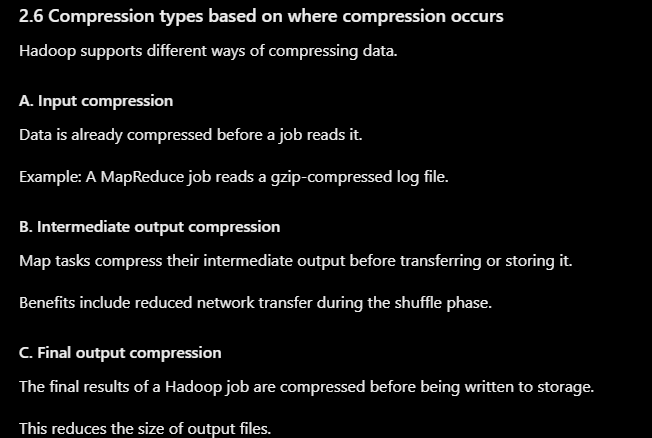
Compression can be applied to input files, intermediate MapReduce data, and output files.
Some compression formats, such as Bzip2, support splitting, while Gzip generally does not support splitting in standard Hadoop processing.
2. Serialization
Serialization is the process of converting an object into a byte stream so that it can be stored in a file or transmitted across a network. Deserialization converts the byte stream back into an object.
Hadoop uses the Writable interface for efficient serialization.
Common Writable types include
IntWritable,LongWritable,Text, andBooleanWritable.WritableComparablesupports both serialization and comparison, making it useful for sorting keys in MapReduce.Serialization reduces data-transfer overhead between Hadoop components.