Basic HTML Overview
 Call Kai
 Learn
 Practice Test
 Spaced Repetition
 Match
 Flashcards
 Knowt Play
1/10

There's no tags or description
Looks like no tags are added yet.
11 Terms
What is HTML?
•HTML stands for Hyper Text Markup Language
•HTML is a markup language, not a programming language. This means it annotates text to define how it is structured and displayed in a web browser.
•HTML is a static language and can be combined with CSS for styling and JavaScript for interactivity.
Anatomy of HTML Document
•HTML document is a series of nested elements that work together to form a complete webpage.
•The document follows a standard structure to ensure consistency and compatibility across different browsers.
•Here are the common elements used for HTML documents
<!DOCTYPE html>
<html>
<head>
<body>

<!DOCTYPE html>
The <!DOCTYPE html> declaration is used to specify the version of HTML. In this case, it indicates that the document is written in HTML5, which is the latest version of HTML.
<html>
The <html> element is the root element of the HTML document. Everything inside this element is considered part of the HTML document.
<head>
The <head> section contains metadata about the document that isn't displayed on the webpage. This section includes important elements like:
•<title>: Defines the title displayed on the browser tab.
•<meta>: Provides information like the character set or viewport settings.
•<link>: Links external stylesheets or resources.
•<style>: Embeds internal CSS styles.
•<script>: Embeds JavaScript for functionality.
<body>
The <body> tag contains the actual content of the webpage that will be visible to users, such as text, images, and links.
HTML Elements and Tags
•HTML Elements and HTML tags are related but distinct.
•An element is the complete structure, including the opening, content and closing tag.
•An HTML tag is the actual keyword or name enclosed in angle brackets “<>”.

Text and Heading
<h1> to <h6>
Headings of various levels
•<h1>
•<h2>
•<h3>
•<h4>
•<h5>
•<h6>
<p> Defines a paragraph

<br>, inline formatting
<br>
•Is used to create a line break in the text, causing the content that follows it to appear on a new line.
•This is a self-closing tag, meaning it does not need a separate closing tag.
Inline formatting
•<b> - Used to make the enclosed text bold, giving it greater emphasis or visual importance
•<i> - is used to display the content in italic style.
•<em> and <strong> - conveys emphasis and adds semantic importance.
Links and Images
•<link> tag defines the relationship between the current document and an external resource, often for stylesheets or favicons. It's an empty element with attributes like href and rel.
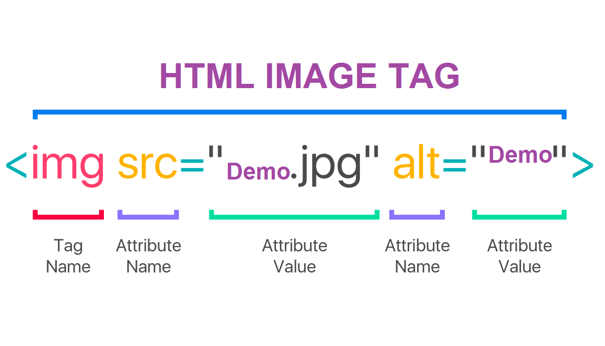
•<img> tag is used to embed images in a web page. It is an empty or self-closing tag. It allows to display images from various sources, such as files on a website or URLs from other websites

Line Comments
•HTML comments are used to add notes or explanations in the HTML code that are not displayed by the browser.
•They are useful for documenting the code, making it easier to understand and maintain.
•To add a comment, use the syntax <!-- your comment here -->.
