CS100 Operating System Part 1
 Call Kai
 Learn
 Practice Test
 Spaced Repetition
 Match
 Flashcards
 Knowt Play
1/55

Earn XP
Description and Tags
MassBay Community College Fall 2026 Semester Professor Snechal Nikalje CS100 Operating System Part 1 Flashcards
56 Terms
What utilizes an operating system?
Every computer, from smartphones to supercomputers. Even game consoles, cars and some appliances do. It’s role is critical; a computer can’t operate without it.
What programs do system software consist of?
Two primary types of programs; the operating system and utility programs
What is the operating system (OS)?
A group of programs that controls how your computer functions
What are the primary functions of the operating system?
Managing hardware, software, or tasks
What does it mean when the operating system manages hardware?
Hardware includes managing the processor, memory, and storage devices as well as peripheral devices such as the printer
What does it mean when the operating system manages software?
Managing software allows application software to work with the central processing unit (CPU)
What does it mean when the operating system manages tasks?
Managing tasks, such as scheduling and coordinating processes (like reading strokes from the keyboard) and managing network resources
How do you interact with the operating system (OS)?
Through user interface, which includes the desktop, icons, and menus that enable you to communicate with your computer
How were early operating systems designed?
For one person performing one task at a time. These are named single-user, single-task operating systems
How are modern operating systems designed?
Allow a single user to multitask; to perform more than one process at a time
What operating systems provide networking capabilities?
Windows and macOS, essentially making them multiuser, multitasking operating systems
How are operating systems categorized?
By the type of device in which they are installed, such as mobile devices, personal computers, robots or mainframes, and network computers
What are the most popular operating systems for personal computers?
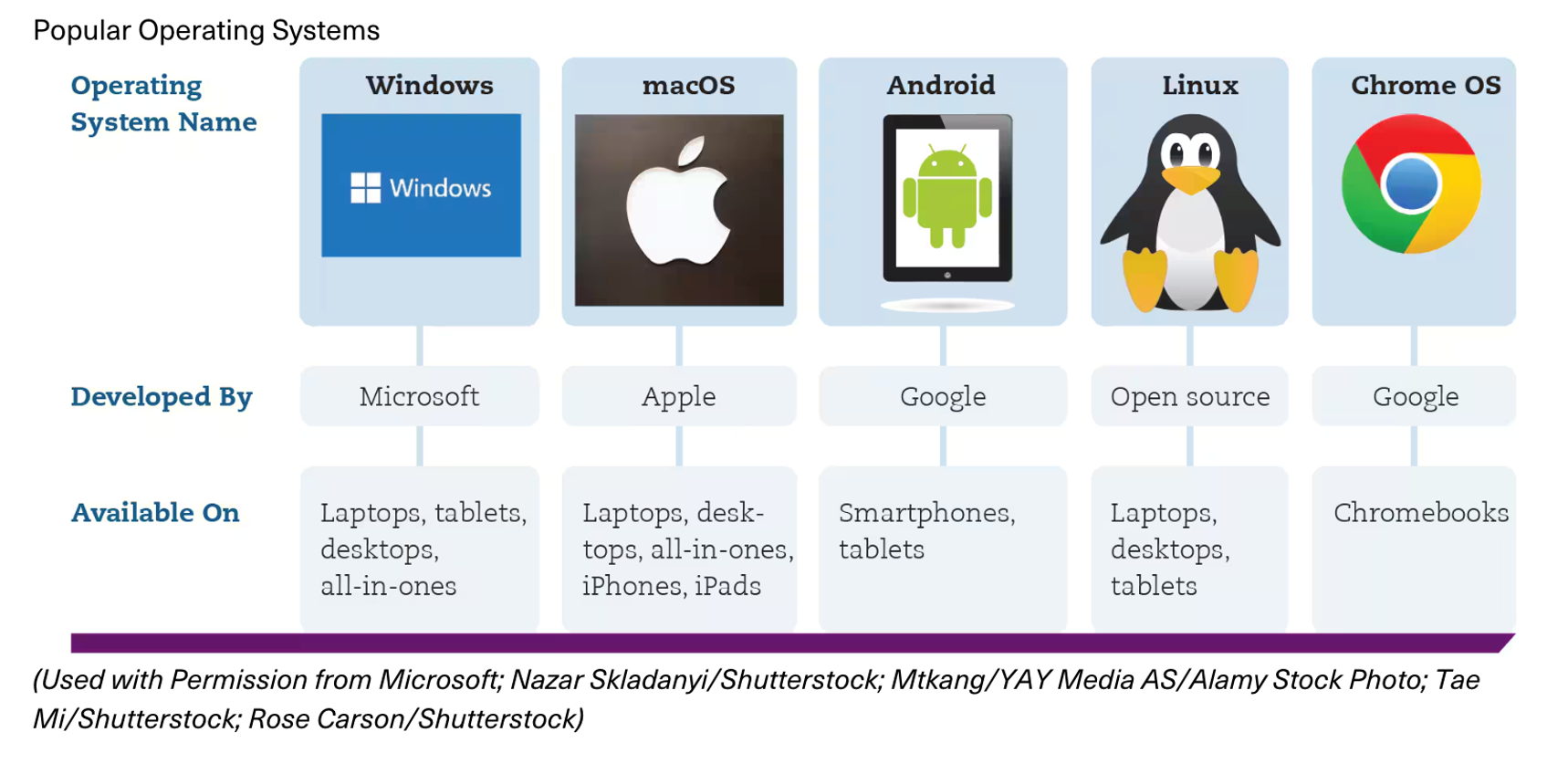
Microsoft Windows, Apple macOS, and Linux
Google's Chrome OS is used on Chromebooks
What are the most popular operating systems for mobile devices?
Android is the mobile OS for devices designed by Google, Samsung, and other companies
Apple has developed different operating systems for different mobile devices; iOS for iPhone, iPadOS for iPad, tvOS for Apple TV units, and watchOS for the Apple Watch
What devices use a mobile operating system?
Smartphones and tablets
What are popular operating systems? (PICTURE)
What common features are found in personal computer operating systems?
A window-based interface with icons and other graphics that facilitate point-and-select commands
Many utility programs
What is a utility program?
A small program that performs many of the general housekeeping tasks for the computer, to help the computer run more efficiently
What kind of utilities are part of a utility program?
Virus protection, backup and restore software, and system management tools
What other features do operating systems incorporate?
Natural language search capability and virtual desktops
What do operating systems support?
Bluetooth and Wi-Fi connectivity
What devices do operating systems like iOS, iPadOS and Android support?
Cameras
Sensors built into mobile devices and touch-screen displays
Multiple types of connectivity (e.g., Wi-Fi, Bluetooth, and near-field communication [NFC])
What other features do operating systems like iOS, iPadOS and Android support?
Mobile payment systems
On-screen note-taking
Voice recognition
What does macOs features integrate?
It features a tight integration between the desktop and portable devices running iOS and iPadOS
What can you do with the macOS desktop?
Take and make phone calls, receive and send text messages, and easily transfer files with Apple mobile devices
How does Windows use the cloud?
Uses your Microsoft account to store your settings in the cloud so you can access your familiar desktop and applications on any devices you log on to
How can you access and store files online with Windows?
OneDrive, a cloud-based storage system
How do you access an Apple device’s cloud system?
Use macOS to sign in to any Apple device with Apple ID
What is Linux?
Free, open source OS designed for use on personal computers and web servers
Who can use open source software?
Anyone can use or modify it
Where can you get Linux?
It is available for download in various packages known as distributions or distros
What does distros include?
The underlying Linux kernel and special modifications to the OS
May also include additional open source software (such as LibreOffice)
What is a kernel?
The code that provides an operating system’s basic functionality
Does it matter what OS in on my computer?
Most application software is OS-dependent
Need to download correct version of software, matched to your OS
Although you might find the same app in Google Play, the Windows store, or the Apple store, you must download and install the app from the specific store that works with your OS
Can I have more than one OS on my computer?
Devices running macOS can also run Windows and Linux
How can you run a Windows program on a macOS device?
Use the Bootcamp utility or install software such as Parallels or VMware Fusion (or Virtual box) to run Windows and any Window-based program
Can Windows devices run macOS?
No, but they can run Linux
How do you run Linux along with Windows?
You can create a separate section of your hard drive (called a partition) and install Linux. You are then given the choice when your computer starts as to which OS you want to use
**Why do machines with built-in computers need an operating system (OS)?
Because machinery that performs a repetitive series of specific tasks in an exact amount of time requires a real-time operating system (RTOS)
**What is a real-time operating system (RTOS)?
Also referred to as embedded systems, it requires minimal user interaction
A program with a specific purpose, and it must guarantee certain response times for certain computing tasks; otherwise, the machine is useless
**Why do devices use real-time operating systems (RTOS)?
They are written specifically for the needs of the devices and their functions
Used for devices that must perform regimented tasks or record precise results
**Where can real-time operating systems (RTOS) be found?
Medical equipment (ex. pacemakers)
Cars (ex. anti-lock braking system)
Surveillance systems and point-of-sale machines
**What is a network operating system?
Allows more than one user access to the computer system at a time by handling and prioritizing requests from multiple users
**What are networks?
Groups of computers connected to each other so that they can communicate and share resources
**Why do networks need a multi-user operating system?
Because many users simultaneously access the server
**What is the server?
The computer that manages network resources such as printing and communications
**Why are the latest versions of Windows and macOS considered network operating systems?
Because they enable multiple computers in a home or small business to connect to one another and share resources
What do larger networks need a robust network operating system?
To support workstations and the sharing of databases, applications, files, and printers among multiple computers in the network
What does a robust network operating system do?
Is installed on servers and manages all user requests
On a network, users share for a printer and the network OS ensures that the printer prints only one document at a time in the order the requests were made
**What are examples of network operating systems?
Windows Server
Linux
UNIX
What is UNIX?
A multiuser, multitasking operating system that’s used as a network OS, although it can also be found on PCs
What other kinds of computers require an operating system?
Mainframes and supercomputers
Who do mainframes support?
Hundreds or thousands of users at a time
Who accesses supercomputers?
Multiple people working on complex calculations
What are some examples of mainframe operating systems?
UNIX
Linux on System z
IBM's z/OS
What operating system do the clear majority of supercomputers use?
Linux