JavaScript, DOM, events, and timers
 Call Kai
 Learn
 Practice Test
 Spaced Repetition
 Match
 Flashcards
 Knowt Play
1/23

There's no tags or description
Looks like no tags are added yet.
24 Terms
Variables
Prefer const when not reassigning and let for reassignment; both have block scope, unlike var's function scope
Arrays
Arrays have zero-based indices and length
Objects
Objects have named properties.
obj.key and obj['key'] read a property
JS Types
Boolean, number, BigInt, String, Symbol, Null, Undefined
Type Coercion
Strings can trigger type coercion, the + operator adds numbers but concatenates when either operand is a string.
strings and numbers differ under +
Arrow expressions
Arrow expression bodies return implicitly, block bodies need return.
Event-driven Programming
Unlike Java, JS programs have no main. They respond to user actions called events.
DOM
The DOM is a tree of elements and other node. Every HTML element becomes a JS accessible object. JS can inspect and update the DOM.
Query Selector
querySelector('selector') returns the first match or null (no error if no match)
querySelectorAll returns a NodeList of all matches
Callback Function Syntax

Get element
getElementById('name') required you to omit the # when passing id. Returns the DOM object for a node with the given id. ID does not exist, no error.
Text

Managing CSS Classes

Creating & Adding Elements

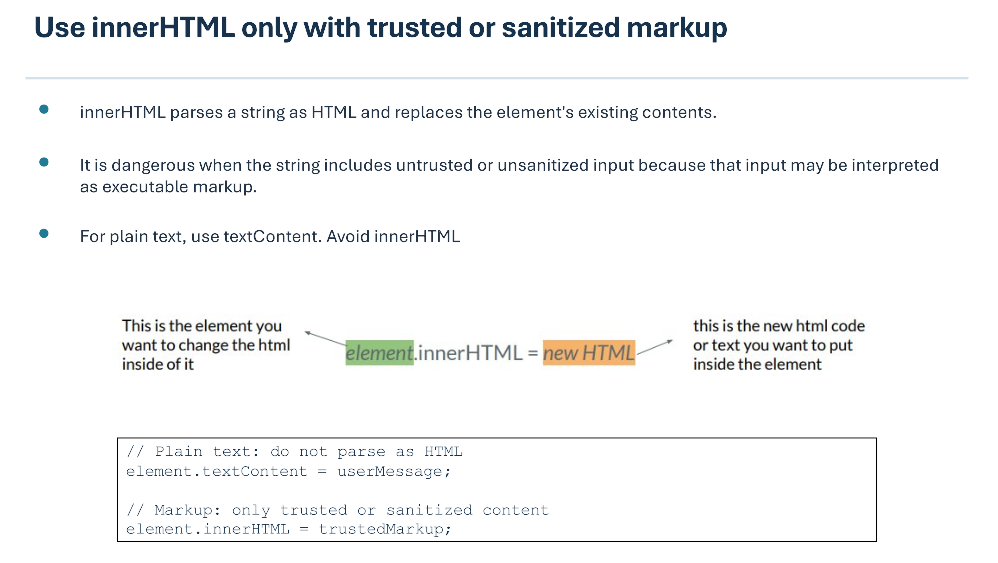
InnerHTML Flaw
How should you pass a function to addEventListener, and why?
Pass the function reference without parentheses (handleClick), not the call result (handleClick()). Adding parentheses runs the function immediately on page load and passes its return value (usually undefined) instead of the function itself.
How do you pass custom arguments to a handler function inside addEventListener?
Wrap the call in an arrow function:
btn.addEventListener('click', (e) => handleClick(e, id));
What is the difference between event.currentTarget and event.target?
event.currentTarget: The element whose listener is actually running (the element.addEventListener()was attached to).event.target: The exact innermost element that triggered the event (which can be a descendant, like a<span>or<svg>inside a<button>).
When should you use event.currentTarget instead of event.target?
Use
event.currentTargetwhen you want to modify the element that owns the listener (e.g., disabling a clicked button), so clicking a child icon inside it doesn't target the wrong element.
Why and how do you use the defer attribute on a <script> tag in the <head>?
<script src="app.js" defer></script> downloads the script in parallel while HTML parses, then waits to execute it until the DOM is fully built—preventing null errors when selecting DOM elements. (Note: <script type="module"> is deferred automatically.)
Which timer method runs a callback once after a delay, and which runs it repeatedly? What are their parameters?
setTimeout(callback, ms)— Runscallbackonce after at leastmsmilliseconds.setInterval(callback, ms)— Runscallbackrepeatedly everymsmilliseconds.Rule: Pass a function reference (
tick), not a call (tick())
How do you stop a setTimeout or setInterval before it finishes or repeats again?
Store the ID returned when creating the timer:
javascript
const id = setInterval(updateClock, 1000);Pass that ID to
clearTimeout(id)orclearInterval(id)to cancel it
Why does this fail to point to the clicked DOM element inside an arrow function handler, and what should you use instead?
Why
thisfails: An arrow function (() => {}) does not have its ownthis; it inheritsthisfrom its outer scope (oftenwindoworundefined).What to use instead:
event.currentTarget— it unambiguously points to the element whose listener is running, regardless of function type.
Why is event.currentTarget safer and more unambiguous than this or event.target inside an event listener?
event.currentTarget always refers to the element whose listener is actually running, regardless of function syntax or which child element was clicked.