Chapter 1: reliable, scalable, and maintainable Applications
 Call Kai
 Learn
 Practice Test
 Spaced Repetition
 Match
 Flashcards
 Knowt Play
1/14

Earn XP
Description and Tags
ntroduces the terminology and approach that we’re going to use throughout this book. It examines what we actually mean by words like reliability, scalability, and maintainability, and how we can try to achieve these goals.
15 Terms
A data-intensive application is typically built from standard building blocks that provide commonly needed functionality. For example, many applications need to:
Store data so that they, or another application, can find it again later (databases)
Remember the result of an expensive operation, to speed up reads (caches)
Allow users to search data by keyword or filter it in various ways (search indexes)
Send a message to another process, to be handled asynchronously (stream pro cessing)
Periodically crunch a large amount of accumulated data (batch processing)
Reliability
Reliability means making systems work correctly, even when faults occur.
Faults can be in hardware (typically random and uncorrelated), software (bugs are typically sys tematic and hard to deal with), and humans (who inevitably make mistakes from time to time). Fault-tolerance techniques can hide certain types of faults from the end user.
(28-32)
How Important Is Reliability?
Reliability is important for all applications, not just critical ones.
Bugs in business applications can cause lost productivity and legal risks.
Outages of ecommerce sites can have huge costs.
Even noncritical applications have a responsibility to users.
Sacrificing reliability can reduce development and operational costs, but should be done consciously.
(31-31)
Scalability
Even reliable systems can degrade over time due to increased load.
Scalability is the ability of a system to cope with increased load.
Scalability is not a one-dimensional label but rather a set of questions about how a system can grow and handle additional load.
One common reason for degradation is increased load: perhaps the system has grown from 10,000 concurrent users to 100,000 concurrent users, or from 1 million to 10 million. Perhaps it is processing much larger volumes of data than it did before.
Describing Load
First, we need to succinctly describe the current load on the system; only then can we discuss growth questions (what happens if our load doubles?).
Load can be described with a few numbers which we call load parameters.
The best choice of parameters depends on the architecture of your system: it may be requests per second to a web server, the ratio of reads to writes in a database, the number of simultaneously active users in a chat room, the hit rate on a cache, or something else. Perhaps the average case is what matters for you, or perhaps your bottleneck is dominated by a small number of extreme cases.
(33-35. Important)
Describing Performance
Once you have described the load on your system, you can investigate what happens when the load increases. You can look at it in two ways:
When you increase a load parameter and keep the system resources (CPU, mem ory, network bandwidth, etc.) unchanged, how is the performance of your system affected?
When you increase a load parameter, how much do you need to increase the resources if you want to keep performance unchanged?
Both questions require performance numbers.
Latency & Response time.
Latency and response time are often used synonymously, but they are not the same.
Latency: It’s how long it takes for data to go from the client to the server and for the server to start responding.
Response time is the total time it takes for the client to get the entire response from the server, including:
The latency (that travel time to and from the server).
The time it takes the server to actually do the work (processing time).
Even if you only make the same request over and over again, you’ll get a slightly different response time on every try.
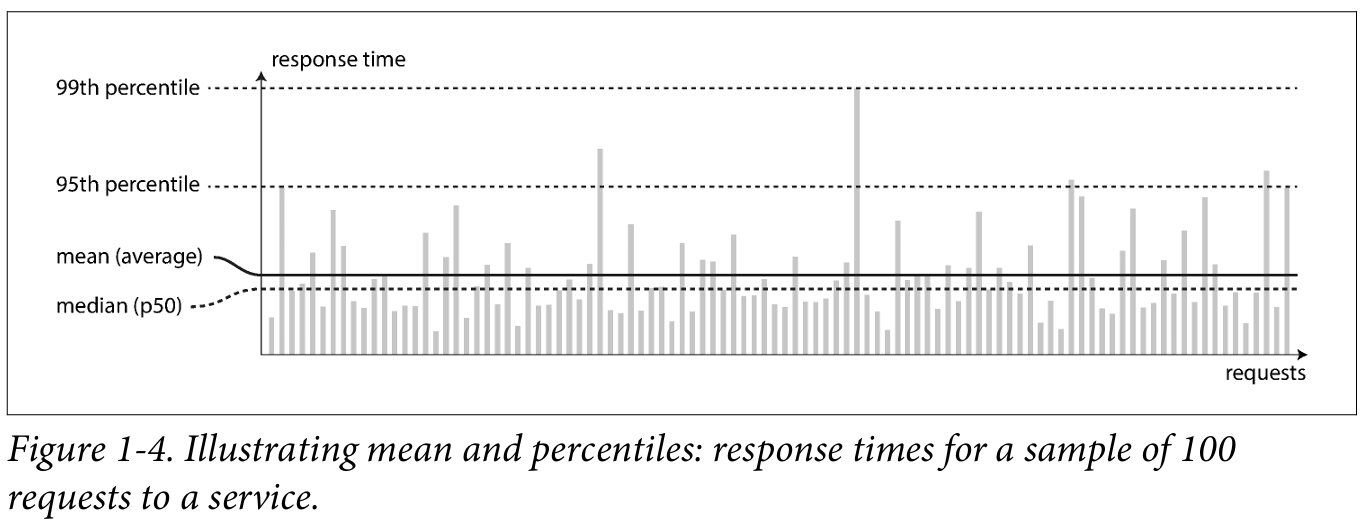
In practice, in a system handling a variety of requests, the response time can vary a lot. We therefore need to think of response time not as a single number, but as a distribution of values that you can measure.
Through put
The number of operations or data a server can handle over a period of time.
The measurement is done by: Requests/sec
How many requests a database can handle is measured by: Queries (or requests)/sec
Metrics for measuring performance (after describing our system Load.)
Response time distribution: Instead of a single number, response time should be considered as a distribution of values.
Mean: The average response time, calculated as the sum of all response times divided by the number of requests.
Percentiles: The median (p50), 95th percentile (p95), 99th percentile (p99), and 99.9th percentile (p999) are commonly used.
Tail latencies: High percentiles of response times, which are important for user experience.
Queueing delays: A significant factor in response time at high percentiles, often due to head-of-line blocking.
Client-side measurement: Measuring response times on the client side is important to capture queueing delays.
Independent load generation: When testing scalability, the load-generating client should send requests independently of response times to avoid artificially short queues.
(35-39)
Approaches for coping with laod: Architecture change
Scaling Challenges
Load-dependent performance: Architectures designed for a specific load may struggle with significantly higher loads.
Frequent architectural changes: Rapidly growing services may require frequent rethinking of architecture to accommodate increased load.
Approaches for coping with laod: Scaling approaches
Scaling Approaches
Vertical scaling: Increasing the capacity of a single machine.
Horizontal scaling: Distributing load across multiple machines (shared-nothing architecture).
Hybrid approach: Combining vertical and horizontal scaling for optimal performance and cost-effectiveness.
Scaling Elasticity
Elastic systems: Automatically adjust computing resources based on load fluctuations.
Manual scaling: Require human intervention to add or remove machines.
Three essential design principles for software systems
Operability Make it easy for operations teams to keep the system running smoothly.
Simplicity Make it easy for new engineers to understand the system, by removing as much complexity as possible from the system. (Note this is not the same as simplicity of the user interface.)
Evolvability Make it easy for engineers to make changes to the system in the future, adapting it for unanticipated use cases as requirements change. Also known as extensibil ity, modifiability, or plasticity.
Operability: Making Life Easy for Operations
Operability is essential for efficient and reliable software operations. It involves proactive problem-solving, automation, and clear documentation to reduce manual effort and ensure system stability.
Good operations teams play a vital role in monitoring, maintaining, and securing software systems, while also collaborating with development teams to improve overall system design and maintainability.
(41-42)
Simplicity: Managing Complexity
Complexity is a major challenge in software development. As projects grow, accidental complexity can arise, making systems difficult to understand and maintain. This can lead to increased costs, risks, and delays.
Abstraction is a powerful tool for managing complexity. By hiding implementation details, good abstractions can simplify systems and improve their reusability. However, finding effective abstractions is a challenging task, especially in distributed systems.
Evolvability: Making change easy
Agile methodologies and practices provide a framework for adapting to change. Technical tools like test-driven development (TDD) and refactoring can also be beneficial in frequently changing environments.
Evolvability is closely tied to simplicity and abstractions. Simpler and easier-to-understand systems are generally more adaptable. By focusing on evolvability, we can create data systems that can more effectively handle the inevitable changes that occur over time.