CSE 3430 – C4-C6
 Call Kai
 Learn
 Practice Test
 Spaced Repetition
 Match
 Flashcards
 Knowt Play
1/21

There's no tags or description
Looks like no tags are added yet.
22 Terms
Address conflict problem
Compilers number every program’s address starting at 0
If several processes are in memory at once, they would all use the same addresses for different things
OS fixes this by relocating each process’s address to where the process actually sits in physical memory
The 4 approaches to address relocation (address conflict problem)
Time-Sharing
Base + Bounds
Segmentation
Paging
Time sharing of memory + its downsides + its solution
Only one process is in RAM at a time. Every context switch, the whole process is saved to disk and the next one is loaded
Downside: terrible performance due to slow disk
Solution: space sharing (memory is divided among processes at the same time)
MMU (memory management unit)
Hardware that translates every virtual address a user process uses into a physical address
The 4 approaches depend on MMU
Base + bounds & its downsides
Base = where the process starts; bounds = its size
On every access, MMU checks where Address < bounds
If yes: adds base to address to get physical address; otherwise, trap and kill
Needs hardware (MMU registers)
Protects processes from eachother
Downsides: Whole address space must be contiguous and loaded

Segmentation + its downsides
Address space split into code, heap and stack segments
Each segment has its own base, bounds and protection (kept in a segment table)
Needs hardware (segment table)
Protects processes from each other
Downsides: Only each segment must be contiguous, not the whole space. All segments must be loaded

Segmented address translation
Top bits of an address choose a segment; remaining bits give the offset
Process: MMU looks up segment’s base and checks the offset against the segment’s bounds.
Offset < bounds → physical = base + offset
Otherwise → error
Example: 0x265c = segment 2, offset 0x65c → 0x3000 + 0x65c = 0x365c

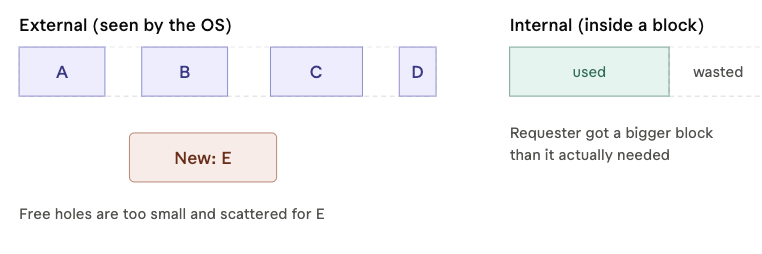
External vs. internal fragmentation
External: free memory is in small scattered holes that are too small to use; affects base + bounds and segmentation
Internal: unused space inside an allocated chunk
Paging
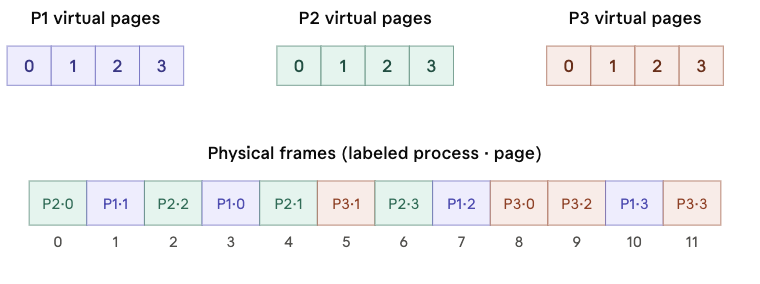
Memory split into fixed-size pages (physical pages are called frames)
Page table maps each virtual page number to a physical page number
Needs hardware (MMU + page table)
Protects processes from each other
Not contiguous; pages can go anywhere
Not fully loaded; some pages can stay on disk
No external fragmentation
Paging address format
Address bits = VPN bits + offset bits
Page size = 2^(offset bits)
Number of pages = 2^(VPN bits)
1 KB = 2^10, 2 KB = 2^11, 4 KB = 2^12
Example: 32-bit address with 4 KB pages → 12 offset bits, 20 VPN bits, 2^20 pages

Thread & Its Attributes
A sequence of execution inside a process
Has its own thread ID, PC, registers and stack pointer
Shares the process's heap with other threads, so shared data must be on the heap
On a multicore CPU, threads can run at the same time on different cores
Critical Section
Code that accesses shared data
Bank example: read balance → change it → write it back
If interrupted partway through, another thread can corrupt the data (for example, 950 instead of 1030)
Mutual Exclusion & Drawbacks Without It
At most one thread in a critical section at a time
Without it, the output is indeterminate: the same input can give different results
Binary Semaphore
A variable with a value of 0 or 1 and two atomic operations:
semWaitB (P): if the value is 0, block; if it's 1, set it to 0 and continue
semSignalB (V): unblock a waiting thread if there is one; otherwise set the value to 1
Semaphore as a lock
Initialize the semaphore to 1
semWaitB = acquire the lock (before the critical section)
semSignalB = release the lock (after the critical section)
Critical sections run as whole blocks: only 1,2,3 → 4,5,6 or 4,5,6 → 1,2,3 can happen, so the result is always correct
File / file system
File = an array of bytes that persists after power-off
File system = the collection of files, and also the part of the OS that manages them
Files are organized in a directory tree; a directory is a special file
Inode
A file's metadata record containing its size and location of its data on disk
Inode number = the file's index in that array = the file's unique ID
Three types of file names
Inode number
Path
File descriptor
Path traversal
A directory's data is a list of name → inode number entries
Lookup starts at the root directory (usually inode 2) and walks down one level at a time
Each level takes 2 reads: the inode, then its data
/etc/bashrc= 6 reads
Allocation methods & their purpose
File data is stored in fixed-sized blocks. There are 4 different allocation methods for storing data, each of which have their own benefits and drawbacks.
Contiguous
Extents
Linked
FAT
Contiguous vs. extent allocation and their pros & cons
Contiguous: one unbroken run of blocks
Fast and simple, little metadata
Terrible external fragmentation, and hard to grow
Extents: a few contiguous runs (2–6) per file
Less fragmentation, still fast
Can only grow until it runs out of extents
Linked vs. FAT allocation and their pros and cons
Linked: each block points to the next
No external fragmentation, grows easily
Very slow random access; one pointer wasted per block
FAT: the same chains, but all the pointers live in one table
Fast random access when the table is cached in memory
Two disk reads per data read if it isn't cached