History and other info
 Call Kai
 Learn
Learn Practice Test
 Spaced Repetition
 Match
Match Flashcards
 Knowt Play
1/52

There's no tags or description
Looks like no tags are added yet.
53 Terms
Early Computers
First Digital Electronic Computer:
First Large-Scale, General Purpose Electronic Digital Computer:

Stored-Program Computer Architecture
3 widely recognized generations of electrical-based, digital computers
Now programs are stored within instead of changing the wires. Von Nuemann Architecture
Vacuum tubes
Transistors
Integrated circuits (ICs)

Basic Parts of a Computer
• 3 Functional Units
– Central Processing Unit (CPU)
– Memory Unit
– I/O Devices
• 3 Buses
– Data Bus
– Address Bus
– Control Bus
Operation of Computer

Software

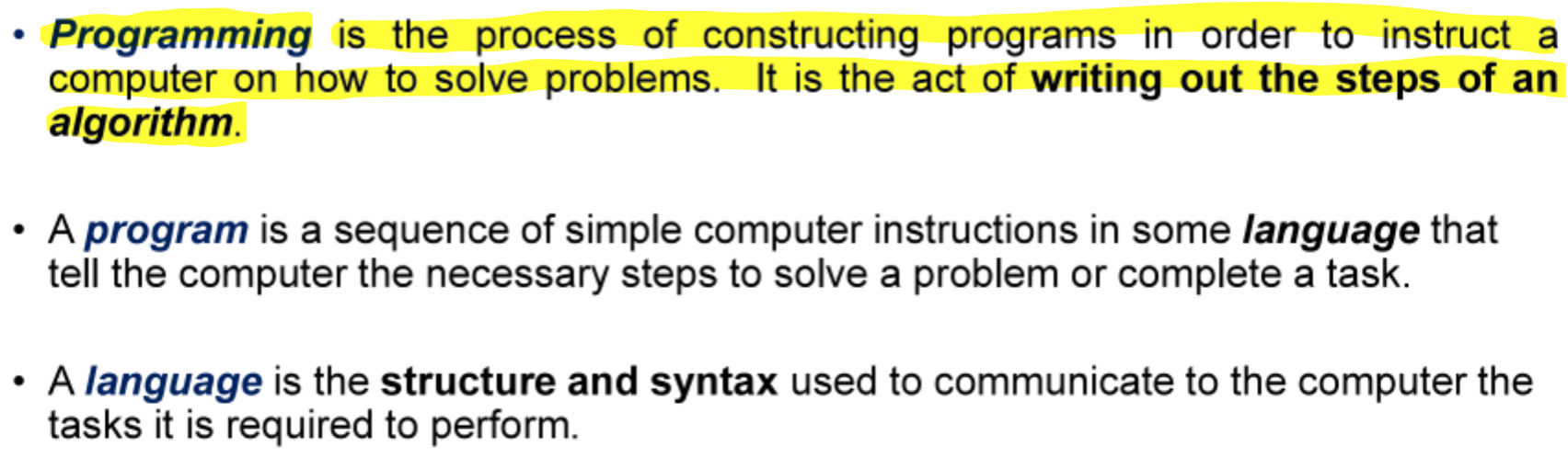
What is Programming
Basic Instruction Types

Electrical signals are used inside the computer to process information. There are two types:

what is an Algorithm
An algotrithm is a precise, systematic method for producing a specific result

A C++ program contains two types of statements:

Preprossor Directives

Two Function Types:
Main difference: the way in which they are called or invoked
Value-Returning Functions
Used when there is only one result returned
Often, function call used as part of an expression
Some built-in function: sqrt(), abs(), pow()
Void (non-value returning) Functions
Do not return values to the calling program
Normally accomplishes some other tasks such as input, output or passes results through parameters or global variables
Main difference:
Void Function: a call is a complete statement printResult (averageStride, distance);
Value Returning Function: a call occurs when the function appears in an expression or an assignment statement
Function Arguments

Definition for printComplex ()

Comparison operators
Comparison of characters will depend on the machine’s collating sequence (ASCII character set) notated with ‘ ‘
Space < ALL Digits < ALL uppercase letters < All lowercase letters

Logical (Boolean) Operators and Logical Expressions
allows to combine logical expressions
! not
&& and
!! or
Order of Precedence

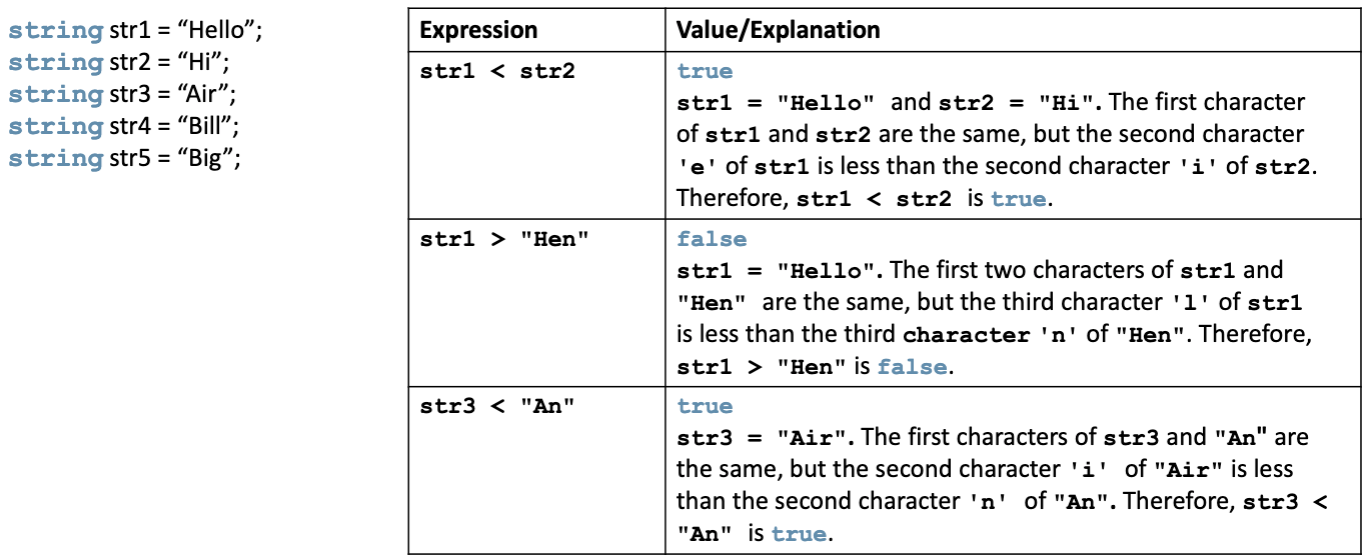
Rational Operators and the string Type
strings are compared character by character
Comparison continues until either a mismatch is found, or all character are found equal
If two strings of different lengths are compared and the comparison is equal to the last character of the shorter string
IF Statement and if-else
The expression is also called a decision-maker
The statement following the expression is also called the action statement
Nested ifs:
An else is associated with the most recent if that has not been paired with an else
Associativity of Relational Operators
relational operators are not the same as relations in math.
relational operators are evaluated from left to right
in software:
= (0 <= 20) <= 10
Fix:
If ((num >= 0 ) && (num <= 10))

Short-Circuit Evaluation

Switch Statements
One or more statements may follow a case label
Braces are not needed to turn multiple statements after it executes until a break is encountered
The break statement may or may not appear after each statement
Switch, case, break, and default are reserved words
To output results correctly
Consider whether the switch structure must include a break statement after each cout statement
Rules for Loops
The loop variable i must be declared
i, j, and k are used by convention, but you can pick any name you want
The starting point of the iteration can begin anywhere, including negative numbers
The loop condition must be an expression that results in a Boolean value
it should contain the loop variable to avoid an infinite loop
The next iteration usually changes the value of the loop variable by 1
It does not always have to be one, and it can be positive (such as 2) or negative (-1)
++ and -- (increment/decrement operator)
++ adds one to the current integer variable
— subtracts one from the current integer variable
++var (pre-increment):
int x = 5;
int y = ++x;
// x is incremented, then value of x is assigned to y
// so, x = 6, y = 6
var++ (post-increment):
int x = 5;
int y = x++;
// value of x assigned to y, then x is incremented
// so, x = 6, y = 5
--var (pre-decrement):
int x = 5;
int y = --x;
// x is decremented, then value of x is assigned to y
// so, x = 4, y = 4
var-- (post-decrement):
int x = 5;
int y = x--;
// value of x is assigned to y, then x is decremented
// so, x = 4, y = 5while Loop
A pre-test loop
The expression provides an entry condition to the loop
While the expression is true, execute statement(s)
Once the expression is false, the loop ends (without executing statement(s))
Can have one or more statements executed each time expression is true
variable i is called the loop control variable (LCV)
while Loop: Counter-Controlled Loops
When you know exactly how many times the statements need to be executed
- use a counter-controlled while loop
counter = 0; // initialize the loop control var
while (counter < N){ // test the loop control var
     .
     .
     counter++; // update the loop control variable
     .
     .
}while Loop: Sentinel-Controlled Loops
When you do not know exactly how many times the statements need to be executed
- use a sentinel-controlled loop
A sentinel variable is tested in the condition
The loop ends when the sentinel is encountered
cin >> variable; // initialize the loop control var
while (variable != sentinel){ // test the loop control var
     .
     .
     cin >> variable // update the loop control variable
     .
     .
}while Loop: Flag-Controlled Loops
When you do not know exactly how many times the statements need to be executed
- use a flag-controlled loop
Uses a bool variable to control the loop
A flag variable is a bool variable that indicates whether a condition is true or false
found = false; // initialize the loop control var
while (!found){ // test the loop control var
     .
     .
     if (expression)
          found = true; // update the loop control var
     .
     .
}for Loop
A pre-test, counter-controlled loop
the most common of loop is the for loop
Syntax:
for (initial statement; loop condition; update statement {
     statements
}
Initial statement - is executed once at the start of the loop
Loop condition - is evaluated before every loop iteration to check for loop termination
Update statement - is evaluated after every loop iteration to update the loop counter
int i;
for (i = 0; 1 < 4; i++){
     cout << i << endl;
}do while Loop
#include <iostream>
using namespace std;

int main(){

     int i = 0;

     do {
          cout << i << " ";
          i= 1 + 5;
     } while (i <= 20)

     return 0;
}
// output: 0 5 10 15 20
Nested Control Structures
Nesting: for loops inside of for loops
for (i = 1; i <= 5; i++){
     for (j=1; j <= i; j++)
          cout << "*";
     cout << endl;
}
In the code above it will output “*” in a series for every time that j is less than i then end the line
The inner loop will continue then back to outer loop which will update and check loop condition then the inner loop will start up again until i <= 5
break Statement and Loops
A break statement in a loop causes an immediate exit of the loop
Won’t be used in this class, as it violates pure structured programming principles, it provides a second, nonstandard exit from the loop
continue Statement
the code did not execute when num == 3 because it triggered the if statement within the loop

Variable name scope
A declared name is only valid within a region of code known as the name’s scope
Functions: Modular and Incremental Program Development
Modular:
Divide a program into separate modules that can be developed and tested separately and integrated into a single program
Incremental Development:
Write, compile, and test a small amount of code
Then write, compile, and test a small amount more (an incremental amount)
And so on
User-Defined Functions
Value-Returning Functions: have a return type
Return a value of a specific data type using the return statement
Void Functions: do not have a return type
Do not use a return statement to return a value
Value Returning Functions
returns a value/s back to the caller
as soon as it hits the return statement, it terminates
Function Prototype
examples
double larger(double x, double y);
It is not necessary to specify the var name in the parameter list
double larger(double, double);
But, the data type of each parameter must be specified

Function Overloading
Function overloading or overloading a function name occurs when creating several functions with the same name
Two functions are said to have a different parameter lists if both functions have either
A different number of formal parameters
If the number of formal parameters is the same, but the data type of the formal parameters differs in at least one position
Overloaded functions must have different formal parameter list
The signature: the name and formal parameter list of the function
Does not include the return type of the function
The parameter list supplied in a call to an overloaded function determines which function is executed
Terminating a Program with the Assert Function
#include <cassert>
assert(expression)
if the expression evaluates to true, the next statement executes
if the expression evaluates to false, the program terminates and indicates where in the program the error occurred
Assert is useful for enforcing programming constraints during program developmetn
After developing and testing a program, remove or disable assert statements
The preprocessor directive #define NDEBUG must be placed before the directive #include <cassert> to disable the assert statement
C++ Data Types
Simple Data Type
Integral (integers)
Floating-Point
Enumeration: a user-defined data type
Structured Data Type
Pointers
Type and Numeric Conversions
If all operands are integers it yields an integral results
If all operands are floating-point it yields a floating-point result
If mixed:
Integer is changed to floating-point
Result is floating-point
Getting a string from input
getline Function
cin >> strVar
Get all reamining character on the current input line
gets whitespace from input
stops accepting character when it receives a newline char
“Phantom” Enter Key

cin and the ignore Function

setprecision Manipulator
#include <iomanip>
setprecision(n)
affects all subsequent outputs
cout << setprecision(4) << 100.54 // output 100.5
cout << 100.58; // output 100.6fixed Manipulator

showpoint Manipulator

setw

setfill Manipulator

left and right Manipulators

Types of Manipulators

rand Function
generates a random number
#include <cstdlib>
rand()
range 0 to RAND_MAX
(rand() % 6) + 10
outputs: 10, 11, 12, 13, 14, 15