Human factors test 1
 Call Kai
 Learn
Learn Practice Test
 Spaced Repetition
 Match
Match Flashcards
 Knowt Play
1/83

There's no tags or description
Looks like no tags are added yet.
Name | Mastery | Learn | Test | Matching | Spaced | Call with Kai | Chat |
|---|
No analytics yet
Send a link to your students to track their progress
84 Terms
What are human factors and what does it apply
Designing an environment to fit human limits and capabilities
Application of psychological science
What does our environment all include in terms of human factors in general
social, physical psychological aspects of the environment
items with the space (ex. equipment, tools)
What do human limits and capabilities include in terms of human factors in general
sensory abilities (ex. visual, auditory perception)
cognitive processing
physiological and/or physical abilities
What kind of emphasis does human factors have and how is it different from ergonomics
Strong engineering emphasis
includes designing tools, equipment, processes (however, they don’t always work out as we expect)
Ergonomics
less broad than human factors
emphasizes biomechanics, posture, force
work to reduce fatigue and injury by focusing on the design of the environment
What fields and professions does human factors work with and draw from
comp. sci
architecture
biological sciences (how we respond to environment)
medicine (med devices, room layout)
what kind of populations do human factors work for
all populations, but it can especially create solutions to problems for special populations (children, elderly, physical/cognitive limitations)
What people/events helped advance human factors and how
leonardo da vinci
explored anthropometrics and flight (looked and birds and eventually created flying machine)
wright brothers
progressed human factors considerations in aviation
WW2
mobilization: needs to employ and move large groups of people made it impractical to select individuals for specific jobs
safety and efficiency: the war’s scale required efficient and safe operation of complex systems
time and motion studies
Who are the founders of human factors and their major contributions
Alphonse Chapanis
saw human factors as the science of ensuring that design takes account of human characteristics
major contribution: shape coding (specifically in the aircraft cockpit in hopes to prevent confusion and therefore crashes)
Paul M. Fitts
developed a model of human movement
Fitts Law
known for his studies in math models of human motion (time-accuracy trade off in phones)
Where does the work ergonomics come from
Greek words:
Ergon “work”
Nomos “law”
What are three factors within ergonomics and how do they interact
Human
machine
environment
there are six different directional interactions (back and forth between each factor with the others)

Difference between a simple and complex ergosystem
Simple examples:
human interacting with environment
human interacting with machine and environment (human working on computer in room)
Complex examples
one human working on many machines in a room (ex. one worker with many coffee machines)
many humans working with one machine (ex. many workers with one photocopier)
what do ‘human factors’ examine
it examines the human part of ergosystem (human, machine, environment) relationships
What model does the systems theory refer to
The input-process-output (IPO) model
What is the IPO model
the input-process-output model
Input > process > output
describes the structure of an information processing model
inputs → materials, human resources, money, info, etc
processes → activities, transformations, operations performed on the inputs etc.
outputs → consumables, services, new information, money
Provide examples of each of the steps in the IPO model with the broad theme of : cafe to get coffee
Inputs → (customer) enters doors, navigate line, read menu, verbalise order, move to pick up line, grasp cup, add milk, navigate exit door
Processes → (store) line organization, menu displays, employee input order into computer, other employee read/interpret/produce order
Output → (product/experience) what you are left with, coffee
What has research revealed about human and machine error
It shows that human error is almost never the sole cause of poor system performance
What happened in the Three Mile Island nuclear incident and what does it reflect
It reflects a mix of human and machine error
Worst commercial nuclear power plant accident in US history
Vent was clogged
Signal got sent saying it needed to be closed
Message got misinterpreted that it was already closed and didn't need help
Lead to explosion
According to Bailey (1982) and the three mile island nuclear accident, what are the most important factors in system performance and reliability
design of system components, particularly human-machine interfaces
state of the system leading up to the incident (ex. stable/unstable, quiet/busy)
operators mental and physical workload
work organization (ex. shifts system, shift length, supervision, design of work groups)
external factors (ex. weather
What are anthropometrics
anthropometrics is the data which concerns the dimension of humans
designers need to create products that are the right size for the user and comfortable to use
why should designers be aware of anthropometrics?
allows designers to accommodate various percentiles so the majority of people can use their product/service
this is especially important for public spaces
What is a workspace envelope, what are the limits
a 3D space within which you carry out physical work activities when you are in a fixed location
the limits are determined by your functional arm reach,
limits are also influenced by the nature of the task as tasks should be arranged within the area
What are the different parts of a workspace envelope
primary zone- able to be more precise and fine motor skills
secondary- elbows straighter but still some bend
tertiary- elbows are fully stretched
Difference between typical work area and maximum work area
typical work area is within the limits of a comfortable bent arm
the maximum are is within comfortable reach of extended arm
What difference in considerations would you make between a light switch or the handle of a mug
for the light switch you would need to use fingertip measurements, and for the hand you would need fist closed measurements
What are some basic principles you should think about when designing a seated work area
relaxed upper arms and elbows at 90 degrees to help maintain straight wrists
adequate clearance for your thighs under the work surface
foot rest for smaller users who would not touch ground
for fine work requiring better visibility, the work surface can be raised, but elbow support must be provided
how does a workspace envelope differ for standing work
arms and hands are most powerful when the elbows are bent and close to sides
for precise, fine work, the surface shoulder be higher so elbows can rest on it and so it is easier for eyes
What are some basic principles you should think about when designing a standing work area
for work that requires the shoulder/back muscles, the surface should be 100-250mm lower than elbows
for other tasks, the surface can be elbow height of just below
precision work should be avoided and instead done while sitting when back muscles are support
what is vertical reach limited by and how is it measured
vertical reach is limited by how far you can reach and grasp objects above or below your shoulder height without stretching or bending
vertical reach measure = from shoulder to the centre of your closed hand (or extended fingertips for button operation)

List if each scenario should be designed to the smallest or largest percentile


List design examples and measurements to consider for each of these scenarios

How might a kin student draw a body differently than a fashion designer
designers draw the body in a artistic, idealised way
kin student would draw it proportional
Describe the aesthetic-usability effect and three reasons why it happens
Users often perceive aesthetically pleasing design as a design that is more usable
aesthetic things creates a positive response in user’s brain, and may lead them to believe it works better
individuals may be more tolerant to minor usability issues when the design is pleasing (we want to like it)
visually appealing design can mask usability problems and prevent issues from being discovered during usability testing
What did the study “Apparent Usability vs. Inherent Usability” look into and what did it find
it studied the aesthetic-usability effect
it found that user consistently rated visually pleasing designs as more usable
even when objective measures of usability did not support this perception
What are three key factors in the aesthetic-usability effect
first impressions matter:
humans are inherently visual creatures
when we encounter a visually appealing interface, we are more likely to have a positive mindset about it
cognitive ease:
aesthetically pleasing designs often convey simplicity and clarity
makes the user feel more intuitive, reducing cognitive load required
trust and credibility
convey a sense of professionalism and competence
more likely to trust that item and assume the same level of care is applied to its functionality
Why is the perception-action cycle important
humans learn through doing not being told
hardwired to learn by interacting with the world around us and then perceiving the results
neuroscientists call this the “perception-action cycle”
stages of the perception-action cycle and what do we do with them
Loop:
information from the environment
information to our sensory systems
motor output
interacting with environment
we use these stages for:
perception (taking in information)
action (response/behaviour)
feedback (what outcome is observed)
adjustment (updating for next time)
what are some individual differences that would play a part in the perception action cycle (ex. medical device design)
experience (worked with the machine before
colourblind
familiarity with icons on the screen
if you have been in the situation before you are interpreting through the screen
What did researcher find on how dancers use the perception action cycle
they showed dancers and non dancers a dance video
they found the brain area associated with movement was triggered more in trained dancers than non
this is because the dancers had used the cycle through training, encoding information required to perform dance moves
when they view the video, their brain accessed that info even though they weren’t moving
What are some ways humans vary
physically: body, height, weight, strength
mentally: vision, hearing , dexterity, colour vision
personality: affecting what work they are suited for, impacting safety requirements as well
different knowledge, experiences to draw on
Priorities to use when designing a layout and list some examples where layout would be important
grouping controls functionally or sequentially
consistency in layout for ease of use
car dashboard, surgical tools
keyboard
piano

What layout considerations were used when designing the keyboard
spread out common letters evenly between left and right hands
put common letter combs together
spreading out vowels
What reference points and zones should be taken into considerations in a workspace
seat, arm rotation, eye reference points
visual envelopes (optimal viewing area for displays)
design eye position (DEP)
What is design eye position
DEP is the position from which the user is intended to view the workstation for an optimal view of the visual interface
What does a visual envelope include
includes objects we can see without left eye, both eyes, or our right eye
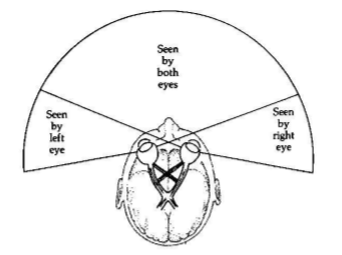
What were the average angles each of the characteristics were seen in the in class activity (in our own results)
movement- 80
colour- 60
shape- 40
word 0
How do cones affect what we see in our peripherals
cones can see colours
they are not evenly distributed
the amount of cones thins out towards the edge of our eyes
the area we can really see things clearly is the biggest cluster of cones at the fovia (centre of our vision)
this about a 20 degree window
Design considerations for placement of information
critical information should be central
less critical but attention-grabbing cues can be placed towards periphery, since motion grabs attention
BUT- avoid constant unnecessary motion in peripheral= distracting and fatiguing
what details can central vision pick up compared to peripheral vision and how might this affect our designs
central- detail, text, fine shapes
peripheral vision- motion, brightness, orientation
ex. we can put something flashing further in our vision as we can still sense motion there
could be for something less critical but still important
What are the 3 main things that need to be considered in layout design
Dynamic measures (what is the task)
layout priorities (what are my tools/my space)
reference points/ zones (my functional/visual area)
How has sitting as a whole changed in through history
we have gone from sitting in between activity to being active in between sitting
On average, how many hours do we spend sitting in a day
10.4 hours
Design considerations for chair ergonomics
support natural “s” shape (especially lumbar)
height for feet to rest on floor
thighs parallel to floor to reduce pressure and promote circulation
trunk-thigh angle ~115 degrees
avoid crossing legs
top of monitor at eye height
don’t for long periods of time
what is the ideal trunk-thigh angle
115 degrees
Is there a perfect ergonomic chair, why or why not and if so why isn’t is used everywhere
no, there isn’t one perfect ergonomic chair. each situation requires specific types of seating
because humans aren’t meant to sit in one spot for a long time, we are meant to move positions
ex. bleashers to fit lots of people
ex. hammock to be comfortable
When driving a car, what does the human, environment, and machine each bring to the table? What are some interactions between these factors
environment
icy, snowy conditions
visibility
traffic, other cars in general
human
height
experience driving
level of alertness
machine
button placement
condition of vehicle
amount of blind spots
interactions:
human forgot glasses, can’t read signs in environment
press button on machine to let other drivers know our direction
experience of driver knowing how to drive in bad weather
all three: hot outside, press button for ac, human feels cooler
what does compatibility refer to in human factors
refers to the relationship of stimuli and responses to humans expectations (expected or unexpected result?)
what are the correspondence between stimuli and response locations (spatial compatibility) an important determinant of
important determinant of speed of response
Types of compatibility
spatial compatibility
the physical, spatial arrangement of controls and their associated displays
conceptual compatibility
the degree to which codes and symbols correspond to conceptual associations (how meaningful are they)
ex. an airport symbol in some countries aren’t as intuitive as others
movement compatibility
the movement of displays and controls relative to the response of the system being displayed or controlled
ex. a clockwise movement of a control knob usually means an increase in the control parameter
ex. rolling a dice harder makes you believe it will be larger
modality compatibility
certain S-R modality combinations are more compatible with some tasks than with others
ex. a verbal response to a verbal command is faster than a manual response and vice versa

ambiguous or clear?

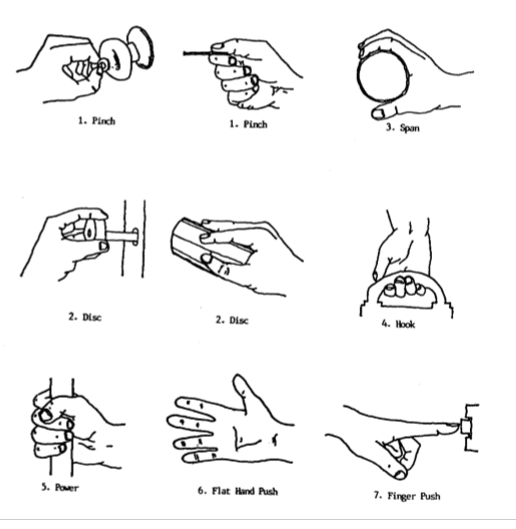
Types of grip
pinch (x2)
span
disc (x2)
hook
power
flat hand push
finger push
Difference between continuous and discrete information and examples
discrete: limited number of outcomes possible
less options (on/off, open/closed, 4 levels)
ex. elevator buttons, pedal click, toggle, a/c levels in car
continuous: all decimals of possible outcomes between two defined point
almost infinite amount
ex. volume knob, window crank, steering wheel, pedal
What factors affect which coding methods are used for hands/handles
the coding method depends on the situation
the demands of the operator
the coding methods already being used
the level of illumination
speed and curacy required for control identification
available space
number of controls that must be coded
What does shape coding use and how does it work
uses tactile sensitivity
control can functionally associate shape with end-use
ex. landing flap lever in an airplane is shaped like a landing flap, landing gear lever is shaped like the wheels
How does texture coding work and example
Controls can be coded by texture
door knobs

How does shape coding work and example
shape can affect coding
ex. does one knob need to be larger than the rest as it is used more
not as useful as shape coding
ex. volume board
Types of coding for controls (hands/handles)
shape
texture
size
location
colour
label
How can location coding help and example
distances between things must be sufficient for discrimination but not too large to not reduce functionality
ex. moving your foot from the accelerator to the brake
how does colour coding work
fewer colours should be used (~5)
colour coding should be reserved for especially meaningful controls (ex. red for emergency)
perception of colour varies with illumination
can be combined with other codes
label coding and problems that could happen
widely used method for coding
not recommended to be used as the sole indicator of control
problems
they take time to read
they must be placed so that the hand doesn’t cover the label while engaging the control
must be kept clean and well illuminated
Principles to consider for handle design
shape and size: cylindrical, spherical, custom shapes
material and texture: non-slip materials, cushioning
handle length and diameter: optimal dimensions for different tasks
force distribution: even distribution to reduce strain
big takeaway from the course about labels
if something needs a label explaining, it is not intuitive enough
safety considerations for door handles, how to change for it
in case of emergency, most building doors are push to exit
push/pull handles need to be intuitive enough to know it is a push
push handles should look like they can be pushed and no other option (should not need a handle)

What does UIUX stand for
user interface, user experience
why is it important to have