Chapter 1: Networks, Topologies & Data Flow
 Call Kai
 Learn
Learn Practice Test
 Spaced Repetition
 Match
Match Flashcards
 Knowt Play
1/56

There's no tags or description
Looks like no tags are added yet.
Name | Mastery | Learn | Test | Matching | Spaced | Call with Kai | Chat |
|---|
No analytics yet
Send a link to your students to track their progress
57 Terms
What are the benefits of digital communication (i.e. using 0s and 1s to represent digital data)?
Small distortions in binary 0s and 1s are less likely to happen than distortions in analog signals (sound waves, radio waves). When they do happen, they tend to be easily detected and reversible, unlike distortions in analog signals that cannot be fixed.
Binary 0s and 1s tend to be very easy to store and process; and for the reason mentioned above, they also have better reliability across long distances.
What factors determine the effectiveness of so-called “data communication”?
Delivery = did the data reach the correct destination?
Timeliness = did the data arrive in a timely manner?
Accuracy = is the data received identical to the data sent?
Jitter = how high is the variation between delays?
What is the difference between timeliness and jitter?
Timeliness measures whether or not data arrived soon enough, while jitter measures the variation in packet delays.
An example of timeliness is a PDF taking 20 seconds to download.
vs
An example of jitter being the variation in the time it takes to deliver different data packets:
Packet 1 took 15 ms to deliver
Packet 2 took 120 ms to deliver
Packet 3 took 20 ms to deliver
Packet 4 took 200 ms to deliver
Packet 5 took 10 ms to deliver
etc.
What is the problem with a high amount of jitter?
When you have a high variation in packet delays, or a high jitter, it means that some packets arrive quickly, while others arrive much later.
This is a problem because if you have audio that arrives very quickly, but video that takes an eternity to render, it makes it impossible to have a conversation over a video-sharing platform like Skype because you get choppy audio, robotic-sounding voices, frozen video, and unsynced audio/video.
In which contexts does timeliness matter the most?
Timeliness matters more in some scenarios than others;
When you’re downloading a PDF, you likely don’t care about whether it takes 5 seconds or even 20 seconds; On the other hand, if you’re on a video call, you probably do care about how long it takes for your voice to reach the other person; Having to wait 15 seconds for your voice to reach everyone else would be unacceptable.
What are some examples of transmission mediums?
Fiber Optic Cable
Twisted Pair Cable
Coaxial Cable
Air/Space

What is a protocol?
A set of agreed upon rules about how devices should communicate. They make sure both devices agree on message format, timing, error handling, addressing, etc.
Name the 3 different Data Flows/Modes of Communication (According to the slides)
Simplex
Half Duplex
Full Duplex
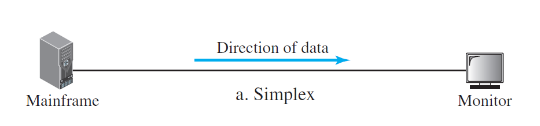
What is a simplex?
A data flow that only happens in one direction. In a simplex, once communication starts, the roles of sender and receiver can never change. So there is no return path.
Ex. A tv that broadcasts signals to the viewer
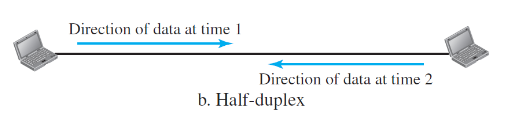
What is a half duplex?
A data flow where data can travel in both directions, but devices cannot transmit data simultaneously. They must take turns.
Ex. Walkie Talkie

What is a full duplex?
A data flow that allows for bidirectional communication that can happen simultaneously. This is used by most modern systems and generally works because they use separate channels, separate frequencies, wires, etc.
Ex. Phone Call

Why can’t data be transmitted simultaneously in a half duplex?
Because they share the same communication channel, and there is no means of splitting it, so trying to transmit data simultaneously would create signal interference.
What are the advantages/disadvantages of a simplex?
Advantages:
It is simple to design, and efficient
Disadvantages:
It does not allow for any kind of feedback, because data only travels in one direction

What are the advantages/disadvantages of a half-duplex?
Advantages:
Allows for 2-way communication
Disadvantages:
Results in lower performance, waiting, and potential collisions

Define a Network
A network is a collection of devices connected together to exchange information.

Define a Node
Any device or point capable of participating in a network
Ex. A laptop, router, tv, phone
Is a node always a computer?
No! Nodes can also be routers, switches, phones, and even printers.
Define an edge
An edge, also known as a link, is the connection between two nodes

Define a Host (end system)?
The source or destination of data; It is referred to as an end system because communication either starts or ends there.
Ex. A laptop, desktop, phone, server
Name the 3 main networking devices
Routers
Switches
Modems

Define what a router, switch, and modem each do (in simple terms)?
Routers = connect different networks together
Switch = connects devices within a local network
Modem = converts signals from your local network to your ISP (Internet Service Provider’s) communication infrastructure.
More about modems:
originates from the word modulation; converts the analog signals from a cable or wire into digital binary data for your computer, and vise versa (demodulation).

What factors determine what makes a good network?
Performance = how much data you can send per second (thoroughput);
Ex. your internet provider might advertise 1Gbps which could transfer 1 billion bits per second, but in reality, you may only achieve 850 mbps because of congestion and other limitations (this is the thoroughput)Data (Latency) = how long the data takes to travel
Reliability = How consistent the performance of a network is
Failure Rate = How often it experiences failure
Recovery Time = How quickly it takes the network to recover after a failure
Robustness = Whether or not the network has an alternative way to keep functioning (ex. another cable/data path available)
Security = How well the network can protect data from unauthorized access
What are the two different types of connections? Describe them briefly.
Point to Point Connections = a single communication channel between 2 devices. No other devices are allowed to participate.
Multipoint Connections = a single communication channel for 2 or more devices.

What are the advantages/disadvantages of point to point connections?
Advantages:
Capacity Reservation: If a cable supports 1 Gbps (Giga bits per second), then the entire available capacity belongs entirely to these 2 devices.
Secure & Private: because only two devices are involved
Fault detection is easy
Disadvantages:
Because you need separate links for separate connections, it can become very complicated to maintain a point to point connection for hundreds of devices.
What are the advantages/disadvantages of a multipoint connection?
Advantages:
Lower cost: because fewer cables are needed
Uses resources more efficiently, since the capacity of a single cable is shared amongst devices
Good for a large number of devices
Disadvantages:
Reduced performance: since the capacity of a single cable is shared among devices, when multiple users rely on the connection, performance decreases
Possible Collisions can occur
Less privacy
Harder to find faults
In a multipoint connection, what allows multiple devices to share the same communication channel?
Two things: Timesharing & Spatial Sharing
Timesharing = when devices take turns using a communication channel
Spatial sharing = where multiple devices use the channel simultaneously, usually by splitting communication in some way so they don’t interfere
Where are multipoint connections most commonly seen?
Multipoint connections are rarely seen in everyday life. They are most common in data centers.

What is a topology?
The geometric representation of the links and nodes in a network.

Name the 4 topologies
Mesh Topology
Star Topology
Bus Topology
Ring Topology
Describe the structure of a Mesh Topology. What kind of connection is it? point to point or multipoint?
The mesh topology is a type of point to point connection where every device is connected to every other device.
It is the most connected topology, and was invented over 50 years ago.

Describe the structure of a Star Topology. What kind of connection is it? point to point or multipoint?
The Star Topology is when each device has a single point to point connection to a central device, called a hub.

Describe the structure of a Bus Topology. What kind of connection is it? point to point or multipoint?
The bus topology is a multipoint connection where all devices share the same cable (called the backbone). Each device is attached to that backbone through a smaller connection called a drop line, and the drop line is attached to the backbone via another connection called a tap.
The tap is what actually allows devices to connect to the backbone without needing to cut the cable every time a new device is added.

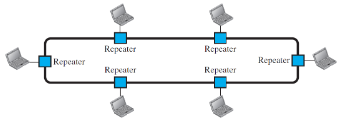
Describe the structure of a Ring Topology. What kind of connection is it? point to point or multipoint?
The ring topology is where a device is only connected to one of its immediate neighbors through a point to point connection, forming a loop. In the ring topology, data can only travel in one direction around the ring.
In this topology, there is also a device called a repeater attached to each node that helps regenerate/strengthen the signal before retransmitting it to the next device. This is necessary because the signal tends to weaken as it travels further throughout the ring.
What are the advantages/disadvantages of the Mesh topology?
Advantages:
Very reliable: even if one link fails, a node will still be connected to at least 2 other nodes, so communication can continue.
Easy to isolate faults: If the connection between A and B fails, then we know that the problem is either the cable connecting them or one of the devices
More secure, since there are typically only a few devices involved
Disadvantages:
High cost, because the number of links grows rapidly with the more devices you add; 5 devices = 10 links, 10 devices = 45 links, 100 devices = 4950 links.
Difficult to install and reconfigure
Wiring can take up a lot of space

What is the formula for calculating the number of links in the Mesh Topology?
The formula is N choose 2, or n(n-1) / 2
This is because every device is connected to 2 other devices, so you want to figure out all the possible combinations of pairs.

What are the advantages/disadvantages of the Star Topology?
Advantages:
Significantly fewer cables than the Mesh Topology
Easy to install and reconfigure
Costs much less, because for each computer you add, you only need one new cable
Disadvantages:
There is a single point of failure. If the hub goes down, everything goes down
Still requires more cables than the ring and bus design
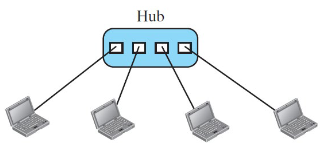
What is the formula for calculating the number of links in the Star Topology?
Formula for the number of links: n
(meaning if you are asked how many links for 12 devices in the star topology, the answer is 12).

What are the advantages/disadvantages of the Bus Topology?
Advantages:
There are very few cables
Easy to install
Disadvantages:
There is usually a limit on the number of taps that can be added to the backbone. It’s usually capped at a maximum of 30 devices or so. This number is decided by engineers who know that after more than 30 devices, the signal starts becoming distorted.
It is hard to isolate faults, since you don’t know whether the backbone, or one of the many devices on the backbone is causing the problem
Hard to re-install and re-connect new devices

What is the formula for calculating the number of links in the Bus Topology?
1 backbone line + n drop lines

What are the advantages/disadvantages of the Ring Topology?
Advantages:
Easy to install & reconfigure
Easy to isolate faults
Disadvantages:
A break in the ring can disrupt the whole network
Data can only travel in a single direction

What is the formula for calculating the number of links in the Ring Topology?
The formula for the number of links = n

Describe a LAN
A LAN (Local Area Network) is a relatively small, privately owned network that is usually limited to a building, office, campus, or home. The idea is that the organization who owns the network controls who uses it.
Ex. BCIT wifi being limited to students
Ex. Home wifi being limited to guests in your home who have the password
Describe a WLAN
A WLAN just stands for Wireless Local Area Network . It’s just a LAN that relies on wireless instead of wired transmission.
Describe a WAN
A WAN (Wide Area Network) is a wide network typically owned by a communications provider (i.e. Telus, Rogers, Bell), that covers cities, provinces, countries, states, etc.

What is an internetwork?
A collection of independent networks connected together.
For example, let’s say you live in Canada, where Telus builds most of the infrastructure that connects Vancouver, Calgary, Toronto, etc. This is fine if you only want to keep your communication within Canada. But, what if you wanted to contact your brother Bilo living in Romania? Well, over in Romania, they don’t use the Telus internet service provider, they use Vodafone Romania. So, in order to speak to Bilo, you would need two very large routers connecting the two wide area networks: Vodafone & Telus. This is what is known as an internetwork.

What is the Internet?
The Internet is just an enormous collection of interconnected networks.
Distinguish between internet and The Internet
internet (lowercase) = refers to any collection of interconnected networks. For example, you could have an interconnected network within your workplace/company that you work at.
The Internet (uppercase) = refers to the global, public, collection of interconnected networks that span the entire world.

What is an access network?
It is the network that gives end users access to the internet.
By default, your computer is not directly connected to the internet backbone. But it can connect to this backbone through access networks, like BCIT’s network (which is actually connected through Telus), your home Telus connection, your Shaw Cable internet, etc.

What is the internet backbone?
The backbone is a large collection of fiber optic network cables, massive routers, and high speed international links that transport all the traffic between the larger/smaller networks that connect to it.

What is a peering point?
It’s the point where international service providers go to exchange traffic;
I.e. where the Telus network, Google network and Microsoft network reconvene.
For example, whenever a user on the Telus network wants to visit youtube.com, which belongs to Google, they first need to enter Google’s network. So the two networks must exchange traffic.
These peering points are usually made up of large data centers, large routers, etc.

What is the internet standard?
It is a formal specification that describes EXACTLY how some aspect of internet communication should work. It gives very specific answers to questions about how long an address should be, or how error detection should work, what should happen if data is lost, etc.
Why are internet standards important?
They’re important because they allow for interoperability, which means the ability for different systems to communicate and work together.
If there was no interoperability, Microsoft devices would only be able to communicate with other Microsoft devices, Cisco with other Cisco devices, etc. which would severely limit communication around the globe
Who creates the internet standard?
A committee called the IETF (the Internet Engineering Task Force).
They are a standards committee/organization that propose specifications for the internet, review them, test them, then implement them as a new Internet Standard.
What are RFCs?
Request for comments. They refer to the technical specification documents that describe potential internet protocols and standards.
Why does RFC stand for “Request for Comments”? (Optional to know)
The reason behind it comes from the early days of networking, where researchers would propose a document detailing different technical specifications for a network standard, and would then ask other researchers for comments/feedback.
If RFCs just describe standards, why isn’t it just called “the standard”? (Optional to know)
Because many RFCs are just proposals for new standards, and less than 2% of all RFCs are ever implemented as part of the current Internet standard.
When was the first RFC written? (Optional to Know)
It was written in 1969 by a 25 year old graduate student, and called RFC-1.