Pediatrics: Assistive Technology
 Call Kai
 Learn
Learn Practice Test
 Spaced Repetition
 Match
Match Flashcards
 Knowt Play
1/17

There's no tags or description
Looks like no tags are added yet.
Name | Mastery | Learn | Test | Matching | Spaced | Call with Kai | Chat |
|---|
No analytics yet
Send a link to your students to track their progress
18 Terms
assistive technology
low-tech and high-tech devices that are used to increase, maintain, or improve functional capabilities of individuals with disabilities
low-tech
inexpensive
simple to make
easy to obtain
e.g., pencil-and-paper communication boards
high-tech
more expensive
more difficult to make
may take longer to obtain
e.g., wheelchairs, augmentative communication devices
AT evaluation
first identify activities that the child or family needs/wants him/her to do
Canadian Occupational Performance Measure (COPM)
observe in the natural environment
consider all factors influencing participation in activities
motor, sensory and perceptual, cognitive and communication, psychosocial, context
trial period to find a good match
careful documentation during the trial periods to show how the system helps improve function
the family and team make the final decision as to which AT is used
AT funding
can come from various sources, therefore strong supporting documentation is needed to show medical necessity
universal design (UD) + 7 principles
concept of making all products and the environment physically pleasing and usable to the greatest extent possible by everyone, regardless of their age, ability, or status in life
equitable use— useful to people with diverse abilities
flexibility in use— accommodates a wide range of abilities
simple and intuitive use— easy to understand
perceptible information— communicates necessary information effectively to the user
tolerance for error— minimized hazards
low physical effort— can be used with a minimum of fatigue
size and space for approach and use regardless of user’s body size, posture, or mobility
universal design of learning (UDL)
educational standpoint where multiple options of how to learn, demonstrate learning and engage with learning are used to match diverse student abilities
alternative and augmentative communication
(AAC) allows communication that does not require speech with the purpose of enabling communication; supports the development of…
language
literacy skills
enhances participation
facilitates friendships
supports interactions with people
grading— lowest tech solution
make sure to not go overboard with the assistance and limit their ability to develop their own skills
because of this and other considerations like price, we always try to use the LOWEST TECH SOLUTION POSSIBLE
the 3 C’s
the 3 C’s are what we use Assistive Tech for (CCCAT)
Communicate (alternatives to speech)
Control (controlling/interacting with the environment— switches)
Compute (using a computer)
***”Com, Con, Com” (come, come, come kitty!)
assessments
Efficiency of Assistive Technology and Services (EATS)
Matching Person and Technology (MPT)
Psychosocial Impact of Assistive Devices Scale (PIADS)
Quebec User Evaluation of Satisfaction with Assistive Technology (QUEST)
picture based communication
for kids with trouble communicating, we can use symbols instead of words
pictures
even simpler, for children who have trouble with pictures, we can use physical objects to represent ideas
e.g., a circular hair tie for circle time, a small chain for recess
pictures can be presented on a board or book called a Picture Exchange Communication System (PECS)

AAC devices
need to pick a device a child can use based on their abilities
require motor ability
pointing, touching, keyboarding, switches, joysticks, or mouses
indirect methods
for significant physical impairments
voice recognition or visual scanning
switches + 2 types
for kids with physical impairments who need help interacting with their environment
initially try a low-tech AT like a switch
simple switches can be used for turning devices on and off, such as a toy for play or electronics in a room
EADL— Electronic Aid of Daily Living
ECU— Environmental Control Unit
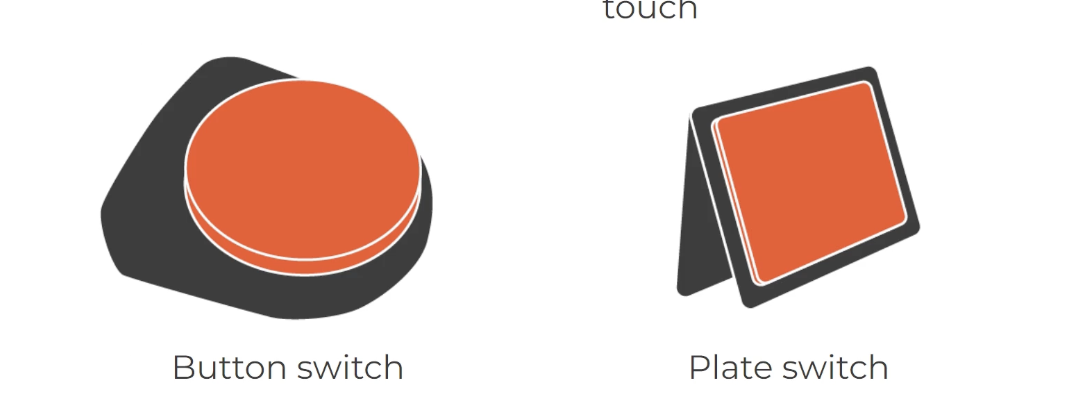
button switch
minimal control of UE; just press down (though requires more force than a plate switch)
can be paired with a PECS to make it an electronic communication device (e.g., press shirt to indicate they want their shirt)
plate switch
same, but better for those with poor strength and/or minimal hand movement
very light touch
high-tech electronic communication
speech-generating devices (SGDs)
synthesized speech (e.g., computer voice, like Siri)
digitized speech (e.g., human voice, more natural)
cell or smart phones
tablets or computers
computers
computers are flexible and allow students to complete high-quality work like their peers
kids with UE impairments may use a computer instead of handwriting altogether
“least change” principle means we change as few things as possible (so that children don’t feel as isolated/different)
we can interact with computers through:
keyboard
mouse
screen (monitor)
computer: keyboard
difficulty due to limited UE function? —> interventions…
change positioning of keyboard
adapting keyboard:
key sensitivity, keyguard or expanded keyboard w/ larger keys, sticky keys, mouthstick, headstick, voice recognition
typing speed:
word prediction, macros and abbreviation expansion (allows you to use initals (e.g., “SL” —> “Sharon Lim”)
computer: mouse
difficulty due to limited UE function? —> interventions…
change positioning
change sensitivity
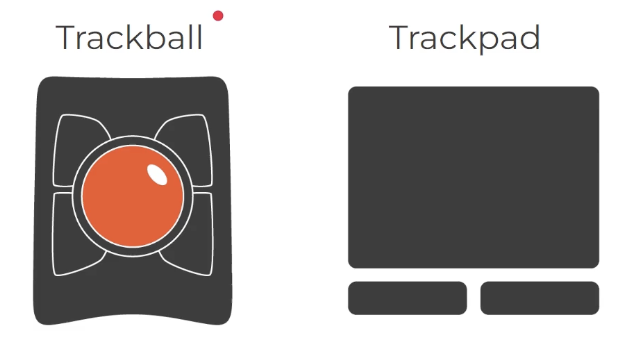
trackball
does not require much UE function; just requires movement of the palm or fingers
trackpad
does not require much UE function; just requires movement of fingers
computer: screen (monitor)
difficulty due to visual issues? —> interventions…
reduce glare, overhead lighting
increase contrast, font size
screen magnifier
voice output tool
instructional technology
literacy skills —>
reading skills —>
writing skills —>
math —>
cognitive prosthetic —>
literacy skills —> text reader, electronic books
reading skills —> adapted books, electronic books
writing skills —> adapted paper, keyboard, word prediction
math —> grid paper, handheld calculator
cognitive prosthetic —> watch with alarm, GPS, earphone