CS0045 Module 3
 Call Kai
 Learn
 Practice Test
 Spaced Repetition
 Match
 Flashcards
 Knowt Play
1/58

There's no tags or description
Looks like no tags are added yet.
59 Terms
These functions are essential for rendering bitmap or stroke-based text in OpenGL, particularly when using the GLUT toolkit
Text & Raster Positioning Function
They operate within the rasterization stage of the graphics pipeline, where pixel-based operations are performed
Text & Raster Positioning Function
Purpose: Sets the current raster position in 2D space
Text & Raster Positioning Function
Parameters: x, y: Floating-point coordinates in object space
Text & Raster Positioning Function
Usage Context:
Defines where bitmap text or pixel images will be drawn
Transformed by the current model view and projection matrices
Text & Raster Positioning Function
Sets the raster position in 2D space for pixel-based operations such as bitmap text or image rendering
glRasterPos2f()
Coordinates are specified in the current model view and projection context
glRasterPos2f()
Renders a string of bitmap characters at the current raster position using a specified GLUT bitmap font
glutBitmapString()
Commonly used for simple on-screen text in legacy OpenGL
glutBitmapString()
drawBitmapString() is an extension of freeglut, therefore you need to add this to your code
#include <GL/glut.h>
#include <GL/freeglut_ext.h>
#include <GL/glut.h>
#include <GL/freeglut_ext.h>

using namespace std;

void textSample(){
    glClear(GL_COLOR_BUFFER_BIT);

    const unsigned char str[100] = {"FEU-TECH"};
    glColor3f(1.0f, 1.0f, 1.0f);
    glRasterPos2f(0.0, 0.0);
    glutBitmapString(GLUT_BITMAP_HELVETICA_18, str);

    glFlush();
}

int main(int argc, char** argv){
    glutInit(&argc, argv);
    glutCreateWindow("Line Strip");
    glutDisplayFunc(textSample);

    glutMainLoop();

return 0;
}
Drawing Text (*Note: Set the color before the position)
glColor3f(0.0f, 0.0f, 1.0f);Blue
glColor3f(1.0f, 0.0f, 0.0f);Red
glColor3f(0.0f, 1.0f, 0.0f);Green
glColor3f(1.0f, 1.0f, 1.0f);White
glColor3f(1.0f, 1.0f, 0.0f);Yellow
glColor3f(1.0f, 0.0f, 1.0f)Magenta
GLUT_STROKE_ROMAN
GLUT_STROKE_MONO_ROMAN
GLUT_BITMAP_9_BY_15
GLUT_BITMAP_8_BY_13
GLUT_BITMAP_TIMES_ROMAN_10
GLUT_BITMAP_TIMES_ROMAN_24
GLUT_BITMAP_HELVETICA_10
GLUT_BITMAP_HELVETICA_12
GLUT_BITMAP_HELVETICA_18
Available GLUT Font Constants
A GLUT stroke font rendered using line segments, allowing scalable vector-based text. Suitable for zoomable or transformable text in 3D scenes
GLUT_STROKE_ROMAN
A fixed-size bitmap font in Helvetica style with 12-point height. Used for rendering small, readable text in 2D overlays or HUDs
GLUT_BITMAP_HELVETICA_12
Refer to the foundational steps required to create and prepare a graphical window for rendering OpenGL content
Window Initialization & Configuration
This process is typically handled using the GLUT (OpenGL Utility Toolkit), which abstracts platform-specific windowing operations
Window Initialization & Configuration
Key Components:
glutInit()
glutInitWindowSize(int width, int height)
glutInitWindowPosition(int x, int y)
glutCreateWindow(const char *title)
Window Initialization & Configuration
Should only be called once in a GLUT program
glutInit()Used to initialize the GLUT library
glutInit()Sets the window size and position respectively
glutInitWindowSize()
glutInitWindowPosition()Usage:
glutInitWindowSize(int width, int height);
glutInitWindowPosition(int x, int y);widthWidth in pixels
heightHeight in pixels
x Window X location in pixelsy Window Y location in pixelsCreates a top-level window
glutCreateWindow()Usage:
int glutCreateWindow(char *name);name //ASCII character string for use as window nameglutCreateWindow()Requests that current window be made full screen
glutFullScreen()Usage:
void glutFullScreen(void);glutFullScreen()Marks the current window as needing to be redisplayed
glutPostRedisplay()Most of the time used in callbacks
glutPostRedisplay()Usage:
void glutPostRedisplay(void);glutPostRedisplay()Enable interactive graphics applications by capturing and responding to user-generated events such as keyboard presses, mouse movements, and clicks
Input Handling Functions
In GLUT, these functions are registered as callback handlers, allowing the application to define custom behavior for each input type
Input Handling Functions
Sets the display callback for the current window
glutDisplayFunc()Usage:
void glutDisplayFunc(void (*func) (void));func //The new display callback functionglutDisplayFunc()Sets the keyboard callback for the current window
glutKeyboardFunc()Usage:
void glutKeyboardFunc(void (*func) (unsigned char key, int x, int y));glutKeyboardFunc()
#include <iostream>
#include <GL/glut.h>
#include <GL/freeglut_ext.h>

using namespace std;

void defaultDisplay();
void keyboardMonitor(unsigned char key, int x, int y);

float px, py;

int main(int argc, char** argv){
    glutInit(&argc, argv);
    glutInitWindowSize(1024, 768);
    glutInitWindowPosition(200,50);

    glutCreateWindow("My First OpenGL");
    //glutFullScreen();
    glutDisplayFunc(defaultDisplay);
    glutKeyboardFunc(keyboardMonitor);

    glutMainLoop();

return 0;
}

void keyboardMonitor(unsigned char key, int x, int y){
    cout << key << endl;
    switch(key) {
        case 'a':
            px -= .02f;
            break;
        case 'd':
            px += .02f;
            break;

        default:
        px=0.0f;
    }
    glutPostRedisplay();
}

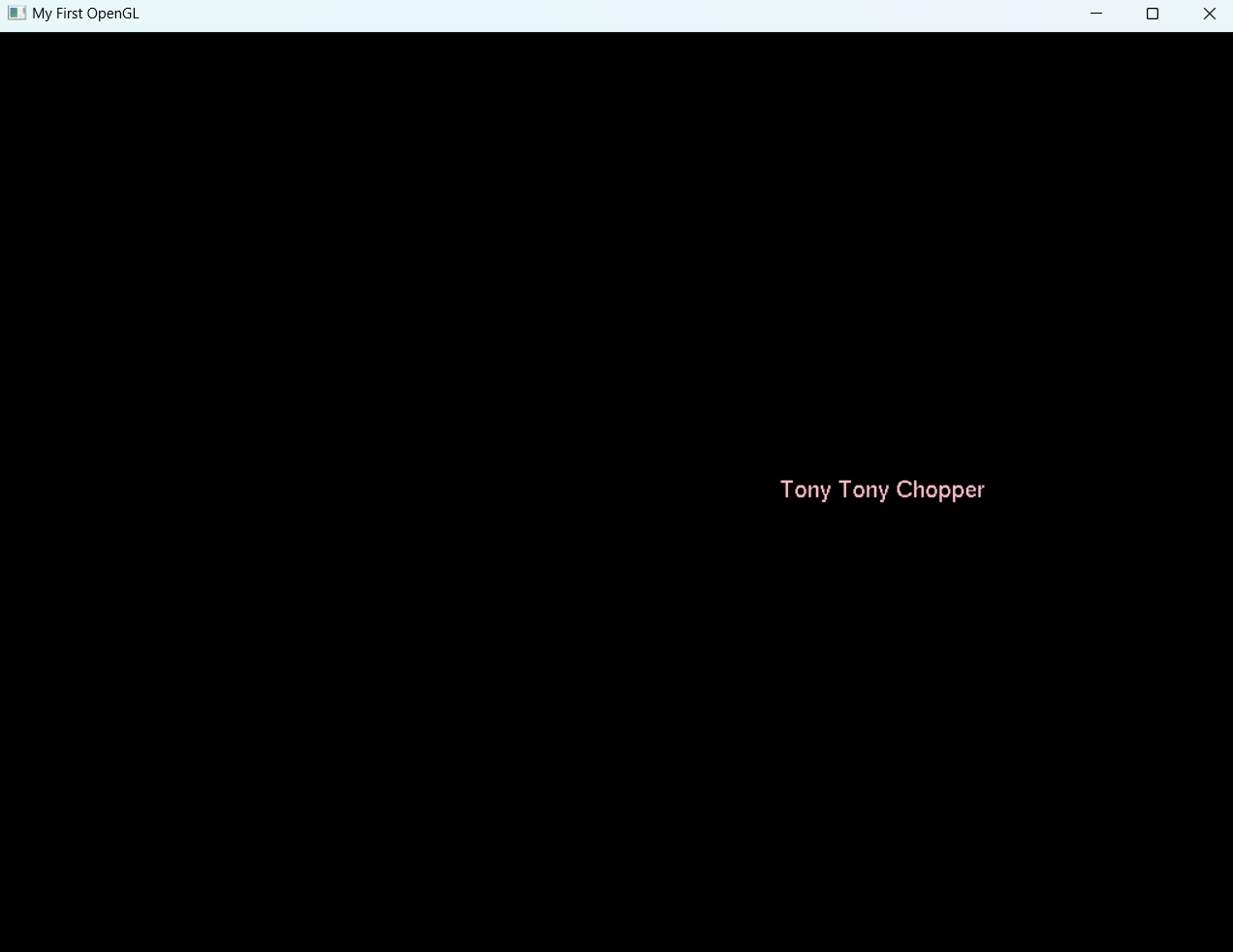
void defaultDisplay(){
    glClear(GL_COLOR_BUFFER_BIT);

    const unsigned char str[100] = "Tony Tony Chopper";
    glColor3f(1.0f,0.75f,0.8f);
    glRasterPos2f(px,py);
    glutBitmapString(GLUT_BITMAP_HELVETICA_18, str);


    glFlush();
}
glutKeyboardFunc() Sample Code
Sets the mouse callback for the current window
glutMouseFunc()Usage:
void glutMouseFunc(void (*func) (int button, int state, int x, int y));func //The new mouse callback funtionglutMouseFunc()When a user presses and releases mouse buttons in the window, each press and each release generates a mouse callback
glutMouseFunc()The button parameter is one of GLUT LEFT BUTTON, GLUT MIDDLE BUTTON, or GLUT RIGHT BUTTON
glutMouseFunc()The state parameter is either GLUT UP or GLUT DOWN
glutMouseFunc()
void mouseMonitor(int button, int state, int x, int y) {
    if (button == GLUT_LEFT_BUTTON) {
        if ( state == GLUT_DOWN)
            cout << "Left button was clicked..." << endl;
        else
            cout << "Left button was released..." << endl;
    } else if(button == GLUT_RIGHT_BUTTON){
        cout << "Right button was clicked..." << endl;
    } else {
        cout << "Middle button was clicked..." << endl;
    }
    cout << x << " " << y << endl;
    //cout << button << endl;
}glutMouseFunc()The passive motion callback for a window is called when the mouse moves within the window while no mouse buttons are pressed
glutMotionFunc(), glutPassiveMotionFunc()Usage:
void glutMotionFunc(void (*func) (int x, int y));
void glutPassiveMotionFunc(void (*func) (int x, int y));
func //The new motion or passive motion callback functionglutMotionFunc(), glutPassiveMotionFunc()Sets the mouse enter/leave callback for the current window
glutEntryFunc()Usage:
void glutEntryFunc(void (*func) (int state));func //The new entry callback funtionglutEntryFunc()The state callback parameter is either GLUT LEFT or GLUT ENTERED depending on if the mouse pointer has last left or entered the window
glutEntryFunc()Sets the global idle callback
glutIdleFunc()Sets the global idle callback to be func so a GLUT program can perform background processing tasks or continuous animation when window system events are not being received
glutIdleFunc()Usage:
void glutIdleFunc(void (*func) (void));glutIdleFunc()Registers a timer callback to be triggered in a specified number of milliseconds
glutTimerFunc()void glutTimerFunc(unsigned int msecs, void (*func) (int value), value);msecs //Number of milliseconds to pass before calling the callback
func // The timer callback funtion
value // Integer value to pass to the timer callbackglutTimerFunc()
#include <iostream>
#include <windows.h>
#include <GL\glut.h>
#include <GL\freeglut_ext.h>

using namespace std;

void defaultDisplay();
void keyboardMonitor(unsigned char key, int x, int y);
void mouseMonitor(int button, int state, int x, int y);
void detectMotion(int x, int y);
void detectPassiveMotion(int x, int y);
void mouseEntryDetector(int state);
void animateText();
void animateString(int value);

float px, py;

int main(int argc, char **argv){
    glutInit(&argc, argv);
    glutInitWindowSize(1024,768);
    glutInitWindowPosition(200,50);

    glutCreateWindow("My First OpenGL");
    //glutFullScreen();
    glutDisplayFunc(defaultDisplay);
    glutKeyboardFunc(keyboardMonitor);
    glutMouseFunc(mouseMonitor);
    glutMotionFunc(detectMotion);
    glutPassiveMotionFunc(detectPassiveMotion);
    glutEntryFunc(mouseEntryDetector);
    //glutIdleFunc(animateText);
    glutMainLoop();

    return 0;
}

void mouseEntryDetector(int state) {
    if (state == GLUT_LEFT){
        cout << "Mouse has left the application " <<endl;
    } else{
        cout << "Mouse has re-entered the application " << endl;
    }
}
void animateString(int value) {
    if (value==1) {
        px += 0.02;
    } else{
        px -= 0.02;
    }
    glutPostRedisplay();
}

void animateText(){
    Sleep(1000);
    px += .02f;
    glutPostRedisplay();
}
    void detectMotion(int x, int y){
        cout << x << " " << y << endl;
}
    void detectPassiveMotion(int x, int y){
        cout << x << "P " << y << endl;
}

void mouseMonitor(int button, int state, int x, int y) {
    if (button == GLUT_LEFT_BUTTON) {
        if ( state == GLUT_DOWN)
            cout << "Left button was clicked..." << endl;
        else
            cout << "Left button was released..." << endl;
    } else if(button == GLUT_RIGHT_BUTTON) {
        cout << "Right button was clicked..." << endl;
    } else{
        cout << "Middle button was clicked..." << endl;
    }
        cout << x << " " << y << endl;
        //cout << button << endl;
}

void keyboardMonitor(unsigned char key, int x, int y){
    cout << key << endl;
    switch(key){
        case 'a':
            px -= .02f;
            break;
        case 'd':
            px += .02f;
            break;

        default:
            px=0.0f;
    }
    glutPostRedisplay();
}

void defaultDisplay(){
    glClear(GL_COLOR_BUFFER_BIT);

    const unsigned char str[100] = "FEU-TECH";
    glColor3f(0.0f,0.0f,1.0f);
    glRasterPos2f(px,py);
    glutBitmapString(GLUT_BITMAP_HELVETICA_18, str);

    glFlush();

    glutTimerFunc(1000,animateString,2);
}
Sample Program
