LIST METHODS
 Call Kai
 Learn
Learn Practice Test
 Spaced Repetition
 Match
Match Flashcards
 Knowt Play
1/13

There's no tags or description
Looks like no tags are added yet.
14 Terms
list creation
created by placing all the items (elements) inside a square bracket [], separated by commas
can have any number of items and they may be of different types (int, float, string, etc)
Sample: name = [1,2,3] # same data types
Sample: name = [‘1’, 2, 3.4] # mixed-data types
slice list
accessing range of items in a list by using the slicing operator [] using colon :
can be best visualized by considering the index to be between the elements
last number is not included in the display
Syntax: start:end
Sample: [0:4] #positive →
Sample: [-2:-1] #negative → starts at the end element
append()
a list method that adds an element (single item) to the end of the list
it only modifies the original list, doesn’t return any value
takes a single item and adds it to the end of the list
item can be number, string, another list, dictionary, etc
Syntax:list.append(item)

count()
its a method that counts how many times an element has occured in a list and returns it
it takes a single element
element - element whose count is to be found
this method returns the number of occurences of an element in a list
Syntax: list.count(element)


extend()
this method extends the list by adding all items of a list to the end
it takes a single argument (a list) and adds it to the end
this method also add element of other native data types, like tuples and set to the list
Syntax: list.extend(tuple_type)

index()
this method search and find given elements in the list and return its position
if the same element is present more than once, this method returns its smalles/first position
indexces in python starts at 0
this method returns the index of the element in the list
this method takes a single argument
element - element that is to be searched
Syntax: list.index(element)

insert()
this method inserts the element to the list at the given index
it function takes two parameters:
index - position where element needs to be inserted
element - the element ton be inserted in the list
this method only inserts the element to the list, it doesnt return any value
Syntax: list.insert(index, element)

pop()
this method takes a single argument (index) and removes the element present at that index from the list
if the index passed to this is not in the range, it throws an error (out of range exception)
the parameter passed to this method is optional
if no parameter is passed, the default index -1 is passed as an argument
this method removes and returns the element at the given index and updates the lsit
Syntax: list.pop(index)

copy()
this method (also known as aliasing) returns a shallow copy of the list
a list can be copied with = operator
old_list = [1,2,3]
new_list = old_list
the problem with this is the list in this way is that if you modify the new_list, the old_list will also be modified
Syntax: new_list = old_list
![<ul><li><p>this method (also known as aliasing) returns a shallow copy of the list</p></li><li><p>a list can be copied with = operator</p><ul><li><p>old_list = [1,2,3]</p></li><li><p>new_list = old_list</p></li></ul></li><li><p>the problem with this is the list in this way is that if you modify the new_list, the old_list will also be modified</p></li><li><p>Syntax: new_list = old_list</p></li></ul><p></p>](https://assets.knowt.com/user-attachments/e6571a15-3033-438b-8533-a305fb6ba027.png)
shallow copy
using this method, you can keep the original list (unchanged) when the new list is modified
the copy() doesn’t take any parameters
it will return a list, doesnt’t modify the original list
Syntax: new_list = list.copy()

remove()
this method searches for the given element in the list and removes the first matching element
it takes a single element as an argument and removes it from the list
if the element passed to this method doesn’t exist, valueError exception is thrown
Syntax: list.remove(element)

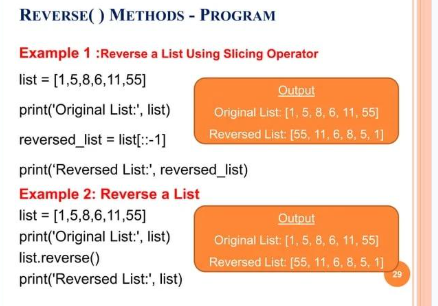
reverse()
this method reverses the elements of a given list
the function doesn’t return any value
only reverses the elements and updates the list
Syntax: list.reverse()
sort()
this method sorts the elements of a given list in a specific order → ascending or descending
Syntax: list.sort()

dictionary
this is an unordered collection of items; has a key: value pair
in creating this, you place items in a curly braces {} separated by comma
an item has a key and the corresponding value expressed as a pair, key:value
while values can be of any data type and can repeat, keys must be of immutable (string, number, or tuple) with immutable elements) and must be unique
