Unit 1
 Call Kai
 Learn
Learn Practice Test
 Spaced Repetition
 Match
Match Flashcards
 Knowt Play
1/44

There's no tags or description
Looks like no tags are added yet.
Name | Mastery | Learn | Test | Matching | Spaced | Call with Kai | Chat |
|---|
No analytics yet
Send a link to your students to track their progress
45 Terms
Assistive Tech (AT)
fills the gap between performance skills and performance demands
any item, piece of equipment, or system (commercially off the shelf, modified, or customized) that is used to increase or maintain functional capacities of individuals with disabilities
AT vs. Rehabilitation Tech
Examples:
RT: functional electrical stimulation
AT: button hook, power mobility device, eye tracking software, reacher, hearing aids, screen reader/speech to text software
Both: exoskeleton, virtual reality
RT aka Therapeutic Use of Technology (TUT):
Remedial approach with graded activity focused on improving occupational performance
Task-oriented, high repetition and intensity
Ex: physical agent modalities, ultrasound, diathermy, paraffin
Same tech may function as RT/TUT or AT depending on intervention goal
Match the right tech to the right person

Low-Tech AT
Simple tech
Typically no power source
Easy to understand and use
No specialized training
Low cost
Ex: large print books, handheld magnifiers, pencil grips, non-slip mats
Mid-Tech AT
Increased complexity ot specialized systems of device
usually user-friendly and customizable
minimal training
typically requires electronic or battery power source
moderate cost
decreased level of clinical reasoning and creativity
Ex: calculator, audio books, electronic calendars, voice memo, basic communication devices
High-tech AT
advanced and specialized systems/devices
usually complex and computerized
cutting-edge solutions
significant training and ongoing support
larger financial investment
clinical reasoning driven by systems and protocols
Ex: speech-generating device, voice-recognition software, computer-access aids with eye-tracking tech, advanced prosthetics, smart home system
Models: International Classification of Functioning, Disability, and Health (ICF)
ICF tells us where the problem is, does not tell us what factor we should consider when making AT decision
too broad, need an OT specific model

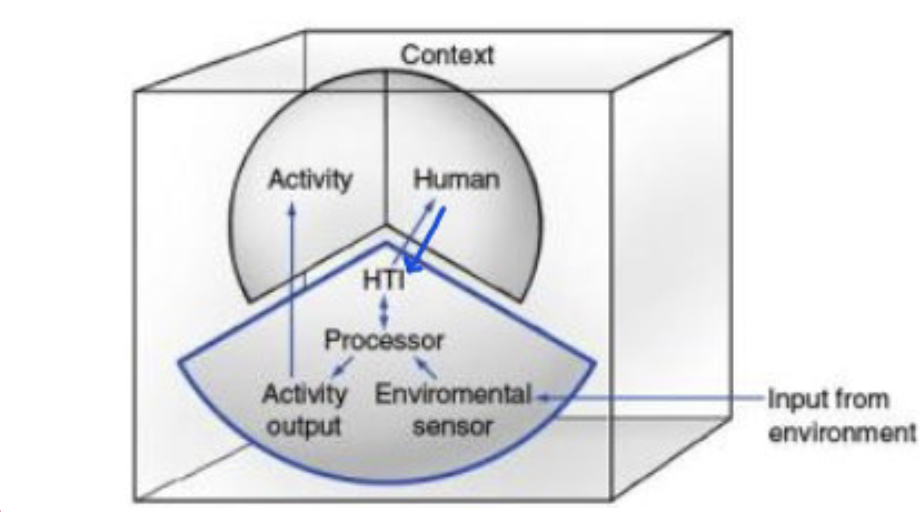
Human Activity Assistive Technology Model (HAAT)
influenced by PEOP and CMOP-E
helps understand how AT interacts with person, environment, and activity
Activity- execution of task, tasks that a person needs/wants to do
cognitive, physical, sensory, perceptual, communicative, and affective requirements for activity
Human- motor, sensory, cognitive, and affective abilities; motivation; novice vs. expert
Context- physical, cultural, social, institutional
AT- human-technology interface (HTI)- how the user controls the AT system and receive feedback
environmental sensor- light sensors (cameras), sound sensors (microphones), motion sensors, and location sensors (GPS)
processor
activity output
Shortcoming- does not tell us where to start or how to solve the problem

Person-Environment-Occupation-Performance Model (PEOP)
client-centered, top-down, based on ICF
Person (intrinsic factor)- physiological, cognitive, spiritual, neuro-behavior, psychological
Environment (extrinsic factor)- social support, social and economic system, culture and values, built environment/technology, natural environment
Occupation- activities, tasks, roles
Performance- actual act of doing
helps identify barriers and facilitators to occupational performance
can use AT to remove barriers and improve performance
Shortcomings: no associated assessment tool and no direct outcome measure; challenge of weighting the different factors, not centered around AT (one of many environmental factors)


Canadian Model of Occupational Performance-Engagement (CMOP-E)
client-centered, top-down
Spirituality- essence of self, gives determination and meaning
Affective- social and emotional functions
Physical- sensory, motor, and sensorimotor functions
Cognitive- metal functions, perception, concentration, memory, comprehension, judgement, reasoning
Occupation- self-care, productivity, leisure
Environment- physical, social, cultural, institutional
Engagement- person/occupation/environment fit, occupational performance, occupational engagement
designed to evaluate the level of difficulty and satisfaction with occupational performance, focus on identifying meaningful occupations
goal is to promote occupational engagement
can use AT to improve performance and satisfaction with occupations
Shortcoming: not specific to AT
Pro: comes with COPM outcome measure


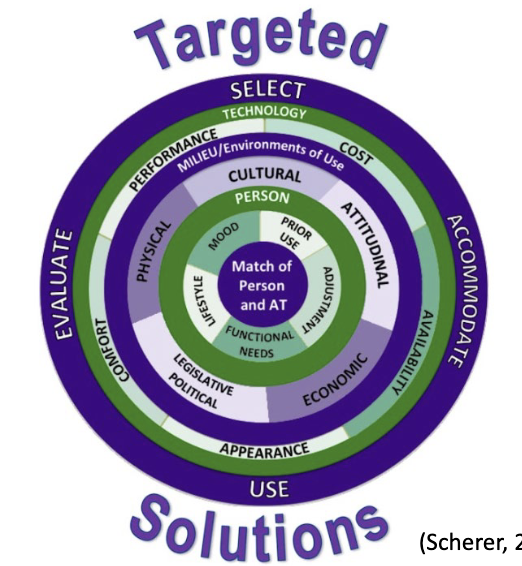
Matching Person and Technology Model (MPT)
organizational framework to assess and recommend successful use of a variety of AT
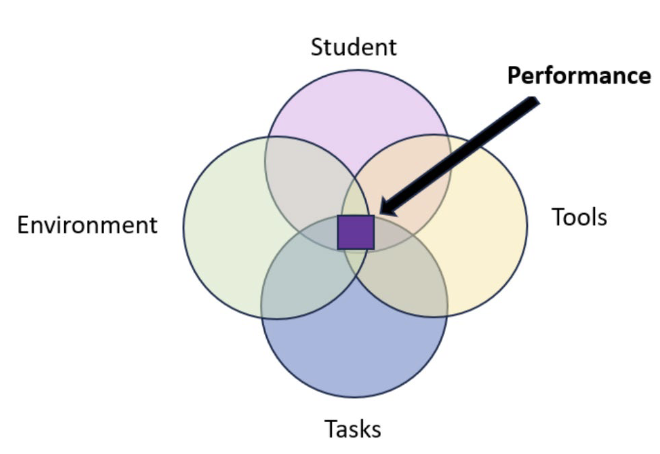
Student, Environment, Tasks, and Tools Model (SETT)
student-based tool to use when deciding what tools and strategies work
promote collaborative decision-making in all phases of AT service design and delivery
focus on understanding student’s: abilities and challenges, interests and preferences, communication/physical/sensory/cognitive needs, strategies and supports, academic and social goals
tools- devices, services, and strategies a student needs to succeed
tools should not be decided until the IEP team examines SET factors
Quality Indicators of AT (QIAT)
collaborative self-assessment conducted by a group of stakeholders
goal is for service providers and school districts to evaluate current practice and create plans to improve
consideration of AT needs, assessment of AT needs, AT in the IEP, AT implementation, evaluation of effectiveness, AT in transition, administrative support for AT, AT professional dev
outcome measure that is scored on a 5-point Likert scale
TAKE HOME MESSAGE

Universal Design
enables and empowers a diverse population by improving human performance, health/wellness, and social participation
usable by all people, to the greatest extent possible, without need for adaptation or specialized design
equitable use, flexibility in use, perceptible info, tolerance for error, low phyical effort, size and space for approach and use
Equitable Use
useful and marketable to people with diverse abilities
same means for all users
avoid segregating or stigmatized
provisions for privacy, security, and safety for all
design is appealing to all
Flexibility in use
design accommodates a wide range of individual preferences and abilities
choice in methods of use
accommodates R or L handed use
facilitates user’s accuracy and precision
adaptability to user’s pace
Simple and Intuitive to Use
easy to understand, regardless of user’s experience, knowledge, language skills, or current concentration level
eliminate complexity
consistent with expectations and intuition
accommodate wide range of literacy and language
provide effective prompting and feedback
Perceptible Info
design communicate’s info effectively to the user, regardless of ambient conditions or user’s sensory abilities
different modes for redundant presentation of essential info
maximize legibility
provide compatibility with a variety of techniques or devices used by people with sensory limitations
Tolerance for Error
design minimized hazards and adverse consequences of accidental or unintended actions
provide warnings of hazards and errors
provide fail safe features
discourage unconscious action in tasks that require vigilance
Low Physical Effort
design can be used efficiently and comfortable and with a minimum of fatigue
maintain neutral body position
use reasonable operating forces
minimize repetitive actions
minimize sustained physical effort
Size and Space for Approach and Use
appropriate size and space is provided for approach, reach, manipulation, and use regardless of user’s body size, posture, or mobility
clear line of sight to important elements for seated and standing users
make reach to all component comfortable for seated/standing users
accommodate variations in hand and grip size
adequate space for use of assistive devices or personal assistance
Ergonomics
designing and arranging things people use so that the people and things interact most efficiently and safely
prevent discomfort and injuries caused by work
fitting workstation and tools to employees
common ergonomic injuries: carpal tunnel, epicondylitis, tenosynovitis, muscle strain, tendinitis, trigger finger, low back pain
ergonomic risk factors: repetition, forceful exertions, awkward postures, holding a position without movement, localized constant pressure
Principles of Ergonomics
work in neutral postures
reduce excessive force
keep everything in reach
work at proper height
reduce excessive motions
minimize fatigue and static load
minimize pressure points
provide clearance
move, exercise, stretch
maintain a comfortable environment
Augmentative Alternative Communication (AAC)
used to help people who are not able to communicate verbally
can use pictures, sign language, low-tech boards with recorded voices, or high-tech devices that can be customized for everyone individually
No Tech: Pictures
picture exchange communication system (PECS) uses visual symbols
aim is to teach intentional, functional communication and to allow users to communicate wants and needs

Low Tech: Simple Voice Output Device
designed to teach cause and effect
relies on pre-programmed phrases and sentences for communication
communication partner records their voice for the user to select an icon

High Tech: Speech Generating Device
commonly found on a tablet; user forms communication with a synthesized voice
most commonly used for pediatrics are single meaning icon systems and multi-meaning icon systems
Multi-meaning icon systems
embed new words within words already stored in system
each word can be accessed with max of 3 hit selection
uses motor planning, which results in efficient communication and consistency
Language Acquisition through Motor Programming (LAMP) Words for Life
84 icons
bilingual- English, Spanish,Greek, Arabic
symbol based with paired text to support literacy
recommended for those who require consistent motor plan that does not change, adequate fine motor skills, can tolerate up to 3 hits per word
visual impairment pages with high contrast
Single meaning Icon systems
require that every word has an individual button
as vocab grows, this causes more linking or navigating through pages to communicate phrases/sentences
can utilize features including predictive text
recommended for patients who can tolerate icons being in different locations, those who are ready to start forming sentences, patient who need quick access to vocab words
ex: TouchChat, Snap Core First, Proloquo2Go
TouchChat
most common for pediatrics
able to choose from various grid sizes
English, Spanish, French options
symbol-based with paired text
customizable pictures and vocab
Snap Core First
highly customizable - changeable grid, change background and text color, add pictures
core words: more, done, want on home page
Proloquo2Go
most commonly purchased as an app
highly customizable grid sizes
various vocab levels
customizable folders
Modalities for choosing words
direct selection-touch access; pressing button with fine motor skill
switches- buttons with ability to record communication partner’s voice, for those with more limited fine motor skills
eye tracking- person can control a computer by looking at words; for those with no or limited UE use
Ecological Validity
extent to which research findings can be applied to real-world settings and natural behaviors
Do adult game interventions work in rehab?
is the patient interested in playing games? are they motivated to participate in therapy
some patients care more about the game than the therapy aspect; insist on games that are not as beneficial for them
some patients don’t care about the game or the therapy; unmotivated, low expectation for recovery
some have severe cognitive/motor/sensory impairments that limit their understanding of games or ability to participate
some patients are more motivated for conventional therapy but are not motivated by game interventions
Human engineering research laboratories (HERL)
mission- improve mobility and function of people with disabilities through clinical research and advanced engineering
interdisciplinary team: engineers, clinicians, business partners, end-users
participatory action design: user need identification → proof-of-concept→ initial user feedback (feasibility) → prototype implementation → efficacy evaluation → usability evaluation → consumer trials (acceptance and cost) → best practice evidence (policy)
Trends in AT
health monitoring
smart home, aging-in-place
user interface, ease of use, task load demand
robotic wheelchair, transfer assist, robot manipulator
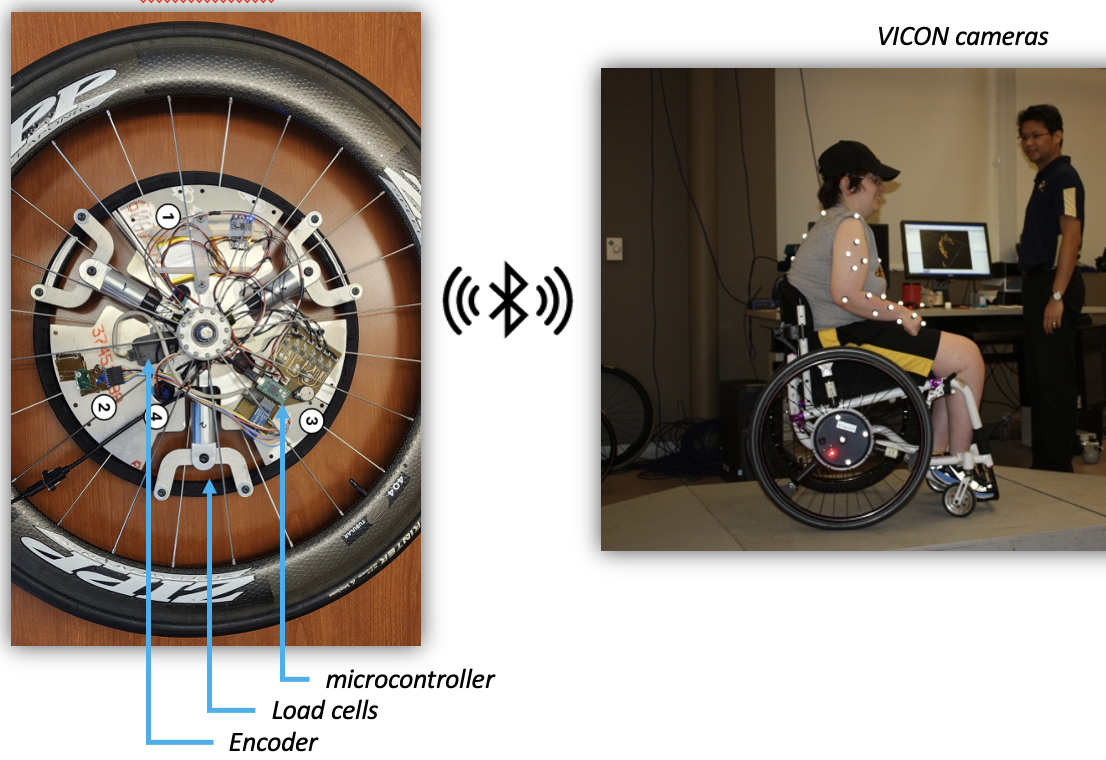
Smartwheel
solves problem of long-term shoulder injury due to constant wheelchair propulsion
goal is to measure propulsion pattern and enhance mobility performance
Virtual Seating Coach
gives pressure relief alerts through phone or tablet
Transfer assistance and injury prevention
goal- reduce user and caregiver strain, promote independent transfers


Trends in robotic wheelchairs
MEBot- all-terrain wheelchair; tip prevention, obstacle negotiation, pressure relief, reduce mobility discomfort

Assistive Robot Manipulator (ARM)
goal- decrease difficulties associated with manipulation deficits for individuals with UE impairments
high cognitive demand to operate the ARM

Robotic Assistive and Manipulation Platform (RAMMP)
integrates robotics and AI into a wheelchair device

What to study
not 3D printing
focus on intro lecture
difference between AT (outcome of intervention, end goal) and RT/TUT (means of intervention, establish/restore/modify client factors)- determine which devices are AT or RT/TUT
low tech, mid tech, high tech
HAAT model
study purpose of models (not ICF)
universal design and ergonomics - know definitions of each principle, look at examples
look at ergonomic assessment forms