Chapter 2: Latency, Bandwidth, Temporal & Spatial Locality, Interpretation, Superscalar Architecture (copy)
 Call Kai
 Learn
Learn Practice Test
 Spaced Repetition
 Match
Match Flashcards
 Knowt Play
1/34

There's no tags or description
Looks like no tags are added yet.
35 Terms
What is the job of the CPU?
The CPU is responsible for fetching, decoding, and executing machine instructions from RAM, and it stores the result in registers or memory.
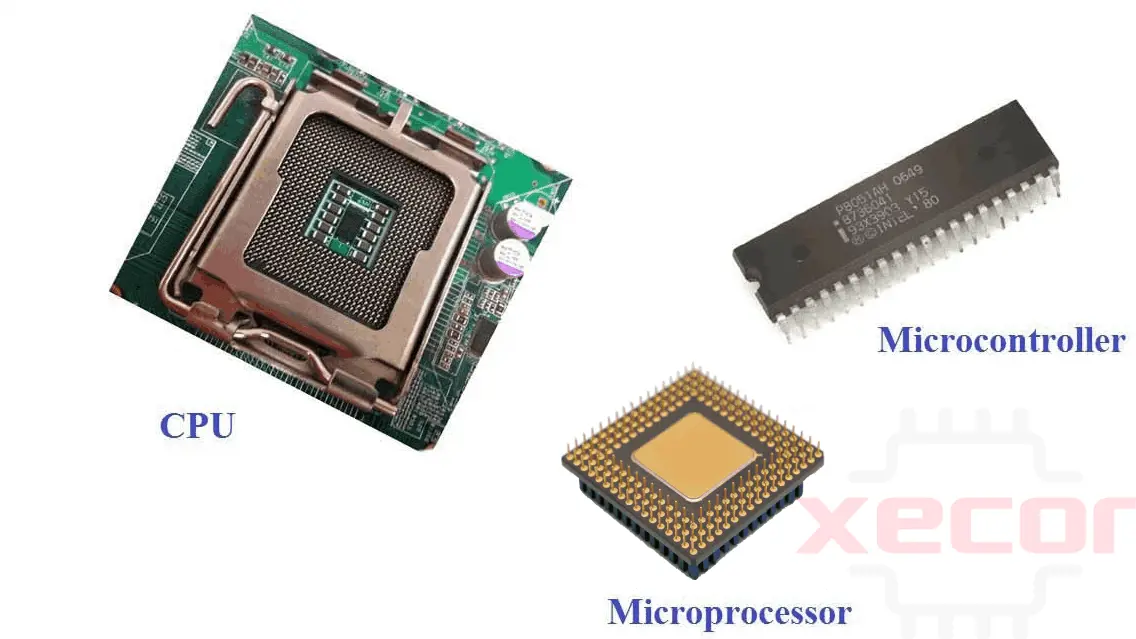
What are the three basic/main components of a computer?
CPU (Central Processing Unit)
Main memory
Buses
What are the four main components of the CPU?
The Control Unit
ALU (Arithmetic Logic Unit)
Registers
Internal Buses connecting them
What is a bus? What does it do?
A bus is a shared set of wires/pathway that lets computer hardware components send/transmit data to each other without needing direct individual connections.
What are the three types of buses? What do they each do?
The three types of buses are address buses, data buses, and control buses.
Address bus: Carries the address of the memory location the CPU wants to access.
Data bus: Carries the actual data being transferred, such as instructions or operand values.
Control bus: Carries the one bit control signals that coordinate the activities of the CPU, memory and I/O devices.
What is the control unit responsible for?
The control unit fetches instructions from memory, decodes them, and generates the actual control signals that coordinate the CPU-telling it which registers to read, which registers to write, and which ALU operation to perform.
What is the ALU’s responsibility?
The ALU performs operations on binary values, including arithmetic (addition, subtraction), bitwise logic (AND, OR, XOR, NOT), and comparisons (equal, less than,etc).
Where does the ALU get its data from? How does it work?
The ALU receives input values from CPU registers. It performs the specific operations on those values and writes the result back to a destination register or to a temporary output register.
What is a register?
A register is a small, ultra-fast storage location inside the CPU that holds a single value (typically 32 or 64 bits). It usually only holds one value that the CPU is currently working with, such as the numbers in an arithmetic expression.
What are the two categories of registers?
General purpose registers: hold data and intermediate results that programs are currently working with.
Special purpose registers: store control and state information used internally by the CPU.
What are two of the most important special-purpose registers?
The program counter (PC): holds the address of the next instruction to fetch from memory
The instruction register (IR): holds the instruction currently being executed.
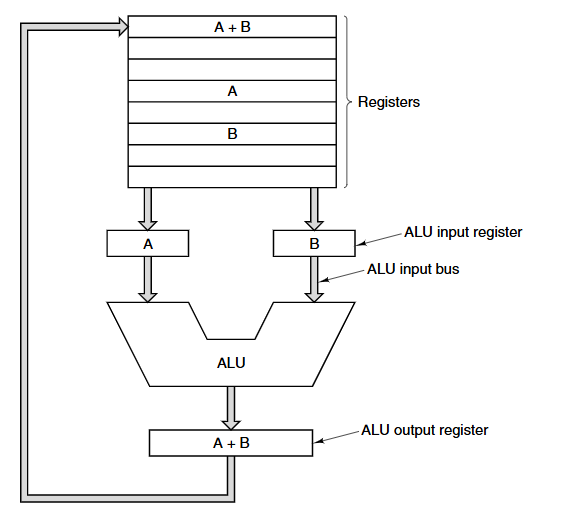
Draw John von Neumann’s datapath. Describe the flow of data in the data path using the ALU as an example.
Two source registers are selected, usually R1 and R2.
Their contents are loaded onto internal buses.
These values are loaded into ALU input registers. One value goes into register A, the other in register B.
The ALU performs the selected operation using A and B as inputs.
Then it places the result in the ALU output register, which is then written back into a destination register.
Given one machine instruction in memory, what does the CPU actually do with it, from start to finish? (the lifecycle of a single instruction in the CPU)
The CPU fetches the next instruction from memory into the instruction register.
Then it increments the program counter to point to the next/following instruction.
It decodes the fetched instruction to determine its type.
If the instruction needs data from memory (words), the CPU computes the required address and fetches that data into a register.
It then executes the instruction and repeats the cycle again.
What were early CPUs like, and why did we start adding complex instructions to them?
Early CPUs had very small, simple instruction sets. Over time, designers began to add many complex instructions, such as floating point operations and array indexing, because a simple complex instruction could replace several simpler ones. This often made programs faster and reduced program size, which led to the rise of CISC instruction design.
What was the problem with adding so many complex instructions?
The hardware became larger, more expensive, and harder to design, implement, and debug.
What does RISC and CISC stand for? What does it mean in technical terms?
RISC (Reduced Instruction Set Computer): uses fast, simple instructions that execute in a single cycle and can be run directly by the hardware without interpretation.
CISC (Complex Instruction Set Computer): uses more powerful, multi-cycle instructions that do more work per command. Because hardware cannot execute these instructions in one cycle, CISC machines rely on interpretation to break them down into simpler operations.
Modern CPUS…
Modern CPUs blur the line between RISC and CISC instructions. Even CISC architectures (like x86) internally translate complex instructions into simpler micro-operations. RISC never fully replaced CISC because companies like Intel have enormous software ecosystems that rely on CISC instruction sets.
What are some of the modern principles of designing CPUs?
Instructions should be executed by hardware whenever possible.
The CPU should start instructions as quickly as possible.
Instructions should be easy to decode.
Only load and store instructions should access memory.
The CPU should have many registers.
What is pipelining?
Pipelining is a technique where the CPU overlaps the stages of instruction execution in order to work on multiple instructions in parallel. Instead of completing one full instruction before starting the next, the CPU breaks instruction execution into stages and keeps all stages busy simultaneously. That way, one instruction finishes every clock cycle; It’s similar to an assembly line where each worker handles one step, and multiple products move down the line at once.
How does pipelining actually change the way the life cycle of an instruction is executed?
Given that computers normally execute instructions as follows:
Fetch the instruction from memory
Decode it
Execute it
Write back the result
Normally, without pipelining, the CPU would do all four stages for instruction 1, then all 4 for instruction 2, and so on.
But with pipelining, while instruction 1 is in decode, instruction 2 is in fetch, instruction 3 might still be waiting to enter the pipeline, and instruction 0 might already be in write-back. So each stage still works every cycle, just on different instructions.
What is latency? What is bandwidth?
Latency is the total time it takes for ONE SINGLE instruction to pass through every stage of the pipeline.
Bandwidth is the number of instructions completed per second once the pipeline is full.
If an instruction goes through 5 stages, and each stage takes 2 nanoseconds, then what is the total travel time for it to move through the pipeline?
5×2=10 ns
Pipelining does not reduce latency, it increases throughout.
If each cycle is 2 ns, what is the number of cycles per second? (This represents bandwidth)
1 cycle = 2ns
1 second = 1,000,000,000 ns
So the number of cycles per second is: 1,000,000,000/2 = 500,000,000 cycles per second
This means five hundred million instructions finish per second, making the bandwidth 500 MIPS.
What is superscalar architecture?
Superscalar architecture is a type of CPU design where the processor has multiple execution units, allowing it to issue and execute more than one instruction per clock cycle. It’s different from pipelining, where only one instruction is issued per cycle, but its stages overlap.
So a better definition would be: Superscalar architecture is a type of CPU design that can fetch, decode, and issue multiple instructions per clock cycle by using several parallel execution units. This allows the processor to execute several instructions at the same time, increasing the output beyond what pipelining can achieve.
Why is memory slow in comparison to the CPU?
Because CPU performance has improved rapidly with things like higher clock speeds, pipelining, and superscalar architecture, while Memory has only increased in size/capacity, but not in speed. As a result, the gap between the two keeps widening, and the CPU can even wait up to dozens of cycles before the data arrives.
What is a cache?
Cache is small, fast memory located close to the CPU. It stores copies of recently used or frequently accessed memory words, so that when the CPU needs data, it can check the cache first (before it checks RAM (main memory)).
Explain how fetching from the cache works; How come the CPU prefers accessing words from the cache rather than from main memory (RAM)?
Well, cache is small fast memory located very near to the CPU, so it would make sense for the CPU to go to the cache first if it needs data instead of immediately going to RAM.
How it works is that:
The CPU requests an address. The cache checks if it has that address stored, if yes, we call it a “cache hit” and if not, a “cache miss”. On a hit, the cache returns the data within just a few CPU cycles. But on a miss, the CPU must wait until RAM is accessed. Then the RAM would send back the data to the cache, the cache would store a copy of the data, and then the CPU finally gets the value.
Caches are great because they act as the “middle man” in between the CPU and slow RAM.
On average, Cache access only takes about 1-4 cycles, while RAM access takes 50-200 cycles or more.
Do programs access memory randomly?
No, they do not. Programs tend to access the same data repeatedly (temporal locality) or data that was near recently accessed data (spatial locality).
What is the principle of temporal locality?
It states that words recently accessed by the CPU are likely to be accessed again soon;
or in other words:
Temporal locality means that if a program access a piece of data once, it is likely to access the same data again soon.
What is the principle of spatial locality?
Spatial locality means that if a program accesses one memory address, it is likely to access nearby addresses soon.
What are the latency and bandwidth of a pipeline whose stages take 20ns, 15ns, 40ns, and 5ns?
LATENCY = 20 + 15 + 40 + 5 = 80 ns
BANDWIDTH = 1 instruction/40 ns = 1/4×10-9 seconds = 25 × 106 seconds or 25 MIPS (25 million instructions per second).
(Note: bandwidth depends on the slowest stage, because the slowest stage determines how often a new instruction can enter the pipeline). The slowest stage is 40ns, therefore, that becomes the cycle time you use to calculate bandwidth). Note that bandwidth is per second, always.
What are:
a) the latency
b) the bandwidth
of a pipeline whose stages take 7000 nanoseconds, 0.000004 milliseconds, 3 microseconds, and 470000 picoseconds?
a) First, we have to convert everything to a single unit. Let’s choose seconds to convert to:
7000 nanoseconds x 10-9 secs/1 nanosecond
0.000004 millisecond × 10-3 secs/1 millisecond
3 microseconds x 10-6 secs/1 microsecond
470000 picoseconds x 10-12 secs/1 picosecond
LATENCY = 7000 nanoseconds x 10-9 secs + 0.000004 millisecond × 10-3 secs + 3 microseconds x 10-6 secs + 470000 picoseconds x 10-12 secs = 0.000007 + 0.000000004 + 0.000003 + 0.00000047 =
1.0474 × 10⁻⁵ seconds
BANDWIDTH = 1 instruction / (7000 nanoseconds x 10-9 secs/1 nanosecond)
(we essentially just divided the number of instructions by the number of seconds when the pipeline takes the longest, or is the most full).
(make sure to choose the largest value for bandwidth, and remember that bandwidth is always per second)
How do we make use of the principle of temporal locality?
We keep recently accessed data/recently used words in the cache of the CPU instead of discarding it immediately. That way, the CPU has quicker and easier access to those words than if it had to access them through main memory (RAM).
How do we make use of the principle of spatial locality?
We take advantage of this by loading data into the cache in blocks, instead of one word at a time. These blocks are called cache lines, so when the CPU asks for address X, the cache will load in X and the surrounding bytes. That way any future access to nearby addresses will hit the cache instead of the RAM.
Define interpretation:
Interpretation is the process of converting one higher level language instruction one at a time to the equivalent set of lower level language instructions. Then executing, then repeating this process.