[ 1FINAL ] E-Tech - Lesson 3 and 4
 Call Kai
 Learn
Learn Practice Test
 Spaced Repetition
 Match
Match Flashcards
 Knowt Play
1/49

There's no tags or description
Looks like no tags are added yet.
50 Terms
Quick Access
What is Number 1?
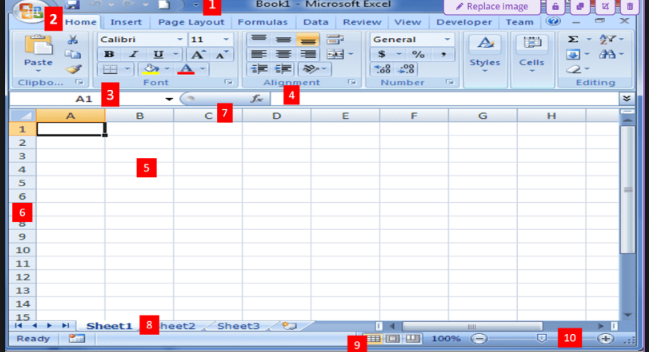
The Ribbon
What is Number 2?
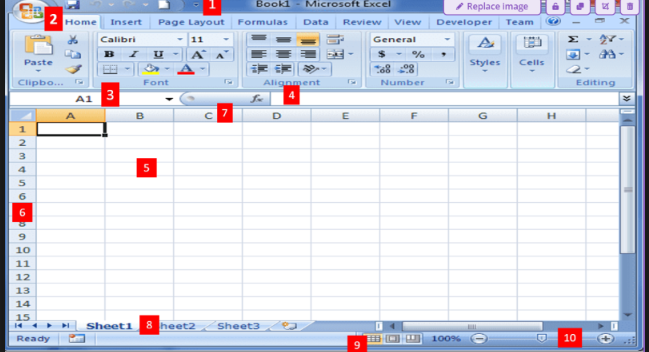
Name Box
What is Number 3?
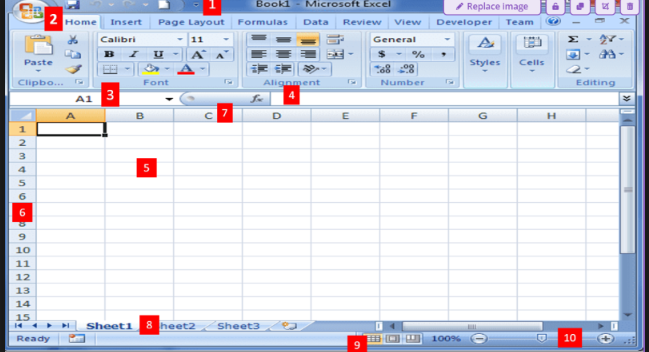
Formula Bar
What is Number 4?
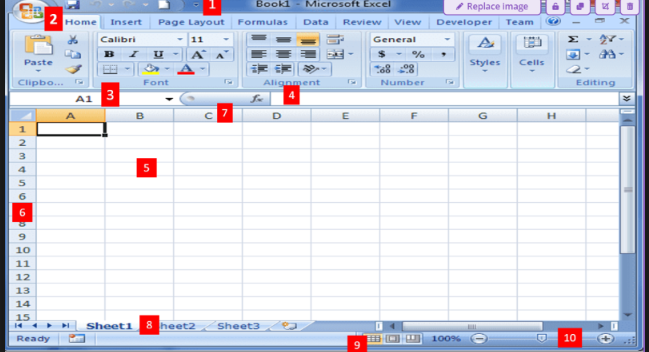
Cell
What is Number 5?
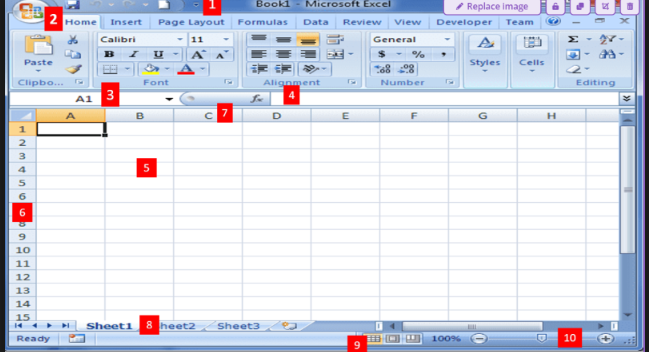
Row
What is Number 6?
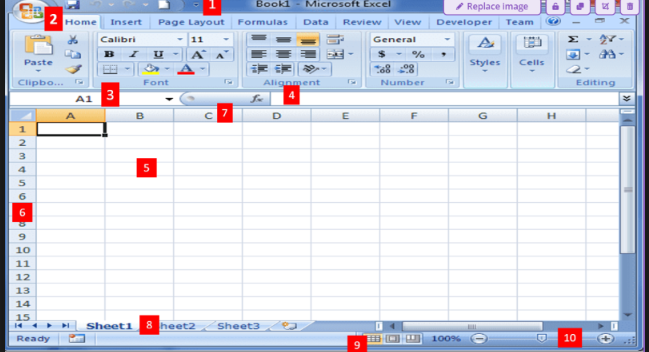
Column
What is Number 7?
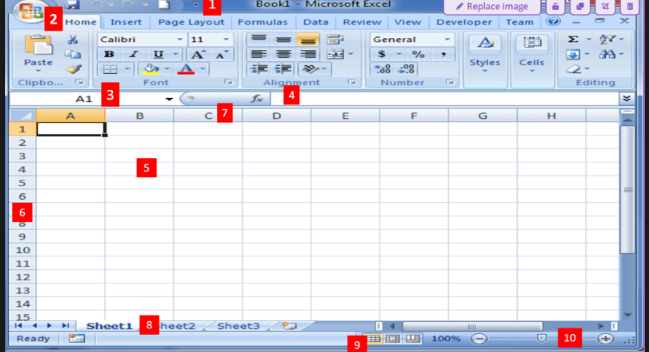
Worksheet
What is Number 8?
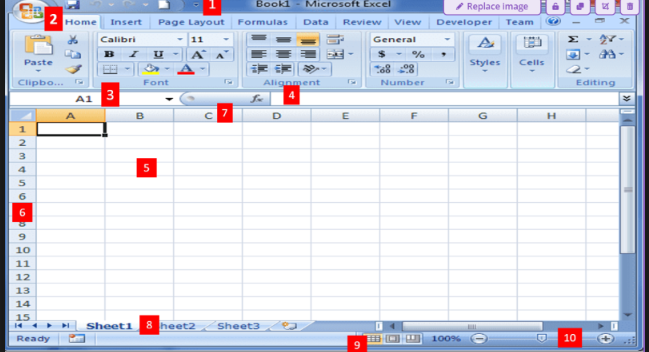
Worksheet View Options
What is Number 9?
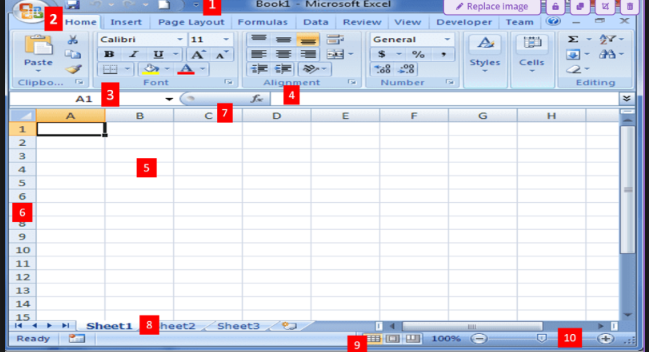
Zoom Control
What is Number 10?
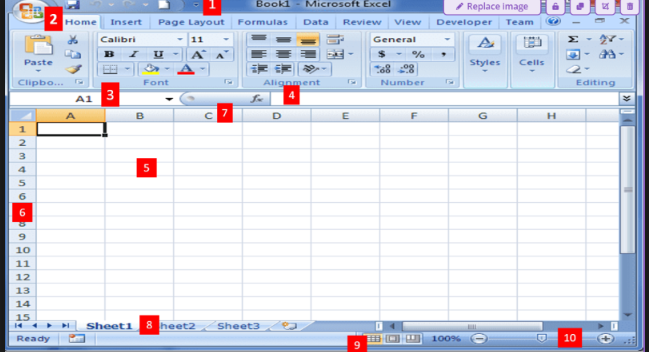
SUM
This function adds the numerical data in any number columns or rows by selecting them or typing them.
SUMIF
This function is used to summate the values of cells in a range that meet the criteria that have been specified.
AVERAGE
This function allows the user to get the average of all the numbers in the chosen cells
COUNT
This function is used to count the number chosen cells that have a number value in them.
IF
This function allows users to achieve a particular value if the condition has been satisfied or TRUE, or if the condition has not been satisfied of FALSE.
AND
This function will test all the conditions set and will return a “TRUE” value if ALL the conditions are met and “FALSE” even if only one condition is not.
VLOOKUP
This function enables users to find something on the leftmost column of the chosen range and return a value related to it.
CONCATENATE
This function combines two or more text strings. It combines the values from two or more cells into another cell.
Mail Merge
This feature allows you to create documents and combine or merge them with another document or data file
It is commonly used when sending out advertising materials to various recipients.
Form Document
it is generally the document that contains the main body of the message we want to convey or send
List/Data File
this is where the individual information or data that needs to be plugged in (merged) to the form document is placed and maintained.
Label Generation
Microsoft will print individual addresses to a standard form that it has already pre-formatted.
It creates a blank form document that simulates either a blank label or envelope of pre-defined size and will use the data file that you selected to print the information or individual address.
Pictures
electronic or digital pictures or photographs you have saved in any local stored device
JPG
This can support 16.7 million colors and suitable for full color photographic images
images is relatively small in file size
It does not support transparency
Joint Photographic Experts Group
What does JPG stand for?
GIF
capable of displaying transparency, thus,
good for blending with other with other
material or element in the document
displays simple animation
impressive only in sending documents electronically or posting into a website.
it only supports 256 colors (logos, art decors, drawings, small text, B&W images)
Graphic Interchange Format
What does GIF stand for?
PNG
built around the capabilities of .GIF
purpose for transporting images on internet at faster rates.
it also supports transparency but it does not support animation.
it can display 16million colors
it allows the control of the transparency level or opacity of images
Portable Network Graphics
What does PNG stand for?
Clip Art
It is a .GIF type
line art drawings or images used as generic representation for ideas and objects
Shapes
printable objects or materials that enhance the appearance
Smart Art
predefined sets of different shapes grouped together to form ideas that are organizational or structural in nature.
Chart
type of material that represent data characteristics and trends.
Screenshots
realistic image that you can capture while discussing any report
In Line With Text
image is located in the line where the text is located
Square
text surrounds the image
Tight
text surrounds the image, but the margin or space between the image and text is smaller
Through
allows the text to cross between some part of the image.
Top and Bottom
pushes the text away vertically to the top and/or the bottom
Behind Text
image can be dragged anywhere but the texts floating in front of it.
In Front of Text
image is located in front of the text or hovers above the text which obscures it.
=SUM(sum_range)
The basic format for SUM() Function
=SUMIF(range,criteria,sum_range)
The basic format for SUMIF() Function
=AVERAGE(range to be averaged)
The basic format for AVERAGE() Function
=COUNT(range to be counted)
The basic format for COUNT() Function
=IF(condition, result if TRUE, result if FALSE)
The basic format for IF() Function
=AND(condition to be met)
The basic format for AND() Function
=IF(AND(condition to be met), result if TRUE, result if FALSE)
The basic format for ANDIF() Function
=VLOOKUP(lookup_value,table_range,column_index_number,range_lookup)
The basic format for VLOOKUP() Function
=CONCATENATE(text1,text2,text3)
The basic format for CONCATENATE() Function