Lecture 2: HCI - User Experience (UX) Process and Techniques
 Call Kai
 Learn
Learn Practice Test
 Spaced Repetition
 Match
Match Flashcards
 Knowt Play
1/29

There's no tags or description
Looks like no tags are added yet.
Name | Mastery | Learn | Test | Matching | Spaced | Call with Kai | Chat |
|---|
No analytics yet
Send a link to your students to track their progress
30 Terms
User Interface (UI) and User Experience (UX)
two terms that are commonly confused. The distinction is subtle but important.
User Interface (UI)
how it looks
User Experience (UX)
how it makes you feel
Everett McKay
in his excellent book UI is Communication, defines UI as what connects users to a product’s underlying technology, and UX as the entire experience users have with a product.
UX Process Lifecycle Template
Design —→ Implement —→ Evaluate —→ Analyze

UX Process Lifecycle Template
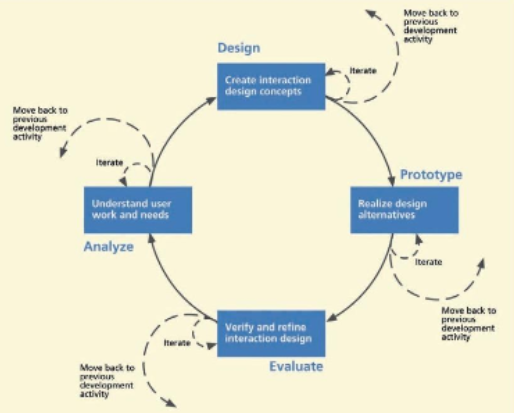
Managing the process with activity transition criteria:
The primary objective of the overall lifecycle process is to keep moving forward and eventually to complete the design process and make the transition to production.
However, for the work in a project to flow among the UX process activities, the team must be able to decide:
when to leave an activity;
where to go after any given activity;
when to revisit a previous process activity; and
when to stop making transitions and proceed to production.
Choosing a process instance for your project:
Increasingly, the need to rush products to market to beat the competition is shortening development schedules and increasing the number of product versions and updates. Web applications must be developed in “Internet time.” Ponderous processes and methods are abandoned in favor of lightweight, agile, and flexible approaches intended to be more responsive to the market-driven need for short product versioning cycles. Abridged methods not withstanding, however, knowledge of the rigorous UX process is an essential foundation for all UX practitioners and it is important for understanding what is being abridged or made agile in choices for the shorter methods.
Web applications
must be developed in “Internet time.”
Among the many possible factors you could consider in choosing in a choosing a process to instantiate the lifecycle template are:
risk tolerance
project goals
project resources
type of system being designed
development organizational culture
Mapping project parameters to process parameter choices.

Lifecycle diagram from ISO 13407 standard
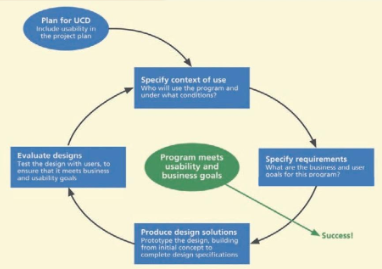
UX process:
A visualization of an iterative user-centered design process

You’re not designing for you.
The most valuable lesson for a UX designer has been that the ways users interact with a product and the experiences they have with it vary wildly depending on their backgrounds and life situations.
Is the user a baby boomer, or ten-year-old just learning to search the web?
Is she coming to your site or app while she’s at home watching TV or on the train commuting to work?
Is she a new mother who has very little time to shop and just wants to order her diapers from your site as quickly as possible, or, is she fashionista who loves spending lots of time looking through the latest designer offerings?
You’re designing to serve needs.
Users’ degree of familiarity with new types of technologies and interfaces is only one key factor you have to always be thinking about. The different needs and desires of different types of users, as well as the different types of businesses and organizations you’re designing for, must also be top of mind.
Jakob Nielsen, formulated the codification for the key things on striving on your designs. He describes the essential components of a quality user experience as the following:
Learnability
Efficiency
Memorability
Errors
Satisfaction
UX Technique: Contextual Enquiry
When to use it: Research
What it is:
Interviewing and observing users in the location that they use the website/app, to understand their tasks and challenges. This information feeds our understanding of why users might behave as they do.
UX Technique: Personas
When to use it: Analysis
What it is:
A fictitious identity that reflects one of the user groups for whom you are designing. This technique captures the who of our definition of UX.
UX Technique: Scenarios
When to use it: Analysis
What it is:
A narrative describing "a day in the life of" one of your personas and how your product fits into their lives. This usually covers the what, when and where from our definition.
UX Technique: Wireframes
When to use it: Design
What it is:
A rough guide for the layout of a website or app. It could be low-fidelity, communicating rough layout information, or high-fidelity, with visual polish. It could be static images or sketches, or an interactive prototype, with clickable elements that simulate the product in use. Wireframes and prototypes explore how someone will use the product.
UX Technique: User Testing
When to use it: Research, Analysis, Design, Production
What it is:
Observing people while they attempt to complete tasks using your product or prototype, and thinking out loud while they do so. These sessions may validate design decisions, or (more likely) reveal additional information about why users behave as they do. Processing these learnings will influence future iterations of the product.
UX Techniques
Contextual Enquiry
Personas
Scenarios
Wireframes
User Testing
Recommended Software UX Tools
Wireframing software
Diagramming software
Analytics software
Text editor
Standard office software
Tool:
Wireframing software: Balsamiq Mockups is a desktop wireframing tool that runs on both Windows and Mac. A single-user license costs $79, and it's very easy-to-use. I've found the ability to export clickable PDFs to be a very powerful way of creating portable interactive prototypes that can be emailed to stakeholders and other team members. Axure is a slicker, more feature-packed alternative that is fast-becoming the industry standard, although the additional features can be intimidating for beginners.
Useful for:
Creating low-fidelity wireframes & interactive prototypes
Tool:
Screen recording software: This is the magical missing ingredient that can turn your humble laptop into a portable usability testing lab. My usability testing app of choice is Silverback. It's a very simple tool that costs around US $70, but it works well and is easy to use. Unfortunately, it's only available on the Mac. Windows users shouldn't fear though—Camtasia Studio is a good option. It costs a little bit more, but that's because it's more than just a screen recorder—you can also use it to create and edit professional-looking screencasts.
Useful for:
Conducting usability testing sessions
Tool:
Diagramming software: Omnigraffle is my tool of choice when it comes to creating diagrams (sorry, it's Mac-only). Microsoft Visio, bundle with the Office suite, is an adequate tool for diagramming; at a PowerPoint.
Useful for:
Creating workflow diagrams, sitemaps, and other visualisations
Tool:
Analytics software: If you're working on a web redesign project, there's a 90% chance that Google Analytics has already been installed for you. And for good reason—there are other analytics packages that do some things better, but there's no question that Google Analytics is a seriously powerful tool for gaining anonymous insights about visitors to a website. Plus, it's free!
Useful for:
Creating workflow diagrams, sitemaps, and other visualisations
Tool:
Text editor: Sublime Text or TextEdit on the Mac, BBEdit Notepad on Windows.
Useful for:
Writing and editing simple prototyping code
Tool:
Standard office software: Whether you choose the Microsoft suite (Outlook, Word, Excel, PowerPoint), the Apple suite (Mail, Pages, Numbers, Keynote) or one of the free or open source alternatives out there, what's important is that they don't get in the way of doing your job. If you're having a hard time exchanging documents with your team members because they're all using Microsoft Excel and you're using Numbers, it may be easiest to just bite the bullet and switch across.
Useful for:
Document preparation; data analysis; presenting findings
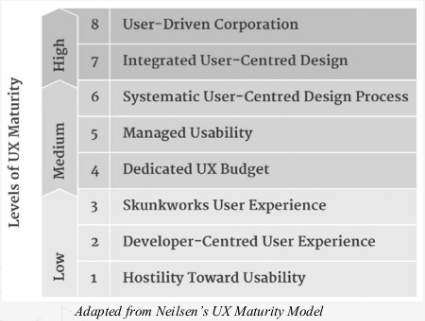
The Various States of UX Maturity