Professor Messor 4.1 | Risk Management
 Call Kai
 Learn
 Practice Test
 Spaced Repetition
 Match
 Flashcards
 Knowt Play
1/11

There's no tags or description
Looks like no tags are added yet.
12 Terms
Threat Assessment
Involves researching potential threats and understanding the behaviors of threat actors. This process gathers and interprets data from a variety of sources, such as hacker group profiles, attack tools, and tactics.
By analyzing this intelligence, organizations can make informed decisions and invest in the most effective prevention strategies. Are crucial for researchers, security operations teams, and others.
Vulnerability Assessments
Are typically minimally invasive, unlike full penetration tests. They help identify potential weaknesses in your network by running vulnerability scanners that probe systems to see what's accessible and potentially exploitable.
These scans identify open ports, available services, and potential security gaps, testing from both external and internal perspectives. Insider threats are also considered during the assessment.
The process often yields a large number of findings, especially on complex systems. After the scan, the results are analyzed and narrowed down to focus on the most critical issues.
Vulnerability Scan Results
Can identify a lack of security controls like missing firewalls, antivirus, or antispyware. Misconfigurations such as open shares and guest access are also common findings.
The scan can also detect real vulnerabilities, focusing on newly discovered issues but occasionally flagging older ones that have not yet been resolved.
Penetration Testing (pentesting)
Is a more aggressive form of security testing where simulated attacks are carried out on a system. Unlike vulnerability scanning, which identifies potential weaknesses, this actively tries to exploit those vulnerabilities to see if unauthorized access can be achieved.
It's often a compliance requirement, with many organizations needing regular third-party assessments. The process is guided by standards such as the National Institute of Standards and Technology (NIST) guidelines on information security testing and assessment.
Posture Assessment
Involves evaluating the security status of devices before they connect to a network. With the rise of Bring Your Own Device (BYOD), ensuring that these devices are secure is crucial. Issues like malware infections, missing anti-malware, and unauthorized applications pose significant risks
Before granting network access, a health check is performed to verify if the device is trusted. Checks might include confirming the presence and status of anti-virus software, verifying that corporate applications are installed, and ensuring that mobile devices have encrypted storage. This process applies to all device types, including Windows, Mac, Linux, iOS, and Android.
Failing your assessment
When a device fails a posture assessment, it’s considered too risky to allow access to the main network. In such cases, the device is usually placed into a quarantine network, where it has limited access only to resources needed to fix the security issue.
If the device still fails, additional measures may be needed.
Risk assessment
Involves identifying assets that could be impacted by an attack and defining the associated risks. These assets might include hardware, customer data, intellectual property, or other sensitive information
The assessment identifies which devices are vulnerable and predicts potential outcomes like data loss or service disruption. Are categorized as high, medium, or low, helping prioritize future security investments. The process guides decision-making for allocating resources toward security enhancements and protective measures.
Vendors
Organizations regularly collaborate with, sharing important data for services like payroll, CRM, email marketing, and more. May be integral to cloud-based services, necessitating careful risk management.
Risk assessment helps categorize by risk level, assessing the potential impact of sharing sensitive information. Contracts play a crucial role in ensuring mutual understanding and enforcing security expectations. By clearly defining responsibilities and standards, contracts help maintain a secure environment.
Security Information and Event Management (SIEM)
Centralize and manage the vast amount of security data generated across an organization. Collect and aggregate logs from various systems—like switches, routers, and servers—into a single database. They allow for real-time analysis by defining specific security events to monitor, while also offering long-term storage for historical data review.
With advanced reporting and data correlation features, it can link diverse data types to paint a comprehensive picture of network activity. This is particularly valuable for forensic analysis, enabling the detailed examination of events after an incident occurs.
Getting the data
Data comes from various sources like sensors, logs, operating systems, and infrastructure devices. It can also include NetFlow data and other monitoring outputs. With so much information flowing in, it’s easy to be overwhelmed, as even a simple query could yield thousands of events
Allow filtering by severity—such as informational, warning, or urgent alerts—so you can focus only on the critical data you need for analysis.
Viewing the data
Can provide you with a view into the data that you simply can’t see by reading through log files.
Trends: Identifying changes and patterns over time, such as constant attack metrics.
Alerts: Highlighting security events and critical issues that need immediate attention.
Visualization: Presenting log information in an understandable format, making it easier to spot anomalies.
Correlation: Combining and comparing data from various sources to get a comprehensive view and better identify complex threats.
These features help in understanding and predicting potential security issues more effectively.
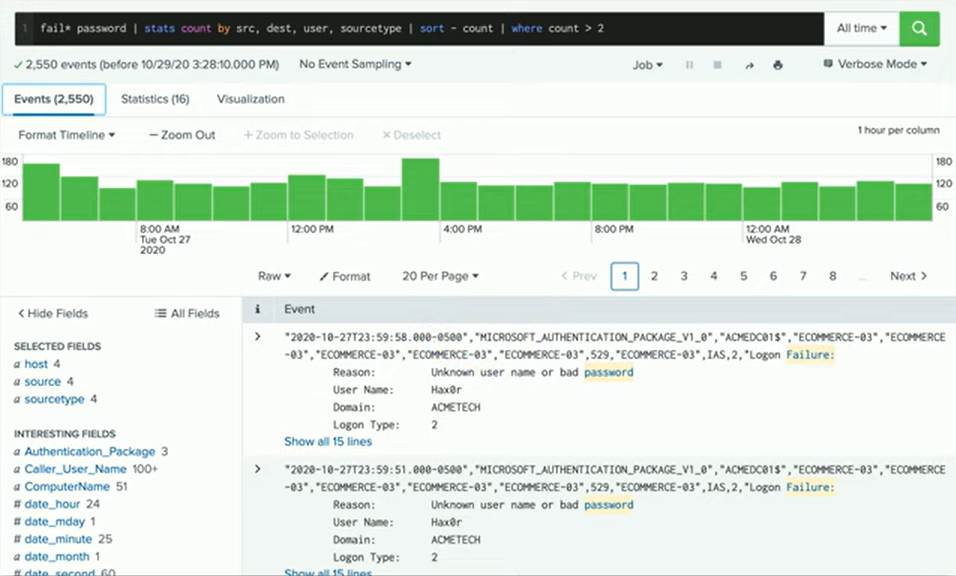
Example Query
An example query might look for log entries containing both “fail” and “password.” This query will:
Return Entries: Display all log entries that include both terms.
Summarize Events: Show the frequency of these events over time.
Identify Patterns: Reveal times of day with higher incidences of these failed password attempts.