CS 105 Quiz 1 Review Flashcards
 Call Kai
 Learn
 Practice Test
 Spaced Repetition
 Match
 Flashcards
 Knowt Play
1/48

Earn XP
Description and Tags
Vocabulary flashcards covering core concepts, error types, syntax, and memory terms from CS 105 Quiz 1 notes.
49 Terms
Program
Instructions for a computer.
Programming language
Syntax (a way) to write programs.
Operating system
The greater program that runs a computer (ex: windows).
Designer (role and steps)
Makes a plan to solve a problem.
Inputs – Process (modifying input) – Outputs
Test plan
Series of tests done that have an expected outcome.
Decomposition
Breaking down into simpler stems.
Syntactic Errors
Non allowed sequence in the language; spelling errors, missed punctuation.
Semantic Errors (also called…)
Run time errors:
Logic, formula, or conversion errors; non-expected results produced (ex: infinite loop).
Thematic Errors
Errors caused by not solving the correct problem.
Warning
Message indicating code does not fail, but compiler thinks there may be a problem.
Error
Finds error and fails to compile.
Source Code
The original code to solve a problem written in human coding language.
Compiling
Turning source code into binary language/computer understandable language.
Linking
Bringing in libraries to a code.
Executable
(.exe) the result of compiling and linking for a computer to run.
White space
Spacing not recognized by compiler.
Variables
Stored values that can change (need to be declared – stated to exist).
Initialization
Value given at declaration.
Assignment
Value given later in an execution statement.
Identifiers
Identify a variables (case sensitive), can not start w/ a digit, cannot contain spaces, cannot use c++ keywords, usually lowerUpperAfter.
Main memory
Storage of main data in a computer.
Bit
1 or 0 = on or off.
Byte
Stores a keystroke (8 bits).
Constant
An identifier that has a non changing value (const int ALLUPPERCASE=#) which must be initialized.
Literal constants
Used directly in code; Characters in '', string in "".
Output stream
cout <<
Input stream
cin >>
Standard Template Library (STL)
Library of all worldwide C++ functions.
Expression
Sequence of identifiers and operaters for evaluation.
Operator
Modifies values (=, +, -, etc.).
% is remainder
(Ex: 5%4 is 1)
Operand
Value being modified by an operator.
Precedence
Which operation has greater importance (multiplication, addition, assignment).
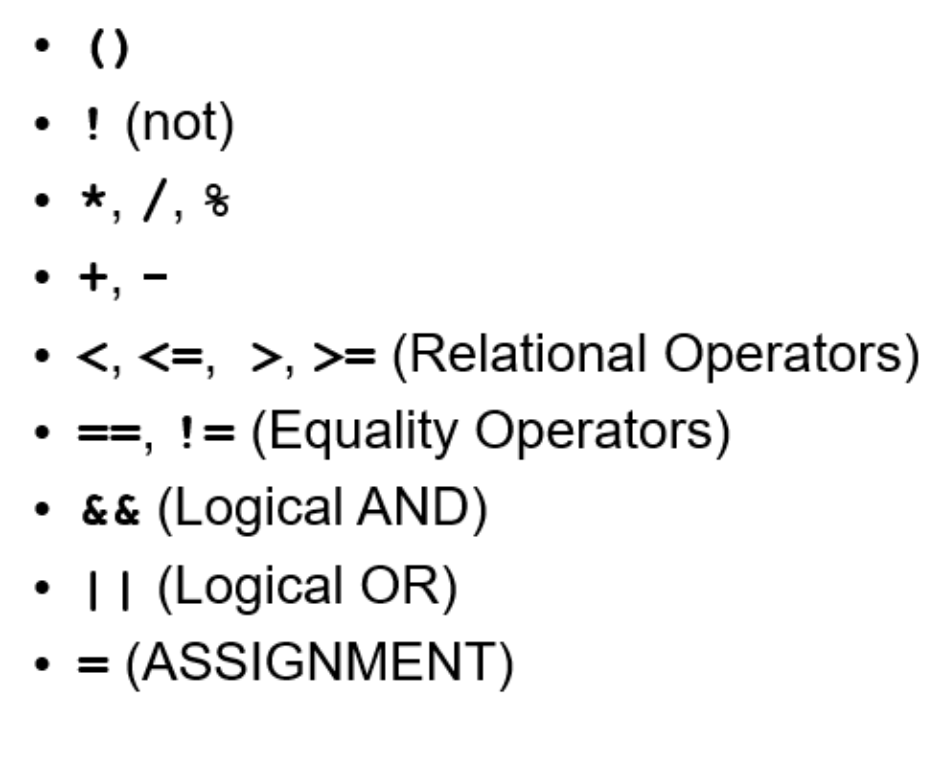
Associativity
Equal level precedence procedure (left to right).
Types of control
o Sequential (normal): execution proceeds one after the other
o Selection (if-then-else): dependent on conditions
o Iteration (looping): repeating until condition(s) are met
If else statement
If statements – If true then statement executed
if (condition) { statement; statement; }
Contains <, >, >= (greater than or equal to), <= (less than or equal to), == (equal to), != (not equal to)
Nested if statements: an if statement within a larger if statement
Else statement
If (condition) {statement(s);}
Else {statement(s);}
o Cascaded if/else statements: an if statement containing an else statement with its own ifs/else’s
Compound Statements
one or more statements in a set of curly braces - must be used for multiple statements in if/else conditionals
Boolean values
Boolean values: true or false
If/else break down to bool
Can be =true or =false

Logical Operators (+what has precedence?)
o && (both statements are true), | | (one or the other statements are true)
o && has precedence over | | (followed by assignment)
Switch Case Statement
selects from multiple actions/cases
Can only be integer or character
—
switch (condition)
{ switch #:
statement; break;
…
default: '
statement; break;}
*if this is a CHAR situation, MUST BE IN ‘ ‘
Types of Control
Types of control
Sequential (normal): execution proceeds one after the other
Selection (if-then-else): dependent on conditions
Iteration (looping): repeating until condition(s) are met
do/While loop
while (condition)
{ statements)
OR
Do { statement(s);}
while (condition);
For
For (statement 1; condition; statement 2)
{action(s)}
—
ex: for (i=0; i<integer; i++)
{ A1 [i] = i+i }
Strings
#include <string>
“strings have to be in double quotes”
string1[#] ← allows to acess induvidual charecters
string1.length() ← gives length of it
can be added: string1 = “a” + string1 + “b”

input failure
bad input = failed state
if (!cin)
cin. clear()
cin.ignore(200, ‘\n’)
dash is opposite way of comments (//which go from down to up btw)

Files
file: place for permanent data storage
#include <fstream>
ofstream variableName1;
ifstream variableName2;
variableName1.open(“datafile.txt”);
variableName1 << num1 << “ “ << num 2 …
variableName1.close();
variableName2.open(“datafile.txt”);
variableName2 >> num1 >> num2 >> …
variableName2.close()

Functions
name () ←can be executed over and over
function name: identifier to call function [name]
Function parameters/argument: value passed into function for use by function code
copy of the value of the parameter is passed
Pass-by-value: changing the value of the parameter in the function does not change the original value
Function return value: value returned to function when calling back
Function prototype: declaring a function and how it is called
used by the compiler to signal syntax errors
If no return value, the type is void
Scope: area of a program within which a variable can be recognized
—
#include <iostream>
returnType functName (parameter type, paramater type); // prototype
using namespace std;
int main ()
…
double funtName(double a, double b);
a + a = b;