CS100 Operating System Part 2
 Call Kai
 Learn
 Practice Test
 Spaced Repetition
 Match
 Flashcards
 Knowt Play
1/42

Earn XP
Description and Tags
MassBay Community College Fall 2026 Semester Professor Snechal Nikalje CS100 Operating System Part 2 Flashcards
43 Terms
What does the operating system do?
It coordinates and directs the flow of data and information through the computer system

How does the operating system (OS) control how I interact with my computer?
Provides a user interface by which you interact with your device
What is a command-driven interface?
Interface in which you enter commands to communicate with the computer system
What is a menu-driven interface?
Interface in which you choose commands from menus displayed on the screen
What kind of interface do operating systems use today?
Graphical user interface, or GUI (pronounced “gooey”)
Who uses graphical user interface?
Current computer and mobile operating systems such as Microsoft Windows and macOS
What do Linux-based operating systems use?
Many commercially available and free interfaces, such as GNOME and KDE, each of which provides a different look and feel
Why does the operating system have to manage the processor?
When using a computer, the processor (or CPU) often preforms several tasks at once. Although the CPU is powerful, it needs the OS to arrange the execution of all these activities so it can work on them one at a time, BUT so quickly that you think it is happening simultaneously
**How does the operating system coordinate multiple activities?
By assigning a slice of its time to each activity that requires the processor’s attention. It then switches between different processes billions of times per second to make it appear that all the processes are running at the same time
**What effect does each keystroke or selection with the mouse cause?
Creates an action, or event, in the respective device (keyboard, mouse, ect.) to which the operating system responds to
**When do events occur?
Events can occur one after another (such as when you enter characters using the keyboard)
Other events involve multiple devices working at the same time (such as the printer printing while you use the keyboard and stream music)
How does the operating system coordinate multiple activities?
Every device has a unique signal called an interrupt that tells the operating system a task is in need of immediate attention
What is an interrupt handler?
A special numerical code that prioritizes the interrupt requests that devices send out
How are interrupt requests processed?
Requests are placed in the interrupt table in the computer’s primary memory (RAM)
What is preemptive multitasking?
How the operating system runs the tasks with the highest priority before running a task assigned a lower priority
How does preemptive multitasking work?
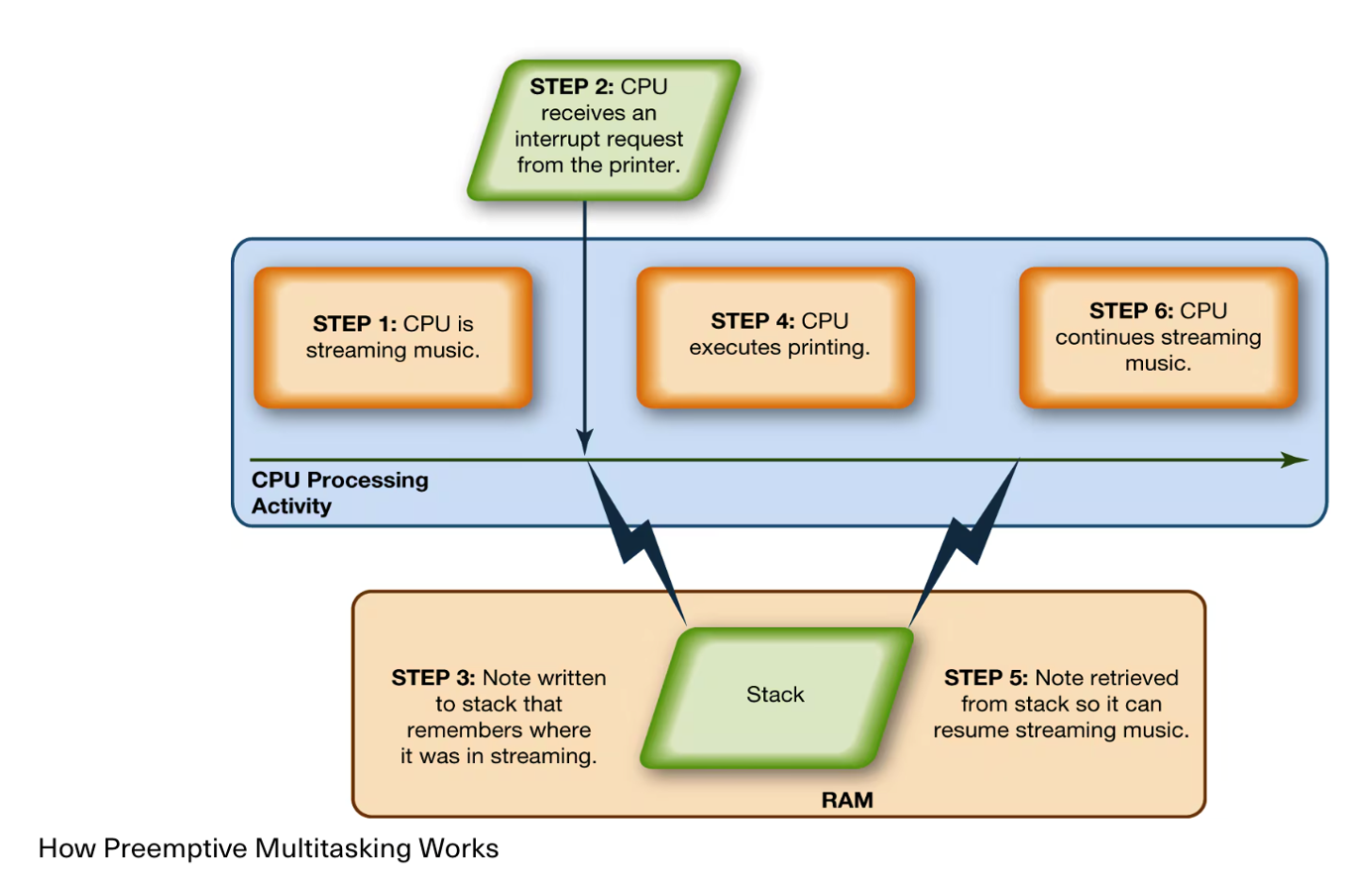
**For example, what happens first when the processor receives a request to send information to a printer?
It first checks with the operating system (OS) to ensure that the printer is not already in use
**What is the buffer?
Temporary storage area in RAM in which the operating system puts data and instructions the processor (CPU) needs
**What is an example of when a buffer is used?
When a print request is sent to the printer, but the printer is already in use. The OS puts the request in the buffer (temporary storage area in RAM)
**What is the spooler?
A program that helps coordinate and manage data queues
**What happens to a print request that is in the buffer?
The request waits in the buffer until the spooler, a program that helps coordinate all print jobs currently being sent to the printer, indicates the printer is available
**What happens when more than one print job is waiting?
A line (or queue) is formed so that the printer can process the requests in order
How does the operating system coordinate the activities of the processor?
It uses RAM as a temporary storage area for instructions and data the processor needs. The processor then accesses these instructions and data from RAM when it’s ready to process them
Who is responsible for coordinating the space allocations in RAM to make sure there is enough space for all the pending instructions and data?
The operating system (OS)
What happens to the pending instructions and data in RAM when the processor no longer needs them?
The operating system clears the items
**How much RAM does a system have?
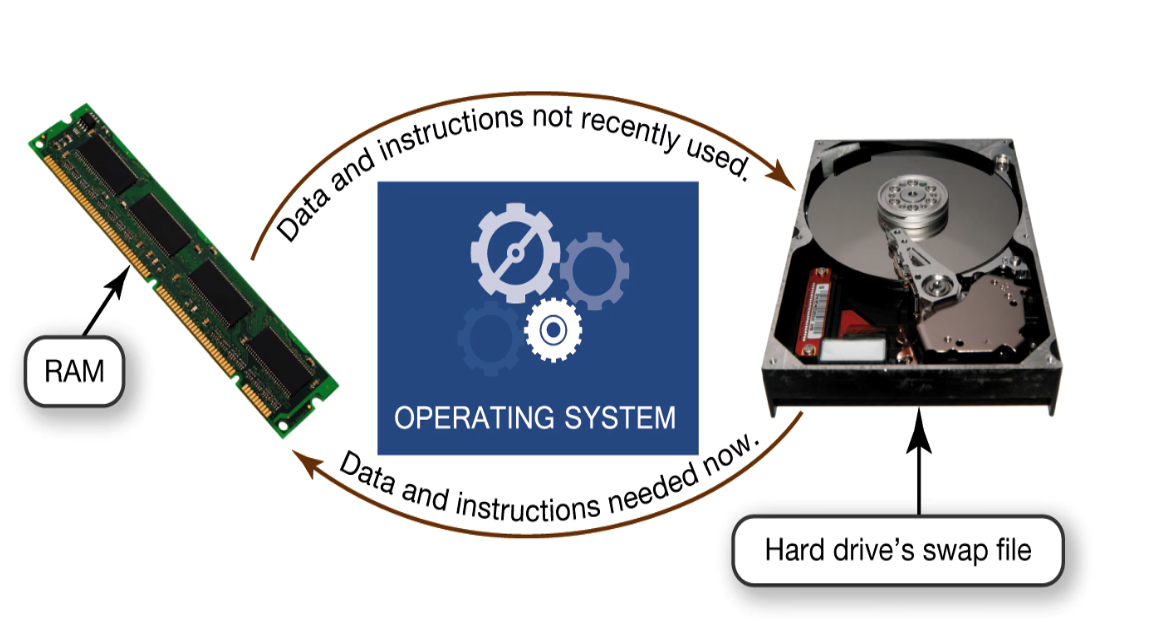
Any system has a fixed amount of RAM installed. When there isn’t enough RAM for the OS to store the required data and instructions, the OS borrows from the more spacious hard drive
**What is virtual memory?
The process of optimizing RAM storage by borrowing hard drive space
**Why does the operating system use swap file (or page file)?
When more RAM is needed, the OS swaps out from RAM the data and instructions that haven’t recently been used and moves them to a temporary storage area in the hard drive called the swap file
**What is the process of paging?
When the data or instructions in the swap file (temporary storage area in the hard drive) are needed later, the OS swaps them back into active RAM and replaces them in the hard drive’s swap file with less active data or instructions
**Swapping visual
Virtual memory borrows excess storage capacity from the hard drive when there isn’t enough capacity in RAM
What is thrashing?
The condition of excessive paging. Only a portion of the hard drive is allocated to virtual memory. You can manually change this setting to increase the amount of allocated hard drive space, but eventually your computer will become sluggish as it is forced to page more often.
How do you solve thrashing?
Increase the amount of RAM in your computer, if excess capacity is available. If you increase the RAM, it won’t be necessary to send data and instructions to virtual memory.
What is the responsibility of the operating system for files?
All of the details of how a file is stored, retrieved, named, and compressed—all of the things we do with files
How do we search for files?
Different operating systems allow different naming schemes and have different tools for searching and optimizing file access
How does Windows support different file systems?
Current versions support New Technology File System (NTFS)
What is a device driver?
A device attached to a computer with a special program that facilitates communication between the device and the operating system
How does a device drive work?
The OS must be able to communicate with every device in the computer system, so the device driver translates the device’s specialized commands into commands the OS can understand, and vice versa
Would devices function without device drivers?
No, they wouldn’t function because the operating system wouldn’t know how to communicate with them
How do computer programs interact with the CPU?
No matter what its type of manufacturer, every computer program needs to interact with the CPU by using computer code the CPU recognizes
What is an application programming interface (API)?
Blocks of operations code that are common to many programs. The operating system includes these blocks of code
What is an example of API?
Microsoft DirectX is a group of multimedia APIs built into the Windows OS that improves graphics and sounds when you’re playing games or checking out videos on your PC.
What are the advantages of API’s?
What happens when two applications share common API’s?
Data exchange is facilitated between two programs, such as inserting a chart from Excel into a Word document