acct 5310 uga test 2
 Call Kai
 Learn
 Practice Test
 Spaced Repetition
 Match
 Flashcards
 Knowt Play
1/204

There's no tags or description
Looks like no tags are added yet.
205 Terms
why learn systems documentation?
1. systems/business process development and improvement
2.auditing
systems/business process development and improvement
1. initial design and development
2. ongoing maintenance/document changes
auditing
1. understand system and its internal controls (required for risk assessment)
2. SOX requirements: management must assess internal controls and auditors evaluate and provide attestation on management's assessment
PCAOB AS 5: how to audit
1. understand the flow of transactions including how these transactions are initiated, authorized, processed, and recorded
2. verify the auditor has identified the points within the company's processes at which a misstatement including due to fraud could arise
3. identify the controls to address misstatements
4 documentation tools
narratives, business process diagrams, data flow diagrams, flowcharts
BPDs
focuses on business processes used by a company
DFDs
graphical description of data sources (who produces) and destinations (who receives), data flows, transformation processes, and data storage
document flowchart
1. flow of documents and info between departments or areas of responsibility within an organization
2. can be used to document internal controls
system flowchart
relationship among the input, processing, and output in an info system
program flowchart
sequence of logical operations that a computer performs as it executes a program
start (BPD)

end (BPD)

activity in a process (BPD)

decision (BPD)

use of DFD
can be used to represent the same process at a high level, important to only include relevant info
data sources and destinations (DFD)

transformation processes (DFD)

data stores (DFD)
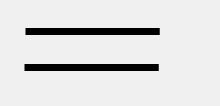
internal control (DFD)

4 categories of document flowchart symbols
input/output, processing, storage, and flow
document
an electronic or paper document

multiple copies of one paper document
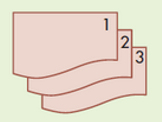
electronic output

electronic data entry
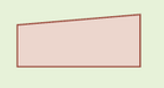
electronic input and output device

computer processing

manual operation

database

magnetic tape

paper document file

journal/ledger

on page connector

off page connector

terminal

decision

communication link

why do we use a dotted line?
information flows
a document flowchart represents
the flow of forms that relate to a particular transaction through an organization
5 processes in revenue cycle
sales order entry, shipping, billing, cash collections, sales returns (if applicable)
4 general threats in revenue cycle
1. inaccurate or invalid master data
2. unauthorized disclosure of sensitive info
3. loss or destruction of data
4. poor performance
5 threats in sales order entry of revenue cycle
1. incomplete/inaccurate orders
2. invalid orders
3. uncollectible amounts
4. stockout or excess inventory
5. loss of customers
3 controls for inaccurate or invalid master data
1. data processing integrity
2. restriction of access to master data
3. review of all changes to master data
3 controls to unauthorized disclosure of sensitive info
1. access controls
2. encryption
3. tokenization of customer personal info
control to loss or destruction of data
backup and disaster recovery procedures
control for poor performance
managerial reports
2 controls for incomplete/inaccurate orders
1. data entry edit controls
2. restriction of access to master data
control for invalid orders
digital signatures or written signatures
3 controls for uncollectible accounts
1. credit limits
2. specific authorization to approve sales to new customers or sales that exceed a customer's credit limit
3. aging of accounts receivable
5 controls for stockouts or excess inventory
1. perpetual inventory control system
2. use of bar codes or RFID
3. training
4. periodic physical counts of inventory
5. sales forecasts and activity reports
control for loss of customers
CRM systems, self-help websites, and proper evaluation of customer service ratings
How does the order process start (1.1 take order)
customer sends a purchase order with type of merchandise and quantity ordered
what happens after the purchase order (1.1 take order)
the vendor completes a sales order with customer info, item #, item name
1.2 Approve credit
credit limits and approval
1.3 Check inventory availability
availability triggers the "picking ticket"
1.4 respond to customer inquiries
customer relationship management systems and using IT to automate response to customer requests
which documents are generated when shipping goods to billing, accounts receivable, and carrier
bill of lading and packing slip
what document goes to expenditure and production cycles
back orders
3 threats in revenue cycle shipping section
1. picking the wrong item or quantity
2. theft of inventory
3. shipping errors (delay or failure to ship)
2 controls for picking the wrong items or quantity
1. bar-code and RFID technology
2. reconciliation of picking lists to sales order details
4 controls for theft of inventory
1. restriction of physical access to inventory
2. documentation of all inventory transfers
3. RFID and bar-code technology
4. periodic physical counts of inventory and reconciliation to recorded quantities
5 controls for shipping errors
1. reconciliation of shipping documents with sales, orders, picking lists, and packing slips
2. use RFID systems to identify delays
3. data entry via bar-code scanners and RFID
4. data entry edit controls
5. configuration of ERP system to prevent duplicate shipments
what does the picking ticket say
item to pull from shelves and quantity to pick
purpose of picking and packing
updates inventory, items moved from stock to
purpose of packing slip
quantity and description of items shipped, accompanies the order
what is a bill of lading
legal contract that defines responsibility for the goods while in transit
what is triggered after goods are shipped
inventory update and billing process
4 threats in the revenue billing section
1. failure to bill
2. billing errors
3. posting errors in A/R
4. inaccurate or invalid credit memos
2 controls for failure to bill
1. separation of billing and shipping functions
2. periodic reconciliation of invoices with sales orders, picking tickets, and shipping documents
4 controls for billing errors
1. configuration of system to automatically enter pricing data
2. restriction of access to pricing master data
3. data entry edit controls
4. reconciliation of shipping documents (picking tickets, bills of lading, and packing list) to sales orders
4 controls for posting errors in A/R
1. data entry controls
2. reconciliation of batch totals
3. mailing of monthly statements to customers
4. reconciliation of subsidiary accounts to general ledger
2 controls for inaccurate or invalid credit memos
1. segregation of duties of credit memo authorization from both sales order entry and customer account maintenance
2. Configuration of system to block credit memos unless there is either corresponding documentation of return of damaged goods or specific authorization by management
3.1 invoice
invoice the customer once goods are shipped
functions in invoicing
1. record sales in sales journal - update GL
2. update the AR subsidiary ledger
3. update inventory
step 4: cash collections
1. customer sends payment to vendor
2. vendor records cash received in cash receipts journal and in customer database (A/R subledher), and G/L
3. deposits are made to the bank and reports are provided by the bank reconciliations
what document is prepared when mail does
remittance list
2 copies of the list are sent to
1. with checks to be deposited at the bank
2. with remittance advices to update A/R balances
3. sent to the reconciliation process
what document is updated when cash is taken to the bank
bank deposit slip
2 cash receipts technology
lockbox and electronic lockbox
Electronic funds transfer
transferring funds through online banking software
electronic data interchange
use of standardized coding techniques to submit business documents electronically
financial electronic data interchange
combination of EFT and EDI to allow the transmission of business documents and funds electronically
step 5: sales returns (if applicable)
previous transactions must be reversed
controls needed for sales returns
1. segregate credit memo authorization from sales order entry and customer account maintenance
2. block credit memos unless there is documentation proving return of goods/other authorization
what needs to be updated with sales returns
sales journal, inventory, A/R sub ledger and general ledger
4 general threats in expenditure cycle
1. inaccurate or invalid master data
2. unauthorized disclosure of sensitive info
3. loss or destruction of data
4. poor performance
3 controls for inaccurate or invalid master data (expenditure)
1. data processing integrity controls
2. restriction of access to master data
3. review of all changes to master data
2 controls for unauthorized disclosure of sensitive info (expenditure)
1. access controls
2. encryption
control for loss or destruction of data (expenditure)
backup and disaster recovery procedures
control for poor performance (expenditure)
managerial reports
a properly designed ERP environment has
a centralized database leveraged by all parties involved
what does the expenditure cycle affect
revenue, production, GL and reporting system
threats in ordering activity of expenditure cycle
1. stockout and excess inventory
2. purchasing items not needed
3. purchasing at inflated prices
4. purchasing goods of inferior quality
5. unreliable suppliers
6. purchasing from authorized suppliers
7. kickbacks
3 controls for stockout and excess inventory
1. perpetual inventory system
2. bar coding and RFID tags
3. periodic physical counts of inventory
3 controls for purchasing items not needed
1. perpetual inventory system
2. review and approval of purchase requisitions
3. centralized purchasing function
4 controls for purchasing at inflated prices
1. price lists
2. competitive bidding
3. review of purchase orders
4. budgets
4 controls for purchasing goods of inferior quality
1. purchasing from only approved suppliers
2. review and approval of purchases from new suppliers
3. tracking and monitoring product quality by supplier
4. holding purchasing managers responsible for rework and scrap costs
2 controls for unreliable suppliers
1. requiring suppliers to possess quality certification
2. collecting and monitoring supplier delivery performance data
3 controls for purchasing from authorized suppliers
1. maintaining a list of approved suppliers and configuring the system to permit purchase orders to approved suppliers
2. review and approval of purchases from new suppliers
3. EDI-specific controls (access, review of orders, encryption, policy)
4 controls for kickbacks
1. prohibit acceptance of gifts from suppliers
2. job rotation and mandatory vacations
3. requiring purchasing agents to disclose financial and personal interests in suppliers
4. supplier audits
3 inventory management approaches
1. economic order quantity
2. materials requirement planning
3. just in time