CS0045 Module 1
 Call Kai
 Learn
 Practice Test
 Spaced Repetition
 Match
 Flashcards
 Knowt Play
1/66

There's no tags or description
Looks like no tags are added yet.
67 Terms
A computer graphics rendering application programming interface
OpenGL
API
Application Programming Interface
With it, you can generate high-quality color images by rendering with geometric and image primitives
OpenGL
It forms the basis of many interactive applications that include 3D graphics
OpenGL
By using OpenGL, the graphics part of your application can be:
• operating system independent
• window system independent
First Developed at Silicon Graphics (SGI) Computer Systems
OpenGL
OpenGL was First Developed at __ __ (__) __ __
Silicon Graphics (SGI) Computer Systems
OpenGL Version 1.0 (__)
1994
Client-Server Model
• Application (Client)
• Server (Vendor OpenGL implementation)
OpenGL
It's not Object-Oriented
OpenGL
Refers to the collection of open, royalty-free standards developed and managed by The Khronos Group, an industry consortium
Khronos Visual Computing Ecosystem
These standards aim to enable hardware acceleration and cross-platform compatibility for a wide range of visual computing applications, including 3D graphics, parallel computing, virtual and augmented reality, neural networks, and computer vision
Khronos Visual Computing Ecosystem
Desktop, Mobile, Web Embedded and Safety Critical
3D Graphics
• Vulkan
• ANARI
• OpenGL ES
• OpenGL
• WebGL
• EGL
• OpenGL SC
• Vulkan SC
• OpenVG
3D Graphics
Authoring and Delivery
3D Assets
• glTF
• COLLADA
• 3DCommerce
3D Assets
Augmented and Virtual Reality
Portable XR
• OpenXR
Portable XR
Vision, Inferencing, Machine Learning
Parallel Computation
• SPIR
• OpenCL
• SYCL
• NNEF
• OpenVX
Parallel Computation
Latest version is 4.5
OpenGL
A sequence of stages that processes 3D scene data to produce a 2D image displayed on the screen
OpenGL Rendering Pipeline
This pipeline can be broadly categorized into fixed- function stages, which are controlled by OpenGL, and programmable stages, where developers can write custom code called shaders
OpenGL Rendering Pipeline
Like the engine of graphics programming
OpenGL Rendering Pipeline
It enables the following:
• Turns complex 3D data into 2D images fast, thanks to the GPU
• Allows developers customize visuals with shaders for unique effects
• Saves time by skipping unnecessary work (like clipping off- screen objects)
OpenGL Rendering Pipeline
Turns complex 3D data into 2D images fast, thanks to the GPU
Why the OpenGL Rendering Pipeline Matters
Allows developers customize visuals with shaders for unique effects
Why the OpenGL Rendering Pipeline Matters
Saves time by skipping unnecessary work (like clipping off- screen objects)
Why the OpenGL Rendering Pipeline Matters

OpenGL Rendering Pipeline:
• Vertex Specification
• Vertex Shader
• Tessellation
• Geometry Shader
• Vertex Post-Processing
• Primitive Assembly
• Rasterization
• Fragment Shader
• Per-Sample Operations
This initial stage involves defining and organizing the raw vertex data (positions, colors, texture coordinates, normals, etc.) in memory, typically using Vertex Buffer Objects (VBOs) and Vertex Array Objects (VAOs)
Vertex Specification
This initial stage (Vertex Specification) involves defining and organizing the raw vertex data (positions, colors, texture coordinates, normals, etc.) in memory, typically using __ __ __ (__) and __ __ __ (__)
Vertex Buffer Objects (VBOs) and Vertex Array Objects (VAOs)
This is the first programmable stage
Vertex Shader
Processes each vertex individually, performing transformations (like model-view-projection), lighting calculations, and passing data to subsequent stages
Vertex Shader
After vertex processing, vertices are assembled into primitives like points, lines, or triangles, based on the specified drawing mode
Primitive Assembly
This programmable stage can generate new primitives or modify existing ones based on the input primitives
Geometry Shader (Optional)
It's useful for advanced effects like tessellation or procedural geometry generation
Geometry Shader (Optional)
This fixed-function stage converts the geometric primitives into fragments, which are essentially potential pixels on the screen
Rasterization
It also performs clipping, discarding parts of primitives outside the viewing frustum
Rasterization
This is another programmable stage where each fragment's final color is determined
Fragment Shader
It can perform complex lighting, texturing, and other per-pixel calculations
Fragment Shader
This fixed-function stage includes various tests and operations on the fragments, such as depth testing (to determine visibility), stencil testing, blending (for transparency), and scissoring, before the final color is written to the framebuffer
Per-Sample Operations
OpenGL Requirements:
• Visual Studio Code
• VS Code C/C++ Extension (C/C++ — Microsoft)
• MSYS2
• MSYS2 UCRT64 GCC
• FreeGLUT
• Windows OpenGL/GLU libraries
C++ source-code editor and debugger
Visual Studio Code
IntelliSense, compilation integration, debugging
VS Code C/C++ Extension (C/C++ — Microsoft)
Windows development environment and package manager
MSYS2
C/C++ compiler and toolchain
MSYS2 UCRT64 GCC
OpenGL window/context and GLUT functions
FreeGLUT
OpenGL functionality provided by Windows
Windows OpenGL/GLU libraries
For this course, use the __ __ toolchain consistently
MSYS2 UCRT64
Save (Shortcut)
Ctrl + S
Compile active .cpp (Shortcut)
Ctrl + Shift + B
Compile + Run/Debug (Shortcut)
F5
Stop running program (Shortcut)
Shift + F5
Open Terminal (Shortcut)
Ctrl + `
Command Palette (Shortcut)
Ctrl + Shift + P
#include <GL/glut.h>

using namespace std;

void display(){
    glClear(GL_COLOR_BUFFER_BIT);

    glBegin(GL_POLYGON);
        glVertex2f(-0.5, -0.5);
        glVertex2f(-0.5, 0.5);
        glVertex2f(0.5, 0.5);
        glVertex2f(0.5, -0.5);
    glEnd();
    glFlush();
}

int main(int argc, char** argv){
    glutInit(&argc, argv);
    glutCreateWindow("simple");
    glutDisplayFunc(display);

    glutMainLoop();

return 0;
}
Output
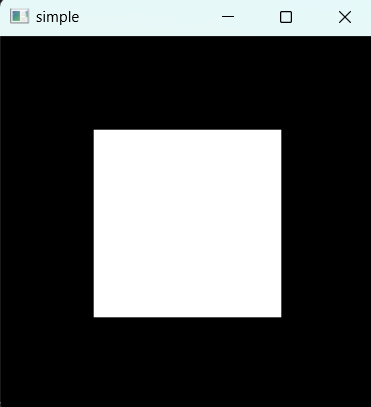

glutInit(&argc, argv);Initializes GLUT and should be called before other GLUT and OpenGL functions

glutCreateWindow("simple");Creates a window on the screen with the title given by the argument

glutDisplayFunc(display);• The function display() is called each time the window needs to be redrawn (pointer to a function)
• display() --- callback function. Global variables may be necessary to pass values among functions

glutMainLoop();Causes the program to enter an infinite event-processing loop. It should be the last statement in the main() function.

void display(){

    glClear(GL_COLOR_BUFFER_BIT);

    glBegin(GL_POLYGON);

        glVertex2f(-0.5f, -0.5f);
        glVertex2f(-0.5f, 0.5f);
        glVertex2f(0.5f, 0.5f);
        glVertex2f(0.5f, -0.5f);

    glEnd();
    glFlush();
}
The OpenGL Coordinate System

glVertex(234)(sfid)Specifies the location of the vertex

glBegin(Glenum mode)Specifies the beginning of an object of type mode. Modes include GL_POINTS, GL_LINES, and GL_POLYGON

glEnd()Specifies the end of a list of vertices
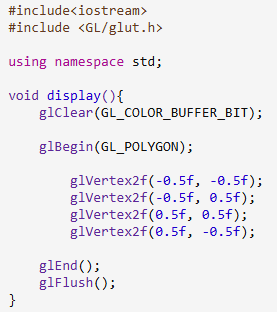
glClear(Glbitfield mask)Clears all buffers whose bits are set in mask. GL_COLOR_BUFFER_BIT refers to the color buffer
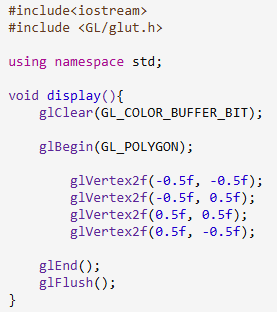
glFlush()Forces previously buffered OpenGL commands to execute
Changing the GLUT Defaults
• glutInitWindowSize(1024, 768);
• glutInitWindowPosition(0, 0);