Professor Messer: 1.4 Part 2
 Call Kai
 Learn
 Practice Test
 Spaced Repetition
 Match
 Flashcards
 Knowt Play
1/28

There's no tags or description
Looks like no tags are added yet.
29 Terms
Building the IPv6 address
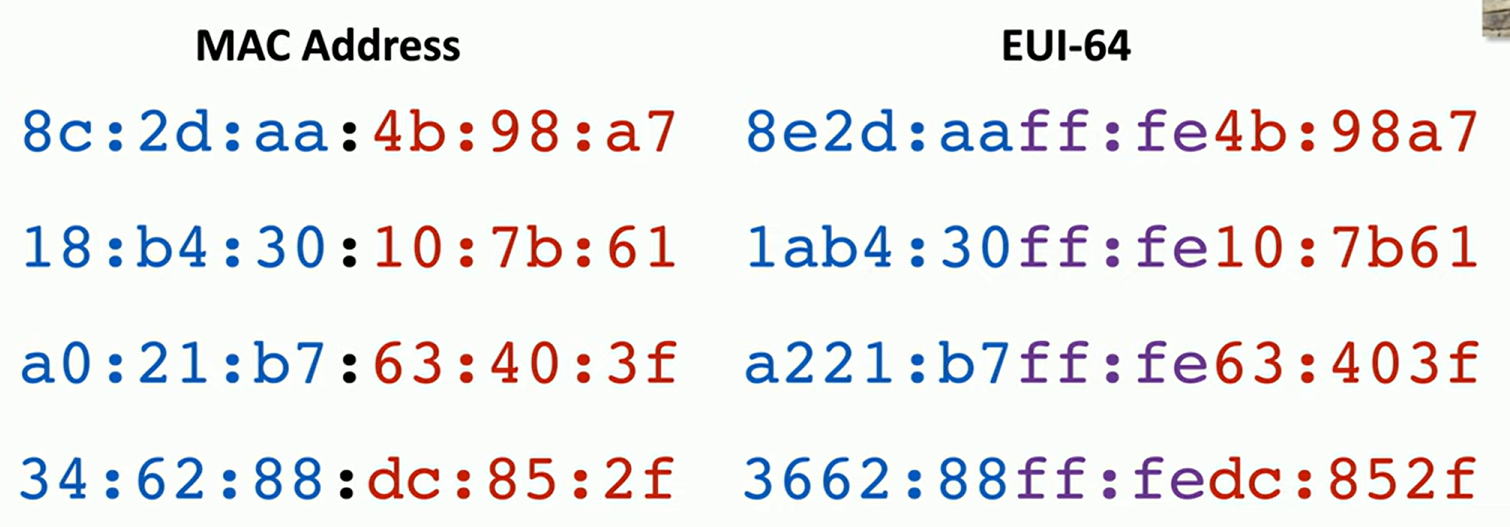
The 64-bit IPv6 subnet prefix is typically the first half of an IPv6 address, associated with your IPv6 subnet. To complete the IPv6 address, you use the EUI-64 address, which involves manipulating the MAC address. First, take the first three bytes of the MAC address and write them in IPv6 format. Next, add the two additional bytes in the middle, which are ff:fe. Finally, include the last three bytes of the MAC address.
This process converts the MAC address into a 64-bit host identifier, which, when combined with the 64-bit subnet prefix, forms a complete IPv6 address.

IPv6 addresses
Are 128-bit addresses used in Internet Protocol version 6. This allows for an enormous number of unique IP addresses—approximately 340 undecillion. Each address is made up of 128 binary values and is typically written in hexadecimal format. To make these addresses easier to view, read, and manage, they are often abbreviated.
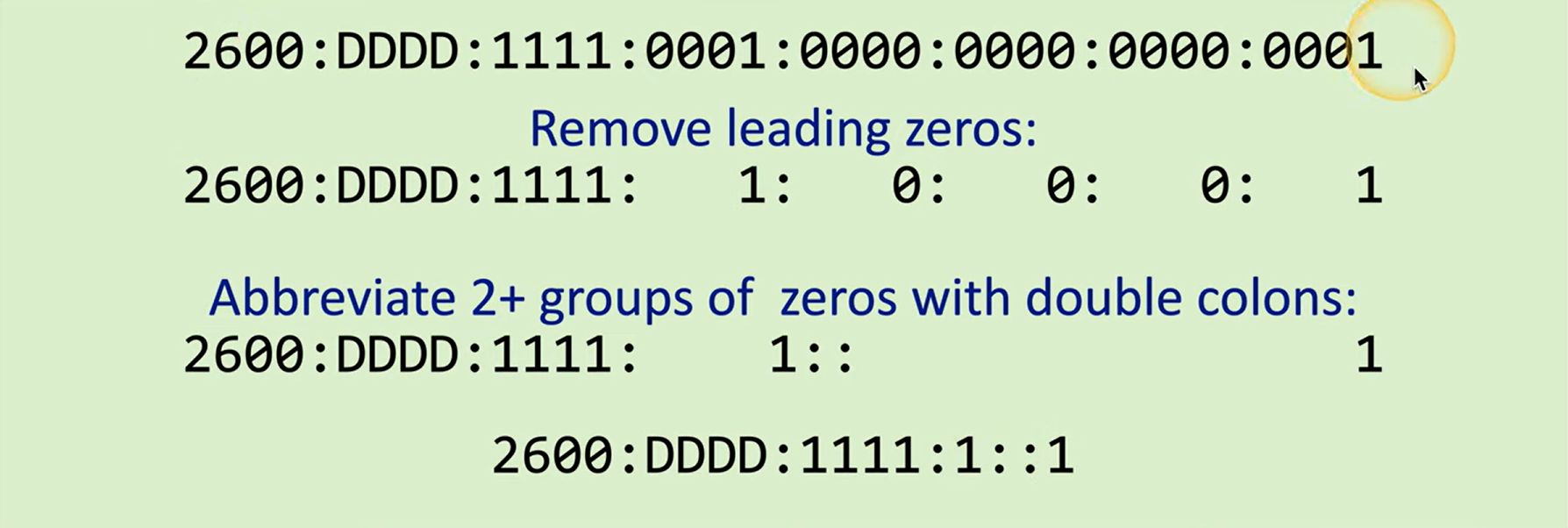
IPv6 address compression
Helps simplify the notation of IPv6 addresses. Groups of consecutive zeros can be abbreviated with a double colon (::), but only one such abbreviation is allowed. Leading zeros in any group can be omitted, making the address more concise and easier to read.2001:0db8:0000:0042:0000:0000:0000:0001 can be compressed to 2001:db8:0:42::1
Configuring IPv6 with a modified EUI-64:
Allows static assignment of IPv6 addresses without a DHCP server. Useful because the IP address remains constant, just like the MAC address, which never changes. The Extended Unique Identifier (64-bit) method combines a 64-bit IPv6 prefix with the 48-bit MAC address of a system to create a unique IPv6 address. Since the MAC address is only 48 bits long, additional bits are needed. This involves inserting ff:fe in the middle of the MAC address
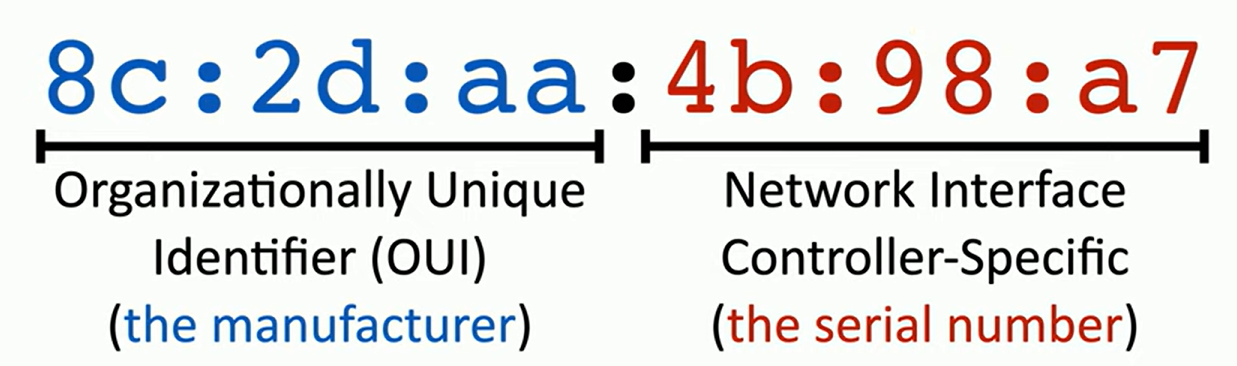
The MAC address, or Ethernet Media Access Control Address.
The "physical" address of a network adapter. It's an EUI-48 address, meaning it's an Extended Unique Identifier that is 48 bits long.
The first three bytes of the MAC address are known as the OUI (Organizationally Unique Identifier), which serves as the manufacturer ID. The last three bytes are assigned by the manufacturer and act as a unique serial number or network interface controller-specific value. No other network interface card should share the same MAC address
Converting EUI-48 to EUI-64
Split the MAC address: Divide the 48-bit MAC address into two 3-byte (24-bit) halves.
Insert FF:FE: Place FF:FE in the middle of the two halves. This adds the missing 16 bits, making the address 64 bits long.
Invert the seventh bit: This changes the address from a globally unique/universal address to a locally administered address. This bit is known as the U/L (universal/local) bit.
The burned-in address (BIA) is modified to create an EUI-64 address
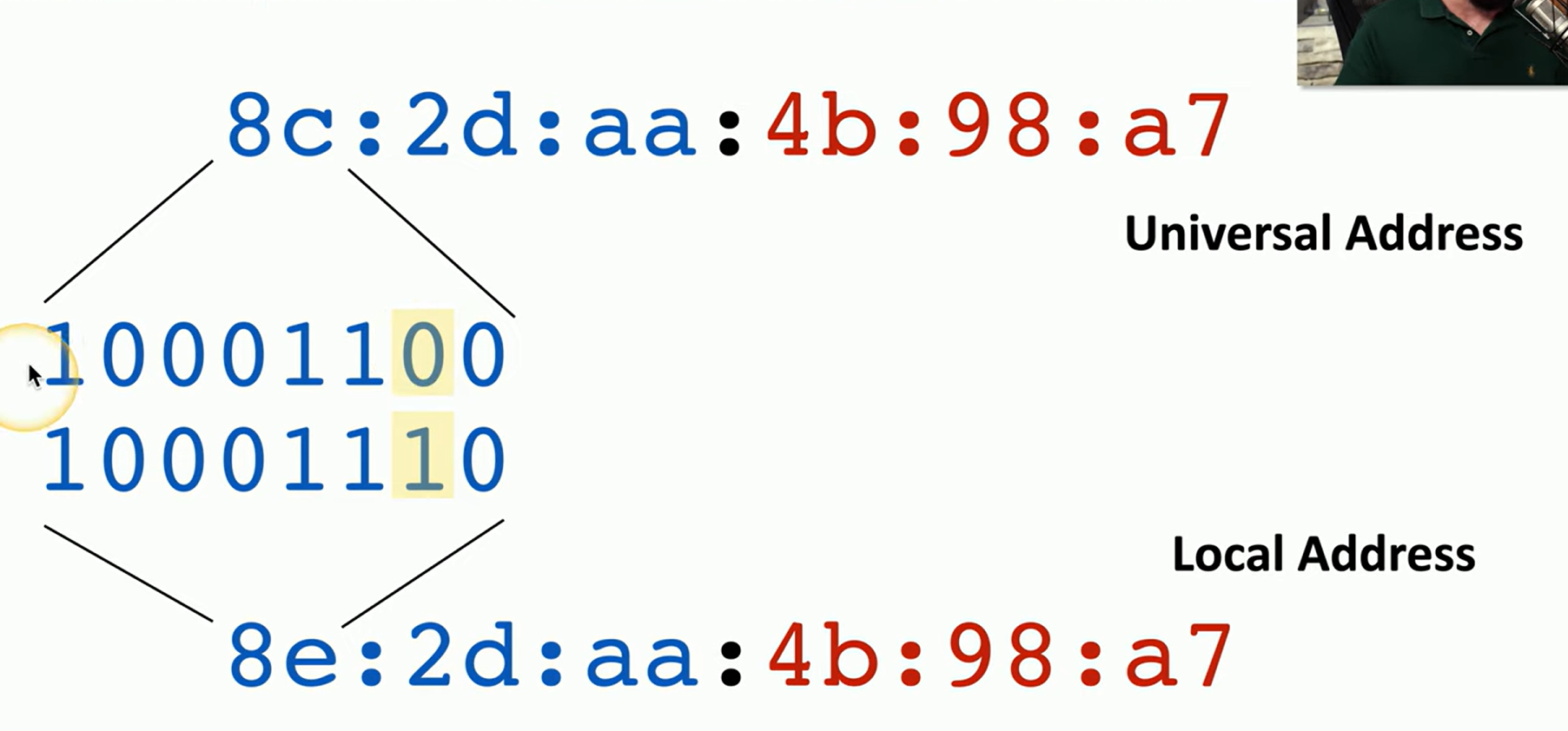
Modifying the MAC
Identify the Seventh Bit & Invert the Seventh Bit

Creating IPv6 address
Start with the 64-bit IPv6 subnet prefix, which forms the first half of the address and is associated with your IPv6 subnet. The second half is created by converting the MAC address to a 64-bit identifier. Begin by splitting the 48-bit MAC address into two 3-byte (24-bit) halves. Insert FF:FE in the middle, providing the missing 16 bits needed for a 64-bit identifier. Modify the first byte of the MAC address by changing the seventh bit to indicate a locally administered address, if necessary.
For example, if the MAC address is 8c:2d:aa:bb:cc:dd and the subnet prefix is 2001:0db8:abcd:0012, you first split the MAC into 8c:2d:aa and bb:cc:dd, then insert FFFE to get 8c:2d:aa:ff:fe:bb:cc:dd. Next, invert the seventh bit of the first byte (8c), resulting in 8e, and the modified MAC address becomes 8e:2d:aa:ff:fe:bb:cc:dd. Finally, combine this with the subnet prefix to form the full IPv6 address: 2001:0db8:abcd:0012:8e2d:aaff:febb:ccdd.
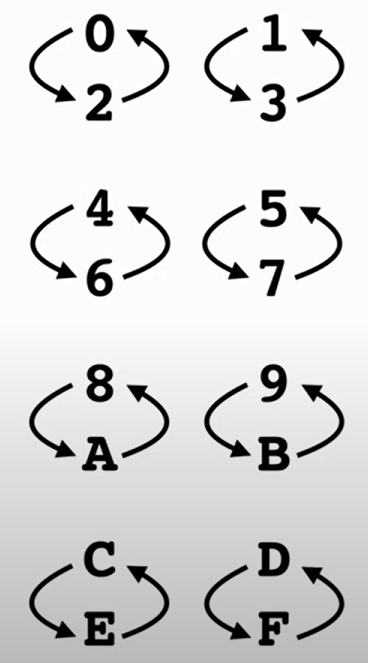
Flipping the 7th bit
Find the second character of the first hex byte in the chart and convert it to the corresponding character in the opposite group.
0 ⇔ 2 | 1 ⇔ 3
4 ⇔ 6 | 5 ⇔ 7
8 ⇔ A | 9 ⇔ B
C ⇔ E | D ⇔ F
Hexadecimal Conversion
10 = A
11 = B
12 = C
13 = D
14 = E
15 = F
Quick Conversions
Convert second bit, combine with the other two bits
Combine third bit with ff
Combine fourth bit with fe (in front)
Combine last bits
Assigning IPv6 addresses
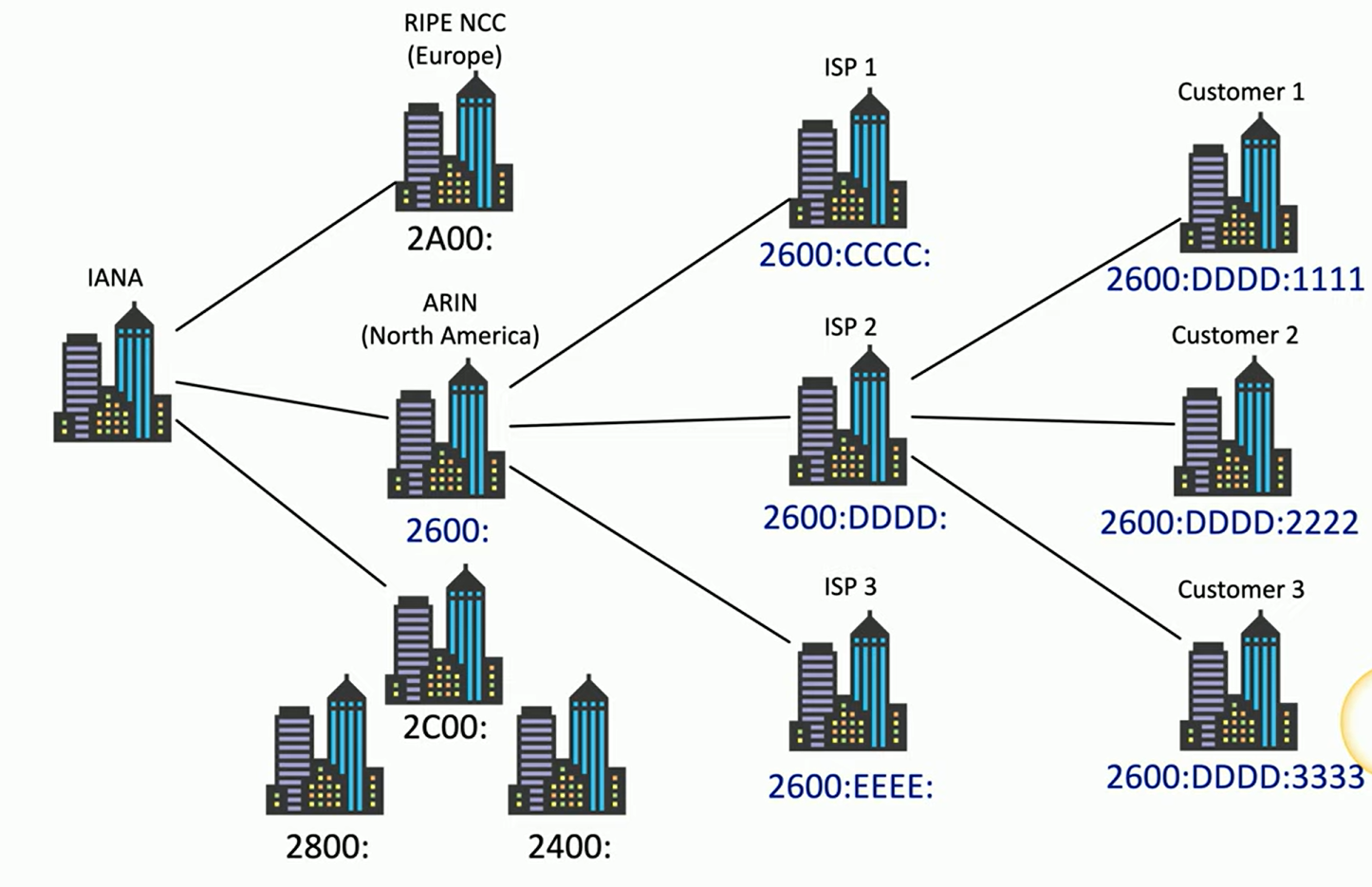
The Internet Assigned Numbers Authority (IANA) provides large address blocks to Regional Internet Registries (RIRs). These RIRs then assign smaller subnet blocks to Internet Service Providers (ISPs). The ISPs, in turn, assign a /48 subnet to their customers.
IPv6 Address Structure
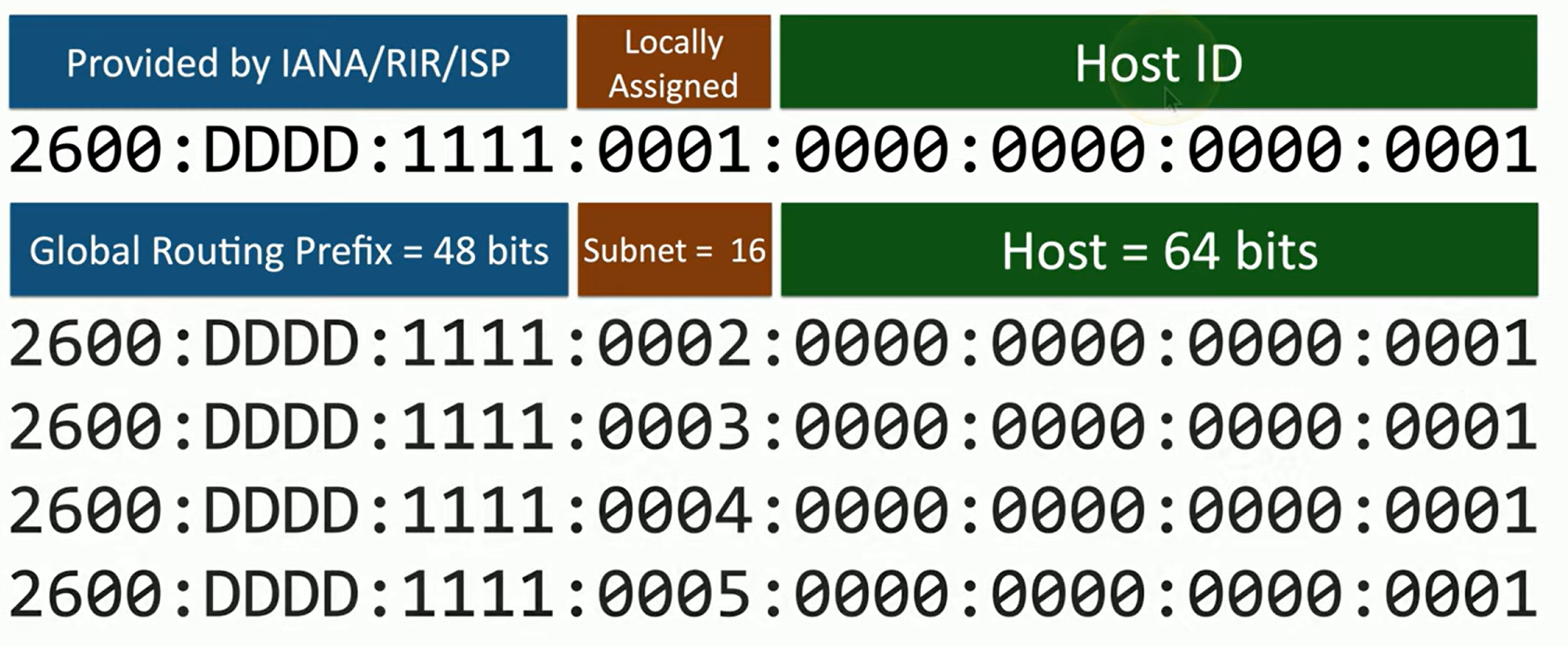
The first three groups form the Global Routing Prefix, consisting of 48 bits. These groups are assigned by the Internet Assigned Numbers Authority (IANA), the Regional Internet Registry (RIR), and ultimately the ISP.
The locally assigned group is a 16-bit subnet identifier, which you can choose.
The remaining 64 bits of the IPv6 address are the Host ID.
IPv6 Network and Host Segmentation
The first half of an IPv6 address is the network portion, while the second half represents the hosts. To create additional networks, you simply change the subnet address in the middle. With 16 subnet bits, you can create 65,536 total subnets. The remaining 64 bits are reserved for the Host ID, allowing each subnet to support up to 18 million trillion hosts. It's common to have the network prefix set to 64 bits and use the last 64 bits for host addresses.
Writing Out IPv6 Subnet Addresses
To create the compressed version of that subnet address, you would use CIDR block notation + normal compression.
IPv6 Subnet Example
Given the IP range provided by your Internet Service Provider, you can assign IPv6 addresses to separate subnets by incrementing the subnet value. . For example, you can create networks 2600:DDDD:1111:1::/64, 2600:DDDD:1111:2::/64, 2600:DDDD:1111:3::/64, and 2600:DDDD:1111:4::/64. This allows you to configure and design your network flexibly, as each individual IP subnet can be differentiated by changing the subnet values.
6to4 addressing
Allows sending IPv6 over an existing IPv4 network by creating an IPv6 address based on the IPv4 address. This method requires relay routers, typically placed in optimal locations with good antennas. Does not support NAT. Not widely implemented in modern networks.
4in6 tunneling
Allows IPv4 traffic to be transmitted over an IPv6 network. Encapsulates IPv4 packets within IPv6 packets. Not widely implemented in modern networks.
Teredo
A tunneling protocol that allows IPv6 traffic to be sent through NATed IPv4 networks, specifically on Windows systems without requiring special IPv6 routers. Typically used as a temporary solution for transitioning to IPv6.
Miredo
Open-source implementation of the Teredo protocol designed for Linux, BSD Unix, and macOS systems. It provides full functionality, allowing these operating systems to tunnel IPv6 traffic through NATed IPv4 networks.
Dual-stack routing
Enables devices to be configured with both IPv4 and IPv6 addresses simultaneously. This setup allows routing devices to handle and route traffic for both IP versions appropriately.
Dual-stack routing IPv4
Configured with IPv4 addresses
Maintains an IPv4 routing table
Uses IPv4 dynamic routing protocols
Dual-stack routing IPv6
Configured with IPv6 addresses
Maintains a separate ipv6 routing table
Uses IPv6 dynamic routing protocols
IPv6 Addressing Missing Pieces
Does not use broadcasts, which are packets transmitted to every device on a network. There’s no ARP either (maps MAC addresses to IP addresses)
Neighbor Discovery Protocol (NDP)
Neighbor Solicitation (NS) messages are sent as multicast to request information from one or more devices on the network. Neighbor Advertisement (NA) messages respond to these solicitations, providing the requested information. Together, NS and NA replace the Address Resolution Protocol (ARP
Neighbor MAC Discovery
Replaces the IPv4 ARP
SLAAC
(Stateless Address Autoconfiguration) Automatically configure an IP address without a DHCP server
DAD
(Duplicate Address Detection) No duplicate IPs!
Finding Routers with Neighbor Discovery Protocol
To locate routers on an IPv6 network, devices use the Neighbor Discovery Protocol. A Router Solicitation (RS) message is sent to a multicast address for IPv6 routers, prompting local routers on the subnet to reply with Router Advertisement (RA) messages.
In addition to responding to solicitations, routers also send unsolicited RA messages to the multicast address ff02::1. These messages provide IPv6 address information, prefix values, and prefix lengths. This process enables local devices to automatically configure themselves with the appropriate IP addresses.