Midterm 1 CS 300 UW madison
 Call Kai
 Learn
Learn Practice Test
 Spaced Repetition
 Match
Match Flashcards
 Knowt Play
1/38

There's no tags or description
Looks like no tags are added yet.
Name | Mastery | Learn | Test | Matching | Spaced | Call with Kai | Chat |
|---|
No analytics yet
Send a link to your students to track their progress
39 Terms
Whats a field
A variable declared inside a class that holds data — it represents the state of an object (or of the class itself, if static).
like a parameter
Array information
-An array has a fixed length, chosen when it's created
-arr.length is a field, not a method — no parentheses.
-Indexing is zero-based: the valid range is arr.length - 1] .
-Unassigned slots hold a default
-their is perfect and oversized arrrays, as declared like
![<p>-An array has a fixed length, chosen when it's created</p><p>-arr.length is a field, not a method — no parentheses. </p><p>-Indexing is zero-based: the valid range is arr.length - 1] .</p><p>-Unassigned slots hold a default</p><p>-their is perfect and oversized arrrays, as declared like </p>](https://assets.knowt.com/user-attachments/4d605f51-c7dc-42e7-aeb8-201bd25a8c06.png)
explain primitives vs. references

distinguish {} from new int[n] .

understand oversize add / remove / search
lowk remember indexOf(arr, size, val)
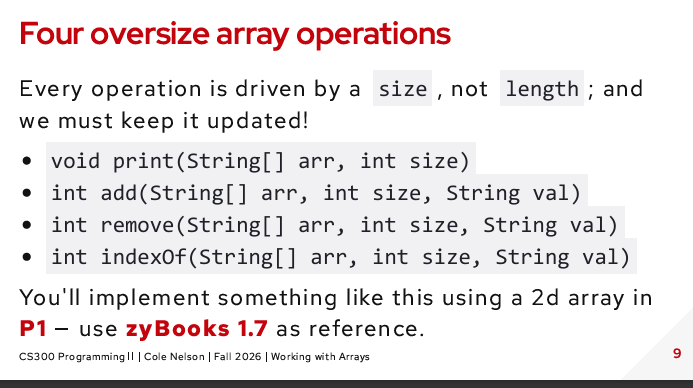
use 2D and parallel arrays.
Definition: An array of arrays — each element of the outer array is itself an array. In Java, rows can even have different lengths ("jagged arrays"), since it's really an array of array references.
Declaration & creation:
java
int[][] grid = new int[3][4];        // 3 rows, 4 columns, all 0s
int[][] grid2 = {{1,2}, {3,4,5}};      // jagged — row lengths can differ
Access: grid[row][col] — row index first, then column.
Traversal pattern (memorize this):
java
for (int r = 0; r < grid.length; r++) {         // rows
    for (int c = 0; c < grid[r].length; c++) {   // cols — use grid[r].length, not grid[0].length, for jagged arrays!
        System.out.print(grid[r][c] + " ");
    }
    System.out.println();
}
Parallel Arrays
Definition: Two or more separate 1D arrays, kept in sync by using the same index across all of them to represent one logical record. Index i in every array refers to the same "entity."
Example setup:
java
String[] names = new String[10];
int[] ages = new int[10];
int size = 0;   // shared oversize counter for both arrays
Here, names[3] and ages[3] describe the same person — that's the whole idea.
![<p><strong>Definition:</strong> An array of arrays — each element of the outer array is itself an array. In Java, rows can even have different lengths ("jagged arrays"), since it's really an array of array <em>references</em>.</p><p><strong>Declaration & creation:</strong></p><p>java</p><pre><code class="language-java">int[][] grid = new int[3][4]; // 3 rows, 4 columns, all 0s
int[][] grid2 = {{1,2}, {3,4,5}}; // jagged — row lengths can differ</code></pre><p><strong>Access:</strong> <code>grid[row][col]</code> — row index first, then column.</p><p><strong>Traversal pattern (memorize this):</strong></p><p>java</p><pre><code class="language-java">for (int r = 0; r < grid.length; r++) { // rows
for (int c = 0; c < grid[r].length; c++) { // cols — use grid[r].length, not grid[0].length, for jagged arrays!
System.out.print(grid[r][c] + " ");
}
System.out.println();
}</code></pre><p>Parallel Arrays </p><p><strong>Definition:</strong> Two or more <strong>separate 1D arrays</strong>, kept in sync by using the <strong>same index</strong> across all of them to represent one logical record. Index <code>i</code> in every array refers to the same "entity."</p><p> </p><p><strong>Example setup:</strong></p><p> </p><p>java</p><pre><code class="language-java">String[] names = new String[10];
int[] ages = new int[10];
int size = 0; // shared oversize counter for both arrays</code></pre><p> </p><p>Here, <code>names[3]</code> and <code>ages[3]</code> describe the <em>same person</em> — that's the whole idea.</p>](https://assets.knowt.com/user-attachments/9b8adef3-68c3-4daf-9a02-bf82a45e27f3.png)
write a tester suite.

Be able to construct an object with new
What is an object? Definition: an object bundles state — the data it remembers — with behavior — the methods you can call on it. A String remembers a sequence of characters, and knows how to hand you .length() , .charAt(0) , or an upper-cased copy of itself with .toUpperCase() . These are all instance methods new builds the object Strings are objects, but get special privileges, i.e... Objects are created via new ... Three things happen, right to left: new reserves the space, the constructor Book("Dune") fills in the starting state, and the reference lands in CS300 Programming II | Cole Nelson | Fall 2026 | Using Objects CS300 Programming II | Cole Nelson | Fall 2026 | Using Objects dune .

Be able to distinguish new static class members from instance members
Common exam trap: a static method cannot directly access instance fields or call instance methods (no object to work on) — but an instance method can access static fields just fine, since it has both the object's data and the class-wide data available to it.
Instance member — belongs to each individual object. Every object gets its own separate copy.
Static member — belongs to the class itself, shared by all objects. Only one copy exists, no matter how many objects you create.

Be able to debug a NullPointerException by naming the null reference
Core idea: A NullPointerException (NPE) happens when you try to use a reference variable that's currently pointing to nothing (null) — calling a method on it, accessing a field, or indexing into it. The fix always starts with identifying which specific variable was null at the moment of the crash.
Steps:
Find the line number in the trace (
Dog.java:12) — go to that exact line.Identify every reference used on that line. One of them is null.
Ask: which variable was never assigned, or was explicitly set to
null, or was returned asnullfrom a method before reaching this line?
you should check for null, like “if (array[i]!=null)“
Be able to explain why objects are compared with .equals() , not == .
== on reference types checks identity — "are these two variables pointing at the exact same object in memory?" It compares the references (arrows), not what's inside the objects.
.equals() checks content/logical equality — "do these two objects represent the same value/data?" — even if they're two completely separate objects sitting at different addresses on the heap.
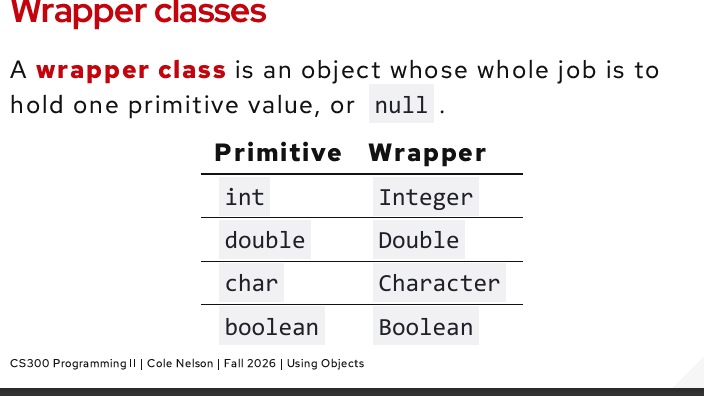
Wrapper classes
A wrapper class is an object whose whole job is to hold one primitive value, or null
So primitives hold the value, and wrappers point to the value
Autoboxing and unboxing
Okay so Intergers are wrappers, so objects, point to value
Primitives hold a value
== just checks if they point to the same place, and boxing is why this issue existsince it turns a simple value into an object with its own separate identity.
so int==integer is fine, will be true
but integer == integer is false
UNLESS the value is x<=127 so -128 to 127
when you hit anything above 128
integer == integer will be false
so integer 2 == integer 2 is true
Quick mental model
Autoboxing: primitive → object (going "up" into a box)
Unboxing: object → primitive (coming back "out" of the box)
Java triggers these conversions automatically, wherever the compiler detects a type mismatch it knows how to bridge — assignment, method calls expecting the other type, arithmetic mixing primitives and wrappers, etc.
What autoboxing is, in plain terms
Primitives (int, double, boolean...) are just raw values — not objects. But sometimes your code needs an object version of a number instead (like Integer instead of int) — for example, to put numbers in an ArrayList, since ArrayList can only hold objects, never raw primitives.
Autoboxing = Java automatically wrapping a plain primitive value inside an object for you, without you having to write the conversion yourself.
java
Integer a = 256;You wrote 256 — a plain int literal. But a is declared as Integer (a class, an object type). So behind the scenes, Java actually runs:
java
Integer a = Integer.valueOf(256);That Integer.valueOf(256) call is what creates the object — a little box on the heap that holds the number 256 inside it. You didn't type new Integer(256) or Integer.valueOf(...) yourself — Java did it automatically. That automatic wrapping is autoboxing.
Why a == b is false
java
Integer a = 256;   // autoboxing creates Object #1, holding 256
Integer b = 256;   // autoboxing creates Object #2, holding 256
Each line runs Integer.valueOf(256) separately. Each call can create a brand new object on the heap. So now you have:
a→ points to Object #1 (out on the heap, containing256)b→ points to Object #2 (a different spot on the heap, also containing256)
Two separate boxes. Two separate arrows. Even though both boxes happen to contain the same number inside, a and b are pointing at two different objects.
== on reference types (like Integer) doesn't ask "do these objects contain the same value?" — it asks "are these two arrows pointing at the exact same object?" Since they're not (two different valueOf calls made two different objects), a == b is false.
Visual way to think about it:
a ──arrow──▶ [Integer object #1: 256]
b ──arrow──▶ [Integer object #2: 256]
Same contents, different objects. == only cares about the arrows matching, not the contents — that's the whole trap.
![<p>Okay so Intergers are wrappers, so objects, point to value</p><p>Primitives hold a value</p><p></p><p>== just checks if they point to the same place, and boxing is why this issue existsince it turns a simple value into an object with its own separate identity.</p><p></p><p>so int==integer is fine, will be true</p><p>but integer == integer is false</p><p>UNLESS the value is x<=127 so -128 to 127</p><p>when you hit anything above 128</p><p>integer == integer will be false</p><p>so integer 2 == integer 2 is true</p><p></p><p>Quick mental model</p><ul><li><p><strong>Autoboxing:</strong> primitive → object (going "up" into a box)</p></li><li><p><strong>Unboxing:</strong> object → primitive (coming back "out" of the box)</p></li><li><p>Java triggers these conversions <strong>automatically</strong>, wherever the compiler detects a type mismatch it knows how to bridge — assignment, method calls expecting the other type, arithmetic mixing primitives and wrappers, etc.</p></li></ul><p>What autoboxing is, in plain terms</p><p>Primitives (<code>int</code>, <code>double</code>, <code>boolean</code>...) are just raw values — not objects. But sometimes your code needs an <strong>object</strong> version of a number instead (like <code>Integer</code> instead of <code>int</code>) — for example, to put numbers in an <code>ArrayList</code>, since <code>ArrayList</code> can only hold objects, never raw primitives.</p><p></p><p><strong>Autoboxing</strong> = Java automatically wrapping a plain primitive value inside an object for you, without you having to write the conversion yourself.</p><p></p><p>java</p><pre><code class="language-java">Integer a = 256;</code></pre><p></p><p>You wrote <code>256</code> — a plain <code>int</code> literal. But <code>a</code> is declared as <code>Integer</code> (a class, an object type). So behind the scenes, Java actually runs:</p><p></p><p>java</p><pre><code class="language-java">Integer a = Integer.valueOf(256);</code></pre><p></p><p>That <code>Integer.valueOf(256)</code> call is what <strong>creates the object</strong> — a little box on the heap that holds the number <code>256</code> inside it. You didn't type <code>new Integer(256)</code> or <code>Integer.valueOf(...)</code> yourself — Java did it automatically. That automatic wrapping is autoboxing.</p><p>Why <code>a == b</code> is <code>false</code></p><p>java</p><pre><code class="language-java">Integer a = 256; // autoboxing creates Object #1, holding 256
Integer b = 256; // autoboxing creates Object #2, holding 256</code></pre><p></p><p>Each line runs <code>Integer.valueOf(256)</code> <strong>separately</strong>. Each call can create a <strong>brand new object</strong> on the heap. So now you have:</p><p></p><ul><li><p><code>a</code> → points to Object #1 (out on the heap, containing <code>256</code>)</p></li><li><p><code>b</code> → points to Object #2 (a <em>different</em> spot on the heap, also containing <code>256</code>)</p></li></ul><p></p><p>Two separate boxes. Two separate arrows. Even though both boxes happen to contain the same number inside, <code>a</code> and <code>b</code> are pointing at <strong>two different objects</strong>.</p><p></p><p><code>==</code> on reference types (like <code>Integer</code>) doesn't ask "do these objects contain the same value?" — it asks "<strong>are these two arrows pointing at the exact same object?</strong>" Since they're not (two different <code>valueOf</code> calls made two different objects), <code>a == b</code> is <code>false</code>.</p><p></p><p><strong>Visual way to think about it:</strong></p><p></p><pre><code>a ──arrow──▶ [Integer object #1: 256]
b ──arrow──▶ [Integer object #2: 256]</code></pre><p></p><p>Same <em>contents</em>, different <em>objects</em>. <code>==</code> only cares about the arrows matching, not the contents — that's the whole trap.</p>](https://assets.knowt.com/user-attachments/76590e20-7769-41f0-814b-cbd753ec8af9.png)
Wrappers and strings are mutable or inmmuntable
inmmuntable, cannot change, your better off making a new string

Be able to describe what the stack, heap, and static regions hold
The stack holds local variables and parameters both primitive and reference types; the heap holds the actual objects reference variables point to.
Stack is stack of frames, holding methods and locals, when any method returns, the frame pops and any local (var after parameters) in it is gone
-object can survive if it is returned
-parameters pass thru
1. Code (the compiled instructions)
This region holds the actual compiled bytecode of your program — the instructions for every method you've written, translated from Java source into something the JVM can execute.
It's essentially your program's logic, sitting in memory once, ready to be run.
It doesn't change while your program runs — it's read-only instructions, not data your program manipulates.
You never directly interact with this region in your code; it's just "where the what to do lives," as opposed to the other three regions, which hold data.
2. Static memory (static fields — one copy per class)
Holds static fields — the class-level variables you mark with the static keyword. Exactly one copy exists total, shared by the entire class, no matter how many objects you create.
java
public class Dog {
    static int numDogs = 0;   // lives in static memory — ONE copy, shared
    String name;                // instance field — lives inside each object on the heap instead
}
Connects directly to your earlier flashcard: static = belongs to the class, so it makes sense it lives in its own dedicated region separate from any individual object.
Static memory is allocated once, when the class is first loaded — not per object, and not per method call.
3. The stack (one frame per method call: parameters and locals)
Every time a method is called, Java pushes a new stack frame onto the stack. That frame holds:
The method's parameters (the values passed in)
The method's local variables (declared inside the method body)
java
public static void bump(int[] arr) {   // "arr" — parameter, lives in bump's stack frame
    int temp = arr[0];                   // "temp" — local variable, also in bump's stack frame
    arr[0] = temp + 10;
}
When the method returns, its entire stack frame is popped off and destroyed — this is exactly why local variables and parameters "go out of scope" and disappear when a method finishes.
The stack works in strict last-in-first-out order: if
main()callsbump(), andbump()calls another method, each call adds another frame on top; they get removed in reverse order as each method finishes.Important nuance for reference types: if a parameter is a reference (like an array or object), the reference itself (the arrow) lives in the stack frame — but the actual object it points to lives elsewhere, on the heap. That's why a method can end (its stack frame destroyed) and the object it was pointing to can still be alive — as long as something else still holds a reference to it.
4. The heap (every object built with new)
Every time you use new to construct an object (or an array), that object is created on the heap.
java
Dog d = new Dog();       // the Dog OBJECT lives on the heap
int[] arr = new int[5];  // the array OBJECT lives on the heap
The heap is where all your actual object data lives — the instance fields, the array elements, the real substance of everything you've built.
Objects on the heap aren't tied to any one method's lifetime — they persist as long as something, somewhere still holds a reference to them (this connects directly to your earlier garbage collection question: an object becomes eligible for GC only when nothing on the stack — or reachable from the stack — points to it anymore).
Variables on the stack that are reference types don't hold the object itself — they hold an arrow (reference/address) pointing into the heap, to where the real object lives.
How they all fit together (mental picture)
STACK (per method call)          HEAP (all objects, live as long as referenced)
┌─────────────────┐              ┌───────────────────────┐
│ main() frame     │              │  Dog object            │
│  d ──────────────┼─────arrow───▶│   name: "Rex"           │
│                  │              │   age: 3                │
└─────────────────┘              └───────────────────────┘

STATIC MEMORY (one copy, class-wide)      CODE (compiled instructions)
┌─────────────────────┐                    ┌─────────────────────┐
│ Dog.numDogs = 1      │                    │ bark() bytecode      │
└─────────────────────┘                    │ bump() bytecode       │
                                             └─────────────────────┘
Exam-style way to think about it: code = the instructions, static = class-wide shared data, stack = temporary per-call data that disappears when the method ends, heap = the actual long-lived objects your program builds and operates on. Every reference variable you've dealt with in this whole conversation — array parameters, Integer objects, this, garbage collection — is really just this same four-region picture playing out over and over.
Be able to identify when an object becomes garbage.
Garbage = a heap object with no remaining reachable references. Garbage collection = the JVM's automatic background process that finds garbage and reclaims its memory, so you never have to manually deallocate objects yourself.
Be able to contrast a shallow copy with a deep copy
The setup — why "copying" gets complicated with objects JavaScript Shallow vs Deep Copy in 60 Seconds!
If a class only has primitive fields, copying is simple — just duplicate the values. But once a class has reference-type fields (arrays, other objects, Strings, etc.), you have to decide: does the copy get its own independent version of those inner objects, or does it just get another arrow pointing at the same inner objects? That decision is exactly the shallow vs. deep distinction.
Shallow copy
Copies the object's fields as-is — primitives get duplicated by value (fine, no issue), but reference-type fields get duplicated as references, meaning the copy's field and the original's field end up pointing at the same underlying object.
java
public class Dog {
    String name;
    int[] favoriteNumbers;

    public Dog(Dog other) {         // shallow copy constructor
        this.name = other.name;                      // String — effectively fine (Strings are immutable)
        this.favoriteNumbers = other.favoriteNumbers; // ❌ just copies the ARROW, not the array itself
    }
}
java
Dog original = new Dog();
original.favoriteNumbers = new int[]{7, 13};

Dog copy = new Dog(original);   // shallow copy
copy.favoriteNumbers[0] = 999;   // mutates through the SHARED array

System.out.println(original.favoriteNumbers[0]);  // 999 — original changed too!
Because copy.favoriteNumbers and original.favoriteNumbers are the same array object on the heap, mutating one is indistinguishable from mutating the other. This is almost always not what you want when you intended to make an independent copy — it's a classic source of subtle bugs.
Deep copy
Recursively copies everything — not just the top-level object, but new, independent copies of every reference-type field too, all the way down. The copy and the original end up sharing zero mutable objects; changing one can never affect the other.
java
public class Dog {
    String name;
    int[] favoriteNumbers;

    public Dog(Dog other) {                    // deep copy constructor
        this.name = other.name;
        this.favoriteNumbers = new int[other.favoriteNumbers.length];  // NEW array
        for (int i = 0; i < other.favoriteNumbers.length; i++) {
            this.favoriteNumbers[i] = other.favoriteNumbers[i];         // copy contents in
        }
        // Arrays.copyOf(other.favoriteNumbers, other.favoriteNumbers.length) does this in one line
    }
}
java
Dog original = new Dog();
original.favoriteNumbers = new int[]{7, 13};

Dog copy = new Dog(original);    // deep copy
copy.favoriteNumbers[0] = 999;    // mutates copy's OWN array

System.out.println(original.favoriteNumbers[0]);  // 7 — original untouched!
Visual comparison
SHALLOW COPY                          DEEP COPY
original ──▶ [array: 7, 13] ◀── copy   original ──▶ [array: 7, 13]
   (both point to the SAME array)       copy     ──▶ [array: 7, 13]
                                          (two SEPARATE, independent arrays)
Quick comparison table
Shallow copy | Deep copy | |
|---|---|---|
Primitive fields | Copied by value (independent either way) | Copied by value (same) |
Reference-type fields | Reference copied — shared object | New object created — independent copy |
Mutating the copy's inner object | Affects the original too | Original untouched |
Cost | Cheap/fast | More expensive — has to duplicate every nested object |
Risk | Silent bugs from unintended shared state | Safer, but must remember to deep-copy at every level of nesting |
Exam-critical nuance
"Deep" doesn't just mean "one level deeper" — if a field is itself an object that also contains reference-type fields, a true deep copy has to recurse all the way down every level, or you've just pushed the shallow-copy problem one layer deeper instead of eliminating it. And note: since String is immutable, sharing a reference to the same String object in a "shallow" copy is actually harmless in practice — immutability sidesteps the whole mutation problem, which is worth keeping in mind as an exception to the "reference fields always need deep copying" instinct.
Be able to use an ArrayList
list.add(x) append x to the end list.get(i) return the element at index i list.size() how many elements it holds list.remove(i) delete index i , shift the rest down

is something a copy or not
Step 1: Is a genuinely new object actually being created?
If not — if it's just b = a (assignment of one reference variable to another) — it's not a copy at all. Stop here. There's only ever one object; both names point to it.
If yes — something like new Book(other), Arrays.copyOf(...), .clone(), a copy constructor, etc. — continue to Step 2.
Step 2: Look at each field/element being copied. For each one, ask: "primitive or reference type?"
Primitive field (
int,double,boolean,char...) → the value itself is duplicated. There's nothing further to chase — this part is automatically "independent," no further question needed.Reference-type field (
String, array, another object,Book, etc.) → ask Step 3 for that specific field.
Step 3: For each reference-type field, was a new object created for it, or was the existing reference just copied over?
If the copying code just does
this.field = other.field;(or equivalent, likeArrays.copyOfcopying array elements that happen to be references) → the copy's field and the original's field now point to the same object. That field is shallow.If the copying code does
this.field = new SameType(other.field);(or manually rebuilds a new array/object with the same contents) → that field is independently duplicated. That field is deep.
Putting it together — the overall classification
All fields are primitive, or all reference fields were independently rebuilt → the whole thing is a deep copy.
At least one reference-type field just had its reference copied (not rebuilt) → the whole thing is a shallow copy — even if every other field was handled properly. One shared reference is enough to make it shallow overall.
True mixed case: some sources call a copy that deep-copies some reference fields but shallow-copies others a "shallow copy" overall (since sharing exists somewhere) — but for this course, the practical exam-answer is: if you can find even one reference-type field where mutating through the copy affects the original, it's shallow.
Be able to debug a crash from its stack trace
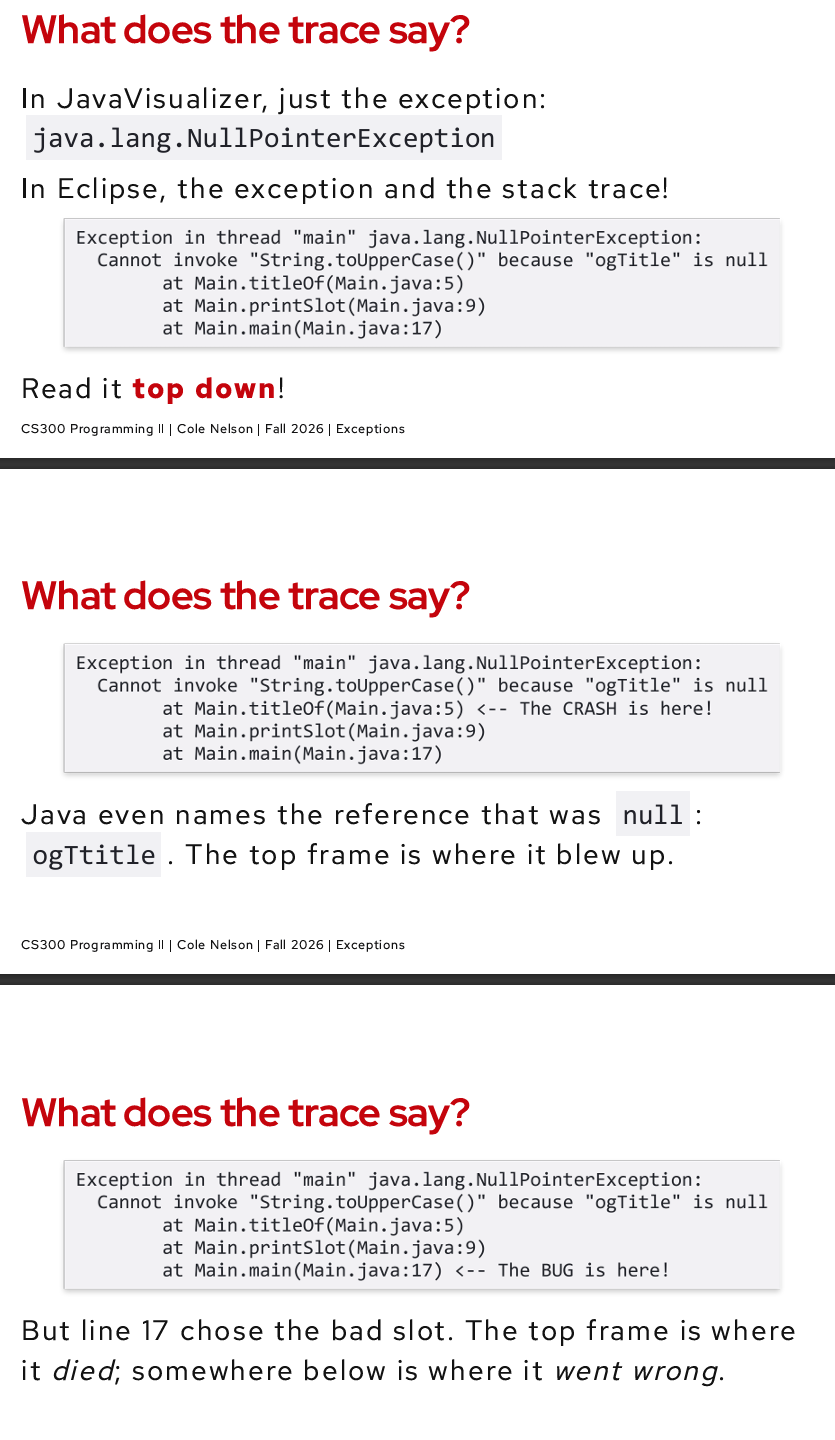

Be able to identify the exception a snippet throws.
Method: Look at what operation is happening on the line that fails, then match it to the category below — the exception name almost always describes the type of invalid operation.
Quick-reference table
Exception | Triggered by | Example |
|---|---|---|
| Accessing an array index outside |
|
| Accessing a string index/char outside |
|
| Calling a method/field on a reference that's currently |
|
| Parsing text that isn't a clean, valid number |
|
| Integer division (or modulo) by zero |
|
| Invalid cast between incompatible object types |
|
| A method receives an argument that's technically the right type but logically invalid | Custom validation, e.g. |
The identification process
Find the exact line/operation that fails (indexing? parsing? dividing? casting? method call on a reference?).
Ask what's actually wrong: is it an out-of-range index? invalid text being parsed? a null reference? bad math?
Match the operation type to its matching exception category using the table — the exception class name is your biggest clue (
ArrayIndexOutOfBoundsliterally tells you it's an array + index problem).Watch for lookalikes: array bounds vs. string bounds are easy to mix up; a
nullreference (NPE) is different from an invalid value (NumberFormatException,ArithmeticException) — a valid, non-null reference can still throw plenty of exceptions that have nothing to do with nullness.
Key distinguishing question to ask yourself
Is the reference itself missing (
null) → NPE. Or is the reference valid, but the value/operation is invalid → some other exception (bounds, parsing, math, casting).
That single question is usually enough to correctly separate NPEs from every other exception type on this list — and it's exactly the trap the "Which one throws?" slide was testing across its four lines: shelf, shelf[0], "14 days", and 7 were all perfectly valid, non-null values — the errors were about what was being asked of them, not about anything being missing.
Be able to classify an exception as checked or unchecked
Checked exception = any subclass of
Exceptionthat is NOT a subclass ofRuntimeException.Unchecked exception = any subclass of
RuntimeException(orError, thoughErrors are a separate rare category for serious JVM-level problems likeOutOfMemoryError).
The one-question test: "Does this exception extend RuntimeException?" Yes → unchecked. No (but still extends Exception) → checked.

Be able to explain why exceptions beat if guards.
Basically execptions cant be ignored, whereas ifs can make it hard to tell apart diff errors and
continue with possibly bad data, exceptions describe the issue, a -1 can be confused with actual data
If-guards require every caller to remember to manually check a special sentinel value, and silently continue with bad data if they forget. Exceptions can't be ignored — they interrupt execution, propagate automatically up the call stack until handled, and carry rich failure information — making bugs impossible to silently miss.
Be able to trace execution into and out of a catch block
BACK (Answer):
The core rule
Java executes the try block line by line, normally — until either (a) it finishes with no problems, or (b) a statement throws an exception. The instant an exception is thrown, execution immediately jumps out of the try block — skipping every remaining line in it, no matter what — and looks for a matching catch.
Trace Example 1 — no exception thrown
java
try {
    System.out.println("A");
    System.out.println("B");
    System.out.println("C");
} catch (ArithmeticException e) {
    System.out.println("Caught!");
}
System.out.println("D");
Output:
A
B
C
D
Nothing throws, so the whole catch block is skipped entirely — control just falls through to the code after the try/catch as if the catch wasn't there.
Trace Example 2 — exception thrown mid-block
java
try {
    System.out.println("A");
    int x = 7 / 0;              // throws here!
    System.out.println("B");     // never runs
} catch (ArithmeticException e) {
    System.out.println("Caught: " + e.getMessage());
}
System.out.println("D");
Output:
A
Caught: / by zero
DHow do exceptions work
1. What an exception actually is
An exception is just an object — an instance of a class like ArithmeticException or NullPointerException — that represents "something went wrong." It's created (with new, explicitly or implicitly) and then thrown, which triggers a special kind of control flow completely different from normal method calls/returns.
java
throw new ArithmeticException("Cannot divide by zero");2. Throwing — how an exception gets started
Two ways an exception comes into existence:
Automatically, by the JVM, when an illegal operation happens:
java
int x = 7 / 0; // JVM itself throws ArithmeticException
Manually, by your own code, using throw:
java
public void setAge(int age) {
    if (age < 0) {
        throw new IllegalArgumentException("Age cannot be negative");
    }
}
This is zyBooks 3.2 — "Throwing exceptions." Once throw runs, the current method stops executing immediately — no further lines in that method run, no matter what comes after the throw statement.
Be able to write a try / catch that recovers from bad input.
The pattern: wrap the risky operation in try, catch the specific exception type it can throw, and use the catch block to get the program back into a valid state — not just print an error and stop.
java
import java.util.Scanner;

public static int getValidInt(Scanner sc) {
    while (true) {
        try {
            System.out.print("Enter a number: ");
            String input = sc.nextLine();
            int value = Integer.parseInt(input);   // risky — throws NumberFormatException on bad input
            return value;                             // only reached if parsing succeeded
        } catch (NumberFormatException e) {
            System.out.println("That's not a valid number, try again.");
            // loop repeats — prompts again instead of crashing
        }
    }
}
Key ideas that make this "recovery," not just error-catching:
The
while (true)loop keeps asking until valid input is given — the program doesn't just print an error and exit.return value;only executes on the success path — if parsing throws, control jumps straight tocatch,returnnever runs, and the loop tries again.The
catchblock gives the user a clear, human-readable message instead of a raw stack trace.
Recovering from bad array/index input (same pattern, different exception type):
java
try {
    System.out.println(names[index]);
} catch (ArrayIndexOutOfBoundsException e) {
    System.out.println("Invalid index — using default instead.");
    System.out.println(names[0]);   // fallback to a safe default
}
Exam-critical point: "recovers" means the program continues running in a valid state afterward — not just that the exception was caught. Catching an exception and then doing nothing useful (or still leaving the program in a broken state) doesn't count as recovery.
Be able to trace control flow through try / catch / finally .
The 5-step mental model:
Execute
trytop to bottom, normally — until it finishes, or a line throws.The instant something throws → stop immediately, skip every remaining line in
try(even if there were more statements after it).Check
catchclauses top to bottom — run the first matching type only, then skip the rest.If no
catchmatches → the exception propagates out of the method, up the call stack (skip to step 5 first iffinallyexists).finally(if present) always runs — whether an exception was thrown or not, whether it was caught or not, even ifcatchitself throws or the methodreturns early.
Trace example:
java
try {
    System.out.println("A");
    int x = 7 / 0;             // throws here
    System.out.println("B");    // SKIPPED — never runs
} catch (ArithmeticException e) {
    System.out.println("Caught");
} finally {
    System.out.println("Finally");
}
System.out.println("D");
Output: A, Caught, Finally, D
No-exception trace (catch is skipped entirely, finally still runs):
java
try {
    System.out.println("A");
} catch (ArithmeticException e) {
    System.out.println("Caught");   // SKIPPED — nothing threw
} finally {
    System.out.println("Finally");   // still runs!
}
Output: A, Finally
Exam-critical trap: finally runs even when the try block hits a return statement — the return value is computed, but finally still executes before the method actually hands control back to the caller. Also: if no catch matches the thrown type, finally still runs before the exception continues propagating upward.
Be able to debug an unreachable catch block
BACK (Answer):
Cause: a catch clause is unreachable when an earlier catch clause in the same try would already catch everything the later one is trying to catch — because the earlier one is for a superclass/parent of the later one's type. Java's compiler detects this and refuses to compile.
java
try {
    System.out.println(playlist[5]);
} catch (RuntimeException e) {                  // parent — matches EVERYTHING below too
    System.out.println("generic");
} catch (ArrayIndexOutOfBoundsException e) {    // ❌ COMPILE ERROR: unreachable
    System.out.println("specific");
}
ArrayIndexOutOfBoundsException is-a RuntimeException (it's a subclass), so the first catch already intercepts it — the second catch can mathematically never be reached, since nothing could get past the first one to trigger it.
How to debug it — the checklist:
Find the class hierarchy of each
catchtype involved (is one a subclass of another?).Check the order they're written in, top to bottom.
If a parent/superclass type appears before one of its own subclasses → that's the bug. The subclass's catch block is unreachable.
The fix — reorder from most specific to most general:
java
try {
    System.out.println(playlist[5]);
} catch (ArrayIndexOutOfBoundsException e) {   // specific — must come FIRST
    System.out.println("specific");
} catch (RuntimeException e) {                  // general — LAST, catches anything else
    System.out.println("generic");
}
The rule to memorize: ✅ specific → general, top to bottom, always. If you're ever unsure whether an ordering is legal, ask: "Does the earlier catch's type include the later catch's type as a subclass?" If yes, swap them.
Be able to distinguish throw from throws
throw — a statement, used inside a method body, that actually creates and throws an exception object right now. It's an action — it stops execution at that exact line.
java
public void setAge(int age) {
    if (age < 0) {
        throw new IllegalArgumentException("Age cannot be negative");   // ACTION — happens now
    }
    this.age = age;
}
throws — a declaration, placed in a method's signature, that warns callers "this method might throw this checked exception, so you must handle it." It doesn't throw anything itself — it's a compile-time contract/promise.
java
public void readFile(String path) throws IOException {   // WARNING — "might happen, be ready"
    FileReader fr = new FileReader(path);   // this line is what might actually throw
}
Side-by-side comparison:
|
| |
|---|---|---|
What it is | A statement | A declaration |
Where it appears | Inside the method body | In the method signature (after parameters) |
What it does | Actually creates & throws one exception object | Warns callers a checked exception might occur |
Quantity | Exactly one exception per | Can list multiple, comma-separated |
Compiler behavior | Immediately halts execution at that line | Forces callers to |
Combined example — they work together:
java
public void process(int b) throws ArithmeticException {   // throws: "heads up, this might happen"
    if (b == 0) {
        throw new ArithmeticException("Can't divide by zero");  // throw: "it's happening right now"
    }
    System.out.println(10 / b);
}
Memory trick: throw = the verb, one action, one object, happens now. throws = the label on the method, a warning list, happens never by itself — it just describes what's possible.
Be able to trace an exception up the call stack.
The rule: when an exception is thrown and there's no matching catch in the current method, the method's stack frame is abandoned immediately, and the exception propagates to whichever method called it — repeating this process, frame by frame, until either something catches it, or it reaches main and crashes the program.
Trace example:
java
public static void main(String[] args) {
    a();
}
static void a() { b(); }
static void b() { c(); }
static void c() {
    int x = 7 / 0;   // thrown HERE
}
Step-by-step:
main()callsa()→a()callsb()→b()callsc(). Stack (bottom to top):main → a → b → c.7 / 0throwsArithmeticExceptioninsidec().c()has notry/catch→ its frame is destroyed, exception propagates tob()(the caller).b()has notry/catcharound its call toc()either → its frame is destroyed too, propagates toa().a()— same story → propagates tomain().main()has notry/catch→ nothing left to propagate to → JVM catches it at the top, prints the stack trace, program crashes.
The resulting stack trace reads bottom-to-top in your terminal, but describes top-to-bottom in call order:
Exception in thread "main" java.lang.ArithmeticException: / by zero
    at Main.c(Main.java:9)     ← where it was thrown
    at Main.b(Main.java:7)     ← who called c()
    at Main.a(Main.java:6)     ← who called b()
    at Main.main(Main.java:3)  ← who called a() (the entry point)
If a try/catch exists anywhere along that path, propagation stops there instead of reaching main:
java
static void a() {
    try {
        b();
    } catch (ArithmeticException e) {
        System.out.println("Caught in a()");   // propagation stops HERE
    }
}
Now main() never even sees the exception — it was intercepted partway up.
Exam-critical point: the exception doesn't "teleport" to a catch — it unwinds one frame at a time, checking each method's frame for a matching catch as it goes, stopping at the first one it finds.
Be able to construct a user-defined exception class.
The pattern: extend either Exception (checked) or RuntimeException (unchecked), and write a constructor that passes the message up to the parent class via super(...).
Unchecked custom exception (most common in this course):
java
public class InvalidAgeException extends RuntimeException {
    public InvalidAgeException(String message) {
        super(message);   // hands the message to Exception's built-in machinery
    }
}
Checked custom exception:
java
public class InsufficientFundsException extends Exception {
    public InsufficientFundsException(String message) {
        super(message);
    }
}
(The only difference in the class definition itself is which class you extends — everything else is identical. But extending Exception instead of RuntimeException means callers of any method that throws it are now compiler-forced to handle it, per your checked/unchecked flashcard.)
Using it — throwing your custom exception:
java
public class BankAccount {
    double balance;

    public void withdraw(double amount) throws InsufficientFundsException {
        if (amount > balance) {
            throw new InsufficientFundsException("Not enough funds: balance is " + balance);
        }
        balance -= amount;
    }
}
Catching it — works exactly like any built-in exception:
java
try {
    account.withdraw(1000);
} catch (InsufficientFundsException e) {
    System.out.println("Error: " + e.getMessage());
}
Why write your own instead of using a built-in exception? A custom exception lets you represent domain-specific problems with a name that actually describes what went wrong in your program's terms (InsufficientFundsException is far more meaningful than throwing a generic IllegalArgumentException and hoping the message explains it) — and callers can catch your specific type without accidentally catching unrelated errors that happen to also be IllegalArgumentException.
Exam-critical detail: you almost always just need super(message) — you're not required to override anything else; getMessage(), printStackTrace(), etc. all come inherited for free from Exception/Throwable.
Be able to write a tester method that passes only when a method throws.
The core pattern: call the method inside a try. If it completes without throwing, that's actually a test failure (it should have thrown!) — so you manually mark it failed right after the risky call. If it does throw the expected type, the catch block is where you mark the test as passed.
java
public static boolean testWithdrawThrows() {
    BankAccount account = new BankAccount();
    account.balance = 100;

    try {
        account.withdraw(1000);          // should throw — balance is too low
        return false;                     // ❌ if we reach this line, NO exception was thrown — test FAILS
    } catch (InsufficientFundsException e) {
        return true;                      // ✅ correct exception caught — test PASSES
    }
}
Why the return false placement is the whole trick: if withdraw(1000) behaves correctly and throws, execution jumps straight to catch — return false is skipped entirely, exactly like any other line after a throw (straight from your control-flow tracing flashcard). The only way return false actually executes is if withdraw finished normally without throwing — which means the method under test is broken.
Also verify the exception carries the right information (stronger test):
java
public static boolean testWithdrawThrows() {
    BankAccount account = new BankAccount();
    account.balance = 100;

    try {
        account.withdraw(1000);
        return false;
    } catch (InsufficientFundsException e) {
        return e.getMessage().contains("Not enough funds");   // also check the message is correct
    }
}
Catching too broadly is a common mistake to avoid — if you catch (Exception e) instead of the specific expected type, your test would also "pass" if the method threw a completely different, unintended exception (like a NullPointerException from a bug elsewhere) — masking real problems. Always catch the specific exception type you're actually testing for.
JUnit equivalent, for comparison (in case it comes up): this manual pattern is literally what assertThrows() automates for you —
java
assertThrows(InsufficientFundsException.class, () -> account.withdraw(1000));But since this course has you writing tests manually (zyBooks 4.11, "Unit testing"), knowing the underlying try/catch/return mechanics — not just the JUnit shortcut — is exactly what this learning objective is testing.
remember that for array you can .length on oversized to find the values with null, where as array list is .size()
Integer Double Boolean capitizied
.size() will not throw a null ppointer experion