CECS 323 - Midterm 3 Practice
 Call Kai
 Learn
 Practice Test
 Spaced Repetition
 Match
 Flashcards
 Knowt Play
1/31

There's no tags or description
Looks like no tags are added yet.
32 Terms

This query will always produce exactly zero rows:
True

The first query returns 122 rows and the second only returns 100 rows, The reason is (select one
Not every customer has a has a sales representative. The INNER JOIN will only return customers who have a matching row in employees.

The first query will produce fewer rows than the second:
False

I want to see every customer who has ever made a payment, and I want to see that customer’s name just once. Will the following query do that for me?
No, it won’t because JOIN to orders will require that the customers returned must have made at least one payment and at least one order.
To join employeesto employees, we must use the JOIN ON, rather than the JOIN USING because (pick one)
We must use the JOIN ON because the primary key column in the parent (employees) is named employeeNumber, while the corresponding migrated foreign key in employees is named reportsTo.
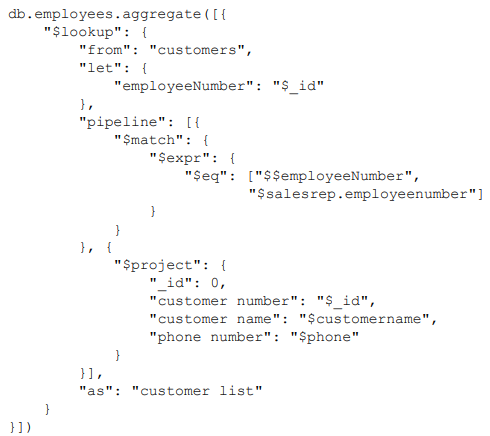
$lookup has two formats: the first requires from, localField, foreignField and as. The second requires from, let (optional), pipeline, and as. In the second form, pipeline in the $lookup allows us to “condition” (transform, operate on) the data of the foreign collection before adding it to the local collection.
The following query:
Produces the same result as an INNER JOIN between customers and employees ON customers.salesRepEmployeeNumber = employeeNumber, and the inner project removes everything from customers except the customer number, name, and phone number. This reduces the amount of data added to the documents output from the $lookup
By itself, the $lookup is like a RIGHT OUTER JOIN in SQL as far as whether a document in coming into the $lookup from the previous pipeline stage will appear in the output.
False

The following query will remove the employees with no customers because of the $unwind
True
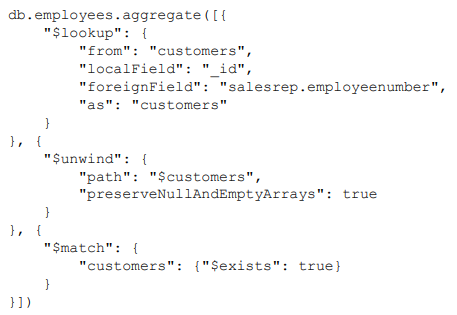
The following query will yield a document for those employees who are not sales representatives to any customers.
False

The following query demonstrates all but one of the following features of the $project
You can use $project to add fields to the output and remove them in the same $project aggregation pipeline stage.

True

Select the one false statement about this query:
customerName cannot appear in the SELECT clause because it is not in the GROUP BY clause.

STRING_AGG(sub.lastName || ', ' || sub.firstName, ' | ' ORDER BY sub.lastName, sub.firstName)

No, because you cannot compound aggregation functions like this. The only way to do this is to use a subquery
Comparing the GROUP BY HAVING clause to the WHERE clause in a SELECT statement, we can say (pick one):
HAVING filters the output after the GROUP BY aggregation has occurred but WHERE filters before the GROUP BY aggregation.

Output one document for each job title in each office with the number of employees who have that title.

A single document with nothing in the _id field, the minimum unit price across all orders, and the total number of payments across all orders.

Add state and country to the _id of the $group, and include them into the $project.
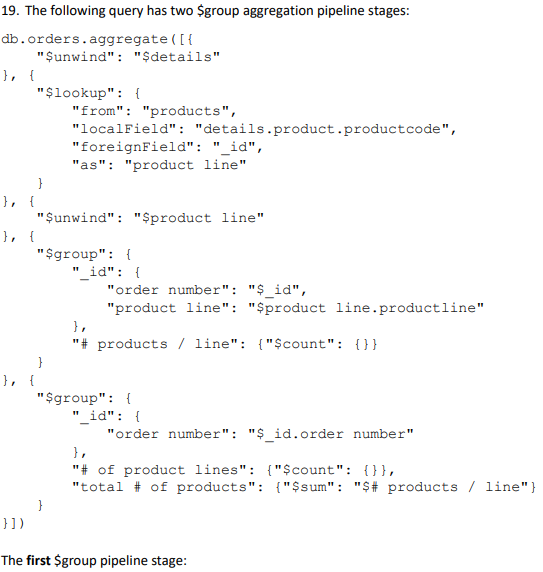
Outputs one document for each product line within each order and the number of products within that order within that product line.
The second $group pipeline stage:
Outputs one document for each order, the number of product lines represented in that order, and the total number of products included in that order.

Will always report out zero rows.
False
The outputs from two SELECT statements are UNION compatible when (pick one):
The outputs from the two SELECT statements must have the same number of columns, and each corresponding column must have a compatible datatype. For instance, column three in the first output might be Integer and column 3 in the second output might a float
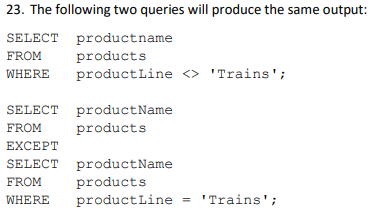
True

False

Will produce the same results.
True

It outputs just one row for each city within each state within each country, no matter how many customers are in that city.

True

True

Without the EXISTS in the second query, we return all employees, regardless whether they have any subordinates or not. But the first query only returns those employees who have at least one subordinate because of the inner join.

Three employees, and the employee number of their mutual manager. No two lines of the output will have the same three employees in it. But there will be multiple cases in which two of the three employees match from one line to another.
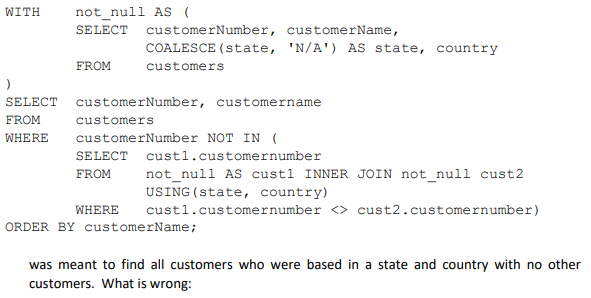
There's nothing wrong with this query as it is.

A report of all employees and their managers where the employee and their manager are based in the same office.