Software Exam Revision
 Call Kai
 Learn
Learn Practice Test
 Spaced Repetition
 Match
Match Flashcards
 Knowt Play
1/25

There's no tags or description
Looks like no tags are added yet.
Name | Mastery | Learn | Test | Matching | Spaced | Call with Kai | Chat |
|---|
No analytics yet
Send a link to your students to track their progress
26 Terms
Chapter 1: Introduction to Programming
.
KK3.1.2 — Requirements, constraints and scope
.
Solution requirements & Functional requirements
Solution requirements - Describes what the client needs from the solution
Functional requirements - What functions or features the solutions NEEDS to provide to its users (e.g. accept booking details and calculate a total)
Non functional requirements
Qualities and characteristics the solution should have (e.g. usability, reliability, maintainability) They describe how well the solution should operate rather than a specific function.
KK3.1.3 — Design tools for representing modules
.
Data Dictionary
A data dictionary is a design-stage tool that defines the characteristics of variables to assist with software development and future maintenance.
What it lists: Variable names, types, formats and purpose.
Why it helps: Reduces confusion during future maintenance.

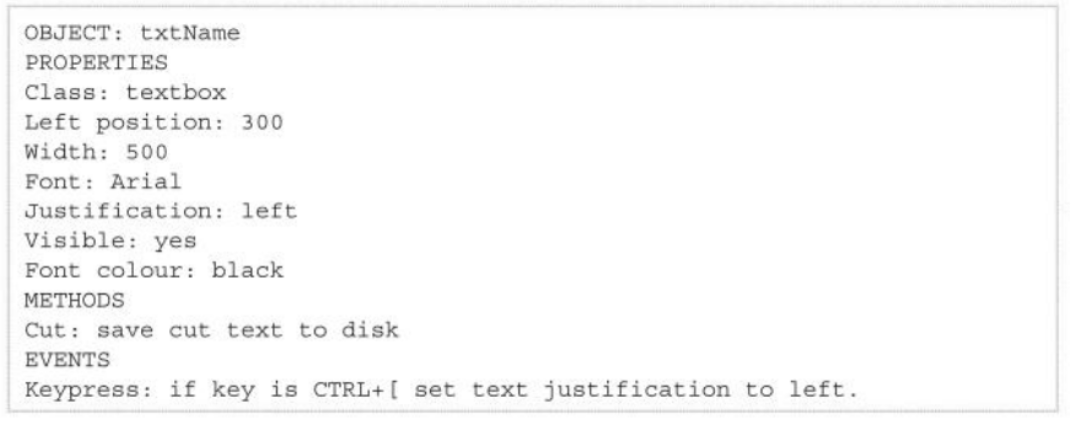
Object description
An object description is a design tool that lists the properties, methods, and events.
Properties define its appearance and position (e.g., a button's width, font, or visibility).
Methods and Events define what it does and how it responds to the user (e.g., clicking the button).
Mock-Up
An annotated visual representation of an interface or output. It should specify layout, sizes, positions, text, fonts, colours, controls, images and other interface components.

IPO chart
It splits a task into three main parts: what goes in, what happens to it, and what comes out. (Input, Process, Output)

Pseudocode
A detailed, text-based description of a computer program or algorithm that is human-readable and language-independent. It is exclusively written for human readability, meaning it cannot be executed by a computer
KK3.1.4 — Characteristics of data types
.
Data Type & Numeric types
A data type is a classification rule that tells a computer how to interpret, store, and perform operations on a specific piece of information.
Numeric types are data classifications used to store numbers, which are split into integers for whole values and floats for decimals.
Text, Boolean data & Operators
Text - Is a sequence of characters (a string). A character is one meaningful unit such as a letter, digit, punctuation mark, symbol or space.
Boolean data - Has two logical values, True/False.
Operators - Special symbols, characters, or keywords that instruct the computer to perform specific mathematical equations.
KK3.1.5 — Data structures: arrays and records
.
Data structure
Organises related data so operations can be performed efficiently. It is more complex than a single data type.
One-dimensional array & Two-dimensional array
One-dimensional array - Stores a collection of elements of the same data type in a single row or sequential list
Two-dimensional array - Stores same-type elements in rows and columns and requires two indices. Suitable for grids, seats, game boards and tables.

Record & Arrays
Record - Groups multiple related items of different data types together under a single name
Arrays
● a LIST of repeated elements, where everything in the list is of the same data type
● Eg. a list of all the ages of people in the class, ‘1,2,3,4’, ‘a,b,c,d’
● Unsorted, contents are identified by numbers (eg. first item in list is 0)
KK3.1.6 — Data sources: TXT, CSV and XML
.
Files & TXT file
Files - Provide persistent storage so information can be retrieved after a program ends.
TXT file - Contains readable characters, generally interpreted as character or string data
Delimited file & XML
Delimited file- Plain text file used to store and exchange tabular data (rows and columns) by separating individual data fields.
XML - A simple, text-based format used to store and send data between different computers or programs.
Text files
Are human-readable; binary files are not readily human-readable. Chapter 1 focuses on text-based sources.
KK3.1.9 — Naming conventions for solution elements
.
Naming convention
● Help someone reading code to understand purpose of each variable
● Makes updating or finding errors easier and saves time
● Reduces confusion by having a standard naming convention across all programs
● Industry standard can make it easier for new programmers to join a company and reduce learning curve, increasing productivity
CamelCase
Camel case is a software development naming convention where multiple words are joined together without spaces, and each word after the first begins with a capital letter.
Example: camelCase, firstName
Snake_case & Hungarian notation
Snake_case - Separates words with underscores, for example total_order_cost.
Hungarian notation - Uses a prefix to indicate data type, structure or purpose. For example: iNumEmployees, arrEmployees or strEmployee
Internal documentation - Consists of meaningful notes and comments embedded in source code.