Chapter 15 - Data fetching and race conditions & Universal error handling in React
 Call Kai
 Learn
 Practice Test
 Spaced Repetition
 Match
 Flashcards
 Knowt Play
1/15

There's no tags or description
Looks like no tags are added yet.
16 Terms
Race condition reasons
Why Race Conditions Happen:
Asynchronous Nature of Promises:
When you trigger a
fetchrequest, it runs in the background while React continues rendering.If multiple
fetchrequests are initiated (e.g., due to rapid state changes), they don't cancel each other out. Each request will complete independently, even if the data is no longer needed.
React's Lifecycle:
When a component re-renders (e.g., due to a state or prop change),
useEffectcan trigger again.If a
fetchrequest is still pending from a previous render, and a newfetchis initiated, both requests will eventually complete and try to update the same state.
Outdated State Updates:
If an earlier
fetchcompletes after a later one, it will overwrite the state with outdated data.This results in a "flash" of incorrect data or unexpected UI behavior.
Fixing race conditions: Force re-mounting
Component Unmounting:
When navigating between pages, if the components are fully unmounted and remounted (e.g., using conditional rendering like
{page === 'issue' && <Issue />}), the old component and its state are completely destroyed.Any pending asynchronous operations (like
fetch) in the unmounted component will not update the state because the component no longer exists.
No Shared State:
If each page component manages its own state and data fetching independently, there’s no risk of overlapping state updates from multiple requests.
Automatic Cleanup:
When a component unmounts, React automatically cleans up its state and effects. Any pending
fetchrequests will not update the state of an unmounted component, preventing race conditions.
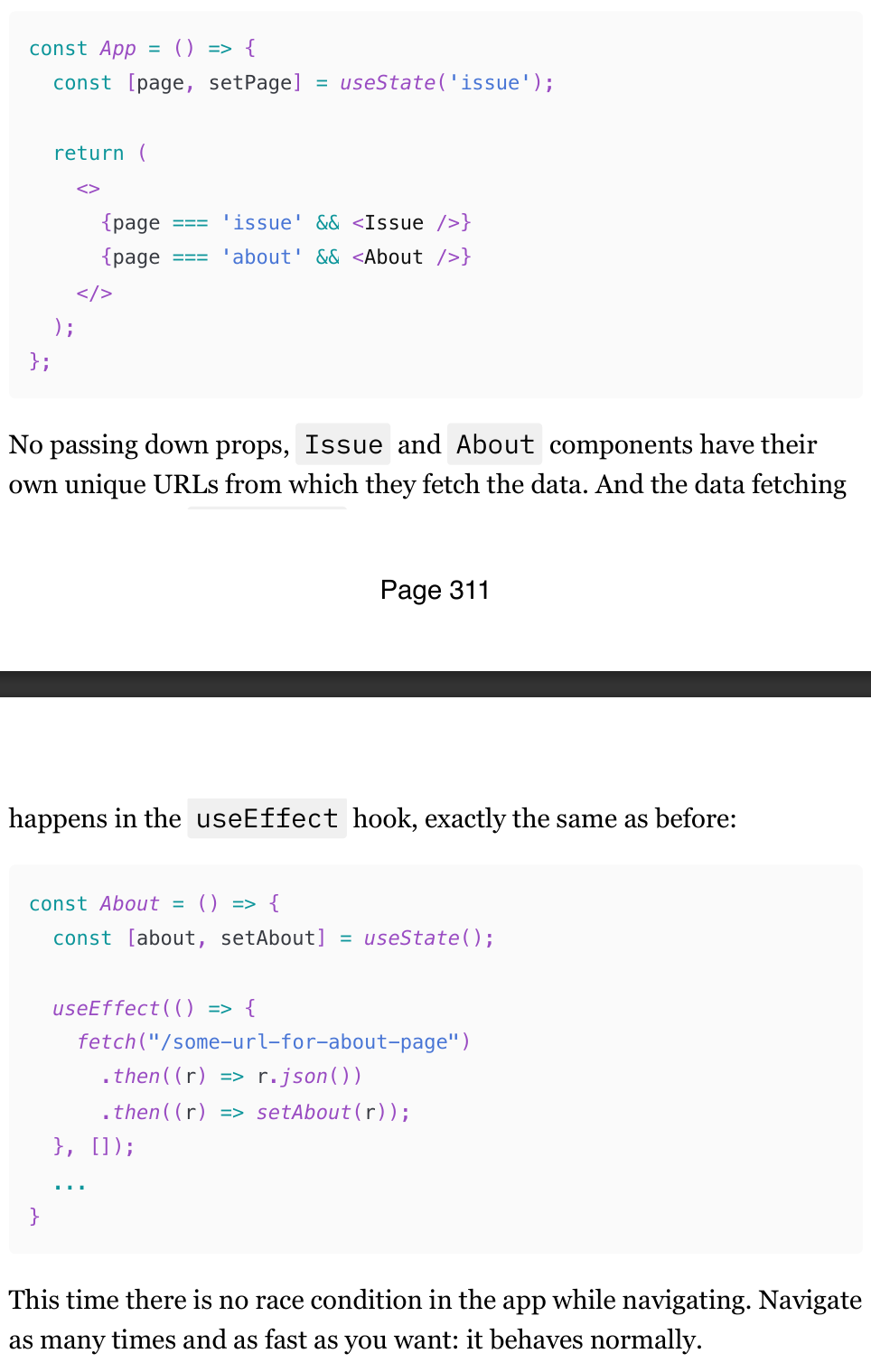
Fixing race conditions: Drop incorrect result
A much gentler way to solve race conditions, If the result returns the id that was used to generate the url , we can just compare them. And if they don't match, ignore them using Refs. The trick here is to escape the React lifecycle and locally scoped data in functions and get access to the "latest" id inside all iterations of useEffect , even the "stale" ones.
If your results don't return anything that identifies them reliably? No problem, we can just compare the URL instead
Fixing race conditions: Drop all previous results
Don't like the previous solution or think that using a ref for something like this is weird? No problem, there is another way. useEffect has something called a "cleanup" function, where we can clean up stuff like subscriptions. Or in our case, it's active fetch requests.
The cleanup function [36] is run after a component is unmounted, or before every re-render with changed dependencies.
The fetch Promise, although async, still exists only within that closure and has access only to the local variables of the started it. So when we check the useEffect run that isActive boolean in the .then callback, only the latest run, the one that hasn't been cleaned up yet, will have the variable set to true . So all we need now is to check whether we're in the active closure, and if yes - set state. If no - do nothing. The data will simply disappear into the void again.
Fixing race conditions: Cancel all previous requests
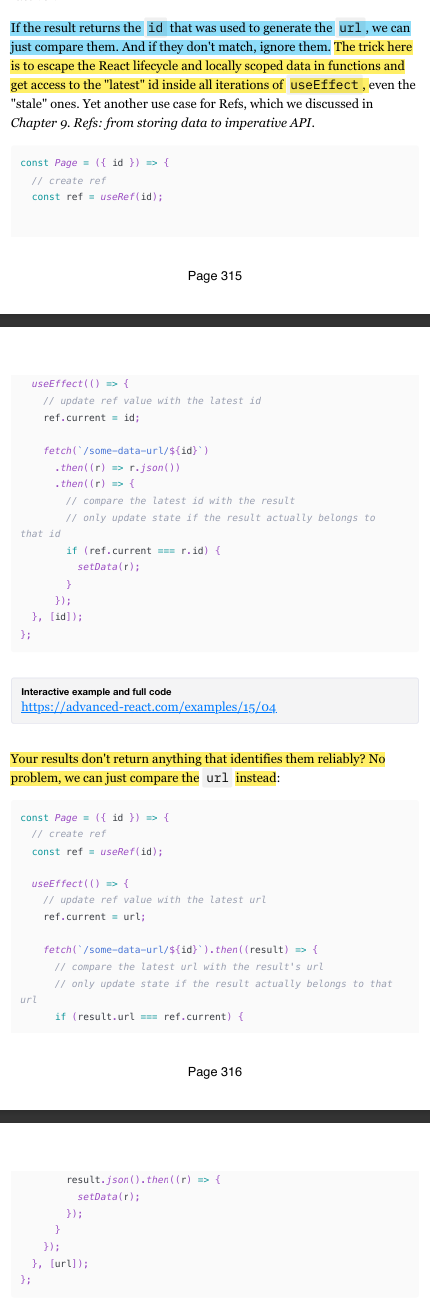
Instead of cleaning up or comparing results, we can simply cancel all the previous requests. If they never finish, the state update with obsolete data will never happen, and the problem won't exist. We can use the AbortController [39] interface for this.
Simple try/catch in React: how to and caveats
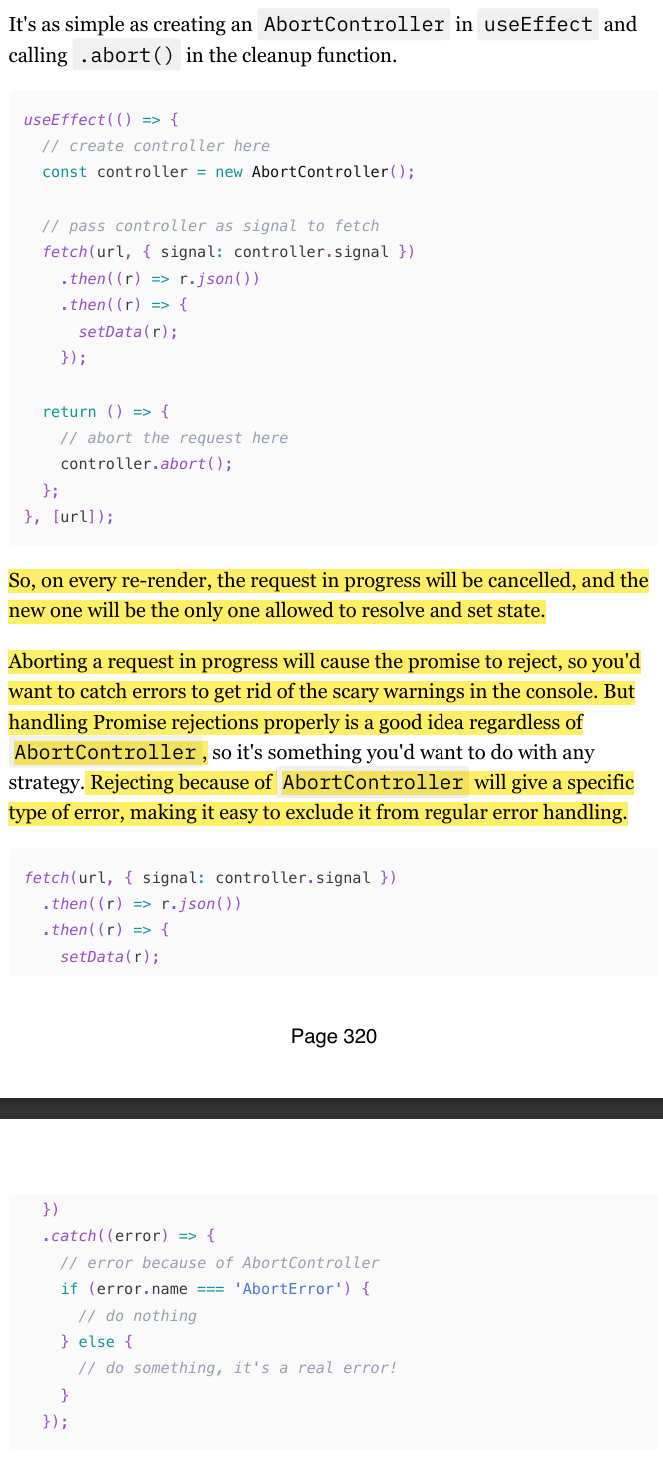
When an error is caught, we need to do something with it, right? So, what exactly can we do, other than logging it somewhere? Or, to be more precise: what can we do for our users? Just leaving them with an empty screen or broken interface is not exactly user-friendly.
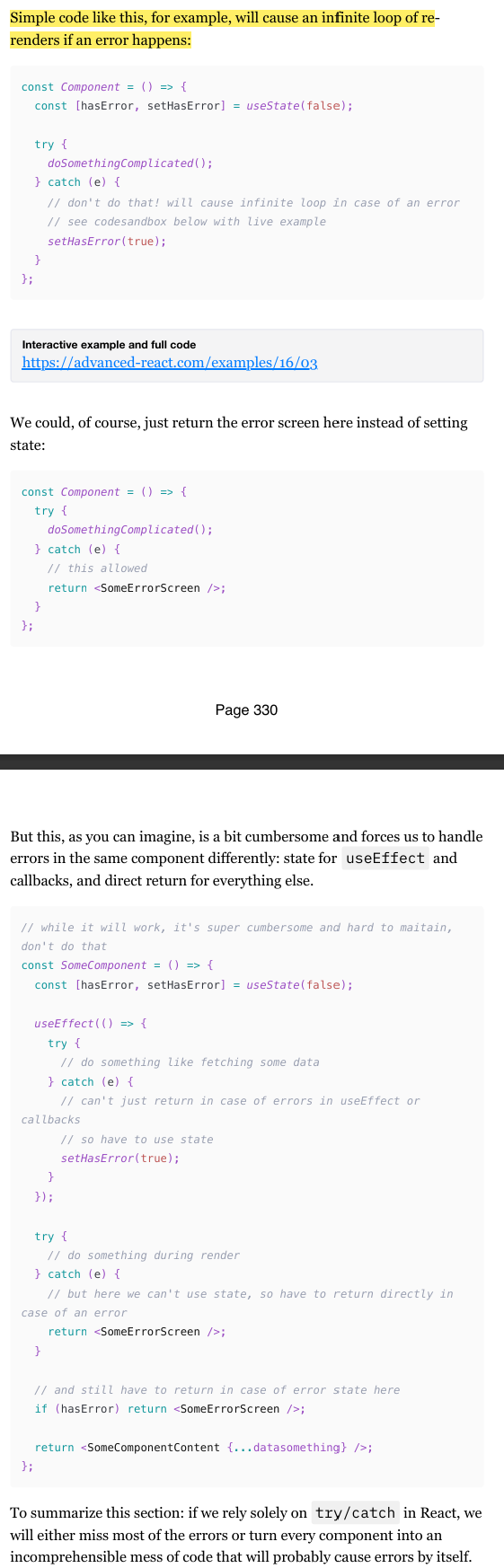
The most obvious and intuitive answer would be to render something while we wait for the fix. Luckily, we can do whatever we want in that catch statement, including setting the state. So we can do something. (check img)
This approach is pretty straightforward and works great for simple, predictable, and narrow use cases like catching a failed fetch request. But if you want to catch all errors that can happen in a component, you'll face some challenges and serious limitations.
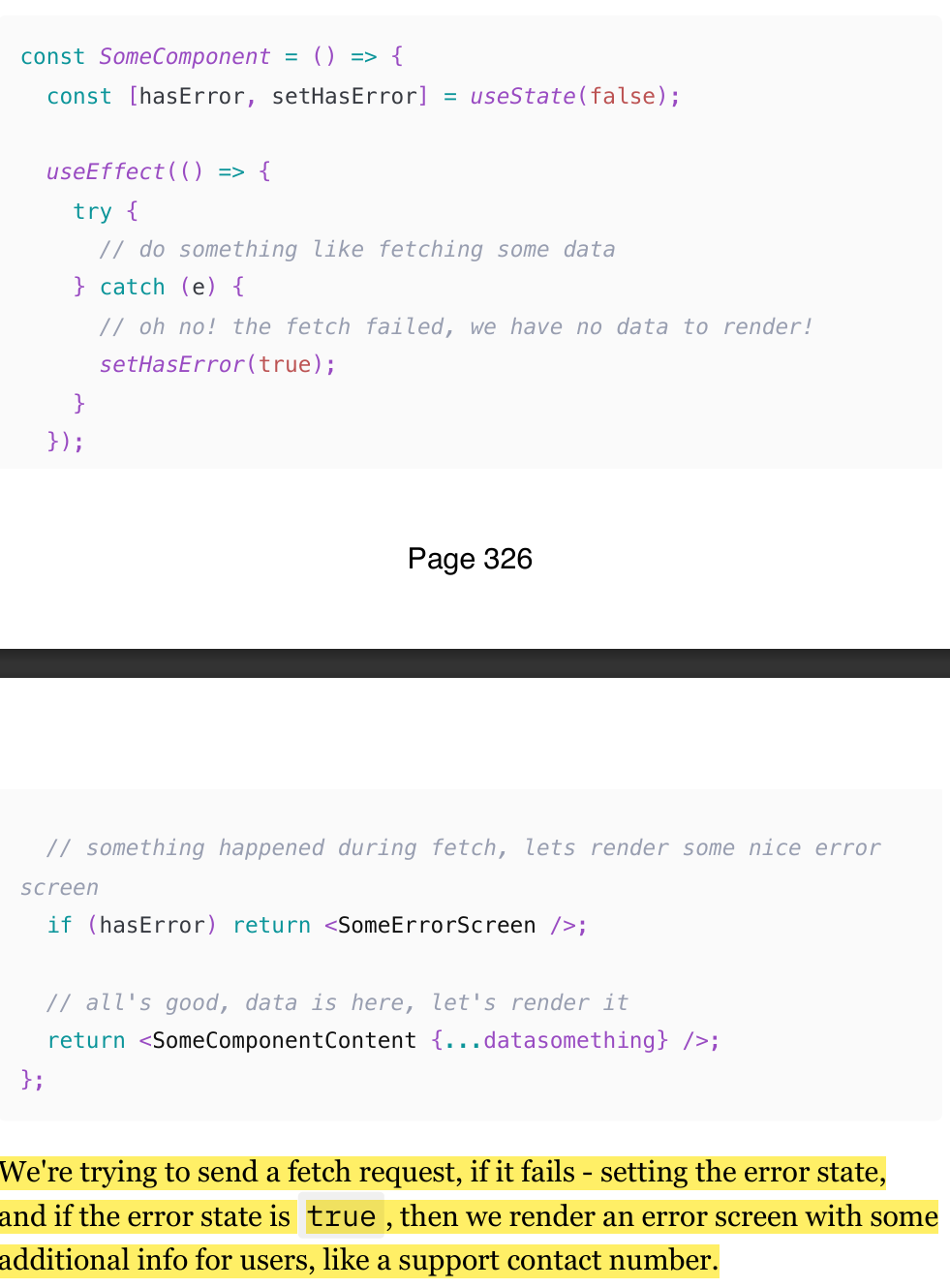
Limitation 1: You will have trouble with the useEffect hook.
If we wrap useEffect with try/catch , it simply won't work (Check img)
Limitation 3: Setting state during render is a no-no
If you're trying to catch errors outside of useEffect and various callbacks (i.e., during the component's render), then dealing with them properly is not that trivial anymore: state updates during render are not allowed
To summarize this section: if we rely solely on try/catch in React, we will either miss most of the errors or turn every component into an incomprehensible mess of code that will probably cause errors by itself.
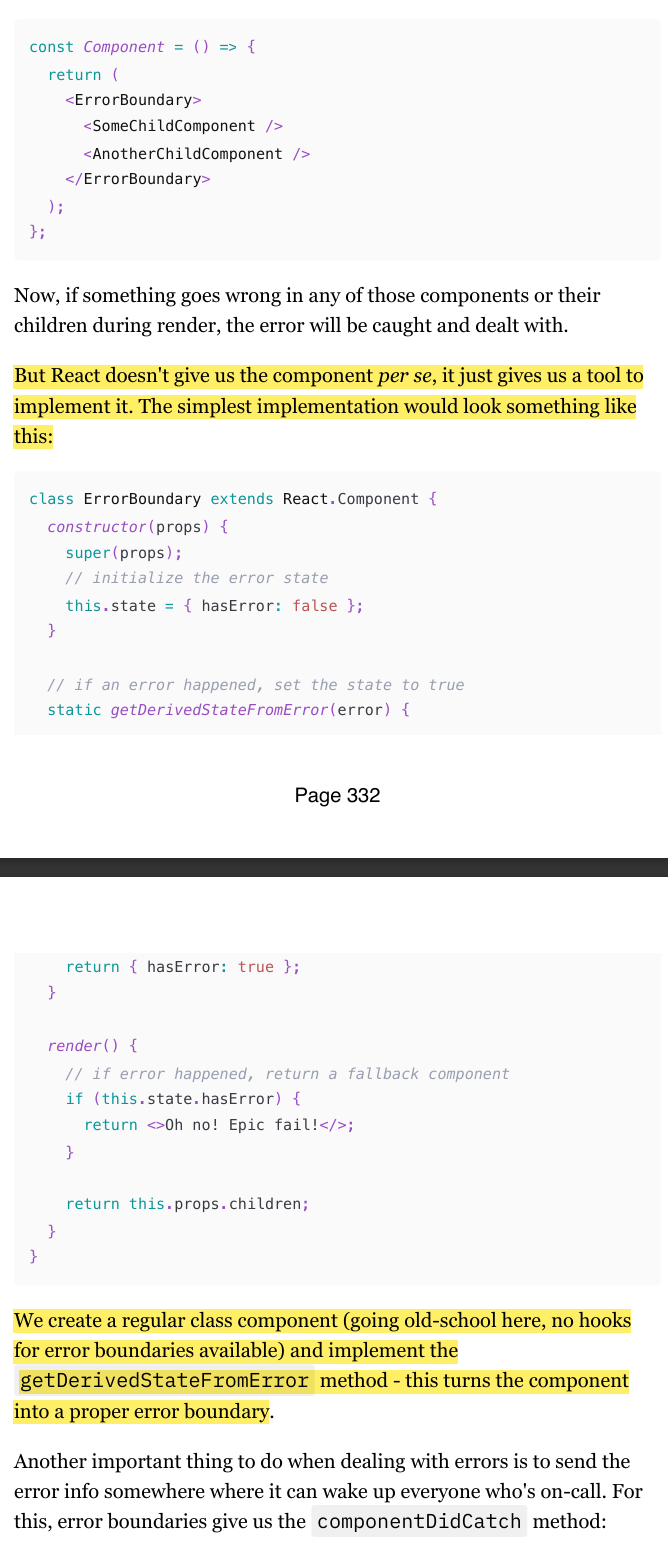
React ErrorBoyndary component
To mitigate the limitations from above, React gives us what is known as "Error Boundaries" [41]: a special API that turns a regular component into a try/catch statement in a way, only for React declarative code.
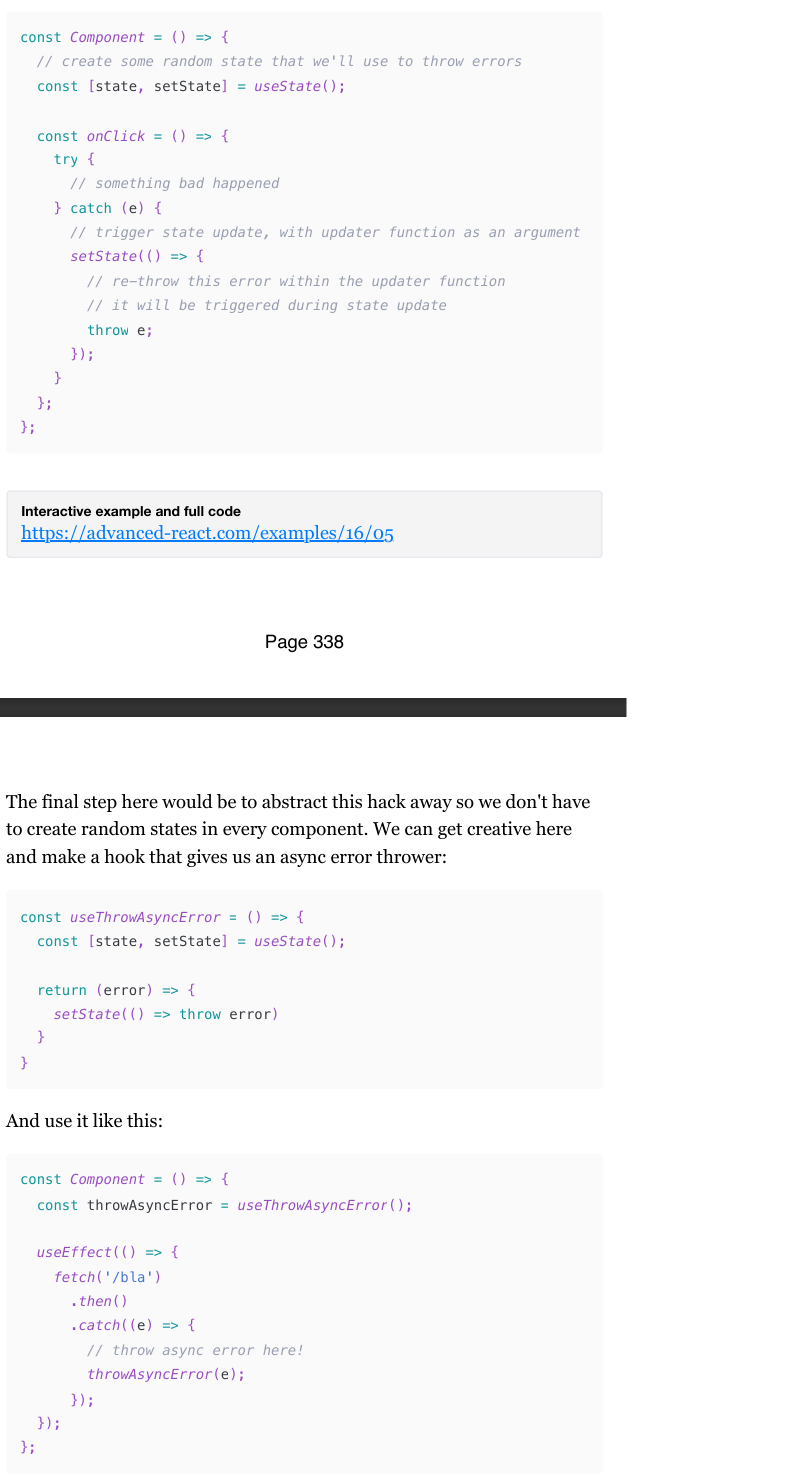
Catching async errors with ErrorBoundary
Interestingly enough, we actually can catch all errors with ErrorBoundary !
The trick here is to catch those errors first with try/catch.
Then inside the catch statement, trigger a normal React re-render, and then re-throw those errors back into the re-render lifecycle.
That way, ErrorBoundary can catch them like any other error. And since a state update is the way to trigger a re-render, and the state set function can actually accept an updater function [43] as an argument. (check img).
The final step here would be to abstract this hack away so we don't have to create random states in every component. We can get creative here and make a hook that gives us an async error thrower
Check specified pages for more examples
(339-341)
Can I just use the react-error boundary library instead?
For those of you who hate reinventing the wheel or just prefer libraries for already solved problems, there is a nice library called "react-error-boundary" [44] that implements a flexible ErrorBoundary component and has a few useful utils similar to those described above.