Architecture of computers (lec. 1)
 Call Kai
 Learn
 Practice Test
 Spaced Repetition
 Match
 Flashcards
 Knowt Play
1/36

There's no tags or description
Looks like no tags are added yet.
37 Terms
Architecture of computers
Definition: A fundamental field in computer science that plays a crucial role in the design and development of computer systems.
Importance: Forms the foundation for designing efficient and capable computing devices, making it essential for computer scientists, engineers, and anyone working with computers.
Computer architecture overview (10)
Hardware Components
Instruction Sets
Memory Hierarchy
Data Path and Control Unit
Pipeline Processing
Parallel Processing
I/O System
System Organization
Performance and Efficiency
Instruction Set Architecture (ISA)

Hardware Components
Computer architecture deals with the physical components that make up a computer system. These components include: Central Processing Unit (CPU), Memory, Input and Output Devices, Storage Devices.
Instruction Sets
Definition: Computer architecture defines the set of instructions a CPU can understand and execute.
Scope: Includes instruction formats, operation codes (opcodes), decoding methods, and execution logic.
Memory Hierarchy
Structure: Computer systems use a hierarchy containing registers, cache memory, main memory (RAM), and secondary storage.
Management: Computer architecture determines how data is managed and accessed within this hierarchy.
Data Path and Control Unit
Data Path: Responsible for performing arithmetic and logic operations.
Control Unit: Manages instruction execution and the flow of data between components..
Pipeline Processing
Definition: A technique used in modern computer architectures where multiple instructions are processed simultaneously.
Benefit: Operates across different stages of the pipeline to improve overall performance.
Parallel Processing
Concept: Multiple processors work together to perform tasks simultaneously.
Purpose: Increases overall computational power.
I/O System
Definition: Defines how input and output operations are managed in computer architecture.
Scope: Includes communication with external devices and peripherals.
System Organization
Definition: Covers the overall organization of the computer system.
Key Aspects: Includes how components are connected, how they communicate, and how they are controlled.
Performance and Efficiency
Goal: Aims to optimize the performance and efficiency of a computer system.
Factors: Includes considerations like clock speed, instruction throughput, and power consumption.
Instruction Set Architecture (ISA)
Definition: Defines the interface between hardware and software.
Function: Specifies how software can communicate with hardware, including available instructions and their formats.
A simple computer model
It typically consists of a basic set of components that illustrate the fundamental principles of computer architecture.
A simple computer model (structure)
Central Processing Unit (CPU), Memory, Input and Output (I/O), Control Unit (CU), Registers, Instruction Set, Bus, Clock.
Central Processing Unit (CPU)
Role: The brain of the computer, responsible for executing instructions.
Simple Model: Represented as a black box that performs computations.
Memory
Function: Stores data and instructions that the CPU needs to work with.
Types: In a simple model, consists of two main types: RAM and ROM.
RAM (Random Access Memory)
Function: Stores data and program instructions that the CPU is currently working with.
Volatility: Volatile storage, meaning contents are lost when the computer is turned off.
ROM (Read-Only Memory)
Function: Contains firmware or instructions that are permanently stored and cannot be modified by the user.
Usage: Typically includes the computer's boot instructions.
Input and Output (I/O)
Interaction: Devices allow the computer to interact with the external world.
Examples: A keyboard for input and a display for output.
Control Unit (CU)
Management: Manages the execution of instructions within the CPU.
Operations: Fetches instructions from memory, decodes them, and controls the flow of data.
Registers
Definition: Small, high-speed storage locations within the CPU used for temporary data storage during computations.
Examples: Program Counter (PC) to keep track of the current instruction, and general-purpose registers for data manipulation.
Instruction Set
Definition: Defines a simple set of instructions that the CPU can execute.
Categories: Includes basic arithmetic operations (add, subtract), data movement (load, store), and control flow (jump, branch).
Bus
Function: A communication pathway that allows data and instructions to move between the CPU, memory, and I/O devices.
Types: Consists of a data bus for data transfer and an address bus for addressing memory locations.
Clock
A clock signal is used to synchronize the operations of the CPU. It determines the speed at which the CPU executes instructions.
A simple computer model flow
The CPU fetches an instruction from memory based on the program counter (PC).
The control unit decodes the instruction.
The CPU performs the operation specified by the instruction, which may involve reading data from memory or registers, performing calculations, and storing results.
The program counter is updated to point to the next instruction.
This process continues until the program completes.
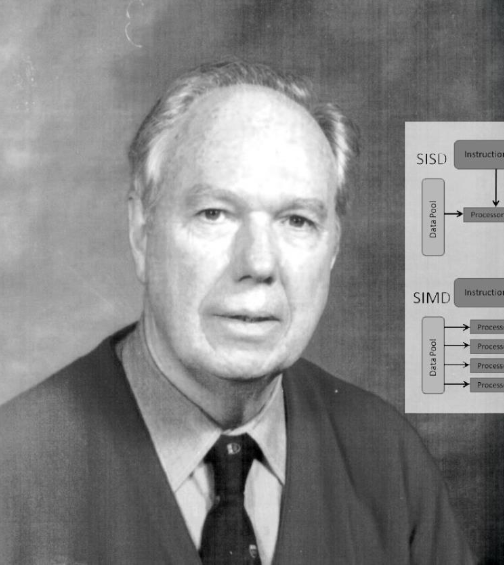
Flynn Taxonomy
Definition: Classification system for computer architectures based on the number of instruction streams and data streams processed concurrently.
Scope: Categorizes computers into four main classes:


SISD (Single Instruction, Single Data)
How it works: One CPU processes one instruction and one data stream at a time, executing everything sequentially.
Context: It is the standard, simplest, and most common design used in traditional von Neumann computers.

SIMD (Single Instruction, Multiple Data)
How it works: One control unit sends the same instruction to multiple processing units, which work on different pieces of data simultaneously.
Use case: Ideal for parallel processing large datasets, such as GPUs used in graphics rendering and scientific simulations.
MISD (Multiple Instruction, Single Data)
How it works: Multiple processing units execute different instructions on the same data stream.
Context: Rare in practice and general-purpose computing; used only in specialized applications where multiple algorithms independently process the same data.
MIMD (Multiple Instruction, Multiple Data)
How it works: Multiple processors operate independently, each executing its own instruction stream and data stream.
Context & Use Case: Common in modern multiprocessor and multithreaded systems as well as high-performance computing (HPC), providing high flexibility for parallel computing tasks.

Harvard Architecture (Terminology)
Separate Memory: Instructions and data are stored in completely distinct physical memory modules.
Simultaneous Access: Because they have separate memory paths, the CPU can fetch an instruction and access data at the exact same time, which speeds up execution.

Harvard Architecture (Use Cases, Pros & Cons)
Common Use Cases: Found in embedded systems, microcontrollers, digital signal processors (DSPs), and FPGAs where high throughput and predictable performance are needed.
Advantages:
Lower risk of instruction and data conflicts.
Highly efficient for real-time and control-oriented tasks.
Disadvantages:
More complex to design and implement.
Requires more physical hardware components.
Princeton Architecture (Von Neumann Architecture) (Terminology)
Unified Memory: Instructions and data share and are stored in the exact same memory unit.
Single Memory Bus: Because memory is shared, a single bus is used, meaning the CPU must alternate between fetching instructions and accessing data.

Princeton Architecture (Von Neumann Architecture) (Use Cases, Pros & Cons)
Common Use Cases: It serves as the foundation for most general-purpose computers, including personal computers and servers, because it is highly flexible and versatile.
Advantages:
Simpler to design compared to Harvard architecture.
Highly versatile for a wide range of computing tasks.
Extremely common and widely adopted.
Disadvantages:
Potential for conflicts between instructions and data when accessing memory.
Limited ability to perform simultaneous instruction fetching and data access.
Machine Language
Lowest Level & Binary: The most basic language a computer understands, consisting entirely of binary code (0s and 1s) tailored to a specific CPU architecture.
Directly Executable: Executed straight by the hardware, with each instruction mapping to a specific CPU operation like math or data movement.
Difficult to Write: Highly labor-intensive and error-prone, requiring deep understanding of computer architecture even for simple tasks.
Platform-Specific: Not portable; code written for one CPU will not run on a different CPU without modification.

Assembly languages
Human-Readable Low-Level Language: Acts as a bridge between machine language and higher-level languages.
Symbolic Representation: Uses short names (mnemonics) instead of raw binary, making it much easier for programmers to write and understand.
Requires an Assembler: Code must be translated into binary machine instructions using a tool called an assembler.
Platform-Specific: Tied directly to a specific CPU architecture (such as x86, ARM, or MIPS).

High-level programming languages
Abstraction: User-friendly languages that use English-like syntax to provide a high level of abstraction away from the hardware.
Portability: Programs are generally portable across different platforms, provided there is a compatible compiler or interpreter.
Productivity: Makes programming more accessible and efficient by offering built-in functions and data structures that simplify common tasks.
Examples: Includes Python, Java, C++, JavaScript, Ruby, and C#, used for everything from web development to scientific computing.
