Chapter 4: Special Members & Classes/Inheritance
 Call Kai
 Learn
Learn Practice Test
 Spaced Repetition
 Match
Match Flashcards
 Knowt Play
1/104

There's no tags or description
Looks like no tags are added yet.
105 Terms

Is this syntax correct in C++? Explain.
No, it is not correct. When you use a member initializer list in C++, C++ automatically handles any naming conflicts automatically. The compiler is smart enough to know that the name outside the parentheses always refers to the class member variable, and the name inside the parentheses is the constructor parameter.
The correct syntax is:


Explain each line of code in the following example.


When you create an object in main, does the object exist forever?
No the object does not exist forever. The object comes into existence during the lifetime of main, and eventually its lifetime ends.
What two special C++ member functions are associated with the beginning and end of an object’s lifetime?
The Constructor and Destructor.
Object begins its lifetime: Constructor
Object ends its lifetime: Destructor
What is a destructor?
A destructor is a special member function involved when an object’s lifetime ends. Its name is preceded by a ~.
What are the three defining features of a destructor?
A destructor does not take normal parameters and it does not have a return type. It is also preceded by a tilde: ~.

For a class called Book, what would its destructor look like?


For a class called Student, what would its destructor look like?


What will be the output of the following code?

How come we almost never need to manually write destructors for our classes?
There is no need for us to write destructors (like ~Book(){}) for our classes because C++ manages normal destruction automatically.
Under what rare circumstance might we need to write a destructor for our code?
Under the circumstance that we have a pointer and a dynamically allocated object located in the same class. Recall, when we allocate memory for a pointer with new, we must always manage that allocation and delete it after. So if it exists in the class, we must manually create a destructor that will delete the pointer for us.


Explain each line of code in the following example.

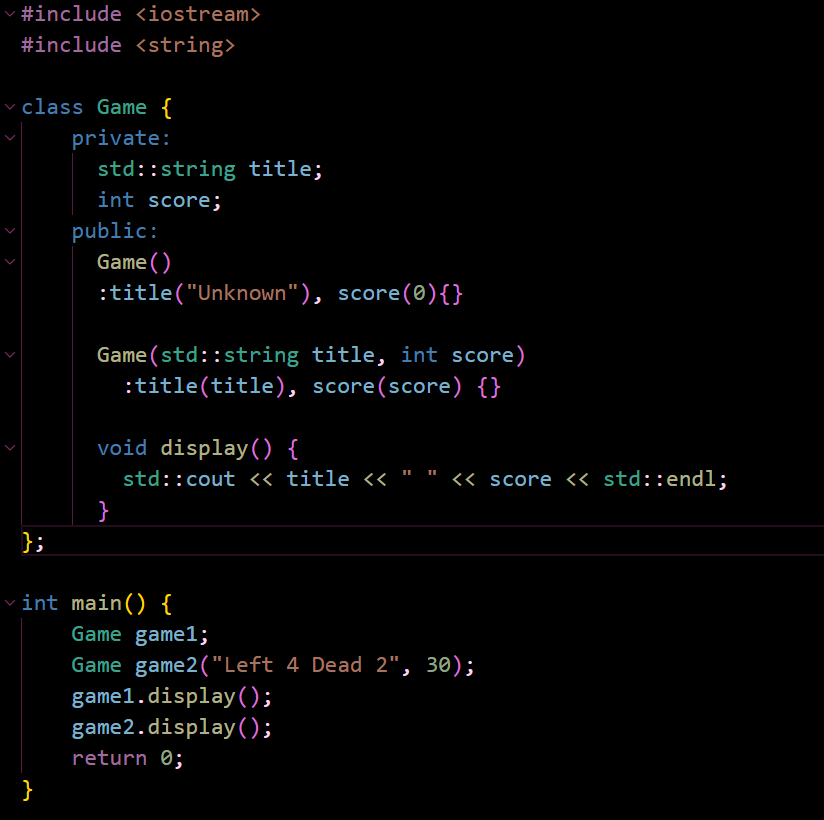
Create a Game class containing:
std::string title;
int score; as private members.
Give it:
a default constructor that initializes title to "Unknown" and score to 0
another constructor accepting a title and score
a display() function
In main(), create:
Game game1;
and another Game using constructor arguments. Show/display both.
Given:
class Number {
private:
    int* ptr;

public:
    Number(int value)
        : ptr(new int(value))
    {
    }

    int getValue() const {
        return *ptr;
    }

    // Write destructor here
};
Write only the destructor that releases the dynamically allocated int.
Then write main() that creates:
Number number{50};
and prints its value.

Given:
class Message {
private:
    std::string* text;

public:
    Message(const std::string& value)
        : text(new std::string(value))
    {
    }

    const std::string& getText() const {
        return *text;
    }

    ~Message() {
        delete text;
    }
};
Write main() that:
Creates a Message containing "Hello Sofia :3" using new.
Stores its address in a Message*.
Prints its text using ->.
Destroys the dynamically created Message afterward.

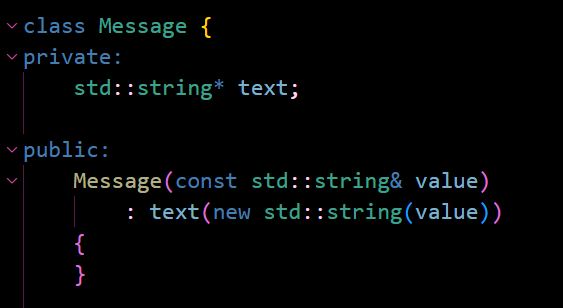
In the following example, how come we use: std::string& value instead of just std::string value?
Technically, if you wrote std::string value, it would do exactly the same thing; There is no functional difference between the two. The only reason we might use std::string& value instead is just for performance reasons.
When you pass by reference: std::string value, C++ is forced to make a copy of the data. It needs to allocate memory and copy the text to create the parameter value.
On the other hand, if you use the std::string& value version, value only becomes a reference to the original data. Memory does not need to be allocated.

Write a complete program containing a class called SecretMessage.
Each SecretMessage should have a dynamically allocated std::string containing its message.
The following code should work in your class:
SecretMessage message{"Hello World :3"};
Add a function that returns the stored message so that this works:
std::cout << message.getMessage();
Make sure the class cleans up the allocated memory when a SecretMessage is no longer needed. Then use your class inside main().
Note:
Adding const to getMessage() is not necessary, but it is good practice. In case someone decides to create a const SecretMessage object, you will not get a compiler error.

What is a copy constructor for?
A copy constructor is a constructor used for initializing a brand new object as a direct duplicate of an existing object of the same class.
For example:
Student student1{“Sofia”, 99,9};
Student student2 = student1;
This creates a new Student called student2 based on the existing student1 object. This is the type of situation where we may want a copy constructor.
Declare a copy constructor for a class called Student.
Declare a copy constructor for a class called Book.
Declare a copy constructor for a class called SecretMessage
Student(const Student& other)
Book(const Book& other)
SecretMessage(const SecretMessage& other)
Notice how they all follow this same pattern.
Why do copy constructors use a reference?
Ex. Student(const Student& other)
Copy constructors use a reference because we don’t typically want to create a copy of the argument. This is because making a copy of the argument requires a copy constructor in and of itself; So it feels stupid to do that when designing your own copy constructor.
What happens if we don’t write/declare our own copy constructor?
C++ implicitly declares a copy constructor for us.
What’s the problem with relying solely on the default copy constructor?
There usually is no problem with relying solely on the copy constructor if you’re only copying simple values that have nothing to do with pointers, such as int, String, etc.
However, the minute we introduce pointers and dynamically allocated memory, using the default copy constructor is going to create problems.

Suppose we have the following class, and we tried to do the following copy. What is the problem with this?
SecretMessage first{“Hello Sofia”};
SecretMessage second = first;
The problem is that this creates a shallow copy, where you end up copying the pointer addresses instead of the actual data being pointed to.
Here’s what it actually does:
When you write:
SecretMessage first{“Hello Sofia”};
The constructor executes:
message = new std::string(“Hello Sofia”);
This means that:
first.message contains 5000, which represents an arbitrary memory address.
So now when you copy the object:
SecretMessage second = first;
We are actually copying first.message into second.message. This is because our class only has one data member: std::string* message.
So copying the pointer produces:
first.message = 5000
second.message = 5000
This means that there are now two pointers that contain the same address and point to the same object (see diagram). But this is not what we want. We want the two objects to have 2 independent strings.

What is a deep copy?
A type of copying that creates an entirely independent clone of the object and allocates brand new memory on the heap.
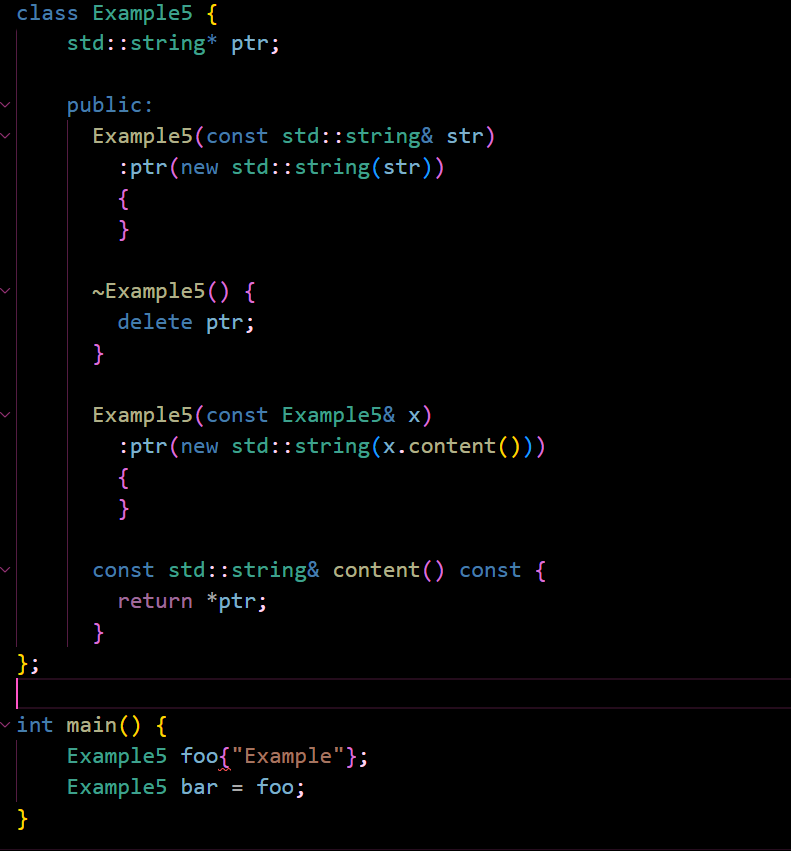
Explain each line of code:

Is this copy construction? Why or why not?
Example5 foo{"Hello"};
Example5 bar{"Bye"};
bar = foo;
This is not copy construction, because we are not creating a new foo object using bar. We are not constructing bar at all, just assigning to an existing object.
Do we always need to write a copy constructor when we want to copy one value into another?
No, we don’t generally need to write a copy constructor to achieve ordinary class behavior that doesn’t involve pointers, like int, double std::string. Only when trying to copy from one pointer to another.

Identify the constructor, destructor, copy constructor, etc. in the following code

Define what a reference actually is
A reference is an alias for an existing object.

Why is the constructor written as:
Number(int n)
instead of:
Number(int& n)?
Writing int&n limits what you can include in your code.
Now n must be a reference to an existing int object.
This is because references are just aliases for pre-existing objects.
For example:
int x = 50;
Number first(x); // ALLOWED

// This is allowed because int x = 50
// is an object of type int.
// So we are using a reference to an object.
Number first{50};
Number second(50); // NOT ALLOWED
// However, here, 50 is just an integer literal,
// not an object. So this is not allowed
// because we are not using a reference to an object.Note: In C++, objects can be of type int, double, etc. so long as they’re being contained within a variable. Otherwise, they are just numeric literals.

Explain what the following section of code according to the comment.
What kind of special member function is this?
This is showing a copy assignment, or an assignment operator overload function.


How come one version is considered to be optimized, and the other is not?
Explain using the following assignment:
    Example5 foo("Example");
    Example5 bar("Other");
    bar = foo;
The first version is optimized because there is no delete and no new. It does not dynamically allocate memory for a brand new string, it just takes the pre-existing string bar already has and changes its value.
The second version is not optimized because it deletes the original pointer belonging to bar and has to dynamically allocate a brand new string to assign to the pointer.
Here is what happens in the unoptimized version:
The ptr belonging to bar is deleted, completely destroying the entire String object “Other” that bar.ptr currently points to.
Then, it creates a brand new string containing the text held in foo, “Example”, and changes ptr to point to this new dynamically allocated string.
Let’s say we have the following class:
class Example {
    public:
    std::string* ptr;
};
And then we proceed to do:
int main() {
    Example a("Hello");
    Example b = a;
}
What happens with the Example objects in main?
Note: this is just a simplified version, missing a lot of implementation.
When we did Example a(“Hello”) we created an Example object containing a pointer to a string that says “Hello". Our object, a, currently owns this string.
Now when we do Example b = a;
We’ve created a second Example object, which contains a pointer to the same string as the first Example object. So now we have two Example objects containing two different pointers to the same string.
Note: They point to the exact SAME string in memory.
This is what is known as a Shallow Copy. It’s considered to be very dangerous, because if one of the objects ends up deleting that memory, the other object is left pointing to deleted space (definitely not good!)


Why is Deep Copying potentially expensive?
Note: Deep Copying is not the Shallow Copying we described in the previous flashcard. This is where we actually duplicate the String, and have two objects, with two different pointers, pointing to two entirely different Strings (not the same string).
In general, copying is expensive because it means that for every single copy, we allocated memory, copied characters, and created another String.
This can become expensive when its something like a 500MB file or a huge vector with millions of elements that could take a lot of time and resources.
What is a temporary object?
A temporary object is an object without a name.
For example:
Example(“Hello”) is a temporary object.
Example a(“Hello”) is not a temporary object. It has a name.
Why might temporary objects be useful?
Temporary objects can be useful when making a copy, because it’s cheap and easy to make a copy of the contents of an object that’s going to disappear anyways.
The idea is that instead of actually copying a value into another object, we just transfer ownership.
In the example show in the image, no string was copied, its just that the ownership of the pointer moved.

What is an l-value?
An l-value is a value that persists, a value that lives beyond a single expression. Essentially, a value which is NOT temporary.
For example:
int x = 5;
Here, x has a name, it persists, so it’s what we would call an l-value.
What is an r-value?
An r-value is just a temporary value that nobody bothers to name.
For example:
5+3
std::string(“Hello”)
Both of these are r-values.
Recall: What does & mean in the following example?
int a = 5;
int& ref = a;
& means that ref is a reference, or an alias for a. This means that a and ref can be used interchangeably.
What does && mean in the following example?
Example6(Example6&& x)
&& means that x is a temporary Example object that we are allowed to take resources from.
Note: You’ll see why this is useful in a minute.
Describe what is happening in each line of the following code:
class Example6 {
    public:
    std::string* ptr;

    Example6(const std::string& str)
    :ptr(new std::string(str))
    {
    }

    Example6(Example6&& x)
    :ptr(x.ptr)
    {
        x.ptr = nullptr;
    }

    ~Example6() {
        delete ptr;
    }
};
// Defines the class
class Example6 {
public:
// Defines a pointer to a string
std::string* ptr;
// The Constructor:
// Parameters: A string reference, or in other words,
// it takes a regular string. str will become a reference
// to the regular string that gets passed in.
// Dynamically allocates this string to be stored in ptr.
Example6(const std::string& str)
:ptr(new std::string(str))
{
}
// The Move Constructor:
// Params: A temporary Example6 object that we can extract
// resources from, otherwise called an r-value.
// Assigns the ptr of the current object to the pointer
//of the temporary object we passed in.
// Afterwards, it sets the pointer of the temporary object
// to null, effectively transferring control of the pointer
// to our current object.
    Example6(Example6&& x)
    :ptr(x.ptr)
    {
        x.ptr = nullptr;
    }
// The Destructor:
// deletes the pointer and frees the string
// so no memory leaks.
~Example6() {
delete ptr;
}
};Draw a diagram to explain specifically how this part of the code works:
Example6(Example6&& x)
:ptr(x.ptr)
{
x.ptr = nullptr;
}Step 1: We start with our temporary object, x.
Step 2: We copy the ptr from our temporary object, x, into the pointer of our new Example6 object.
Step 3: Now both pointers point to the same string. This is dangerous, so immediately after, we set the value of the temporary object’s pointer to null.
Now we’ve effectively transferred ownership of the pointer to the new object.

What happens if we don’t set nullptr in our move constructor?
If we don’t set nullptr, suddenly, they both think they own the same block of memory, since they’re both pointing to the same string, in the same location in memory.
Because of this, delete ptr runs twice for each object. The result is that we end up deleting the same memory twice. This can cause undefined behavior and potentially crash your computer.
What is this showing?
    Example6& operator=(Example6&& x)
    {
        delete ptr;
        ptr = x.ptr;
        x.ptr = nullptr;
        return *this;
    }
This is showing the Move Assignment Overload, or in other words, it is overloading the = (assignment) operator for our Example6 class so that when we set two objects equal to each other, this operation runs.
Describe what each line of the following example is doing:
    Example6& operator=(Example6&& x)
    {
        delete ptr;
        ptr = x.ptr;
        x.ptr = nullptr;
        return *this;
    }
// Takes a temporary Example6 object called x
// Deletes the pointer of the current Example6 object;
// meaning: if the object that called this operation
// was called a, it would free the contents of a.ptr
// Then it sets the pointer of the current object
// to the pointer of the temporary object, x.
// Now both pointers point to the same location in memory.
// To transfer ownership, we set the pointer of x to null.
// Then, we return the dereferenced value of this.
// Recall: 'this' is a pointer to the current object that
// called the function. So dereferencing 'this' will return
// the current object, a, for example.
// Now a contains the newly updated pointer.
Example6& operator=(Example6&& x)
{
delete ptr;
ptr = x.ptr;
x.ptr = nullptr;
return *this;
}Label the different Constructors, Overloads, and Destructors in the following code:
class Example6 {
    public:
    int* ptr;

    Example6(int val) {
        ptr = new int(val);
    }

    Example6(Example6&& x)
    :ptr(x.ptr)
    {
        x.ptr = nullptr;
    }

    ~Example6() {
        delete ptr;
    }

    Example6& operator=(Example6&& x)
    {
        delete ptr;
        ptr = x.ptr;
        x.ptr = nullptr;
        return *this;
    }
};
class Example6 {
public:
int* ptr;
// The Regular Constructor
Example6(int val) {
ptr = new int(val);
}
// The Move Constructor
Example6(Example6&& x)
:ptr(x.ptr)
{
x.ptr = nullptr;
}
// The Destructor
~Example6() {
delete ptr;
}
// The Move Assignment Overload
Example6& operator=(Example6&& x)
{
delete ptr;
ptr = x.ptr;
x.ptr = nullptr;
return *this;
}
};What is the syntax for calling the Move Constructor or the Move Assignment Overload in main?
// The Move Constructor
    Example6(Example6&& x)
    :ptr(x.ptr)
    {
        x.ptr = nullptr;
    }

// The Move Assignment Overload
    Example6& operator=(Example6&& x)
    {
        delete ptr;
        ptr = x.ptr;
        x.ptr = nullptr;
        return *this;
    }
They are actually called in the exact same way.
To call the Move Constructor:
std::move(a)
To call the Assignment Overload:
std::move(c)
Side Note: The letters just represent the names of the objects you’ve created.
Given the following class, which part of main is calling the Move Constructor, and which is calling the Move Assignment Overload? Explain how you know.
int main() {
    Example6 a(10);
    Example6 b = std::move(a);
    Example6 c(20);
    b = std::move(c);
    return 0;
}
class Example6 {
public:
int* ptr;
// The Regular Constructor
Example6(int val) {
ptr = new int(val);
}
// The Move Constructor
Example6(Example6&& x)
:ptr(x.ptr)
{
x.ptr = nullptr;
}
// The Destructor
~Example6() {
delete ptr;
}
// The Move Assignment Overload
Example6& operator=(Example6&& x)
{
delete ptr;
ptr = x.ptr;
x.ptr = nullptr;
return *this;
}
};int main() {
// This is creating a brand new Example6 object called a.
Example6 a(10);
// This is trying to create a BRAND NEW Example6 object
// named b by transferring the pointer from a to b.
// Therefore, this is calling the Move Constructor.
Example6 b = std::move(a);
// This is creating a brand new Example6 object called c.
Example6 c(20);
// This is RE-ASSIGNING b by transferring the pointer
// from c to b.
// Therefore, this is calling the Move Assignment Overload.
b = std::move(c);
return 0;
}Describe what value each of the pointers is pointing to by the end of main.
int main() {
    Example6 a(10);
    Example6 b = std::move(a);
    Example6 c(20);
    b = std::move(c);
    return 0;
}
class Example6 {
public:
int* ptr;
// The Regular Constructor
Example6(int val) {
ptr = new int(val);
}
// The Move Constructor
Example6(Example6&& x)
:ptr(x.ptr)
{
x.ptr = nullptr;
}
// The Destructor
~Example6() {
delete ptr;
}
// The Move Assignment Overload
Example6& operator=(Example6&& x)
{
delete ptr;
ptr = x.ptr;
x.ptr = nullptr;
return *this;
}
};int main() {
Example6 a(10);
// a
// ptr points to 10
Example6 b = std::move(a);
// Runs the Move Constructor.
// b has the contents of its ptr deleted.
// Now we set b.ptr to x.ptr:
// b.ptr = x.ptr
// or in other words:
// b.ptr = a.ptr
// now b.ptr points to 10.
// a.ptr is set to null.
// we return our object, b.
Example6 c(20);
b = std::move(c);
// Runs the Move Assignment Operator.
// b has the contents of its ptr deleted.
// b.ptr = c.ptr
// now b points to 20.
// c.ptr is set to null.
// we return our object, b.
return 0;
}Answer:
a = nullptr
b points to 20.
c = nullptr.
What are implicit members?
Implicit members are member functions that are automatically generated for you by C++.
For example:
In the following class:
class Rectangle {
    private:
    int width;
    int height;
};
We did not write Rectangle() or ~Rectangle() or Rectangle(const Rectangle&)
Yet C++ still allows us to use all of these functions anyway.
What implicit members can the compiler generate?
It can generate a:
Copy Constructor
Copy Assignment Operator
Move Constructor
Move Assignment Operator
Default Constructor
Destructor
Why does C++ generate implicit members?
Because in simple classes, the compiler-generated versions are usually sufficient.
In a class like:
class Point {
    private:
    int x;
    int y;
};
The compiler knows how to copy integers, destroy them, and assign integers, so it can assign that functionality automatically.
The only reason we don’t stick with the compiler-generated versions for things like the Move and Copy constructor is because we do not want the compiler’s automatic behavior.
In the example below, will C++ automatically create a default constructor for you?
Explain why or why not.
class Rectangle {
    private:
    int width;
    int height;

    public:
    Rectangle(int x, int y)
    :width(x), height(y)
    {
    }
};
Here, C++ will NOT automatically create a default constructor for us.
This is because C++ will only create a default constructor for us if no other constructors are defined or declared in a class.
In this case, because we already defined a constructor, the compiler will no longer generate a default one for us.
What can we do to fix this problem and have the compiler generate a default constructor for us?
class Rectangle {
    private:
    int width;
    int height;

    public:
    Rectangle(int x, int y)
    :width(x), height(y)
    {
    }
};
We can add the following line:
class Rectangle {
    private:
    int width;
    int height;

    public:

    // add this line:
    Rectangle() = default;

    Rectangle(int x, int y)
    :width(x), height(y)
    {
    }
};
This line tells the compiler to auto-generate a default constructor for us.
It is actually functionally equivalent to writing:
Rectangle() {
}
What can we do if we wanted to prevent the following function from ever being called:
Rectangle(const Rectangle&)
class Rectangle {
    private:
    int width;
    int height;

    public:
    Rectangle(int x, int y)
    :width(x), height(y)
    {
    }
};
Inside of our class, we can initialize it to delete. This disables copying, so now the copying of a Rectangle can never be done.
class Rectangle {
    private:
    int width;
    int height;

    public:
    Rectangle(const Rectangle&) = delete;

    Rectangle(int x, int y)
    :width(x), height(y)
    {
    }
};What is the actual meaning of delete in the code below?
class Rectangle {
    private:
    int width;
    int height;

    public:
    Rectangle(const Rectangle&) = delete;

    Rectangle(int x, int y)
    :width(x), height(y)
    {
    }
};
What delete really means is that the function still exists, but nobody is ever allowed to use it.
This is why it disables the ability to copy a Rectangle in this example.
Why might we want to disable copying?
We might want to disable copying if our class owns a resource.
For example:
In this class, we might want to disable copying so that we don’t accidentally create two objects that think they own the same file (or perhaps, that they own the same block of memory containing the file).
class File {
    private:
    File* fileHandle;
    File(const File&) = delete;
}Will this compile?
class Student {
    public:
    Student(const Student&) = delete;
};

int main() {
    Student a;
    Student b(a);
}
No, this will not compile.
The reason being that we set the Copy Constructor to delete, which means that it exists, but it can never be used.
When we try to do:
int main() {
    Student a;
    Student b(a);
}
We effectively try to initialize b by assigning it to a, which calls the Copy Constructor, to make a copy of a into b.
Since we are forbidden from ever using the Copy Constructor, this will not compile.
What limitation exists whenever you have a class with private members?
class Rectangle {
    private:
    int width;
    int height;
};
Whenever you have a class with private members, C++ does not allow you to access them directly using the . (dot) operator to assign them new values.
This means that C++ will not allow:
class Rectangle {
    private:
    int width;
    int height;
};

int main() {
// THIS IS NOT ALLOWED!
    Rectangle r;
    r.width = 5;
}Why might balance being private here be a good thing?
class BankAccount {
    private:
    double balance;
};
This is a good thing because it means that someone outside of the class cannot just do:
account.balance = 100000;
Why might this restriction on private variables in Rectangle be a problem?
Is there any way to get around this problem?
Explain using the code below.
Rectangle duplicate(const Rectangle& r) {
    Rectangle result;
    result.width = r.width * 2;
    result.height = r.height * 2;
    return result;
}
It may be a problem if we decide we want to create a function that creates a new rectangle which is double the size of the original.
The problem is that the compiler will not let us access or modify width or height directly through the . (dot) operator because both are private.
The only way to get around this would be to write getter methods such as: int getWidth() and int getHeight(), and then the function can access the values. But we don’t always want to expose these values/members to the whole world, so we use friend functions instead.
What is a friend function?
A friend function is a non-member function that is allowed to access a class’s private and protected members.
Identify the friend function in the following code.
What does the friend function mean/do?
class Rectangle {
    private:
    int width, height;

    public:
    Rectangle(int x, int y)
    :width(x), height(y)
    {
    }

    int area() {
        return width * height;
    }

    friend Rectangle duplicate(const Rectangle&);
};
This is the friend function!!
friend Rectangle duplicate(const Rectangle&);What it does: It tells the compiler to acknowledge it as a friend, and allow it to access the private members of this class.
Where does this friend function need to be defined?
class Rectangle {
    private:
    int width, height;

    public:
    Rectangle(int x, int y)
    :width(x), height(y)
    {
    }

    int area() {
        return width * height;
    }

    friend Rectangle duplicate(const Rectangle&);
};
The friend function needs to be defined outside of the class, because friend functions are not member functions.
Now that we’ve defined it as a member function, it allows us to directly access these private members, and do things like r.width * 2.
class Rectangle {
    private:
    int width, height;

    public:
    Rectangle(int x, int y)
    :width(x), height(y)
    {
    }

    int area() {
        return width * height;
    }

    friend Rectangle duplicate(const Rectangle&);
};

Rectangle duplicate(const Rectangle& r) {
    Rectangle result;
    result.width = r.width * 2;
    result.height = r.height * 2;
    return result;
}Identify the friend class in the following code.
What does the friend class mean/do?
class Square {
    friend class Rectangle;
    private:
      int side;

    public:
      Square(int a)
      :side(a)
      {
      }
};
class Rectangle {
private:
int width, height;
public:
Rectangle(int x, int y)
:width(x), height(y)
{
}
int area() {
return width * height;
}
void convert(Square a);
};The friend class is:
friend class Rectangle;It allows the entire Rectangle class to access the private variables belonging to Square.
So now we could do something like this in Rectangle if we wanted to:
void Rectangle::convert(Square a) {
    width = a.side;
    height = a.side;
}Is friendship reciprocal?
For example, in the following class, does this mean that Square can also access the private variables of Rectangle?
class Square {
    friend class Rectangle;
    private:
      int side;

    public:
      Square(int a)
      :side(a)
      {
      }
};
No, friendship is not reciprocal. It only allows the friend class to access its private variables, but it is not allowed to access the private variables of the friend class.
Suppose A is a friend of B.
and B is a friend of A.
Does this make A a friend of C?
No, friendship does not chain together.
If:
A-B
B-C
This does not mean that A is also a friend of C. Every friendship must be explicitly declared.
Is print() a member function or a non-member function?
friend void print(Student&)
How would you call it?
print() is not a member function, it is a non-member function.
Because it is not a member function, we would not call it with an object.
Instead, we would do:
Student a;
print(a);Create a class: class Box with private: int length; int width; int height;
Write a friend function: Box combine(const Box&, const Box&);
that returns a brand-new box whose dimensions are the sums of the corresponding dimensions. Then write a member function: int volume();
class Box {
    private:
    int height;
    int length;
    int width;

    public:
    Box(int l, int w, int h)
    :length(l), width(w), height(h)
    {
    }

    int volume() {
        return length * width * height;
    }

    friend Box Combine(const Box&, const Box&);
};

Box Combine(const Box& a, const Box& b) {
    int newWidth = a.width + b.width;
    int newLength = a.length + b.length;
    int newHeight = a.height + b.height;
    Box newBox(newLength, newWidth, newHeight);
    return newBox;
}Create a class: class BankAccount that contains: double balance; as a private member.
Write: friend void printBalance(const BankAccount&);
The friend function should print the account's balance directly by accessing the private variable.
class BankAccount {
    private:
    double balance;

    public:
    BankAccount(double balance)
    :balance(balance)
    {
    }

    friend void printBalance(const BankAccount&);
};

void printBalance(const BankAccount& myAcc) {
    std::cout << myAcc.balance << std::endl;
}

int main() {
    BankAccount sofiasAccount(45.6);
    printBalance(sofiasAccount);
    return 0;
}Create: class Account with private: double balance;
Create a friend function:
void transfer(Account&, Account&, double); that transfers money from one account to another.
Before:
Account A = 100
Account B = 50
After:
Account A = 80
Account B = 70
class Account {
    private:
    double balance;

    public:
    Account(double balance)
    :balance(balance)
    {
    }

    friend void transfer(Account&, Account&, double);
};

void transfer(Account& a, Account& b, double moneyToTransfer) {
    a.balance = a.balance - moneyToTransfer;
    b.balance = b.balance + moneyToTransfer;
}

int main() {
    Account accountA(300.00);
    Account accountB(250.00);
    transfer(accountA, accountB, 30);
    return 0;
}What is the main purpose of inheritance?
The main purpose of inheritance is to avoid code duplication.
What is a Base Class, what is a Derived Class?
A base class the class which is inherited from.
A derived class is the class which inherits from the base class.
Is this allowed? Why or why not?
class Polygon {
    private:
    int width;
    int height;
};

class Rectangle : public Polygon {
    public:
    int area() {
        return width * length;
    }
};
No, this is not allowed. The compiler would complain if you tried to do this.
The reason why is because both width and height are private, so Rectangle cannot access either of those values, even as a derived class.
Is this allowed? Why or why not?
class Polygon {
    protected:
    int width;
    int height;
};

class Rectangle : public Polygon {
    public:
    int area() {
        return width * length;
    }
};
Yes! This is allowed! The moment we change private variables to protected variables, suddenly, they can be accessed by derived classes. The protected modifier means that it remains hidden from outside code, but it can be accessed by derived classes.
In the following example, what does Rectangle inherit from Polygon?
class Polygon {
    protected:
    int width, height;

    public:
    void set_values(int a, int b)
    {
        width = a;
        height = b;
    }
};

class Rectangle : public Polygon {
    public:
    int area() {
        return width * height;
    }
};
Rectangle inherits:
Width
Height
set_values()
It does not inherit:
area()
What does the visibility modifier here actually mean in regards to inheritance?
class Rectangle : public PolygonThe visibility modifier public means two things.
It means that when Polygon inherits from Rectangle, it inherits:
Its public members as public
And its protected members as protected.
Essentially, the public keyword actually has nothing to do with the fact that Polygon is a public class. What it means is that when Rectangle inherits from Polygon, it maintains public visibility for members that are already public, and protected visibility for members that are protected.
What does the visibility modifier here actually mean in regards to inheritance?
class Rectangle : protected PolygonThis means that:
public members are inherited as protected
protected members are inherited as protected.
What does the visibility modifier here actually mean in regards to inheritance?
class Rectangle : private PolygonThis means that:
public members are inherited as private
private members are inherited as private.
Is everything inherited? What isn’t?
Not everything is inherited. The things that are not inherited include:
Constructors
Destructors
Assignment Operators
Friend Functions
Private Members
What will be the output of the following example? Explain why this is.
class Mother {
    public:
    Mother() {
        std::cout << "Mother: No parameters";
    }

    Mother(int a) {
        std::cout << "Mother: int parameter";
    }
};

class Son : public Mother {
    public:
    Son(int a)
    :Mother(a)
    {
        std::cout << "Son: int parameters";
    }
};

class Daughter : public Mother {
    public:
    Daughter(int a) {
        std::cout << "Daughter: int parameter";
    }
};

int main() {
    Daughter Kelly(0);
    Son bud(0);
}
The output will be:
Mother: No parameters
Daughter: int paramter
Mother: int parameter
Son: int parameter
The reason why is because Daughter inherits from Mother, and a Daughter object cannot exist without a Mother object being created first. This is because Mother builds on top of Daughter.
So in main, before a Daughter can exist, we must first construct a Mother. When we do, the Mother constructor runs automatically. Since there are 2 mother constructors:
    Mother() {
        std::cout << "Mother: No parameters";
    }

    Mother(int a) {
        std::cout << "Mother: int parameter";
    }
but Daughter did not specify which constructor to run, it automatically chooses to run the default constructor, printing “Mother: No parameters”. Afterwards, the Daughter object can be created, so the Daughter constructor runs and prints “Daughter: int parameter”.
The same thing goes for the Son. Before we can have a Son, we need to have a Mother object. So the Mother object is constructed first. It uses the constructor: Mother(int a), because Son explicitly calls this Mother constructor.
Then it prints: “Mother: int parameter” and “Son: int parameter”.
class Son : public Mother {
    public:
    Son(int a)
    :Mother(a) // Here, Mother constructor is called
    {
        std::cout << "Son: int parameters";
    }
};Create: class Animal containing: protected: int age; and a member function: void setAge(int);
Create: class Dog : public Animal with a member function: void printAge(); that prints the inherited age.
class Animal {
    protected:
    int age;

    public:
    void setAge(int);
};

class Dog : public Animal {
    public:
    void printAge() {
        std::cout << age;
    }
};Create: class Vehicle
containing: protected: int speed; and: void setSpeed(int);
Create: class Car : public Vehicle with: int travelTime(int distance); that returns: distance / speed
class Vehicle {
    protected:
    int speed;

    public:
    void setSpeed(int);
};

class Car : public Vehicle {
    public:
    int travelTime(int distance) {
        return distance/speed;
    }
};What is a Base Class Pointer?
A Base Class pointer is a pointer variable declared as the type of the Base Class.
Create: class Shape with: virtual int area() { return 0 }
Create: Rectangle and: Triangle derived from Shape.
Store both objects in: Shape* ptr; (one at a time) and call: ptr->area();
class Shape {
    protected:
    int width;
    int height;

    public:
    Shape(int w, int h)
    :width(w), height(h)
    {
    }

    virtual int area() {
        return 0;
    }
};

class Rectangle : public Shape {
    public:
    Rectangle(int w, int h)
    :Shape(w, h)
    {
    }

    int area() {
        return width * height;
    }
};

class Triangle : public Shape {
    public:
    Triangle(int w, int h)
    :Shape(w, h)
    {
    }

    int area() {
        return (width * height) * 1/2;
    }
};

int main() {
    Rectangle rect(3,4);
    Shape* ptr = ▭
    ptr->area();
    Triangle tri(3,4);
    ptr = &tri;
    ptr->area();
    return 0;
}Does this work? Explain why or why not.
class Polygon {
};

class Rectangle : public Polygon {
};

int main() {
    Polygon* ppoly = ▭

    // pretend we've created a Rectangle object called rect
}
Yes, this does work! Because Rectangle is a type of Polygon!
Therefore, we can have a Base Pointer of type Polygon (the parent class) pointing to an object of a derived class.
Is this allowed? Explain why or why not.
class Polygon {
    public:
    void set_values(int, int);
};

class Rectangle : public Polygon {
};

// Does this work?
int main() {
    Polygon* ppoly = ▭
    ppoly->set_values(4,5);

// Pretend we created an object called rect of type Rectangle
}
Yes! This is allowed. We are using the Polygon pointer to access the underlying Rectangle object and to run set_values on, so it works.
But the only reason this works is because set_values() is a function that belongs to Polygon.
Is this allowed? Explain why or why not.
class Polygon {
    public:
    void set_values(int, int);
};

class Rectangle : public Polygon {
    public:
    int area() {
     // pretend we have something here
    }
};

// Does this work?
int main() {
    Polygon* ppoly = ▭
    ppoly->area();

// Pretend we created an object called rect of type Rectangle
}
No, this is no longer allowed. The reason why is because area() is not a function belonging to Polygon.
You might think this should work because we’re dealing with a Rectangle object underneath the Polygon pointer, but C++ doesn’t see it that way. It is only allowed to access functions that belong to Polygon, because the actual pointer type is Polygon.
Is this an example of Polymorphism? Explain why or why not.
class Polygon {
    public:
    void set_values(int, int);
};

class Rectangle : public Polygon {
};

int main() {
// Is this polymorphism?
    Polygon* ppoly = ▭
    ppoly->set_values(4,5);

// Pretend we created an object called rect of type Rectangle
}
No, this is in fact, not Polymorphism. This is because we can only do set_values() and not area() on the underlying Rectangle object because the type of the pointer is Polygon.
We haven’t fully achieved the ability to substitute one with the other like in Polymorphism.
Identify which is the pointer type and which is the actual object:
Polygon* ppoly = ▭The pointer type: Polygon
The actual object: Rectangle
How does this help us achieve Polymorphism? What difference does adding a virtual function to the Polygon class make?
class Polygon {
    public:
    virtual int area() {
        return 0;
    }

    void set_values(int, int);
};
The moment we add a virtual function, it means that when we call this function through a Base Pointer, we want to use the actual object’s implementation of this function, not the implementation defined by Polygon.
If area() is not virtual, then the compiler will only look at the type of the Base Pointer: Polygon* and it calls the area function belonging to Polygon, regardless of the actual object its pointing to.
So is this allowed now?
class Polygon {
    public:
    virtual int area() {
        return 0;
    }
};

class Rectangle : public Polygon {
    int area() {
        return width * height;
    }
};

int main() {
    Polygon* ppoly = ▭
    ppoly->area();

// Pretend we created a Rectangle object called rect
}
Yes, this is allowed now. Now the compiler stops using Polygon’s version of the area() function, and instead uses the version belonging to the actual object, Rectangle.
Create: class Animal containing: virtual void speak() { cout << "Animal" }
Create: class Dog : public Animal whose speak() prints: Dog
Then create: Animal* ptr = new Dog(); and call: ptr->speak();
What should be printed?
class Animal {
    virtual void speak() {
        std::cout << "Animal";
    }
};

class Dog : public Animal {
    void speak() {
        std::cout << "Dog";
    }
};

int main() {
    Animal* ptr = new Dog();
    ptr->speak();
}Create: class Shape containing: protected: int width; int height;
and: void setValues(int,int);
Create two derived classes: Rectangle and Triangle each with its own: area() function.
In main(), create one rectangle and one triangle, set both to width 10 and height 4, and print their areas.
Make sure to use base pointers and virtual functions.
class Shape {
    protected:
    int width;
    int height;

    public:
    void setValues(int, int);

    virtual int area() {
      return 0;
    }
};

void Shape::setValues(int width, int height) {
     this->width = width;
     this->height = height;
}

class Rectangle : public Shape {
    public:
    int area() {
        return width * height;
    }
};

class Triangle : public Shape {
    public:
    int area() {
        return width * height / 2;
    }
};

int main() {
    Rectangle rect;
    Shape* shapePtr = ▭
    shapePtr->setValues(10,4);
    std::cout << shapePtr->area();

    Triangle tri;
    shapePtr = &tri;
    shapePtr->setValues(10,4);
    std::cout << shapePtr->area();
}What’s the mistake in the following chunk of code?
class Shape {
    protected:
    int width;
    int height;

    public:
    void setValues(int, int);
};

void Shape::setValues(int width, int height) {
     :width(width), height(height);
}
// The mistake is here
void Shape::setValues(int width, int height) {
     :width(width), height(height);
}
We used an initializer list to initialize the variables, but you are actually not allowed to use initializer lists outside of constructors.
So inside a normal function, we have to do:
// The mistake is here
void Shape::setValues(int width, int height) {
     this->width = width;
     this->height = height;
}What is the difference between the two of these?
virtual int area() {
    return 0;
}

virtual int area() = 0;
// Regular virtual function
virtual int area() {
return 0;
}
// Pure virtual function
virtual int area() = 0;They are two different things.
The first one is just a regular virtual function. It means that when this function is called, it should choose the implementation of area() based on the actual object it is operating on.
The second is a Pure Virtual Function. This means that the function has no implementation in the Base Class, and now all derived classes are forced to provide one.
What does a pure virtual function mean?
It means that the function has no implementation in the base class, and that all derived classes are forced to provide an implementation for this function.
If we decided to put this pure virtual function into our Polygon class, what would happen to the Polygon class?
class Polygon {
    public:
    virtual int area() = 0;
}
The moment a class contains a single Pure Virtual Function, it automatically becomes an abstract class, which means that it can no longer be instantiated.
So here, Polygon becomes an abstract class, and it can no longer be instantiated.
This means you can no longer do: Polygon poly;
However, it does not mean that you can no longer create pointers of type Polygon, such as:Polygon* poly;
Describe what is happening in main and with the virtual function:
class Polygon {
    protected:
    int height;
    int width;

    public:
    void set_values(int a, int b) {
        width = a;
        height = b;
    }

    virtual int area() = 0;
};

class Rectangle : public Polygon {
    public:
    int area() {
        return width * height;
    }
};

int main() {
    Rectangle rect;
    Polygon* ppoly1 = ▭
    ppoly1->set_values(4,5);
    ppoly1->area();
}
class Polygon {
protected:
int height;
int width;
public:
void set_values(int a, int b) {
width = a;
height = b;
}
// Here, we define a Pure Virtual Function
// this means all other derived classes
// must provide an implementation of this
// function
virtual int area() = 0;
};
class Rectangle : public Polygon {
public:
// Here, rectangle implements the area()
// function.
int area() {
return width * height;
}
};
// Here, we create a new Rectangle
// We create a Polygon pointer that
// contains a Rectangle object
// We run set_values() and area()
// on the underlying Rectangle object,
// rect.
int main() {
Rectangle rect;
Polygon* ppoly1 = ▭
ppoly1->set_values(4,5);
ppoly1->area();
}Is this allowed? Why are we allowed to call area(), when area() doesn’t even have an implementation in the Base Class?
class Polygon {
    protected:
    int height;
    int width;

    public:
    void set_values(int a, int b) {
        width = a;
        height = b;
    }

// What does this do? Explain.
    void printarea() {
     std::cout << this->area();
    }

    virtual int area() = 0;
};
This is allowed.
What it does: It calls the area() function on the current object (the object which originally called the printarea() function).
It is allowed, and it will compile, because area() is a Pure Virtual Function. This means that we are required to have an implementation of area() in every derived class. As a result, when the area() function executes, it does not care about the fact that its located within the Polygon class, and that the Polygon class does not have an implementation for it.
When it runs, C++ just checks to see what the current object is, and it runs the correct area() function based on that.