Java & Docker
 Call Kai
 Learn
 Practice Test
 Spaced Repetition
 Match
 Flashcards
 Knowt Play
1/20

There's no tags or description
Looks like no tags are added yet.
21 Terms
What is a hypervisor?
oftware responsible for creating, running, and managing virtual machines (VMs) and allocating physical hardware resources to them.
Runs directly on physical hardware without a general-purpose host OS; acts as a lightweight OS dedicating almost all resources directly to guest VMs.
Either a traditional host operating system (e.g., Linux) or a Type 1 hypervisor (e.g., VMware ESXi, Microsoft Hyper-V).
A lightweight foundation providing security guarantees and enabling higher-level abstractions, while consuming minimal hardware overhead.
What is the difference between Type 1 and Type 2 Hypervisors, and how do they manage hardware?
Type 1 (Bare-Metal): Runs directly on the physical hardware without a general-purpose host OS; acts as a lightweight OS dedicating maximum resources to guest VMs (e.g., VMware ESXi, Microsoft Hyper-V).
Type 2 (Hosted): Runs on top of an existing host OS (e.g., Linux, Windows).
Resource Partitioning: Both carve a finite pool of physical hardware into virtual slices (e.g., a 16-core, 32 GB RAM server split into four VMs with 4 vCPUs and 8 GB RAM each).
What is a Virtual Machine (VM), and what key factor impacts its performance?
Definition: A fully self-contained, isolated environment running its own guest operating system, appearing to the user as having dedicated CPU, RAM, disk, and networking.
Production Context: Most production server logins are to VMs rather than bare metal.
Performance Factor: VMs rely on finite physical hardware; misconfigured hypervisors, over-allocated resources beyond physical limits, or shared/non-dedicated resources (common in the cloud) cause unpredictable performance.
What is a container engine?
and how does its architecture fundamentally differ from Virtual Machines (VMs)?
Role: Software that runs on an operating system to manage and execute multiple containers.
Core Difference: Unlike VMs (which each require a full, separate guest OS), a container engine shares access to a single OS kernel across all running containers.
Trade-off / Advantage: It is much lighter with less overhead than VMs, but it relies heavily on deep, specialized support from various subsystems within the host kernel (e.g., the Linux kernel).
What is the full computing abstraction stack—from bare metal to containers
and how does it map to AWS?
Bare Metal Foundation:
Physical hardware (CPU, RAM, storage, network) representing a strictly finite pool of resources.
In AWS: Represented by EC2 Bare Metal instances (
.metal), where you get direct physical hardware access with zero hypervisor layer.
Hypervisors & Virtual Machines (VMs):
Creates isolated guest OS environments. Type 1 hypervisors run directly on hardware, while Type 2 run inside a host OS.
In AWS: Standard EC2 instances run on hypervisors—primarily the lightweight, hardware-offloaded Nitro Hypervisor (KVM-based), or legacy Xen.
Traditional Container-on-VM Stack:
Bare Metal → Host OS / Type 1 Hypervisor → Guest OS (VM) → Container Engine → Container → App.Provides strong multi-tenant isolation, but adds redundant virtualization layers and resource overhead.
Dedicated Container Hosts:
Strips away the intermediate hypervisor and guest OS layers:
Bare Metal → Host OS → Container Engine → Container → App.
Containers Defined:
Lightweight, custom-built execution environments that share the host OS kernel (unlike VMs, which duplicate entire OS stacks).
Isolation is enforced at the kernel level via strict resource and visibility constraints on CPU, RAM, disk, and network for running processes (e.g., Java applications).
Despite all of the complexity within these layers of abstraction, as a Java developer, you will be focused mainly on the container as a deployment target, and this way of doing things has some important benefits.

What is a Docker image?
how is it constructed?
and how does layer caching work?
Definition: A read-only snapshot containing the filesystem dependencies, native libraries, language runtimes, tools, and application code needed to run software. Uniquely identified by a SHA256 hash.
Layers: Each leading command in a
Dockerfile(e.g.,FROM,RUN,COPY) creates a distinct filesystem layer.Caching: Docker caches intermediate layers during
docker build. If a step and its preceding context haven’t changed, Docker reuses the cached layer (CACHED) to skip redundant work.
What are the roles of FROM, RUN, COPY (vs. ADD), and CMD in a Dockerfile?
FROM: Specifies the base image to build upon (e.g.,FROM eclipse-temurin:11orFROM scratchfor a bare/empty image).RUN: Executes commands inside the container environment during the build phase (e.g., package installation, downloading tools); modifications become part of the image layer.COPYvs.ADD:COPYmoves local files into the container filesystem (preferred for simplicity);ADDoffers advanced capabilities like fetching remote URLs and auto-extracting.tararchives.CMD: Defines the default executable and arguments launched when a container starts from the image (e.g.,CMD ["java", "HelloDocker.java"]).
How are Docker images named, stored, and shared across systems?
Tagging (
-t): Replaces unwieldy SHA256 hashes with human-readable labels (e.g.,docker build -t hello .).Registries: Central repositories for sharing images (Docker Hub is the default; private registries can also be hosted).
Image Reference Anatomy:
[registry_domain]/[image_name]:[tag](e.g.,k8s.gcr.io/echoserver:1.4).Core CLI Commands:
docker push(upload to registry),docker pull(download from registry), anddocker login(authenticate to private registries).
how can the default CMD be overridden, and how is runtime configuration injected?
Overriding
CMD: Any command appended after the image name replaces the defaultCMDentirely (e.g.,docker run hello pwdexecutespwdinstead of the original process).Runtime Configuration: Following the Twelve-Factor App principle of keeping images portable across environments, configuration is injected at runtime using environment variables via the
-eflag (e.g.,docker run -e KEY=val hello), accessible inside Java viaSystem.getenv().

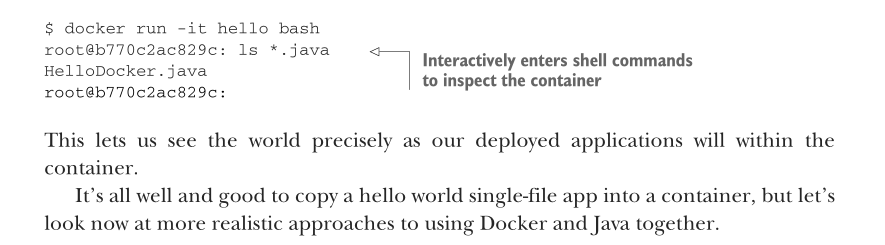
How to start bash with a container?
Command:
docker run -it <image_name> bash(orsh).Flag
-i(--interactive): KeepsSTDINopen so keyboard input can reach the process inside the container.Flag
-t(--tty): Allocates a pseudo-terminal (TTY), providing a formatted shell prompt and handling terminal signals.Use Case: Overrides the default
CMDwith a shell session to explore the container filesystem, inspect environment variables, and debug issues live
Multistage build with Docker
Docker allows us to define multiple images in the same file and, most important, copy between them. With this ability, we can construct an image in which to build our application.
Fully removed from whatever JDKs our local system has—and then copy the results into our deployment image. This has advantages for both security and image sizes.
This process is referred to as a multistage build, and you can see it in action when a Dockerfile has multiple FROM statements. FROM lines that are just intermediate stages of the build also include an AS keyword to name them for later use in the Dockerfile, whereas our main resulting image is left as before. img:

Why does COPY . . often invalidate Docker layer cache prematurely, and how can you prevent it?
The Root Issue:
Docker caches the result of each instruction.
Running
COPY . .copies everything from the local working directory. Even an irrelevant file modification (e.g., local logs, IDE metadata) invalidates that layer's cache, forcing all subsequent instructions to rerun from scratch.
The Problematic Files:
Files not required for the container build often trigger these unnecessary rebuilds:
Version control history (e.g.,
.git)IDE settings and metadata (e.g.,
.idea/,*.iml)Local build outputs and compiled classes (e.g.,
build/,out/,target/,*.class)
The Solution (
.dockerignore):Place a
.dockerignorefile in the same directory as theDockerfile.It works similarly to
.gitignoreusing standard shell wildcard patterns (e.g.,*.class,out/).Docker ignores these matching files and directories when evaluating
COPY/ADD, preserving the build cache and shrinking image size.
How do you prevent Docker from re-downloading Maven and its dependencies on every code change?
Core Rule: Separate slow-changing dependencies from fast-changing source code into distinct Docker layers.
The Problem: Running
COPY . .first forces a full redownload of Maven distribution and libraries on every minor source edit.The Pattern:
Copy config only: Copy
.mvn/,mvnw, andpom.xml.Prefetch dependencies: Run
./mvnw dependency:go-offline(cached in its own layer).Copy source & build:
COPY src/ ./src/and run./mvnw package.
Result: Dependencies stay cached unless
pom.xmlchanges, dramatically cutting build times.
How do you expose a container's internal network port to the host system in Docker?
Containers run in isolated network namespaces by default, blocking outside access to internal server ports (e.g., an HTTP server).
The Solution: Use the
-p(port mapping) flag indocker run:Format:
-p <HOST_PORT>:<CONTAINER_PORT>Example:
docker run -p 8080:8080 hello
Port Breakdown:
First value (
8080): Port exposed on the host machine (accessible vialocalhost:8080).Second value (
8080): Port the application inside the container is actively listening on.

What does the EXPOSE instruction in a Dockerfile do, and how does docker run -P interact with it?
EXPOSEis informational, not functional:Specifying
EXPOSE 8080in aDockerfileserves as metadata documenting intended ports; it does not actually open or map the port to the host system by default.
Publishing all exposed ports with
-P:Running
docker run -P(uppercase) instructs Docker to map every declaredEXPOSEport to a randomly chosen, ephemeral high-order port on the host.Because the assigned port changes dynamically, you locate the active host-to-container mapping using
docker ps(e.g.,0.0.0.0:55031->8080/tcpmaps host port55031to internal port8080).
Production value of ephemeral ports:
Solves host port collision when scaling or running multiple container instances side-by-side.
Each container safely keeps its standard internal configuration (like listening on
8080) while a load balancer or service discovery orchestrates traffic to their unique host ports.
Why should service locations never be hardcoded inside a container, and how should they be handled in production?
The Rule: Containers must never make assumptions about where surrounding dependencies or sibling services live relative to themselves.
The Mechanism: Inject service addresses dynamically via environment variables or rely on dedicated service discovery systems alongside standard DNS and load balancers.
The Purpose: Keeps container images portable and decoupled across different runtime environments (local, staging, production) where hosts and IP configurations constantly shift.
What’s docker-compose for?
Docker Compose defines and runs multiple related containers together on one machine. It can preserve container state across restarts and is mainly used for local development rather than large-scale production.
How can multiple microservices use one PostgreSQL container in Docker Compose?
Locally, you can run just one PostgreSQL container, but that PostgreSQL instance can contain several separate databases:
PostgreSQL container
│
├── users_db
├── orders_db
├── payments_db
└── inventory_db
How do fixed container names simplify debugging with docker exec, and what does docker exec actually do?
Predictable Targeting (
--name&--rm):Using
--name <name>assigns a stable identifier instead of a random string, making the container straightforward to target in scripts and secondary terminals.Pairing it with
--rmensures the container automatically deletes on exit, freeing up the custom name so subsequent runs won't crash from name conflicts.
Attaching with
docker exec:Runs a secondary process inside an already-running container without spinning up a new one or restarting the current environment.
Using flags like
-it(e.g.,docker exec -it <name> bash) opens an interactive shell into the active container, allowing real-time inspection of running processes (likeps aux) and container state.
It’s important to remember that exec doesn’t start a new container—it attaches to an existing one. Figure 12.8 shows how the processes coexist within the single container.

How can you profile a containerized Java process using JFR tools and extract the recording to your host machine?
Inspect the Target JVM (
jps/jcmd):Open an interactive shell inside the container (
docker exec -it <container> bash).Run
jpsto find the Java Process ID (oftenPID 1in containers).Use
jcmd <PID> <command>(e.g.,jcmd 1 VM.version) to query JVM runtime status.
Capture Diagnostic Data with JFR:
Start recording:
jcmd 1 JFR.startbegins tracing events and resource utilization into memory/disk buffers.Save the snapshot:
jcmd 1 JFR.dump name=1 filename=./capture.jfrwrites recorded profile data to a local file inside the container's filesystem.
Extract File to Host (
docker cp):From the host terminal, copy the saved recording out without stopping the container:
docker cp <container_name>:/path/to/capture.jfr ./capture.jfrThe resulting
.jfrfile can now be inspected offline using tools like JDK Mission Control.

Why is writing logs to STDOUT/STDERR preferred over writing to local log files in containerized applications?
Downsides of writing to files in containers:
Resource overhead: Bundling a separate log-forwarder agent inside the container wastes memory/CPU and violates the single-process-per-container rule.
Volume complexities: Sharing files via mounted host volumes adds brittle configuration overhead and can introduce filesystem performance bottlenecks.
The standard pattern (
STDOUT/STDERR):Containers configure application logging frameworks (e.g., Log4j2 Console Appender) to emit logs directly to standard output streams.
Docker automatically captures these streams and stores them in well-known locations on the host filesystem.
Production advantage:
Allows running a single centralized log collector/forwarder on the host (or cluster node) to aggregate and ship logs to destinations like Elasticsearch or cloud storage, decoupling the application completely from the logging infrastructure.