Chapter 1 (Continued): Protocols, Networking Layers & More
 Call Kai
 Learn
Learn Practice Test
 Spaced Repetition
 Match
Match Flashcards
 Knowt Play
1/29

There's no tags or description
Looks like no tags are added yet.
Name | Mastery | Learn | Test | Matching | Spaced | Call with Kai | Chat |
|---|
No analytics yet
Send a link to your students to track their progress
30 Terms
Give a precise definition of what a Protocol is
A protocol is the set of rules that define the format, order, and handling of messages between communicating devices.
What is a “Networking Layer”, otherwise known as a Protocol Layer?
A single tier/component in networking architecture that solves a specific set of problems.
Why do we need Protocol Layering?
Because without individual layers that solve distinctly different problems, you would need a giant piece of software capable of handling it all. With Protocol Layering, you have individual layers that each solve a different problem, making it much simpler to work with and more modular.
For example, if there was no protocol layering:
Each time you visit a website, you would need a giant piece of software to handle all of the following:
The Browser’s HTTP request
Error handling
Data transmission across cables/wires
The correct interpretation of the data
…etc.
So if you ever needed to change this software, you would have to modify multiple different aspects of it and risk breaking something in the process, making it incredibly complicated.
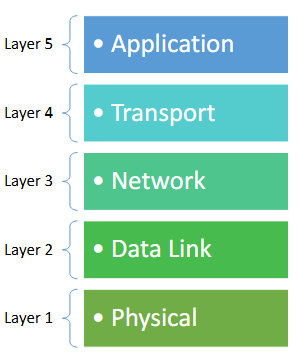
Name the 5 layers in Networking Architecture
Layer 5: Application Layer
Layer 4: Transport Layer
Layer 3: Network Layer
Layer 2: Data Link Layer
Layer 1: Physical Layer
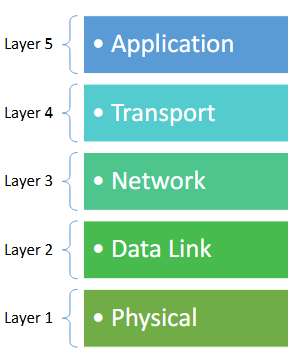
In the 5 Tiers of Protocol layering, how exactly does the layering work? Does each layer know the inner workings of the layer below it? Or is it completely separate?
Each layer has its own specific role that is independent from the layer below it. However, the layer above uses the services/results provided by the layer below, it just doesn’t care about the implementation of those other services, only the end result.

Give an analogy to describe how layering works in Protocol Layering
Analogy given by Mr.Chou:
“Imagine you ordered a package from Amazon. All you care about is the package itself. You don’t care about the stamps on it, or the sender’s address, or even the process the mailman used to deliver the package to your door. All you know and care about is what’s inside the package.”

Define modularity
Modularity means that each component is built independently from one another so that you can modify and replace things without breaking or affecting the rest of the components.
In the context of a Protocol Layer, what is a protocol?
A protocol (in the context of the different tiers) is the specific set of rules used at a layer.
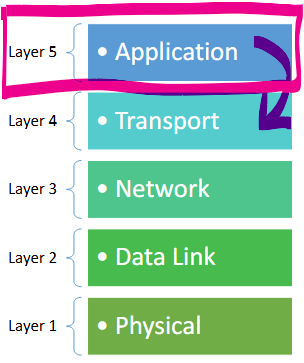
Describe the job of the Application Layer
The Application layer is responsible for applying the correct protocol (rules) for an application to correctly use and interpret data.
It deals with:
Web Browsing (defined by the HTTP protocol):
How a browser asks for a webpage/how a server responds
Email (defined by the SMTP and IMAP protocols):
How messages are formatted, sent, and received
DNS (defined by the DNS protocol)
How to find the IP address that corresponds to a domain name like wikipedia.org.
The output of the Application Layer is called a Message.

Describe the job of the Transport Layer
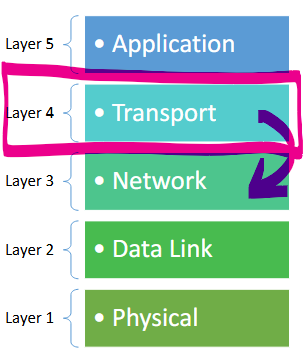
The Transport Layer decides which application should receive the incoming data.
For example:
You may have multiple different applications running on your computer: Discord, email, MyBCIT, etc. You wouldn’t want the text message to your girlfriend to end up in your boss’ email inbox. This is why the transport layer is used to decide exactly which application should be receiving this data.
To do this, the Transport layer adds a Source Port number and a Destination Port number to the message/output produced by the previous layer (the Application Layer).
Depending on which protocol (set of rules) was used at this layer, either TCP or UDP, the final output can either be called a Segment (when using TCP) or a User Datagram (when using UDP).
What is a port number?
A port number is a number between 0 and 65,000 that is used to route incoming data to the right application.
For example:
Port 21 = represents a File Transfer
Port 443 = represents secured web traffic…etc.
Describe the job of the Network Layer
The Network Layer allows devices to communicate across the globe, through the internetwork. It follows several different protocols (sets of rules that define what a layer should do), including:
IP (Internet Protocol)
ICMP (Internet Control Message Protocol)
ARP (Address Resolution Protocol)
DHCP…etc.
Each set of rules tells the Network layer to carry out a different set of responsibilities. The IP (Internet Protocol) tells it how to deliver data, ICMP (Internet Control Message Protocol) tells it to provide error/diagnostic messages in case something goes wrong (ex. “Destination unreachable”), ARP (Address Resolution Protocol) tells it to map MAC addresses to IP addresses, etc.
NOTE: You do not need to know the expanded acronyms for each one, just know that it follows several different protocols.
By the end, the Network layer has added a Destination IP address and a Source IP address to the data/output produced by the previous layer (the Transport Layer). The final result is what’s known as a Datagram or Packet.

Describe the job of the Data Link Layer
The Data Link Layer allows devices connected to the same local network to communicate, and it organizes data into Frames. Remember: it only delivers things locally.
It takes the output produced by the previous layer and adds to it to make it into a Frame, which includes:
The Destination MAC Address
The Source MAC address
Error detection info
and the data output by the previous layer (the Datagram/Packet)
So the “Frame” is just the final output of adding all of this information to the original data.

What is a MAC address?
A MAC address is a unique identifier, different from an IP address, that is only used to identify the hardware of a device on a local network, not the broader Internet.
It is represented by a twelve digit hexadecimal number separated by colons (ex. A1:B4:C5:C1:DD:3E)


Describe the job of the Physical Layer
The Physical Layer transmits and receives bits through a transmission medium such as: Fiber Optic Cables (bits transmitted as light), WiFi (radio waves), and Ethernet Cables (voltage channels).
More specifically, it converts bits into signals, and signals into bits.

What is the difference between the TCP & UDP Protocols used at the Transport Layer, and the ARP, DHCP, ICMP, and IP protocols used at the Network Layer?
At the Transport Layer, TCP and UDP protocols are alternatives. The transport layer can choose to use either set of rules.
Whereas at the Network Layer, IP, ICMP, DHCP, etc. are all mandatory to use; They are not alternatives to one another because they each serve a different function. IP is the set of rules that defines how data is sent, ICMP defines error messages, etc.
What is a PDU?
A Protocol Data Unit. It just refers to the piece of data being handled by a specific layer.
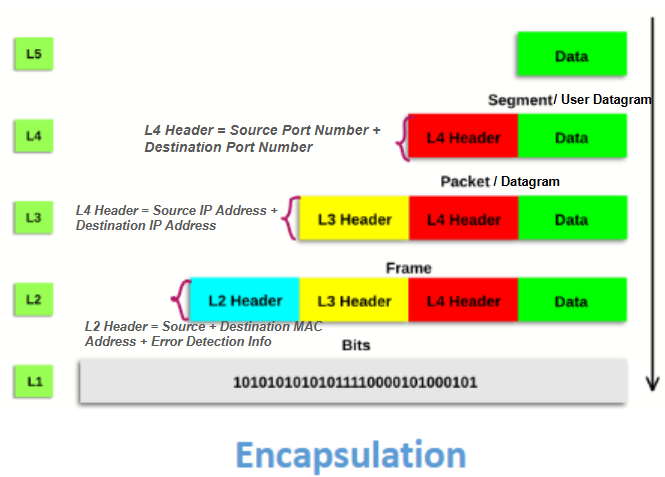
What is encapsulation?
Encapsulation describes the process of new information being added to a piece of data by each layer as you move down the layers
L5: Application Layer
Does not add any new information, is simply the final version of the data, called the Message.
L4: Transport Layer
Adds the Source Port Number + Destination Port Number
Final Output is called: User Datagram/Segment
L3: Network Layer
Adds the Source IP Address + Destination IP Address
Final Output is called: Datagram/Packet
L2: Data Link Layer
Adds the Source MAC Address + Destination MAC Address
Final Output is called: Frame
L1: Physical Layer
Adds nothing, but converts bits into signals
The new pieces of information added by a layer are known as a header. For example, the L4 Header refers to the new pieces of information added by the Transport Layer: the Source Port Number + Destination Port Number.
The new pieces of information + the pieces of information added by the previous layer is what makes up the output of each layer.
What is decapsulation?
The opposite of the process above.
Why do we need 4 different types of addressing?
Because each layer solves a completely different problem, and for this reason, they each need a different way of identifying things.
Name the 4 types of addressing at each layer, and describe what they represent
Addressing at every level:
Application Layer: Names (human readable domain and website names like www.bcit.ca; Used to identify server, resources, or applications)
Transport Layer: Port Numbers (identifiers for an application or a process on a computer; ex. discord, email, etc.)
Network Layer: IP Addresses/Logical Addresses (an address used to uniquely identify a device over the internetwork. Assigned according to networking rules.)
Data Link Layer: Link Layer Addresses/Mac Addresses (used to identify a network interface, like WiFi, ethernet, a laptop, on a local network)
Physical Layer : none
How is the physical layer and data link layer typically implemented?
It is implemented in an NIC (Network Interface Card). This is a hardware component used to connect a computer to a network.
Why is the data link layer and the physical layer implemented in the NIC?
Because both the physical layer and data link layer are very close to the hardware.
The data link layer deals with frames and error detection, while the physical layer is all bits.
Which devices implement all 5 layers of the TCP/IP model? Is it computers? Routers? Switches?
A host computer must be able to implement all 5 layers of the TCP/IP model.
However, routers and switches do not necessarily implement all 5 layers; typically only 2 or 3.
In an internet, we change the LAN technology to a new one. Which layers in the TCP/IP protocol suite need to change?
LAN technology means WiFi, ethernet, etc.
So you will need to change the Physical layer, because the transmission might change, and the Data Link layer, because that deals with connection over a local network (like WiFi).
The Network layer and everything above does not need to be changed because that deals with IP addresses and everything outside your local network.
A _______ connects a network to other networks.
Router
A ______ connects devices within a network.
Switch
A ________ changes the form of data.
Modem
(remember: A modem modulates)
What is different about the OSI Model?
Only the top 3 layers of the OSI model are different from the TCP/IP Model.
The first 4 bottom layers are the same, and the top 3 layers just divide the responsibility of the Application Layer into two more layers.
Name all the layers in the OSI model, and explain what the new layers do;
Application Layer
Presentation Layer: Controls the representation and formatting of data; ex. encryption, character encoding, and data compression
Session Layer: Manages communication sessions between devices; Synchronizes, manages, and ends communication between devices.
Transport Layer
Network Layer
Data Link Layer
Physical Layer