CSC207 Midterm 2
 Call Kai
 Learn
 Practice Test
 Spaced Repetition
 Match
 Flashcards
 Knowt Play
1/27

There's no tags or description
Looks like no tags are added yet.
28 Terms
View
Framework and drivers
Displays audio-visual information such as buttons, graphics, and sound effects. The user interacts directly with the View.
Dependencies
ViewModel: View reads display data from ViewModel. View rerenders alongside ViewModel updates
Controller: user interaction with View causes Controller to react, Controller decides what View does with user input
View Model
Interface Adapters
Information that View will display.
Presenter
Interface Adapters
Receives information (from the Use Case Interactor using the Output Data Object) and puts readable strings and values into the ViewModel to be displayed in the View.
Dependencies
Output Data: needs to receive Output Data object created by User Case Interactor
ViewModel: updates ViewModel with what to be displayed
Implementations
Output Boundary: Presenter fills formatting logic defined by Output Boundary
Controller
Interface Adapters
Converts raw user input into usable pieces of data in the format described by the Input Data, then invokes the Use Case Interactor to actually carry out the user request.
Dependencies:
Input Data: creates and populates an input data obj. to pass to Use Case Interactor
Input Boundary: Controller calls its methods to trigger use case logic
Input Data
Application Business Rules
Object created by Controller passed to Use Case Interactor. Is in most optimal format for the interator.
Input Boundary
Applications Business Rules
Interface implemented by a Use Case Interactor that provides decoupled way for Contorller to execute business logic (dependency inversion principle)
Use Case Interactor
Application Business Rules
Contains main logic for executing a specific use case.
Dependencies:
Input Data: uses input data to execute use case
Output Boundary: calls methods in this class to push results to Presenter
Output Data: packages result of use case into an Output Data object
Data Access Interface: use to look up/store information in the database
Entities: operates on entities to carry out business logic
Implementations:
Input Boundary: executes what controller called into
Output Data
Application Business Rules
Object created by the Use Case Interactor to pass results of the use case to the Presenter.
Output Boundary
Application Business Rules
Interface implemented by a Presenter class. Gives Use Case Interactor a way to send results outwards.
Data Access Interface
Application Business Rules
Interface implemented by the Data Access class. Gives Use Case Interactor decoupled way to read/write data (dependency inversion principle).
Data Access
Frameworks and Drivers
Reads and writes persistent data to a file/database outside the program.
Dependencies:
Database: talks directly to underlying data
Entities
Implements:
Data Access Interface: provides data to and saves info from Use Case layer
Database
Frameworks and Drivers
Data store. External detail every inner layer is unaware of.
Entities
Enterprise Business Rules
Class storing information about program’s building blocks.
S in SOLID
Single Responsibility Principle
A class should only have one reason to change
Separate things that change for different reasons
Actors cause change
High cohesion (deg. to which elements in module belong tgthr), low coupling (deg. of interdependence among modules)
O in SOLID
Open/Closed Principle
A class should be open for extension but closed for modification
Often done using interfaces or inheritances to keep functionality stable
L in SOLID
Liskov Substitution Principle
Subclasses should be substitutable for their base classes
Well documented interfaces to be clear about expected behaviour
I in SOLID
Interface Segregation Principle
Interfaces should not force classes to implement unnecessary methods
D in SOLID
Dependency Inversion Principle
High lvl. modules should not depend on low lvl. modules (high coupling); both instead depend on abstractions (via interfaces)
High lvl. → core level goals of program
Low lvl. → details of implementation (volatile, ext. influences)
Modules → class/set of closely related classes
Frameworks and Drivers
Lowest lvl:
View
Data Access
Database
Interface Adapters
Controller
Presenter
View Model
Application Business Rules
AKA Use Case layer
Use Case Interactor
Input Data
Input Boundary
Output Data
Output Boundary
Data Access Interface
Enterprise Business Rules
AKA Enterprise Business Rules
highest-level policies
Entity
User story
Describes feature from POV of user
As a … I want to … so I can …
Use case
How an actor and system interact to accomplish a goal
Name, primary actor, preconditions, trigger, success outcome, main success scenario, extensions
Event driven programming
Programs react to events (user actions)
Event occur → trigger event listener method → method receives event object containing details abt. interaction → listener calls other methods to handle event → chain of method calls across objects forms network of objects
at runtime: call stacks create method calls
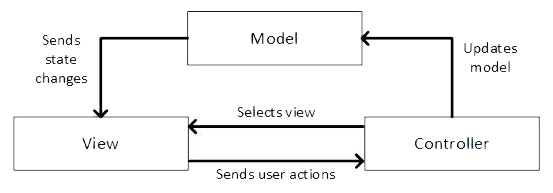
Model View Controller
The user interacts with the View, which creates an event
The Java system calls a listener method in a View object
The View immediately calls a method in the Controller to handle the event
The Controller manipulates the Model
The Model fetches any necessary data from the database
The Model calls a method in a View object to let it know that there's been an update
The Controller decides which screen to display
The View calls getter methods on the Model and updates the UI
Model View Presenter
The user interacts with the View, which creates an event
The Java system calls a listener method in a View object
The View immediately calls a method in the Presenter to handle the event
The Presenter manipulates the Model
The Model fetches any necessary data from the database
The Model calls a method in a Presenter object to let it know that there's been an update
The Presenter calls methods in the View to update the user interface

Design Process
Noun Verb Analysis (UML Class Diagram)
Scenario Walkthroughs
User stories
Use cases
UML Sequence Diagrams