Professor Messer 4.5 | Physical Security
 Call Kai
 Learn
 Practice Test
 Spaced Repetition
 Match
 Flashcards
 Knowt Play
1/11

There's no tags or description
Looks like no tags are added yet.
12 Terms
Video surveillance:
Most organizations use this, if it is just for your facility we commonly refer to that as CTV (Closed Circuit Television).
Can replace physical guards and is often equipped with features like object detection to identify license plates or faces.
Multiple cameras are typically networked and recorded over time, with advanced features like motion detection using radio reflection or passive infrared, enabling detection even in the dark.
This is especially useful in low-traffic areas.
Asset tracking tags
Help maintain a detailed record of every asset, including routers, switches, cables, fiber modules, and CSU/DSUs.
These tags can be integrated with financial systems, allowing tracking of financial records, audits, depreciation, make/model, configuration, purchase date, and location.
Are tagged using barcodes, RFID, or visible tracking numbers for easy identification.
Tamper detection:
Ensures constant surveillance, even when equipment cannot be physically monitored.
Devices like firewalls and routers can be equipped with case sensors that detect case removal, triggering alarms from the BIOS; we refer to this as hardware tampering.
This can be integrated with asset tags so that if someone removes a tag, a message is left indicating the device once had a tag, providing a trace of tampering.
Employee training
Employees are some of the best physical security assets an organization can have. Properly training them to recognize security issues turns them into an effective early warning system.
Personal, one-on-one training sessions are highly effective, and high-visibility posters and signs provide constant feedback on important security reminders. While login messages display information when employees start their day, they often become invisible over time.
An intranet page serves as an always-available source of documentation, and ongoing updates help keep everyone alert and informed.
Access control hardware
Prevents unauthorized entry by requiring authentication.
This security hardware includes purpose-built technology like gates, locks, and cameras, designed to meet specific security needs.
These systems are often networked and integrated for enhanced security; you have to badge in but notice there’s also camera.
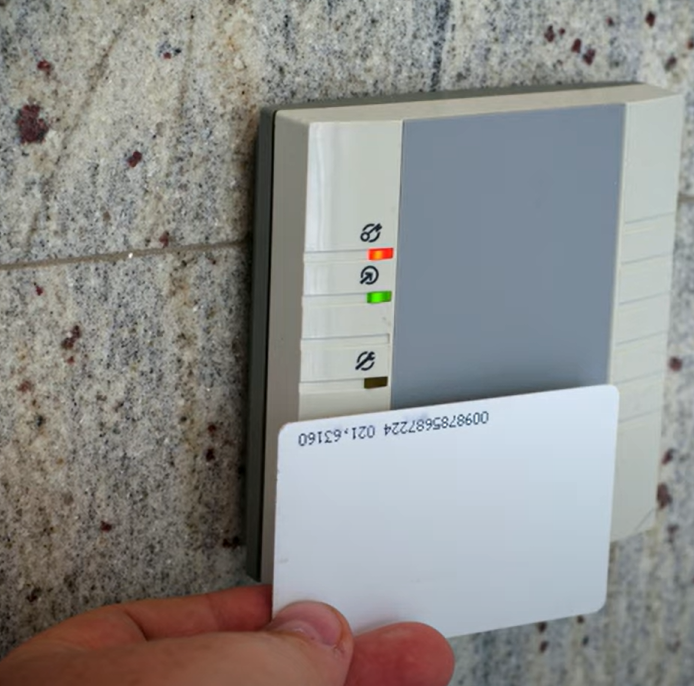
Badge readers
Provide electronic, keyless access, often requiring PIN authentication. This eliminates the need for physical keys, avoiding the risk of losing them or having to re-key locks.
These systems are centrally managed for ease of administration. We can go to one central workstation and configure exactly who has access to which rooms through that one central management console.
Inside a card, it is usually an identification chip, and that chip is powered and read using this antenna that is inside the card
Biometrics
Use personal characteristics like fingerprints, retinas, or voiceprints for authentication.
Typically, only a mathematical representation of the biometric is stored, not the actual fingerprint.
Difficult to change, unlike a password. Are used in specific situations and are not foolproof.
Access control vestibules
Use a sequence of doors to secure entry.
When one door opens, the others lock, preventing simultaneous access. In some setups, all doors are normally locked, and unlocking one stops the others from being unlocked. Users must fully close one door before proceeding.
This ensures no tailgating occurs, as individuals or controlled groups move through the secure area one at a time.
Locking cabinets
Require a key for access to the devices inside.
In data centers, different groups manage hardware, and each is responsible for securing their data.
Racks can be installed side-by-side, with enclosed, lockable cabinets that still allow ventilation through the front, back, top, and bottom.
Smart lockers
Provide safe and automated delivery and pickup, saving time and preventing theft.
Packages are delivered to the locker, and recipients receive an email or text with instructions. Using a PIN or mobile app, they can unlock the locker for fast, secure, and convenient retrieval.
Eliminate missing packages, offer easy tracking, and provide peace of mind, knowing packages are safe until collected.
Data destruction and media sanitization
Third parties are always after our information, we need to be sure it’s destroyed in a way that no one else can gain access to that information later.
Proper disposal is not just a security concern but also a legal issue, as some data must be retained for specific periods. Offsite storage can be considered.
Sensitive information should not be discarded carelessly, as dumpster diving and recycling can pose risks.
Physically destroying media ensures complete data elimination, but if reusing drives, effective sanitization methods must be employed to prevent data recovery.
Sanitizationing media:
Involves clearing data from infrastructure equipment like switches, routers, or firewalls. A factory reset deletes data and returns the configuration to default settings, providing the next user with a fresh setup.
For storage devices, wiping data ensures its unrecoverable removal by overwriting the data storage locations. This process is useful when you need to reuse or continue using the media.