COMP 426 Midterm 2
 Call Kai
 Learn
 Practice Test
 Spaced Repetition
 Match
 Flashcards
 Knowt Play
1/97

There's no tags or description
Looks like no tags are added yet.
98 Terms
Browser
application used to review and display information from the web
When developing websites, it is important to check compatibility and make sure sites work well on all the most prominent browsers
true
Rendering Engine
responsible for rendering the DOM on the browser screen
networking service
responsible for making network requests to servers
storage
other browser features + connections for device hardware
javascript runtime
functionality to run javascript code
Web APIs
serve as the interface between the JS Runtime and browser features
implemented by each individual browser according to the same standard, so each webAPI should be functional regardless of browser
Which objects or functions have we used built into JS/TS that allowed us to interact with browser features (such as the rendering engine or networking)?
fetch, document, console, setTimeout etc
when the call stack is empty, it is time to run waiting tasks
true
event loop
responsible for moving this task onto the call stack
constantly checks if the call stack is empty and if so, it will move a waiting task into the call stack
microtask queue
has a higher priority than the task queue; executes immodestly after the current script before the next macrotask
promise handlers, callbacks, and continuations are added to the microtask queue
.then(), .catch(), .finally(), .async/await
tasks queue
executes one task per event loop turn; only one task is processed at a time per event loop iteration
setTimeout(), setInterval(), setImmediate, DOM events, fetch()
React
library for developing user interfaces and managing state
make user interfaces composable → react components
better manage state and UI updates when an app’s state changes
react components
describe a UI element in react
defined using functions that returns JSX
JSX enables HTML and JS/TS to be combined into one file, combining UI and functionality specifications into one file
JSX
a syntax extension to JS that enables the user to write markup similar to HTML in JS/TS files
React components are defined as functions
True
React components return JSX
True
The input of component functions are props (properties) like attributes in HTML (these are type script objects)
true
composability
other components can be nested inside of components via JSX
If all of our components are functions, how does our page load React components to begin with?

component hierarchy

reduction of files
with react we can reduce the number of necessary files
typescript tools
static typing
we installed react to better handle creating user interfaces
true
TSX (view + styling + functionality)
allow us to eliminate writing CSS files, making the code more organized and easier to maintain
Tailwind
CSS framework that provides built in classes to apply styles to elements directly in markup (HTML/TSX)
removes unnecessary abstractions of classes and maintaining styles
allows the developer to easily see which styles are applied to elements in-line
reduce dependencies on extra CSS files
allows UI components to be specified into one single (.tsx) file
has built in classes
Wouldn’t tailwind be less efficient to use, since it would add a lot of “bloat” (unused CSS) to our app?
when our app build, Tailwind will remove all unused classes, leaving only the CSS that is used
this reduces our bundle size, decreasing our app’s load time
state
refers to the current “configuration” of our app’s data and its presentation
an immutable reference to the state’s value
model (comp 301)
stores the application data
view (comp 301)
shows the UI
controller (comp 301)
called on to manipulate the data stored in the model
updates the view to reflect the new state of the model
what would the state of our app (pixel art marker) include?
app data and the UI
UI and State Relationship
actions on the UI changes the app’s state
state changes then updates the UI
Ex: the user clicks on the eraser tool button, changing the active tool stored in the state → the state (active tool) changes, so then the UI updates to show that the eraser is selected
react utilized the architectural model of the ui and state not the MVC
True
JSX features
extensible: can define your own components
composable
programmable: component defined as a function runs whenever rendered; can program this function to dynamically and conditionally render as needed
reflects the current state of the application
your code in react should almost never be dealing directly with the DOM
True
your code should be nothing but components
components produce JSX
react translates this to updates on the DOM
Where is the state in react? If our application is now just a dynamically rendered JSX, then where is the actual application state?
in the components
react state hook
react uses the useState() hook to maintain state
const [state, setState] = useState(initialValue);
setState
a function used to update the state’s value
useState(initalValue)
sets up a state variable with an initial value
how react “reacts” to state changes
setState() is called
triggers the react’s re-rendering process
react finds all DOM elements that rely on/use that state and re-renders them
react commits this change by mutating the DOM
Trigger → render → commit
you MUST use setState() to trigger a re-render (counter+=1 does not work)
counter+=1 causes the UI to not update on the state change, causing the state and UI to become out of sync
In React, it is common to refer to the view as a function of its state
what does the function mean?
the user interface is a direct, predictable output generated from the current state date

What text will display on the screening the paragraph after the user presses the button?
Jane Doe

If multiple state changes occur in one action, only one re-render occurs
True
these changes are queued in order and run once the action finished, otherwise, a re-render could start mid-action
What happens if you added a state for the word and when you load your data, you set the state to be that word?
every time you change a state, you rerun the body of the component function
side effects
any action that a component takes that is not rendering the UI (or updating state)
do not want to trigger a re-render
How do you handle side effects
the useEffect() hook
useEffect can handle all three triggers of side effects
Run on every render, Run on first render, and Run on state change

Without useEffect, every re-render would add a new event handler
True
The useEffect() hook also can return a cleanup function that runs before the effect reruns or when the component unmounts. This is crucial to preventing memory leaks!!
True

memoization
preserving (caching) the result of an “expensive operation” every re-render and only recalculating it when needed
React is a library, not a standalone framework (a tool inside the tool box)
True
React does not have a built in router (no built in way to display specific pages)
True
- React knows how to build things on a webpage, but it doesn't automatically know which page to show when someone visits a specific URL
What happens when we try to load another page other than the home page?
we would have to load the new .html page then load the corresponding css and js
Multi-page Application (MPA)
every time we navigate to a new page, the browser requests a new HTML page “blowing" up”/deleting everything and starting entirely from scratch
Router
library/tool that hijacks this traditional process
instead of using <a> links connected to new pages, routers usually provide their own link component that should be used instead
when a router link is pressed, the router clears the DOM and replaces it with a new page component
The router then changes the active URL in the browser to reflect a page change
Routers use browser APIs to override default browser behavior, preventing the browser from trying to load a new resource when the URL changes
The router handles page changes, and renders using the JS loaded initially because all components are part of the JS bundle. It just switches the page that it is showing
Single page application (SPA)
the app logs once on the client, then routing actions shuffle the active component on the screen
the app does not restart every time we try to load a new page
when we add a router, our app becomes this type of application
What is an example of a single page application?
an angular framework project
What ways are SPAs worse than MPAs?
search engine optimization, initial load times, memory consumption, security complexity
How do new users find new websites?
search engines
In an SPA app, if crawlers cannot run JS, they will never see more than just the home page of the site because there is only index.html
True
Search engine optimization (SEO)
how do we engineer our site in a way that makes our site more accessible to more people on search engines
SEO vs MPA vs SPA
For search engines optimization (SEO): multi-page application (MPAs) > single page application (SPAs)
FOR UX: SPAs > MPAs
For Interactivity: SPAs > MPAs
For Speed: SPAs > MPAs
Client-side rendering (CSR)
SPAs have HTML rendered entirely on the client using the downloaded React code in the JS bundle (HTML files are an empty shell!)
When Next.js projects build and deploy, server code is generated as well
True
What occurs after the client requests the website’s home page?
Next.js tries to generate the HTML file for this page (using React) on the server first
this HTML file should look Iike the page, it is not just a blank shell, the the DOM gets updated and shows the right page on the browser
Server-side rendering (SSR)
the initial HTML is generated on the server not the client (Next.js)
affects the first load when we enter the app (afterwards, we treat the app like an SPA)
Hydration
reconcile the existing page and sprinkle in functionality (JavaScript)
SSR (server side rendering) vs SPA (single page application)
SPA: the loading ends and the crawler works with what it sees
SSR: pre-rendered page with Next.js.
the page is not interactive, but it usually contains enough content for the crawler to index this page well
[slug]
matches a single path component
[… slug] and [[…slug]]
matches all remaining path components and double bracket version matches optionally

page.tsx
request result is rendered react component
often any related subcomponents in same directory
wrapped in layouts nested from root
Route.ts
request is handled as an API endpoint
useState and useEffect are for client components
true
When to fetch?
As a client component: initial load has empty list, request to API made by
Show the page first, get the data later
As a server component: request to API made by server and list rendered to HTML server-side on initial load
Get the data first, then show the page
Pros and Cons:
Pro Client: interactive time is shorter because client-side components come up quicker
Pro Server: web crawling because you are not running any JS
Anatomy of a client-side component
“use client”
path parameters accessed with useParams() hook
fetch via useEffect
requires then handlers
results in updated state → triggers rerendering
Client data fetching vs Server data fetching
Pros Client data fetching: has a faster FCP (first contentful paint), but a better UX
Cons client data fetching: should conditionally render while loading, may need to render differently on error, lots of performance issues, race conditions between re-renders
Pros Server data fetching: has a worse FCP (first contentful paint), but better SEO (search engines optimization)
SEO only matters if data incorporated into the page is not specific to the user or user’s input
Note: In most cases, we prefer to stick with client data fetching unless the SEO boost is very important - we prefer to always prioritize FCP
first contentful paint (FCP)
measures the time from when a user visits a page to when any part of the page’s content is rendered on the screen
server side component
allowed to be async
means that we can just await the params prop
similarly, can await fetch() and .json() of the response when fetching data server-side
ReactQuery
React Query is a smart assistant for API data.
QueryClientProvider= Gives your app access to the assistant.queryKey= Tells the assistant which information you want.queryFn= Tells the assistant how to get it.data= The information it found.isLoading= Whether the initial request is still loading.error= What went wrong.
We can use localStorage.get() and localStorage.set() to store data in the browser that our website can access between sessions
true
Why is storing application data in the frontend bad?
reloading the app will reset state because the app reloads
data stored in one browser is not accessible in another browser
database
structured collection of data that can be used to store information
relational database
connect related data through relationships
CRUD operations
C: create
R: read
U: update
D: delete
we can use a database URL to connect to the database
true
tables and what they contain
data in databases are stored in this
columns: values for each record are stored here and have a specific data type
data: stored in rows (records)
primary key: uniquely identify records
foreign keys: connect records across tables
foreign key
columns that store the ID of records in another column to link data together
one-to-many relationship
one user can have many todo items, but a todo item can only have one user
Foreign key column are placed on the “many” side of the one-to-many relationship because columns cannot hold lists
true
because of this limitation, we need an association table
association table
a third table to handle many-to-many relationships
composite primary key
primary key is set to two columns so items are uniquely represented by the blue (pk1, pk2)
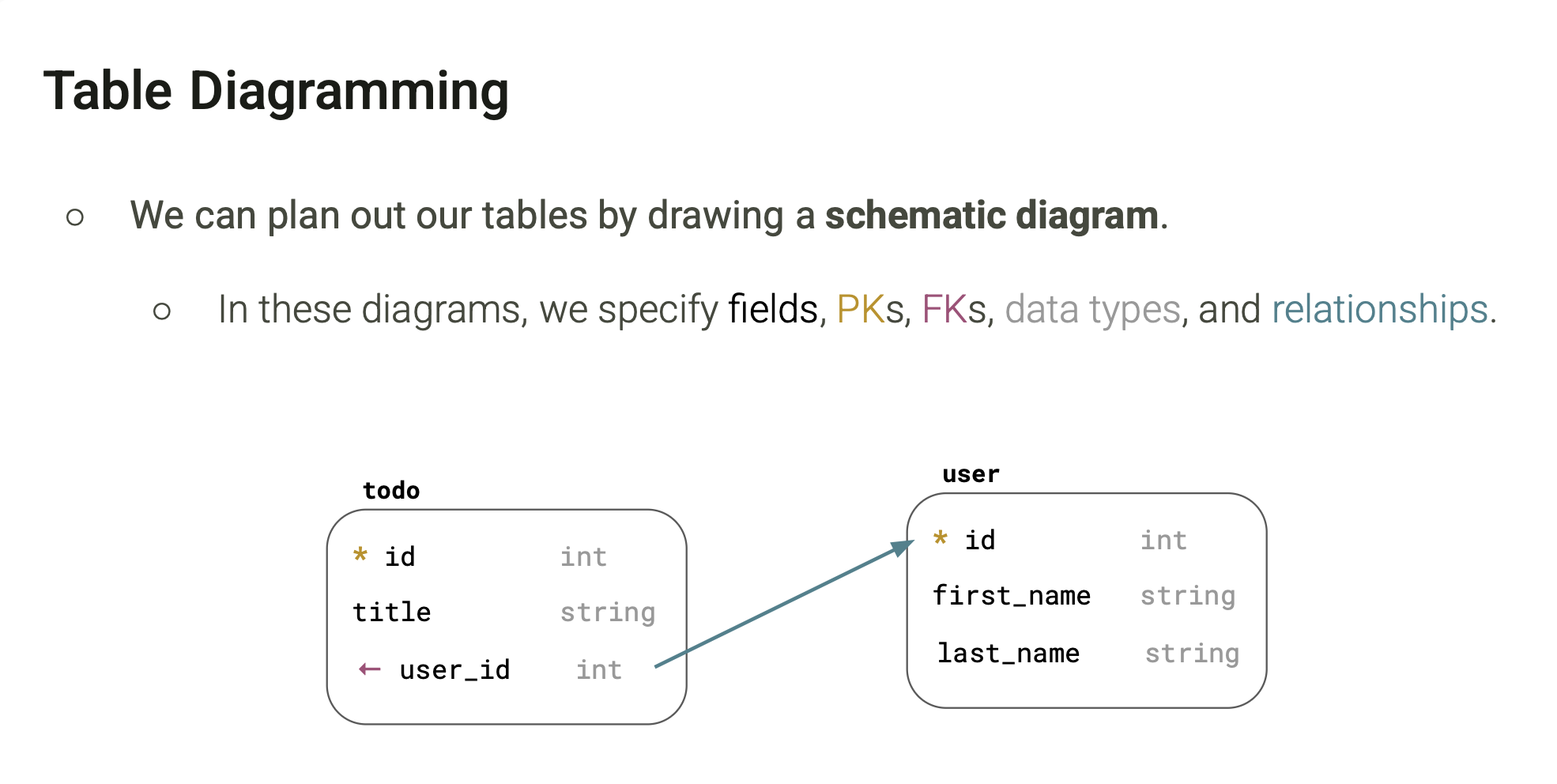
schematic diagram
a visual blueprint that maps out the structure of a relational database
we specify the PK(*), FK(←), data types and relationships
SQL (Structured Query Language)
built for querying and working with data in a relational database
we can run SQL commands on a database from within our TypeScript projects, but we would have to define this SQL commands in raw strings
the result we will get from SQL is also in a string format (not easily parsable by TypeScript)
call stack
where the code runs
task queue
where callbacks wait
event loop
makes sure waiting callbacks do not interrupt code that is already executing
If a mounted React component re-renders because its state changes, calling useState(10) again inside the component function resets that state to 10.
False. React preserves state across re-renders of the same mounted component. The initial value is used when state is initialized, not on every re-render.
What does response.json() return?
response.json() is asynchronous and returns a Promise that fulfills with the parsed JavaScript data.